
















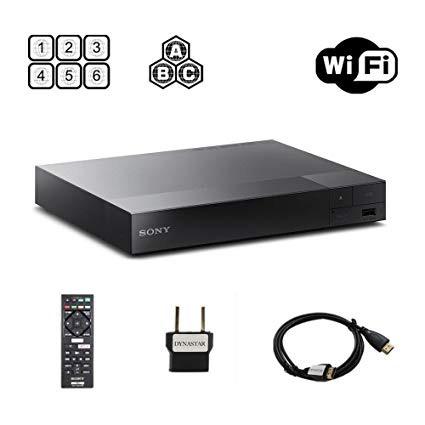
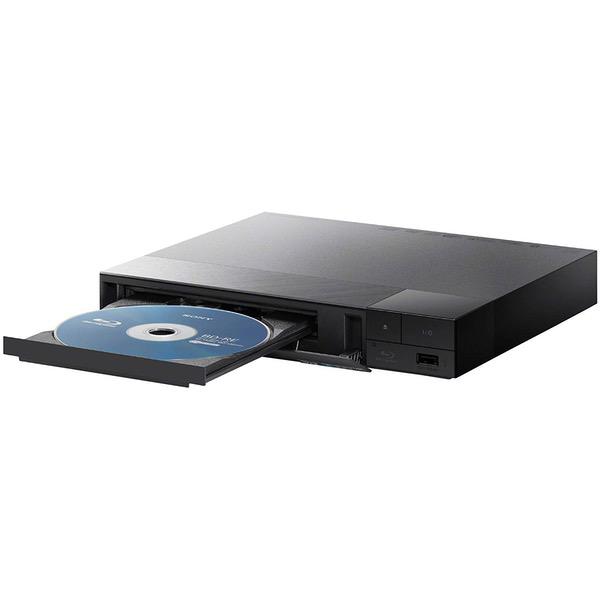
Sony BDP-S3700 Region Free Blu-ray Player, Multi region Smart Wifi 110-240 volts, 6FT HDMI cable & Dynastar Plug adapter bundle Package
Write a review
$15800

Sony BDP-S3700 Region Free Blu-ray Player, Multi region Smart Wifi 110-240 volts, 6FT HDMI cable & Dynastar Plug adapter bundle Package

Write a review
B075VCYRG4
+
Add to wish list
BestBuy
Silver
Best Buy Co., Inc. is an American multinational consumer electronics retailer headqu...

City: US, Richfield

Delivery
Pickup at your own expense
Tomorrow from 09:00 to 20:00, Store location
Free
Payment options
Apple Pay Google Pay Mastercard Visa
Cash, bank card, credit/installment payments, cashless payment for legal entities
Warranty and returns
Exchange/return of products of proper quality within 14 days Official manufacturer's warranty: 12 months
Features
Connectivity Technology
Item Dimensions
Item Weight
Model Year
Built-In Media
Description
This fits your .
Make sure this fits by entering your model number. REGION FREE VERSION - NO RESTRICTIONS: PLAYS BLURAY REGION A, REGION B, & REGION C & PLAYS standard DVDs from ANY REGIONS 0, 1, 2, 3, 4, 5, 6, 7, 8 BLU-RAY & DVD PLAYBACK - Make the most of your HDTV. Blu-ray disc playback delivers exceptional Full HD 1080p video performance along with stunning hi-definition sound. LG Blu-ray players also play DVDs, so there is no need to replace your old DVD collection. Not only that, DVD Up-Scaling delivers exceptional image quality with 1080p up scaling via HDMI. 110-240 volts player supports Pal and NTSC / Plays Blu-rays, DVD, CDs plus has USB input to play all your content. USB Playback, External HDD Playback, 1080p Upscaling. HDMI output, coaxial audio output, Ethernet connection, and USB input ***WiFi Built In*** 300+ streaming apps including Netflix, YouTube, Hulu Plus, Amazon Instant Video, works with wired or wireless wifi connection PlayStation Now: Stream and enjoy Playstation 3 games, Full HD 1080p Blu-ray disc playback & DVD upscaling
Reviews
3.1
Reviews: 20
5 stars
50%
4 stars
0%
3 stars
5%
2 stars
0%
1 star
45%
Serkan Okar
5
I had been shopping around for a region-free bluray/dvd player and I’d like to provide you the information I have gathered to help you with your decision. First: There are laws that prohibit the sale of region free bluray players from manufacturers or by retailers in the US. That is why you don’t see region free bluray players in brick stores like Bestbuy, WalMart, Target, etc. Second: Due to the first point, manufacturers like Sony, Samsung, etc. do not manufacture or market region free bluray players in the US. I’d like to emphasize this because I see a lot of comments and complaints from customers who purchased such players and when they contacted Sony, Samsung about their region free bluray player, they were disappointed because [insert bluray company] customer service said thay did not have region free bluray player in their line of products therefore could not provide service. If you pay attention, you will see all region free bluray players are sold by third-party sellers. There is nothing wrong with that. I have already purchased and tested two region free bluray players sold by such third-party seller on Amazon and both players met my expectations and did play discs from different regions of the world. However, you should not contact [insert bluray company] for any questions regarding region free functionality of your region free bluray player. Because they did not produce such a product. It was the third party seller (a company with technical skills and expertise) that purchased the player from [insert bluray company], changed the factory settings, unlocked the bluray player and turned it into the region free bluray player. Region free bluray player is simply an existing model of a bluray player (such as the one on this page) with all the functionalities of that model, but in addition to that, it is region free and plus converts PAL to NTSC (and the 110 - 220 voltage conversion is added if you wish to use it in another country that uses 220 voltage). Because of that, if you contact the third party seller for any of the features of the product, they will most likely refer you to the product page on the offical [insert bluray company]’s website. You should only contact them only if your question is pertaining to the region free functionality. My biggest complain is that third party sellers often double the price of that bluray player model. I checked many region free bluray models on the internet and found out that almost every bluray player is actually half the price when they are not region free. Basically, the third party seller charges the price of the bluray player to unlock it, thereby doubling its price. If a bluray player in its plain version is $75-80, the region free version will be $150 - $160. This is all because of the current regulations that prevent bluray companies from manufacturing their own region free models. I am not sure if that’s the case in other parts of the world. This Sony model works well as expected. So far I have used Region B Bluray discs imported from UK (The Avengers Series 4 Bluray) and it played it perfectly with no issues. Here’s what you need to pay attention to: 1) Make sure Quick Start Mode is off!! This is a setting on the player, very easy to see and confirm. Sony models show that when you turn on the player for the very first time and going through initial setup proceess. LG model I have tested (LG BP350), it’s in the settings. Both models have Quick Start Mode off by default so you probably won’t have to do anything. 2) Make sure your player is OFF before you press the button to change the region code. You don’t have to change the region for DVDs It is set to region free for DVDs. You only need to change it for Bluray discs. Turn off the player. For Sony models, press Yellow for Region A, Blue for Region B, Red for Region C. For LG models, press 1 for Region A, press 2 for Region B and press 3 for region C. When you do that, the player will turn ON. And it will be ready to play the disc. By habit, I turned the player on and pressed the region codes and it didn’t work. It is important that the unit must be off before you take that action. This model has wi-fi buit in and I was able to connect successfully with no issue. The third paty seller states that updating the firmware will not cause issues with the region free capability; they say they guarantee that their player wont lose region free capability but I would not want to test that theory unless my player starts having issues as I don’t want to risk losing region free capability (with so many firmware updates and codes, you never know what will happen). The only problem I had was when I played a region B Bluray disc that had 5.1 DTS audio track, and the audio kept cutting out for a second every 2-3 minutes. I had the HDMI out from the player to LG OLED TV and I was using the audio optical out from the TV to the receiver. For whatever reason, the sound kept cutting out for a second and came back on. I could see the signal going out on the front panel of my receiver. I am not sure if this issue has anything to do with the disc being region B (maybe the TV didn’t fully recognize the audio signal although I thought regions codes are only for picture signals and did not impact audio signals) I Googled it and saw recommendations about changing the audio settings on the player and turning them off (it also recommended changing the digital audio otput to PCM but that would defeat the purpose of enjoying the 5.1 DTS audio format). I have not had this issue with The Avengers Bluray disc whih only has 2.0 PMC audio track. So either the 5.1 DTS audio signal did not pass to the TV or TV did not pass it to the receiver consistently which caused the audio dropouts. But this player also had digital audio coaxial output. I think I will try that to see if it resolves the issue. The audio quality probably won’t be the same as HDMI signal but still better than constant cutouts. ONE AMAZING FEATURE NOT MENTIONED ANYWHERE ELSE: I noticed that under the Options menu, there is "Closed Captions" settings. This is a fantastic new feature that I have not seen on a Blu-ray player before. I have been trying for years for a way to turn on Closed Captions on DVDs that dont have subtitles. Not matter what I have tried, I have not been able to succeed. Recently, I read that Closed Captions signals work only on analog signals therefore I I needed to try analog cables. I tried analog cables, switched the picture settings on my Blu-ray player to analog output, also changed the settings on my TV to analog and I was not able to get a signal or turn on the Closed Captions (TV has closed caption feature but it mainly works with cable TV signal -when comes through tuner-, it has been impossible to turn them on while playing DVD without the TV tuner/cable network). All these years, I have been playing those DVDs on my laptop using Windows Player (you can turn on the closed captions on Windows Player) and using an HDMI cable from the laptop to the TV. This was the only solution I could find. Cut a long story short, this Blu-ray player enables the user to turn on the closed captions on DVD!!! My most sincere thanks and congratulations to whoever thought of adding this feature to the blu-ray player (nothing to do with 4K picture quality but such a useful and wonderful feature that had been missing from players until now).
Ofer C.
5
waited a long while before buying this unit, but when arrived, it did exactly what it should do... play DVDs and Blu-rays from all around the world. Tests which I have made: - The unit is now installed to 220V outlet, and working without any problem - played Blu rays region A (good will hunting), region B (The hobbit extened edition movies, star wars the empire strikes back, back to the future, Star trek enterprise (S2 disk 3) - ALL movies loaded quite fast and no issue with the viewing. you switch between the region using the remote control. - played DVD Region A(Princess bride), Region B(catch me if you can). DVD region is selected automatically - insert the disk and the movie will play. Overall very satisfied. will update when I will check the wi-fi. Cant comment on the 3D since I dont have a 3D television. Also, this unit is surprisingly small...
Mrs Oliphant fan
5
This review is for the Sony BDP-S3700 Blu-Ray player. (Not all reviews on this page are for this model.) This is one of the rare players nowadays which is nice and small: 9" x 7.5" x 1.5". I only own DVDs, but the features I wanted were easier to find on a Blu-Ray player: Region free, Remote control, HDMI out. It is designed to be connected to an HDTV or to an HD recorder such as the AverMedia EZrecorder. (To watch your DVDs and Blu-Ray discs on a computer, buy a player with USB out.) I tested it with a US DVD (NTSC) and a UK DVD (PAL) - both played fine automatically. To change any setup settings, press the Home button. Most of the settings can stay as-is. But for the Output Video Resolution (within Screen settings) it was better to change it from Auto to 1080p - the Auto setting was outputting everything at 480i - or at least the three or four DVDs I tested. If ever resolution is poor for a particular DVD, this is the setting to adjust. (To check what resolution is being sent to the TV, press the Display key lower right on the remote, then look upper left on the screen.) Quality was excellent, though as always I adjusted my TVs settings to get brightness, sharpness, and color just right. The remote itself is small and nicely laid out. It is getting harder to find real remotes nowadays - many manufacturers want us to use our phones instead. But personally I dont want anything bright or distracting in the dark - would rather just use the pause/play button on a real remote. If playing a Blu-Ray disc, the remote has three colored buttons to switch as necessary among the three Blu-Ray regions. As mentioned already, DVD regions change automatically.
dsm67
5
Review for the Sony Region Free UBP-X800 from bombay electronics. Ive had this for a couple weeks from bombay electronics and it plays region 2 Blu rays perfectly. The lazy or stupid people that gave it bad reviews do not know how to read or follow the instuctions. Its simple: 1. Make sure there are no DVD or Blu Ray in the tray. 2. Turn the power button OFF. 3. Press the color button on the remote for the region you want to play. This turns the power back ON and you are ready to put a Blu Ray back in machine to play. If you have turned the power button on your system back on during this process you have done it wrong. For dvds it plays everything without any problems. The picture quality is outstanding on this player as anyone owning Sony players should already know. I didnt and do not plan on updating firmware as if it aint broke dont try to fix it. When I turned it on the first time I skipped setting up WiFi and then later chose an option to never upgrade firmware automatically. It couldnt really since it doesnt have my WiFi settings but just another step to ensure there is no auto update.
amxcoder
5
I liked everything about this player. It works just like it is supposed to do. It has all the functions on the remote. Unbelievably many blue ray players have buttons omitted from the remote to save money, like subtitles. Sony has everything covered with this player. I have not seen any other blu ray player that has CC. Many of us have a lot of older dvds and they do not have subtitles. My wife and I are both hard of hearing and the CC on this player is great. If you are old like us, your hearing will naturally fade with age. Buy one of these for insurance against that. BTW, it was new in the carton and was not a return or something. I recommend the seller. I am thinking of buying another to stash away so I can replace this one when it wears out. Amazingly, Sony does not claim to do CC with this player on the box or their online advertising. That is the one thing I can fault Sony for doing with the player. WTF? The engineers design in a great feature and Sony keeps it a secret. I dont get it.
Lee A. Bartholomew
5
Basically Im paying them an extra 80-100 dollars to do what is probably doable if your good at mucking around with things like that. So seeing reviews about dead players, well it is a $60 player. I wouldnt use it as my main player. Only for Region B movies Which is the main reason I got it. The side effect is it plays all Regions of dvd. So suddenly a French dvd started playing just fine. Id given up on it ever running. As it claimed it was in NTSC. Im going to assume its in PAL. My old nearly $300 Sony still works and apparently the old remote works with this player as well. Which gives you one added feature not found on the tiny remote. Forward 15 seconds or backwards 10 seconds. Love that feature. The only problem with the old remote is the IR LED is loose. I did hook it to the network to see if I could download the apps. Sure I can. Didnt mess anything up but I wouldnt leave it plugged in all that much. Like Rooting your smartphone not all smartphone makers really like to be Rooted. My old HTC, or HTCs in general unroot all the time. Pain in the back. Odds are if you upgraded the firmware on this item it would revert back to its $60 self. Dont treat this like a normal blu ray or dvd player. Keeping this in mind and that it is a $60 player this should not be a problem. The warranty is with the seller and the extension (if it bothers to work, I usually dont rely on those. As a player the only really big miss is the how much time is left on the disc display. Dont really need the display but hitting display on the remote itll show up on the tv. I kinda like to have it as time remaining , not time played. I had been rolling the dice between this Sony and the LG and it really came down to , I know Sonys, LG makes okay blu ray burners but they dont last as well as they used to. And their washing machines yikes. Dont get me started.
HopeThisHelps
5
As advertised, it easily installed straight from the box in two minutes, played perfectly (European Zone and US DVDs). It is simple to operate and understand. Everybody buy this so we can drive the price down - it will open literally half of the world for your viewing pleasure,or more. You have no idea how much quality viewing you are forsaking if you limit yourself to US-only DVD platform pap and pablum. "Top 40" dreck is still just dreck.
Woody
5
Excellent for multi region use. Works as advertised for good price with added benefit that its Blue-Ray as well. As you wont find a 110-220 product in any of the box stores, buy this one and save yourself the time I wasted trying to find a great product. This is it.
Adrian L. Amstutz
5
Blu-rays, and DVDs from all Regions 1 and 2 play perfectly. The wireless connections for Netflix, YouTube and a host of other applications are superb. I especially enjoy the wireless media connection to my computer for playing the videos from my hard drives. My next task is to teach myself how to get the photos and music on my hard drives to play. Well worth the investment.
Ali Ateya Abdali Neama
5
Before purchasing Sony BDP-S5500 from MULTISYSTEM-ELECTRONICS, I purchased the same device with zone B and DVD region 2 from Sony shop (Bahrain), but unlike other players there was no magic code worked to change DVD region to 1, and oddly while playing one of Sony 3D movies the remote control was very slow and I had to use an app in my phone instead of the remote, so I purchased the same model multi-region, it plays zone A bluray and supports 220 voltage, I updated the firmware and functionality remained the same, and I tried that 3D movie and remote work perfectly (I used the remote from my first purchase).
You may be interested
  • Bestsellers
  • Recently Viewed
 
Similar products
Fast and high quality delivery

Our company makes delivery all over the country

Quality assurance and service

We offer only those goods, in which quality we are sure

Returns within 30 days

You have 30 days to test your purchase