
















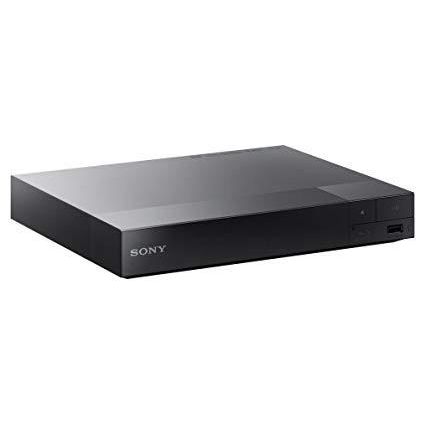
Sony 2D/3D Multi System Zone All Region Code Free Blu Ray and DVD Player - WiFi
Write a review
$18900

Sony 2D/3D Multi System Zone All Region Code Free Blu Ray and DVD Player - WiFi

Write a review
B00M0UC4K2
+
Add to wish list
BestBuy
Silver
Best Buy Co., Inc. is an American multinational consumer electronics retailer headqu...

City: US, Richfield

Delivery
Pickup at your own expense
Tomorrow from 09:00 to 20:00, Store location
Free
Payment options
Apple Pay Google Pay Mastercard Visa
Cash, bank card, credit/installment payments, cashless payment for legal entities
Warranty and returns
Exchange/return of products of proper quality within 14 days Official manufacturer's warranty: 12 months
Features
Item Dimensions
8 x 8 x 2 in
Item model number
Sony-RF-3DBluRAY
Item Weight
Model Year
2012
Brand Name
Sony
Description
  • Works on all TVs with HDMI connection
  • 100~240V 50 / 60Hz - For use world-wide use
  • IP Noise Reduction Pro is engineered to improve the picture quality of Internet entertainment for producing sharp and clear images.
  • Get detailed movie information and search across internet apps, including YouTube and Video Unlimited for related entertainment with Gracenote.
  • BD: A/B/C - DVD: 012345678 PAL/NTSC
Reviews
3.8
Reviews: 20
5 stars
50%
4 stars
20%
3 stars
5%
2 stars
10%
1 star
15%
Patrick
4
Good player BUT the instruction manual is awful and Sonys tech support is even worse. I could not figure out how to make it play blu rays other than Region A--until I looked here at Amazon and figured it out. So to help anyone in the future, heres what you do: turn the player completely off. To play a Region A blu ray, with the player still off press the small red button on the remote control. Now turn the player on, open the tray and put the disc in. It will now play that disc. To play a Region B disc, do basically the same thing: turn the player completely off, press the small blue button on the remote, turn the player on, open the tray, place the disc in, and it should play now with no problem. I spoke to 2 different tech support people and both of them were "very sorry" to inform me that the player only played Region A discs, but that is definitely not true--it plays all, but as someone else commented it is kinda strange the way you have to turn it completely off and press the appropriate colored button on the remote. I could not find any of this on the instruction manual. Sony should be ashamed of themselves. Good player though.
Mark C. Jones
4
I bought this player because I owned two Samsung Blu-ray players both of which sometimes malfunction while playing 20th Century Fox Blu-ray discs. This Sony player plays all manufacturers Blu-ray discs. However, on occasion the machine stalls when you insert a disc to play. To make it work, you have to unplug and replug the power cable into the power outlet. This stalling doesnt happen often, but enough to be annoying. On occasion the Sony player also stalls while playing DVDs and returns to the Main Menu screen. I have owned three Blu-ray players--two Samsung and one Sony-- and all of them have some kind of glitch. Im wondering if the Blu-ray format has turned out to be a disappointment. When Blu-ray discs and players work as advertised they provide improved picture and sound quality. But the occasional performance problems are a disappointment. DVD discs may not have theatre quality picture and sound, but they work all of the time in all players--even the $30 DVD players you find at Target and Wal-Mart. I sometimes consider going back to DVDs because of their performance consistency. Just calling them as I see them!
Subhash Bhardwaj
4
Easy to install solid product that you would expect from Sony. However, I miss the feature of seeing frames when wanting to go back or forward during the video play. This feature has become common place, I had expected that Sony would incorporate it in their player even though DVD is now being relegated to the list of old technologies.
Shoppin Mom
4
Very attractive machine. Is also really small which is great for our limited space. You have to set the region code, but it was quite easy. Dont rely on the instructions (they look like Xerox copies rather than the originals and are not helpful anyway), but read the reviews for any questions. We set it up in minutes and have watched movies from two different regions so far without any issues. UPDATE: The machine is still going strong over a year so no worries about the warranty voided due to the unlocking of the player for international movies. My only concern is that there are no buttons, not even an eject button. Should we lose the remote (which is tiny like the player), the movies are stuck in the player until we find it. So far not an issue but we are really careful with Redbox movies. Losing the remote for a week or two in a toybox could get expensive. Treat that remote like gold.
You may be interested
  • Bestsellers
  • Recently Viewed
 
Similar products
Fast and high quality delivery

Our company makes delivery all over the country

Quality assurance and service

We offer only those goods, in which quality we are sure

Returns within 30 days

You have 30 days to test your purchase