BenQ GW2480 Eye Care 24 inch IPS 1080p UltraSlim Monitor | Optimized for Home & Office with Adaptive Brightness Technology | Speakers
Write a review
$11900

BenQ GW2480 Eye Care 24 inch IPS 1080p UltraSlim Monitor | Optimized for Home & Office with Adaptive Brightness Technology | Speakers

Write a review
B072XCZSSW
+
Add to wish list
Target is a general merchandise retailer with stores in all 50 states and the District...

City: US, New York

Delivery
Pickup at your own expense
Tomorrow from 09:00 to 20:00, Store location
Free
Payment options
Apple Pay Google Pay Mastercard Visa
Cash, bank card, credit/installment payments, cashless payment for legal entities
Warranty and returns
Exchange/return of products of proper quality within 14 days Official manufacturer's warranty: 12 months
Features
Display Type
LCD
Item Dimensions
16.54 x 6.9 x 21.26 in
Item Weight
8.4 lbs
Mount Type
Wall Mount
Refresh Rate
60 hertz
Screen Size
23.8 in
Aspect Ratio
16:9
Description
This fits your .
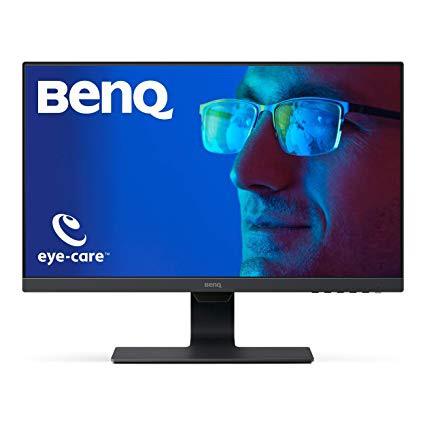
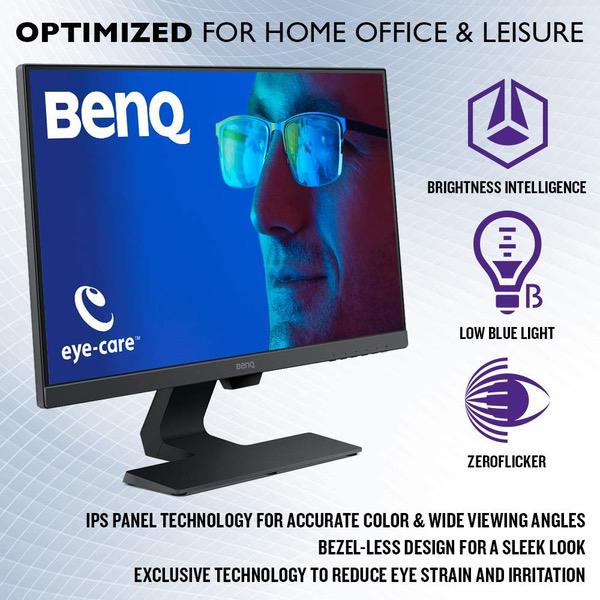
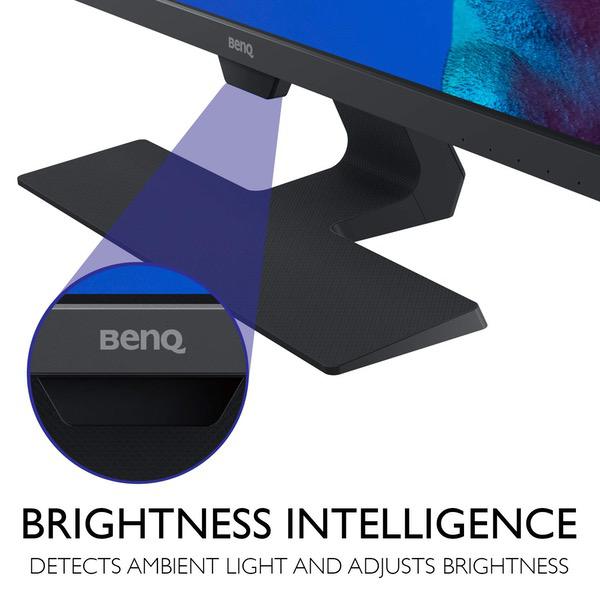
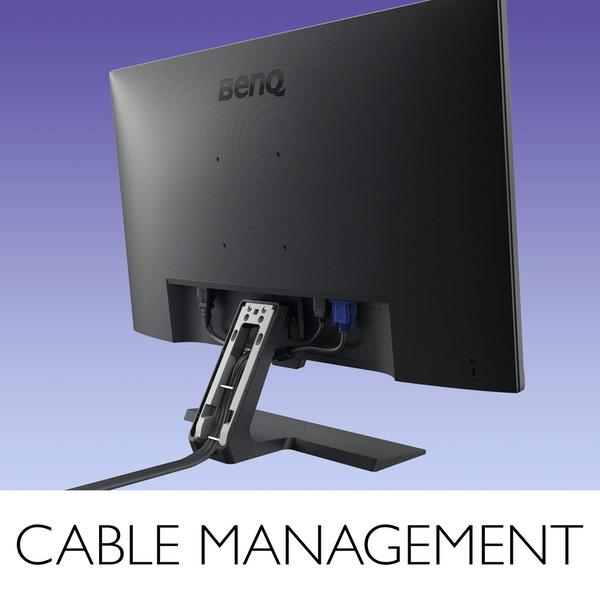
Make sure this fits by entering your model number. ENGINEERED FOR HOME OFFICE AND LEISURE : 23.8” Full HD IPS Widescreen with 1920 x 1080 Resolution and 250 nits of brightness WIDE VIEWING ANGLE IPS PANEL: 178° H/V wide viewing angles for clarity from any viewpoint. OS Compatibility- Windows 7,Windows 8,Windows 8.1, Windows 10 EDGE TO EDGE SLIM BEZEL DESIGN: Minimize distractions and create virtually seamless multi-panel configurations for maximum visibility Relieve eye-strain through self-adjusting brightness: Actively adjusts brightness according to on-screen content and ambient light conditions via BenQ’s patented BRIGHTNESS INTELLIGENCE Technology EYE COMFORT: Experience the difference with Low Blue Light and ZeroFlicker Technology CABLE MANAGEMENT SYSTEM: Neatly hides cables inside monitor stand; Mounting type: VESA Wall Mount: 100x100 (mm)
Reviews
4.1
Reviews: 20
5 stars
60%
4 stars
20%
3 stars
0%
2 stars
10%
1 star
10%
Amazon Customer
4
Good: -Its noticablly more colorful than traditional TN LED monitors -LIghtweight ultra slim bezel is sharp looking. -Blue light and zero flicker -Vesa mountable (which I use a dual monitor set -up) -I personally havent seen any limitations in lag or sloppy response times yet. I have my settings maxed in the games I play. BenQ has a three year warranty on there screens. Bad: -Not nearly as bright as traditional monitors -IPS screens in general and this one very much bleeds light out of the corners. -Trade of slim bezel smooth looking design for weakness and the potential of dust getting under the screen while cleaning -Speakers are awful but what can you expect. For who it was bought for its having sound where they dont now. My goal was to set up a dual monitor situation for my home office. So I wanted to have a matching set for ease of use and matching the screen settings. So I will be buying a second one to finish the pair. So even though this will be used on my business center, I first hooked it up to my gaming rig and did a little bit of photo rendering to see if I like the screen. I would use this with confidence for gaming , especially for working with photos. Games and pictures look much more vivid. I think the biggest drawback is how dark it appears in a dark room. I am still working with the settings a bit. I watched a Kong skull island on here, to test the special effects scenes, the bleeding on a wide screen with the black bars on top and bottom really, really stick out. You can definitely see corner bleeding. That being said the quality of the video was great, so it was a trade off. I would not watch TV on here much, or at least without getting some speakers anyway. I wanted to keep the price down and still get a quality product, I feel this was good fit.
Peter Jay
4
Using this as a wall-mounted vertical (portrait) display monitor, HDMI input, showing a slideshow at a business, near the business entrances. It worked right out of the box. The wide 178/178-degree viewing angle was the selling point. Not using DisplayPort, so I dont see any of the DIsplayPort issues mentioned by others. Walking past the monitor horizontally, the brightness is not totally continuous, but its very good - just fine for my clients purposes. Ive had several unsolicited positive comments on the increased viewing angle since replacing the old monitor. So far, no quality issues. A big plus (typical these days) is that if the power fails while the monitor is on, it powers back up by itself. BTW using the Gofanco HDMI -> twisted-pair dual-monitor extender (plus HDMI pass-through, so Im really feeding 3 monitors), also purchased from Amazon, with shielded CAT6 cable, and that is working flawlessly. FYI, resolution of the Gofanco device is limited to 1024, which is not an issue with me.
Adaya
4
0:00 0:00 This video is not intended for all audiences. What date were you born? January February March April May June July August September October November December 1 2 3 4 5 6 7 8 9 10 11 12 13 14 15 16 17 18 19 20 21 22 23 24 25 26 27 28 29 30 31 2019 2018 2017 2016 2015 2014 2013 2012 2011 2010 2009 2008 2007 2006 2005 2004 2003 2002 2001 2000 1999 1998 1997 1996 1995 1994 1993 1992 1991 1990 1989 1988 1987 1986 1985 1984 1983 1982 1981 1980 1979 1978 1977 1976 1975 1974 1973 1972 1971 1970 1969 1968 1967 1966 1965 1964 1963 1962 1961 1960 1959 1958 1957 1956 1955 1954 1953 1952 1951 1950 1949 1948 1947 1946 1945 1944 1943 1942 1941 1940 1939 1938 1937 1936 1935 1934 1933 1932 1931 1930 1929 1928 1927 1926 1925 1924 1923 1922 1921 1920 1919 1918 1917 1916 1915 1914 1913 1912 1911 1910 1909 1908 1907 1906 1905 1904 1903 1902 1901 1900 Submit Adobe Flash Player is required to watch this video. Install Flash Player Solid monitor for the price and looks really good. Didnt want to spend a lot of money on a secondary monitor as it would be for the kids and need to be able to put it away constantly when finished to save space around the house. The current idea is to use this monitor with a wireless hdmi transmitter/receiver running a VM+GPGPU to provide my kids with a extra computer. Test Configuration:[Receiving Hardware] BenQ GW2780 27 Inch IPS 1080p HDMI Monitor w/ Speakers OREI Wireless HDMI Transmitter Receiver Extender 1080P Kit with IR Remote IBRA Orange HDMI Cable 3ft - UHD HDMI 2.0 (4K@60Hz) Ready -18Gbps-28AWG Logitech MK345 Wireless Combo – Full-sized Keyboard with Palm Rest and Comfortable Right-Handed Mouse Configuration:[Test Source System] CPU: AMD ThreadRipper 1950X RAM: G.Skill 128GB DDR4 @2933Mhz GPU: MSI Radeon RX Vega 64 - Driver 18.9.3 NVMe: 2 x Samsung 960 PRO 1 TB Software: VMWare Workstation 15 Pro - Windows 10 NVMe Guest OS [1GB Shared Video Memory] Configuration:[Source System] "Not able to test yet, QNAP in RMA process" QNAP TVS-1282 4.3.5 GPGPU: GeForce GTX 1050TI Virtualization: macOS High Sierra / Windows 10 So since my QNAP is not here, I decided to test with my workstation machine just to see how well the OREI RX/TX worked for 1080p source/destination. As you can see from the screenshots attached, theres no more then 7ft between the source/destination, originally I tried putting it in a different area, but due to line of sight issues with my computer, the logitech keyboard/mouse input was very laggy, and the hdmi receiver dropped once, but that was due to moving the equipment around. But anyways, there was/is no latency from the video source and it successfully passes audio through the VM to the monitor with no latency. But wait, even better, the VM is running on the BenQ monitor as an extended screen from my workstation, so this is twice as intensive for image processing on the OREI. Other then the lackluster Logitech MK345 distance/input, even had to use an ASUS USB extender I found for the USB receiver to get a good input signal. Uploaded a 4K 15 second video running on the VM playing a youtube video with audio. The monitor colors stayed rich, good contrast and quality sturdiness (really needed because of the kids), hoping the gaming is smooth with no tearing, but will update once my QNAP is back. Will update once I get my QNAP back, and test a full blown DirectX game setup with the GeForce 1050 TI in passthrough, I hope others find this useful, as I was unsure of the power of this device due to the NAS/PC-to-VM requirements.
Scott M.
4
Great monitors. I purchased two for my workspace. You can tell they’ve been developed on a budget. For instance, screen can sometimes shift from inside the bezel. Only seemed to be an issue when moving the monitors to their mounts, however, it’s a fantastic deal for the price and it’s been everything I’ve expected so far. Great monitors at a great price.
Product variations
Column filling
Sort by Price Sort by Availability Sort by CODE Sort by Screen Size
$11900
In stock
+
B072XCZSSW
Screen Size:
23.8 in
$17900
In stock
+
B072XFFQ4K
Screen Size:
27 in
You may be interested
  • Bestsellers
  • Recently Viewed
 
Similar products
Fast and high quality delivery

Our company makes delivery all over the country

Quality assurance and service

We offer only those goods, in which quality we are sure

Returns within 30 days

You have 30 days to test your purchase