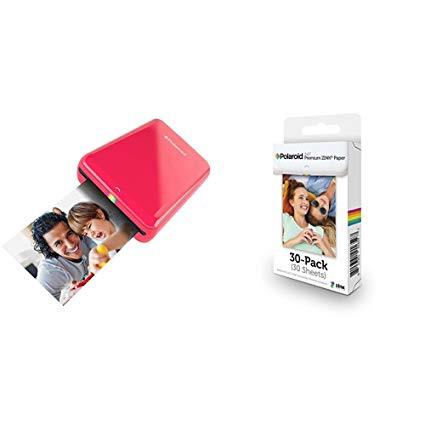
Polaroid ZIP Mobile Printer (Red) with Polaroid ZINK Photo Paper TRIPLE PACK (30 Sheets)
اكتب تقييم
$‎ 10200

Polaroid ZIP Mobile Printer (Red) with Polaroid ZINK Photo Paper TRIPLE PACK (30 Sheets)

اكتب تقييم
B01NAIISSG
Paper Bundle
Target is a general merchandise retailer with stores in all 50 states and the District...

المدينة: US, New York

Delivery
Pickup at your own expense
Tomorrow from 09:00 to 20:00, Store location
Free
Payment options
Apple Pay Google Pay Mastercard Visa
Cash, bank card, credit/installment payments, cashless payment for legal entities
Warranty and returns
Exchange/return of products of proper quality within 14 days Official manufacturer's warranty: 12 months
Features
Style
Paper Bundle
Description
This fits your .
Make sure this fits by entering your model number. Prints Directly from Your Mobile Phone or Tablet via Bluetooth or NFC Technology 2x3" Photos Are Full-Color & Smudge-Proof, and Feature Peel-Back, Sticky Paper Measures a Compact 2.9 Inches x 4.7 Inches x 0.9 Inches; Weighs Just 6.6 Ounces Earth Friendly; No Cartridges & No Extra Packaging to Discard for Reduced Waste Latest Version; Reinvented M230 Premium Formulation Ensures Peak Performance Long-Lasting Image; Fade-Resistant Even with Exposure to Light, Heat & Humidity
Reviews
3.3
التقييمات: 20
5 نجمة
35%
4 نجمة
20%
3 نجمة
10%
2 نجمة
5%
1 نجوم
30%
reamethable
4
I got it for scrapbooking and a travel journal. Dont expect high quality and res prints, its a tiny mobile printer after all. If you want high quality prints, mobile printers arent what youre looking for. I did extensive research to compare between the Polaroid ZIP, Instax Share, HP Sprocket and Kodak and image quality, yellow/reddish vintage-like hues and lower res images seem to be the prevalent complaint. I settled on Polaroid because the app allowed collages and white frames for the polaroid effect. It seemed to have better options than the other apps. Youll need to manually lighten or brighten the photos before printing as they print a little dark than what youll see on your phone. It takes some getting used to. Just revert the photo after youre done printing. There was a lot of negative reviews on the app that apparently made it unusable or clunky to use but they have a new app or updated version following the bad reviews. Look for Polaroid Zip app which worked fine for me printing over 20 photos in multiple sessions for my scrapbook.
Rami Jouda
4
I got this device cuz i liked the concept of a portable printer that you take on the go. Also the fact that u get a quick zero ink pics., i really wanted to try that. I was not desapionted, actually i like this printer alot and my friends around me all go mouth open when they see it working. So heres my experience in this product so far. - I already left the seller a great feedback since this item got shipped in the same day ordered even though i had a free (5 to 8) days shipment on. So thank you alot. - The printer is very user friendly. U dont really need a manual for it. As long as you have NFC in ur phone. Or bluetooth. Just connect it. And itll open the app. Automatically, or take you to the app market to download the free app. - The app. Itself is kindda slow and needs alot of tweeking but gets you the job done. It also have alot of options and editing tools which i was surprised they were included, anyways this is a review of the printer not the app. (I would give the app. A 3 stars though, you need to check the app. To know what i mean). - Okey so i opened the box and found the free pack of paper in there ready to be put inside. This is probably the only tricky part of this whole thing. Once you put the paper inside as shown in instructions on the pack, you are ready to go. - Just NFC the printer with ur phone and the app will open. Choose your options, edit, and customize your picture then click print on your phone. The pic will come out like a rabbit being pulled out of a magicians hat, leaving the crowd anxious to see the pic, and experience the (zink) Ive been bragging about XD. My cons. to this product, and why its 4 stars instead of 5. Well dont expect to see the same picture in your vivid and lively colored phone screen coming out of this printer. I mean its portable after all and it got its limitations. The pics tend to get a tad reddish by default. Although you can tweek this through the app. Its still annoying and you could waste few papers (a pack of 20 for 10$) on trails.Ive added a pic that might show you the difference. Oh and if you are raeding this. Dont edit the pic, and fit it FULLY in the app. Leave some frame to it in the app. Unless you dont care about it getting cropped a bit. It also shows in the pic attached. Hope this was helpful :)
joe9624
4
The Polaroid Zip printer is a neat little toy! The reason why I say toy is because if you want stellar prints from this printer then you are not going to get them. Dont get me wrong this printer is fun to play with and the app (which is now newly updated) works pretty well. The Zip uses 2x3 ZINK adhesive photo paper. ZINK is a technology that allows to print without the use of ink. I had the previous version of this model, the POGO. Polaroid has really stepped up their game with this model. The nice slick design and mobility of the printer is great. The photo quality, while still not amazing, is still tons better then the original POGO. I am excited to see where this technology goes in the future! I fully recommend this product to anyone who wants to easily make cute printouts of photos from their smartphones and not expect professional grade prints.
Katydid McNally
4
This product is so amazing. I read a lot of the reviews before I purchased this item and a few people had a problem with the lighting difference between the picture on your phone and the picture that was printed. But if you just adjust the brightness in your phones photo editor, the printed polaroid turns out great! The app is really easy to use with the product and it comes with stickers and borders that you can use for free which was a nice bonus. It only took a few days to get here with the standard shipping and it came right on time in perfect condition. The only thing I was bummed about was that I wanted to use it right when I got it but the printer wasnt charged yet. But it didnt take long waiting for it to be charged so that wasnt a huge deal. Also, it takes anywhere between 3-5 minutes for the printer to actually print your photo once you hit the print button as well. But thats not really a downside, just something to keep in mind if you tend to be impatient. Overall, I really love this product and the price isnt bad for what you are getting. Im very pleased with my purchase!
Product variations
Column filling
ترتيب بواسطة السعر ترتيب بواسطة الامكانية ترتيب بواسطة الكود ترتيب بواسطة Style
$‎ 10200
متوفر بالمخزون
+
B01NAIISSG
Style:
Paper Bundle
$‎ 8700
متوفر بالمخزون
+
B00TE8XKIS
Style:
Printer Only
You may be interested
  • Bestsellers
  • Recently Viewed
 
Similar products
$‎ 9900
New York, US
Gold
Operating System Printer TechnologyLaser
$‎ 66900
New York, US
Gold
Operating System Windows, Mac Printer TechnologyInkjet
$‎ 64900 $‎ 69900 -7%
New York, US
Gold
Operating System Windows, Mac Printer TechnologyInkjet
$‎ 31900
New York, US
Gold
Operating System Windows, Mac Printer TechnologyInkjet
Show more
Fast and high quality delivery

Our company makes delivery all over the country

Quality assurance and service

We offer only those goods, in which quality we are sure

Returns within 30 days

You have 30 days to test your purchase