
















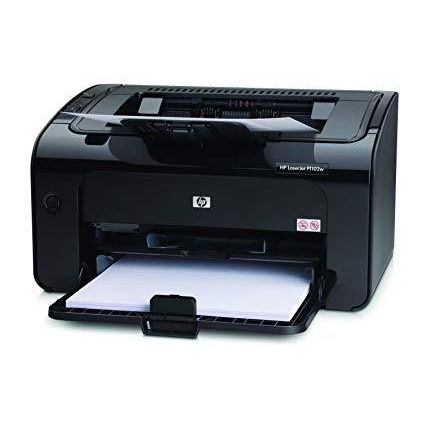
HP LaserJet Pro P1102w
Write a review
$37900

HP LaserJet Pro P1102w

Write a review
B0036TGGVO
+
Add to wish list
Target is a general merchandise retailer with stores in all 50 states and the District...

City: US, New York

Delivery
Pickup at your own expense
Tomorrow from 09:00 to 20:00, Store location
Free
Payment options
Apple Pay Google Pay Mastercard Visa
Cash, bank card, credit/installment payments, cashless payment for legal entities
Warranty and returns
Exchange/return of products of proper quality within 14 days Official manufacturer's warranty: 12 months
Features
Connectivity Technology
Wireless;USB
Item Dimensions
8.82 x 13.66 x 7.64 in
Item Weight
11.6 lbs
Operating System
Printer Output
Monochrome
Printer Technology
Laser
Description
This fits your .
Make sure this fits by entering your model number. 150-sheet input tray Manual Duplex Printing Hi-Speed USB 2.0 port; WiFi 802.11 b/g 3 LED indicator lights; 2 buttons 100-sheet face-down bin, 100 sheets output tray
Reviews
4.1
Reviews: 20
5 stars
50%
4 stars
20%
3 stars
20%
2 stars
5%
1 star
5%
Amazon Customer
5
A year and a half ago, I bought HP Officejet Pro 8500, an all-in-one desk jet printer. I dont have school-aged kids and I do most of my printing at work. So I used the printer sparingly. I learned that when I did need it, the ink would dry up! And a full set of HP 940 cartridges costs around $85! Shame on you HP! I read somewhere that the inkjet printer fluid is the most expensive substance in the world per ounce. It is even more expensive than gold! I tried researching on ways I can refill the cartridges but I didnt find a good or reliable way. I decided that I was done being gouged by HP for the cartridges so I researched on the internet and it seems like the cheapest way to go was to just get your picture prints from various local or online stores and then print your home stuff on a laser printer. I then tried to research on wireless laser printers. I know that HP being HP, it would still try to gouge me on the toners and in fact, the toner for this printer is expensive. So I decided that one of my criteria for my new printer is that Im either able to find an easy way to refill the toner or find a good third party compatible toner. And guess what, there are 4.5 star rated third party toners in Amazon for this specific printer. A two-pack costs around twenty bucks. TWO TONERS FOR 20 BUCKS! I was also looking at an entry-level Brother wifi enabled laser printer. That one had automatic duplexing and I actually liked it better but it did not have a highly rated toner from a third party. Isnt it sad though that the main criteria I had to use was a availability of refills or a non-branded toner? I purchased 1102w and was pleasantly surprised about its small footprint. I wasnt thinking about it when I first bought the printer but I realized that this unit also is compatible with Apples Air Print. Sadly, the latest firmware was not installed so I had to download a firmware update utility from HP. And I had to delete the printer as a wireless printer and add it again as a wired printer because I read online that you can not update the firmware wirelessly. But after updating the firmware, I was able to print from my iOS devices. This is a nice bonus. We are an Apple household and I knew from other reviews that HP didnt document wireless printing (on OS X) very well. Fortunately, I just followed the steps outlined in the October 30, 2010 Amazon review by R. Ruiz "Bohemian Bon Vivant" and I was able to set-up wireless printing in OS X Snow Leopard in no time. I am not sure if this will work for OS X Lion. Overall, the HP 1102w is an inexpensive wireless printer that has excellent (and and cheap) third-party toners available.
pedalpower
5
I have had an older version of this style of HP LaserJet (Model P1006) for several years and have had no problems with it. I ordered this newer model because it is wireless. We have four computers scattered around the house and wanted to be able to print from any of them. The first Pro P1102 I ordered arrived damaged. The box had a couple of holes punched in it and the hinges on the top lid were broken. I contacted Amazon for a replacement the same day the damaged one arrived. The replacement arrived two days later with no charges to my account. I have 30 days to return the damaged printer. It took me less than an hour to set it up and have it printing wirelessly from all four computers - two XPs, one Vista, and one Windows 7. Some reviewers complain about the high cost of the LaserJet cartridges, however, InkJet cartridges cost more per page. A HP-85A replacement cartridge for this printer costs $69.00 for 1600 pages for 4.3 cents per page. A HP-74XL b&w cartridge for my wifes InkJet printer costs $42.00 for 750 pages for 5.6 cents per page. Generic cartridges for both printers can be purchased for less. My wifes printer also requires a color cartridge in addition to the b&w cartridge. I love the b&w LaserJet. If I want a color photo, I put it on a flashdrive and print it at the local grocery store for 24 cents and dont have to bother with the slow speed and other color ink jet problems. This LaserJet will print a page from standby in less than 10 seconds with the succeeding pages printing in less than five seconds each. One must wait much longer for my wifes InkJet to initialize and print. This LaserJet also came with a USB cord if one wants to run on USB.
Jennifer A. Ray
5
I ordered the HP LaserJet Pro P1102w Printer (CE657A#BGJ) for our office. The primary users of this are our company owner and the employee who assists him with billing. The purpose of this printer was to be able to have one closer to her desk so she doesnt have to walk across the building every time she prints an invoice, and also to prevent both of their print jobs from being held up by print jobs by the rest of the team upstairs. This little printer does just the trick. It is nice an small, so it fits well in the limited space we have in the reception area, but it is powerful enough it prints all of their documents quickly and well. Set up was easy. The software walks you through configuring it for your wireless network, and I had no issues installing it on the Windows PCs we needed it on. After the printer is configured, users can easily install the printer on their desktops by pointing their web browser to the IP address for the printer, and using the install wizard there. The boss also has a MAC computer and an iPad and has been able to configure both to print to this printer using Airprint. The Airprint functionality required a firmware update for the printer after I received it, but the firmware was easy and quick to install. Airprint was an unexpected bonus - we didnt even realize the printer did this until it arrived and I read the manual. The boss was so tickled by this feature that he had me find him a good multifunction HP printer that also had this functionality and he bought that for his home. The HP LaserJet Pro P1102w printer has been a good purchase for our office, and prints documents very well. I highly recommend it.
Candace Strickler
5
I own a computer repair business. We have sold nearly 50 of these in the last year. They are incredibly easy to install. Simply plug in the included usb cord and the onboard mass storage device is automatically installed and the driver installation begins immediately. It can easily be configured on your wireless network during the installation. This is even easier if you install first to a computer that is already connected wirelessly to your network. The printing is lightening fast and very economical. The toner is reasonably priced, and produces crisp printing that you generally only see on much higher end machines. Even though it comes with a so-called starter toner cartridge, it lasted forever. The spool up when printing wireless is nearly instantaneous. I can not say enough great things about these very compact, excellently priced units. Out of the 48 we have purchased - we had one that was producing a fuser type artifact on the page. Solid dark vertical line on the middle-left of the page. I received a replacement within 24 hours. Other than this one issue, they have been flawless, and had not one issue. Several of these are in Doctors and Dentists office, where they are printing 50-200 pages/day.
Shoom
5
I purchased this printer refurbished in 2011 for only $50!! It has worked great since then. I always have had problems with printers- both cheap and expensive ones. Every once in a while this printer doesnt print, but I found out these rare errors are software related. Re-plugging the printer cable into the computer always fixes these issues. No need to troubleshoot or re-install software. My favorite part of this printer is how long the cartridges last and how affordable they are. One cartridge lasts for 5000 sheets and they cost around $10 for a refurbished cartridge. I loathe the fact that the average printer requires ink cartridges which only last a few hundred sheets; those ink cartridges literally cost more than gold in weight. This printer and the refurbished toner cartridge has saved me lots of money over the past 3.5 years.
uktravailer
5
I bought this as our main black and white printer for home as a I am sick to death of the expense of the Lexmark inkjet color all-in-one that we currently use, mainly for text. That can now be relegated (optimized?) for color printing only. I have a similar wired HP1006 printer at work, so I already suspected that this would be a great printer with the advantage of wifi connectivity. I was not disappointed. Set-up was very easy. Simply unpack the printer, plug into the AC supply and then use the USB cable supplied to connect to your PC for a one-time installation. Choose the custom install options if you dont want to have the usual HP "customer bloatware" installed too (just uncheck the box on the next screen, its teh only "custom" option HP allows!). Follow the prompts and select the "wireless" connectivity options. Unplug the USB cable and store it away. Enter your WEP/WPA key for your home network when prompted and hey presto, youre good to go. Whole set up took under 10 minutes on a WinXP machine. Adding other laptops was easy - just use the install disk. No need to use the USB cable at this point, again use custom install to disable the HP bloatware being added, and select the option that states "I want to print from a printer already configured on wifi". Takes under 10 minutes on a Vista machine. I will try adding a Win7 laptop tomorrow, but do not anticipate any issues. The wifi signal seems pretty good and easily able to send files quickly from the ground floor of the house to the second floor, with no drop. Summary of features: * Printing is fairly fast and the machine wakes up from its eco-sleep mode pretty rapidly. * Duplex printing is manual, but I am used to that with the HP1006. * There is a manual feed tray above the main tray. * Maximum paper width is 8.5 inches. A highly recommended printer.
Dennis Eichenlaub
5
We had an older HP Laser Jet with a Link Sys wireless printer adapter. I bought a new laptop running Windows 7. Software for the printer adapter will not run on Windows 7. We have three laptops (Win 7, Win Vista, and Win XP). Wireless printing is a requirement for us. The only wireless adapter that was advertised to work with all 3 was outrageously expensive. Thats when I found I could get a brand new HP Laser Jet with wireless built in for under $100. Thats less than the outrageously expensive adapter. I decided I had to at least try this solution. I read the reviews about the easy installation -- and a couple that said it didnt work. I was skeptical about the easy installation. The printer adapter was supposed to be easy to install, but the automatic software didnt work. I ended up with tech support for over half an hour. I had to disable my firewall & anti-virus, configure my router for fixed IP addresses, blah blah blah. Every time I got a new wireless router or changed a wireless configuration it was the same drill all over again. The HP was amazingly easy on all three of my laptops. Plugging in the USB cable connects a external disk (thumb drive). If your auto-run is on, the installation program starts itself. If it isnt, just go to the external disk and click the install program. The only thing I had to tell the program was which network was mine, and the password for my network. It took care of everything else itself. Once its up, it prints like an HP. No surprises there, which is a good thing. I was pleasantly surprised to find that this printer hosts its own web page. Just point your favorite browser to the IP address on the test page, and voila -- full printer configuration and status information. I never expected this on a low-end printer. I dont know how other brands wireless printers work. Maybe they are just as good as the HP. All I can say is that I am totally impressed with this little box. I still cant believe I got all this for under $100.
Detroit Chick
5
Just got this printer - we needed a simple printer - nothing fancy. Considered InkJet but for only 30$ more we were able to get the LaserJet which is a huge bonus, imo, because I tend to set coffee mugs down on my papers and the LaserJet toner wont smear. Additionally, if you print envelopes for mailing and its raining (or they get dropped in a puddle) your printing will stay intact. It claims to be 19/ppm but I think its faster. I am extremely impatient and I do not find myself waiting for the page to print. The auto-off function is really nice, since I tend to forget I turned it on. I have been involved in running/maintaining office networks for over 20 years and I have to say this was, hands down, the simplest intall EVER. Literally remove the packing materials, plug it into power, attach the usb cable to your printer & after a few clicks (seriously, like 4) youre up & running. LOVE the wireless capability. We are renovating and our office is in a temporary location which means a less than ideal set up for our items and wireless just means 2 less cables for us (2 computers). Love that!!! Less mess!! I have sworn by HP printers since the late 80s (yes, that long) and Ive never been disappointed. We have a color HP laser printer that well be bringing out when the renovations are done but for now this is perfect!!!! Just want it to print b&w, fairly quickly & not smear. Perfect! It truly took me longer to remove the packaging than it did for me to get it installed & running on our network. Crazy good!!
B. Villa
5
This is my second HP printer I have purchased this year. The other purchase was an HP 8500e All in One printer. And now, this one. I have to say that wireless technology is an absolute wonderful thing. The printer was so easy to set up that I was more surprised than anything. Took me about 5 minutes to unpack, get toner/drum unpacked and ready, put it on my desk, and get it ready to print! The software installation was easy as well. But I learned that although you dont need the CD for install, I strongly recommend you install the software from the CD so you wont have any issues. I did try it without the CD and it found the printer but the wireless part was not so good. I unloaded the software, reloaded the software, only this time using the CD, and bingo! It worked. I was up and running in less than 15 minutes. The wireless part is by far the best thing I could have ever imagined. I have a laptop that I work from almost anywhere in my home and print. It is so cool. I tried printing from the internet (simulating being elsewhere in the city) and it worked like a charm. Wow. No issues to report, as yet. The starter toner it comes with expects to print a few hundred pages and so far I have printed about 140 with no problems and crystal clear print. This is a great printer! I recommend it only if you dont mind not having to print color and only need b&w. I use it mostly for Word and Excel documents where I dont need (or care for) color. This is great for students as well, small foot print that takes little space on a desk and will probably cost far less in the long run. Thumbs up!
Oneofus
5
Ive seen many reviews on this printer and they run the range from very low to very high. Since many reviewers dont state what platform they are using, saying the printer doesnt work is useless. In addition, skills vary widely when it comes to setting up computer devices and equipment. I have a dual-boot Windows 7/Mint Linux box that I have attached this printer to via USB. It already has an HP all-in-one attached also via USB. I tried to use this printer wirelessly with the Linux OS, but I couldnt get it done (I think this was because of my lack of skills mostly). Once I attached it via USB it was installed automagically by Linux (times have changed). After some tweaking through Gnome and Samba, my wifes Linux box was able to communicate with the printer wirelessly and print documents. Once I have more time I may fiddle with it some more and try to get it work wirelessly with my computer. For now I am satisfied with the setup. The printer will come out of sleep mode from either computer. It prints fast, it prints well, and I like the idea of the number of sheets per cartridge, which is much better (cost-wise) than the small HP all-in-one. I am very happy with my purchase, and recommend this printer to any individual (not necessarily business) who needs to occasionally print black-only copy. Used as per its intended purpose, it is a great printer.
Product variations
Column filling
Sort by Price Sort by Availability Sort by CODE
$37900
In stock
+
B0036TGGVO
You may be interested
  • Bestsellers
  • Recently Viewed
 
Fast and high quality delivery

Our company makes delivery all over the country

Quality assurance and service

We offer only those goods, in which quality we are sure

Returns within 30 days

You have 30 days to test your purchase