
















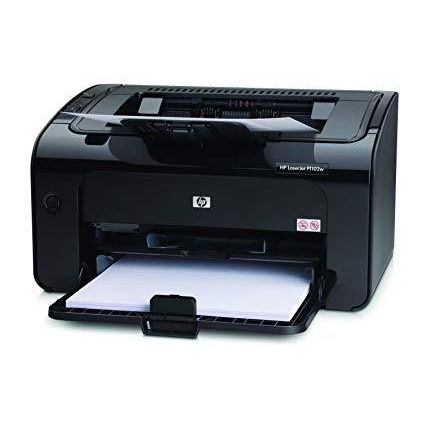
HP LaserJet Pro P1102w
Write a review
29609

HP LaserJet Pro P1102w

Write a review
B0036TGGVO
+
Add to wish list
Target is a general merchandise retailer with stores in all 50 states and the District...

City: US, New York

Delivery
Pickup at your own expense
Tomorrow from 09:00 to 20:00, Store location
Free
Payment options
Apple Pay Google Pay Mastercard Visa
Cash, bank card, credit/installment payments, cashless payment for legal entities
Warranty and returns
Exchange/return of products of proper quality within 14 days Official manufacturer's warranty: 12 months
Features
Connectivity Technology
Wireless;USB
Item Dimensions
8.82 x 13.66 x 7.64 in
Item Weight
11.6 lbs
Operating System
Printer Output
Monochrome
Printer Technology
Laser
Description
This fits your .
Make sure this fits by entering your model number. 150-sheet input tray Manual Duplex Printing Hi-Speed USB 2.0 port; WiFi 802.11 b/g 3 LED indicator lights; 2 buttons 100-sheet face-down bin, 100 sheets output tray
Reviews
4.1
Reviews: 20
5 stars
50%
4 stars
20%
3 stars
20%
2 stars
5%
1 star
5%
Mrs. Punch
4
I am a horribly impatient person, and I tend to get frustrated very easily when things take longer than I expect, or do not go how I have planned. So, when I bought a Yudu machine and tried to print transparencies on our Epson, I just about had an apoplectic fit when I found that the Epson would not print transparencies, and there was no way to trick it into doing so. I spent almost half an hour trying different configurations, schemes, and actions to get it to print, but finally after my husband checked the Epson FAQ page (Question: Will this Epson print on transparencies? Answer: No) I gave up and sat down in a grumpy heap and pouted. My dreams of making myself a faux vintage Peter Gabriel shirt were nearly dashed. My husband, ever the patient man, rolled his eyes and suggested that I look for laser printers, and directed me to Amazon. I was interrupting his gaming with my tantrum, and he figured we could use another printer regardless, to handle our volume of monochrome printing we do monthly. I then began my search. I was determined to buy something cheap, but not too cheap - that would print clearly and sharply, but also had a decent price for replacement toner cartridges. I threw many options at him before finally narrowing it down to this printer and a Brother model. The Brother was substantially cheaper and had good reviews, but couldnt verify if it would print transparencies or not. The HP didnt specifically say that it would, but hinted around at it very generally. So, I decided to take the risk. I ordered it with our prime account, and received it the next day - so the shipping was super duper fast - we hadnt opted to pay for one day. It was packaged well, and easy to set up - it was literally a plug and play, and got itself working so quickly I was rather amazed. (Be aware though that you need a USB cable with it - we luckily had one in our cord stash, but it didnt come with one). Within a few minutes, I was gleefully printing out my proposed tshirt ideas and compiling my Yudu portfolio. It prints fast and clearly, even on transparencies. I was worried about smudging issues since the transparency surface is quite smooth, but there wasnt any smudging, even directly off of the tray. We printed 600 pages of open source rpg manuals as well (all the same evening we recd the unit), and it works like a champ. So - its worth it. Its a great addition to our home office, and absolutely saved the day. Peter Gabriel shirt dream realized! (I will attach a picture as soon as the screen is done burning!)
Karl Burrows
4
***Update 4/1/2011*** I have installed a few more of these and have used the wireless for some of the setups and it seems to perform fairly well. No drops from the wireless network and is pretty easy to setup to joina wireless network. Just note that you need WPA security at a minimum for the printer to work wirelessly. Original Review: I have purchased 2 of these for customers that needed a replacement for an older model HP laser printer. This laser printer seems to be comparable to the older 1005/1006 and 1100 series of laser printers they appear to have replaced. The only difference appears to be this model adds wireless. Print quality, toner cost per page doesnt seem to have changed any over the last several models of this series. You get a typical starter cartridge that is about 60% full and software still includes tons of bloatware for a low volume desktop printer. Pros: * Inexpensive small footprint laser printer * Quick first page printing Cons: * Why does HP continue to want to install so many programs for a simple laser printer? If you dont know how to install the software, you end up with a huge customer participation program that sends you usage to HP, a driver update program that has never worked in the 12 years I have been installing these and a desktop manager that runs at startup when all you can do is print. Why do we need something running to help us print to a basic B&W laser printer that will print just fine with the drivers installed without the program running at start-up. I find this aggrevating especially when you install HP software on a laptop. When you are away from the printer, it takes longer to boot because the HP program is searching for the printer it cant find. HP used to provide corporate drivers that were just the drivers, which is all you need. Not available with this model, so you cant avoid the bloatware. The wireless seems like an afterthought. This is the only entry-level laser printer HP offers, so if you are in an office environment, you probably dont even need the wireless. I guess I wonder why they didnt add an Ethernet card instead. Yes, I know many routers have USB ports for printers, but those are typically harder to configure, where the Ethernet connection is more universal for small business networks or typical home networks where you already have a wireless router with a 4 port switch. Conclusion: It is what it is. A basic, no frills B&W laser printer with decent print speeds. I have been buying these for years and they serve their purpose. Remember, you get what you pay for. If you just need something on a desk to print an occasional email or invoice, it will meet your needs. If you will use this as a primary printer for a desktop or small office, I would recommend looking at some of the mid line laser printers with larger paper trays, larger capacity toner cartridges, etc. A few more dollars get a lot more features.
Sassamon Leather
4
I was in need of a fast, compact wireless printer and visited my local big box retailer and came on to Amazon to do some research. I read a few of the reviews of people that have had problems with this HP P1102w. I decided that for a little more than $100 I could take a chance and if it didnt work out, Id send it back. I can report that setup was very well specified and that by following the directions I was able to get this unit up and running in a very short amount of time. I was able to connect to my wireless network very quickly and was printing out b+w sheets with zero problems. I have an old Lenovo laptop running Windows XP. Again, no problems with setup. I did have an issue trying to set up multiple laptops using another OS and I havent done the research to find out if its even possible to get the printer to talk to more than one machine. As its my primary printer with my primary laptop Im not going to worry about it. Speed: The printer is lightening fast for me. Up to now Id have to physically bring my laptop to the inkjet printer and hook up the USB cable and wait. Print times were glacially slow. Now I hit Ctrl-P and a few moments later I hear the printer kicking out a copy. The printer turns itself on and off before and after printing a file so I dont have to physically do it. So far so good with that. Quality: For my purposes, mostly text and a few illustrations, this printer is crisp and clean. Price: Again, for a little more than $100 I cannot complain about the price. Overall Impression: This is a quick, compact, fast laser printer that just plain works. It was easy to setup, fits my needs and I would not hesitate to recommend it to anybody with similar needs.
Martin from Massachussetts
4
We bough about 6 of these at work before even realizing that they support Apples AirPrint. Out CEO has an iPad so we quickly bought one for him to try out that feature. The downside is the shipping models dont have the firmware version that supports Airprint. Easy enough for an IT person to upgrade, but might cause a little pain for an average consumer, which is why I rated it a little lower there (and it doesnt get 5 stars overall). Airprint works fantastic and is super easy to setup once you have the new firmware installed. I loved this printer so much, and its $99 price tag at the time (though it looks like the price has crept up, too bad) that I immediately bought one for home and love it. The only downside (and this doesnt warrant a lower star rating, BTW) is that the paper is stored externally which usually means it will suck up any humidity in the house (the paper that is) and cause jams. That said, I have yet to have the device jam so it may not matter (though that top page does get dusty too). Go buy the printer, especially if you want to print from an iPad!!
Product variations
Column filling
Sort by Price Sort by Availability Sort by CODE
29609
In stock
+
B0036TGGVO
You may be interested
  • Bestsellers
  • Recently Viewed
 
Fast and high quality delivery

Our company makes delivery all over the country

Quality assurance and service

We offer only those goods, in which quality we are sure

Returns within 30 days

You have 30 days to test your purchase