
















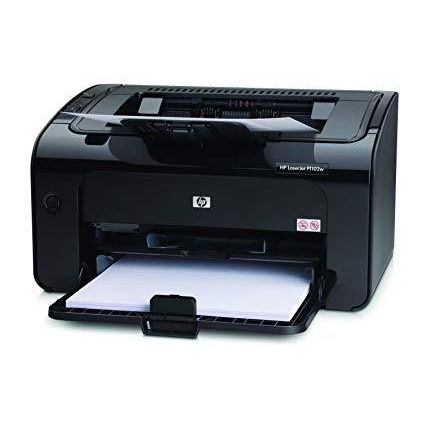
HP LaserJet Pro P1102w
Write a review
29609

HP LaserJet Pro P1102w

Write a review
B0036TGGVO
+
Add to wish list
Target is a general merchandise retailer with stores in all 50 states and the District...

City: US, New York

Delivery
Pickup at your own expense
Tomorrow from 09:00 to 20:00, Store location
Free
Payment options
Apple Pay Google Pay Mastercard Visa
Cash, bank card, credit/installment payments, cashless payment for legal entities
Warranty and returns
Exchange/return of products of proper quality within 14 days Official manufacturer's warranty: 12 months
Features
Connectivity Technology
Wireless;USB
Item Dimensions
8.82 x 13.66 x 7.64 in
Item Weight
11.6 lbs
Operating System
Printer Output
Monochrome
Printer Technology
Laser
Description
This fits your .
Make sure this fits by entering your model number. 150-sheet input tray Manual Duplex Printing Hi-Speed USB 2.0 port; WiFi 802.11 b/g 3 LED indicator lights; 2 buttons 100-sheet face-down bin, 100 sheets output tray
Reviews
4.1
Reviews: 20
5 stars
50%
4 stars
20%
3 stars
20%
2 stars
5%
1 star
5%
Tom Apiaceae
3
I BOUGHT my HP 1102w about five years ago. It replaced my model 1012, which was very similar. The older machine lasted but a few years. The replacement ended its service life in an even shorter time. I had hopes for the "wireless" feature, which came with the new machine. A few hours of fruitless experiments dashed those hopes. I connected the USB plug and that was that. FIRST THE GOOD: The print is surprisingly sharp. The speed of rasterizing and output is admirable. The price is right. I LIKE the open paper drawer: I can easily load in a few pages for a quick job. Envelope loading is also fairly easy. To avoid confusing the sensor, remove paper before inserting envelopes. Printing *standard,* number 10 envelopes causes the printer to grind and complain. But the envelopes usually come out fine. There might be a little stray toner and some curled paper, but the result is usable. With the right software, you might be able to print short envelopes, such as number 6. Oddball envelopes (such as greeting card envelopes) might be more difficult: With these, positioning type in the right place is tricky. (Microsoft Word has custom settings that might help.) USB CUTOUT. On the printer cabinet, I like the small cutout for the USB connector. The cutout makes the connector easy to plug in or remove. (Some printers actually dont have this appreciated feature.) The cutout eases jimmying the cable, which becomes necessary when documents refuse to print. NOW THE BAD: In many ways, this machine is the "little print-engine that could." But its toy-like. Youre kidding yourself if you depend on it for anything beyond casual use. Even so, it will wear out in record time. Despite occasional and undemanding use, my printer died after about two and a half toner cartridges. The output paper table is flimsy and particularly annoying. Only two scrawny plastic tabs hold it in place. The table tends to fall off. When it does, it often pries the cartridge door open. The open door sets off an annoying error that stops the printer. Of course, printouts fly in every direction. Such events become more common as plastic parts loosen with wear. WIRELESS, HA! As many have reported, the wireless capability is a major disappointment. We never managed to coax this printer to work with cell phones. When the 1102w drops into "sleep" mode, it vanishes from the network. Try to find it! Sometimes a print command over the USB can arouse the printer. Sometimes, even the USB has no effect. And there goes the admirable speedy output! What if one needs a print for an immediate meeting? That situation initiates FWM (Frantic Workaround Mode): Start jiggling the on-off button. Disconnect and reconnect cables. Cancel and resend documents, etc. A computer reset plus a long wait is often necessary. Under your breath, grumble a few Saxon expressions. Maybe theyll serve as incantations to the Data Demon and revive the machine. No? Miss the meeting. Your boss is giving you the hairy eyeball. Throw up your hands in dismay. Never mind the HP manual. Its hopeless! (What else would you expect in these days of IT illiteracy?) To the uninitiated, the process recalls Fawlty Towers: The Complete Collection Remastered . (Mr. Fawlty had no end of equipment problems. If hed owned an 1102w, all of these troubles would have befallen him.) DOES ALL THE FIDGETING produce results? Sometimes YES! But in those less patient, more frenzied times (when you most need results), NO! Documents can disappear into a data black hole and never be seen again. In the most recent instance here, the black hole claimed the printer itself. Maybe a transient hit the wee HP and an invisible fuse popped. Ill never know. (HP doesnt reveal fuse locations. Dont bother researching in the book or on the Web. HP fuse locations are as secret as nuclear codes.) HP, RIP. After two and a half toner cartridges, fade to black forever. Ironically, the cadaverous printer remains shiny and new. Id like to say "it was fun while it lasted." Instead I say this: I was about to rectify the matter with TBM (the big mallet). This mallet is the universal fixative. I reserve it for use with delinquent IT products. The 1102w denied me that final pleasure. Summing up: Despite its cherubic cuteness and snappy print output, the 1102w is the opposite of dependable. I replaced it with an M402dn ( HP LaserJet Pro M402dn Monochrome Printer (C5F94A#BGJ) ), which definitely isnt a toy. I hope it will have more stamina. I hope I dont rue the day I bought it. Stay tuned. Meanwhile, three stars and two big mallets for the HP1102w.
Jeff Maziarek, author of Codis Journey
3
The only reason I bought this printer was because my old HP 1012 LaserJet wouldnt work on my new Windows 7 PC. With that said, as a satisfied HP customer for over 10 years, I was drawn to purchase another LaserJet despite some of the negative reviews on this page. I figured that if the overall rating was 4 Stars, then Id go ahead and give it a whirl. When it arrived the other day and I compared it to the old 1012 printer, it was obvious that HP had taken some cost out of the old one, which is fine as long as the printer works properly. Setting it up was very easy because I use printer as a hard-wired (i.e., USB-based) device instead of a wireless installation. The driver software loaded quickly and the unit was ready to print in just a few minutes. The print quality is very good, and the speed is definitely faster than my dinosaur 1012. Two things I dont appreciate about this printer, but they are not enough for me to give it a less than stellar review. First, come on HP, whats with the "intro" cartridge that only supports about 700 pages? Just include a standard cartridge and raise the price a reasonable amount to cover the cost. Second, when configuring the "printing preferences" the choice for "EconoMode" has text under that says "(May Save Print Cartridge)." Really HP? In the case of the old 1012 it was obvious that EconoMode saved toner so that qualifier wasnt included in the software. This makes me wonder if clicking on that box actually does save toner, and if not, then whats the point of even saying it? Even with those drawbacks Im still inclined to give this puppy four stars, however, I will be sure to update this review if I find issues with this product going forward. UPDATE - 4-12-14: This printer does a nice job on full pages, but its really lousy printing #10 envelopes. The addresses are barely visible at all. Nice work HP engineers! My old HP 1012 printed envelopes beautifully. I changed my rating to 3 Stars because of this.
P. Craig
3
This is a great little printer with excellent print quality and a small size. Since its wireless and tiny you can place it in many places you might not have considered for a printer. Ours is inside an end table in our living room. The onboard embedded web server is great for monitoring the printer and checking toner life, and drivers are available for most platforms. If you use Windows, HP actually embeds the drivers into an onboard memory chip, making them immediately available as soon as you connect a USB cable. Very slick, and it works. For the Mac however, its not so simple. For some reason HP couldnt find room in the onboard memory for a Mac driver, so you have to download it or install from the CD. The real issue with this printer however is the wireless network setup. Since you cant just connect an ethernet cable to it, and since the Mac driver cannot configure the network print server over USB, you are left with the dubious option of connecting to the printer in ad-hoc mode, connecting to the embedded web server, configuring the printer for use on your wireless network, restart the printer, and pray it works. If not you have to reset it to defaults and start over. Took me a couple of tries, and I do this stuff for a living. To be fair once it is configured it works great. While I understand HPs desire to keep this printer at a low price point with Wi-Fi functionality, I would gladly have paid a bit more for Ethernet and WiFi, or a more full-featured driver. Edit 8-21-2011: HP has released a firmware update for this printer that seems to address many of the wireless installation issues under Mac OS, particularly OS X 10.7 Lion. I couldnt get Lion to even see this printer on my network. After the firmware update, OS X finds the printer via Bonjour and offers to find and install drivers. The firmware is dated 2011-06-09 and is version 20110512, and even has a Mac OS installer. Bravo to HP for resolving these issues.
Sterling
3
It seems that this unit is not immune to the various driver and network issues that seem to bewoe nearly every HP printer for home and office. This unit is the upgraded version of the 1006P which is discontinued. The 1102w is wireless which is nice in concept but can cause problems. We have about 6 or 7 of these around the offices for the past two years. Most are shared and every now and again, when someone prints, it goes to the wrong printer. It doesnt lock the print spool like its predecessor would when it runs out of paper in the middle of a job, but it will have occasions when it does get a job jammed in there and you have to manually clear the spool or restart the machine. When trying to connect over the network, these things seem to want to broadcast their own SSID which can be confusing when trying to connect to them when theres more than one. On the plus side, it does print fast and the quality is good. It takes a decent range of paper types and theres no bleed because its laser (although be prepared to pay for those cartridges). Rarely have had issues with paper jams and it holds up well. Black color is better than the old silver and gray of the previous model. One problem is using non OEM cartridges. It (like pretty much all HP printers) is VERY fussy about what type of cartridge is being used. All around, an excellent B&W desktop printer thats decently priced, but be prepared to deal with driver/network issues when they occur.
Product variations
Column filling
Sort by Price Sort by Availability Sort by CODE
29609
In stock
+
B0036TGGVO
You may be interested
  • Bestsellers
  • Recently Viewed
 
Fast and high quality delivery

Our company makes delivery all over the country

Quality assurance and service

We offer only those goods, in which quality we are sure

Returns within 30 days

You have 30 days to test your purchase