
















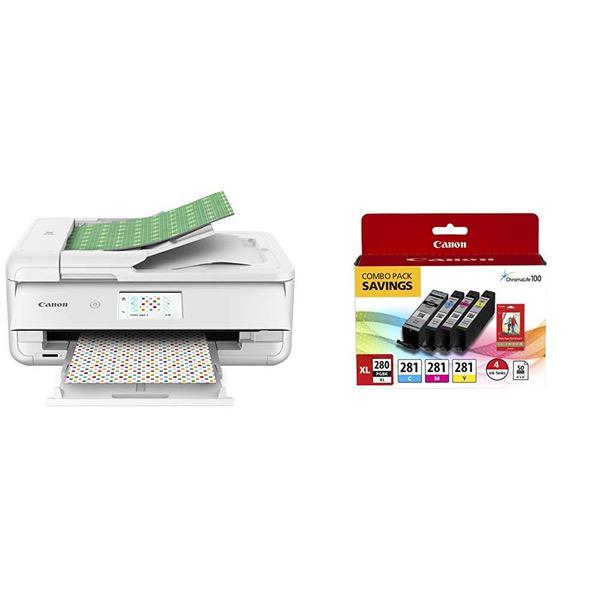
Canon TS9521C Wireless Crafting Printer, 12X12 Printing, White
Write a review
$17900 $22900

Canon TS9521C Wireless Crafting Printer, 12X12 Printing, White

Write a review
B07G6BH2C7
TS9521C- Wireless Crafting Printer
+
Add to wish list
Target is a general merchandise retailer with stores in all 50 states and the District...

City: US, New York

Delivery
Pickup at your own expense
Tomorrow from 09:00 to 20:00, Store location
Free
Payment options
Apple Pay Google Pay Mastercard Visa
Cash, bank card, credit/installment payments, cashless payment for legal entities
Warranty and returns
Exchange/return of products of proper quality within 14 days Official manufacturer's warranty: 12 months
Features
Connectivity Technology
Bluetooth, Ethernet, USB, Wireless
Item Dimensions
18.5 x 14.5 x 7.6 in
Item Weight
21.3 lbs
Operating System
  • Windows, Mac
Printer Output
Color
Printer Technology
Inkjet
Style
TS9521C- Wireless Crafting Printer
Wireless Type
802.11bgn
Description
  • The PIXMA TS9521C has 5 Individual Inks that are ready for craft projects & everyday needs. ChromaLife100 protects photos from fading; 100 yrs. album, 30 yrs. behind glass, 20 yrs. without glass.
  • Print from all your favorite devices, whether that is a smartphone, tablet, memory card or computer - with Air Print , Mopria Print Service, and Wi-Fi - the PIXMA TS9521C is ready for all your devices.
  • With 12'x12" paper support, booklet layout copy, oversized scanning and Auto Document Feeder for multi-page documents, the PIXMA TS9521C is extremely versatile and ready to handle lots of projects.
  • FOR NUMBERS LISTED IN PRODUCT DESCRIPTION SEE “SPECIFICATION SHEET” IN TECHNICAL SPECIFICATION SECTION BELOW
Reviews
3.1
Reviews: 20
5 stars
30%
4 stars
15%
3 stars
20%
2 stars
0%
1 star
35%
Avid Shopper
5
I was a little anxious about all the negative reviews regarding setup for canon printers. However, setup for this printer was a breeze. No issues there. Ive already printed several full page pattern papers and the amount of ink left is satisfactory. I also tried printing a 4x6 photo and the printer worked beautifully. The only possible negative comment that I could make about this printer is that you lose quality when you print small images (about 1.5x2in photos). But I have another photo printer for small photos so this is not a big deal. It does everything else beautifully and I would recommend it for crafters.
PattiT
5
I had used Epson printers exclusively up to now, but I was so frustrated with ink leakage and ink streaking on everything I printed, I did my research and came up with this printer. I haven’t had it long, but I am impressed with how clean the prints are! As for photos, i’m Still working with ICC profiles to get the same colors to print right on my Ilford paper, but i’m Hopeful i’ll Get there. I’m also excited by the possibilities of printing bigger...overall, very impressed...so far!!!
Lisa Friesen
5
I wish there were more stars to give it! I am an avid crafter and scrapbooker. This printer makes my crafting days so much easier! I love the 12x12 printing feature. It also prints borderless and the quality of the print is outstanding! I doubt if I ever buy another brand.
Mapko76
5
This is a solid printer, so far. Ive researched all brands and it lead me to this printer for what I need (print, scan, copy). Set up was easy, just follow instructions. Im not using the wireless feature, Im using the USB option. Tip, make sure you have a printer cable (USB) because it doesnt come with one. I had one from my old printer. I read too many bad reviews during my research where customers got fed up with the wireless not working the way it should. Maybe it does work well, Im not using it. Im not talking about this particular model or even Canon, I mean all wireless printers. I used the CD that came with it to install the setup instead of the online option. Very easy. So far, so good. I printed a pic and a document and it was easy and quick. Well see how this printer works months down the line, but for now, it seems solid. Ink is always going to be expensive, just deal with it or find other options that work for you. Ive read many options in different reviews, do your research. I ordered an extra ink cartridge package for this printer when I purchased it. The ink they give you is only used for setup so you have some to use. I read its only for set up and doesnt last long. Buy extra ink just so you have it on hand when you need it. I would recommend this printer for anyone wanting occasional printing at home. This is what I need it for, simple printing of documents (maybe some photos) at home. Sometimes I even go a month or more without printing. Marc
J. York
5
The Canon TS9520 has earned the right to be called the best multifunction printer Ive ever owned. Ive easily owned 20 printers over the years but this is the apex of functionality and ease-of-use. SETUP This is Canon’s weakness and this printer was no exception. After you plug it in, it wants you to run the Canon Print app on your phone to pair via Bluetooth and then do the setup from your phone. It doesn’t work. I got through to the point where the app and the printer were able to communicate with each other but then the process hung up and after about 5 minutes I gave up. I then walked over to the printer’s touch screen and pressed the “settings” gear icon and went into the Wi-Fi settings to set it for my local network. After that, things worked beautifully and I was able to have the printer go out to the Internet and fetch and install the latest firmware update. I wish Canon would ditch the useless Canon Print app and resign themselves to doing the configuration through the touch screen! WIRELESS The wireless printing works perfectly from both my Mac and Windows computers. Even AirPrint from my phone works perfectly. Every time. I replaced a Canon TR8520 and that confounded printer always showed up as “offline” from my Windows computer (while working perfectly from my Mac). That problem is gone with the TS9520. What a relief that Canon has finally worked out this issue. AirPrint is especially slick for printing photos. I loaded some 4x6 paper into the back paper feeder on the printer and then went to my phone and selected a photo to print. Upon clicking the share/print button, the TS9520 immediately showed up as a printer choice and it showed the 4x6 paper in the feeder as an optional printing target. I hit print and about a minute and a half later it was done. The printout was excellent; much better than I expected. I’m also the owner of a high quality photo printer (Canon Pro 9000 Mark II) and I don’t think it could have done much better. I’m very impressed and it’s possible that if the 9000 Mark II ever dies, I won’t bother to replace it now that I have the TS9520. COPYING Both single-sided and dual-sided copying worked great. There is one quirk if you copy double-sided to double-sided: after the TS9520 scans one side of each page through its auto-feeder, you have to lift those pages up exactly as they rest in the tray and place them back onto the auto-feeder for a second pass. This is because the TS9520 doesn’t have a way to pull the pages back in and scan the back sides. It actually works fine though but means you can’t just walk away and copy a bunch of two-sided pages: you have to reposition the paper after the first side of each page is scanned. This isn’t a huge deal and having a paper feeder mechanism to do this for me would add a lot of size to the printer. Copies come out amazingly well. I couldn’t tell the difference between the original and the printed copy. I’m quite impressed. SPEED My 4x6 printed in about 80 seconds which is plenty fast. What really surprised me is how quickly it can print a full sheet of text: 5 seconds. Pages seemingly shoot out and yet the print quality is excellent. I would have expected fast printing like this on “draft” mode but to get high quality prints at this speed was unexpected. I’m very happy with the speed. Even my wife commented “wow, this thing prints fast”. SCANNING Wireless scanning works great. I put in a color photo and hit scan and it then asked where I wanted to send the result. One option was my Windows 10 laptop so I clicked that and sure enough, when I walked back to my laptop there was a popup saying that scanning was in progress. About 60 seconds later my “Documents” folder popped open and there was a new JPG file containing my scan. What’s really neat is that it auto-detected that I was scanning a photo so it sent it through as a JPG. I then put on a text document and it scanned the same way and the resulting file was a PDF. Just what you’d want and without any fuss or manual intervention. INK Usage appears to be about “normal”. I find with Canon, the smart thing to do is buy their XL or XXL cartridges. They cost more but hold far more ink than the regular cartridges. Even though the upfront cost is higher, it’s much cheaper in the long run. SUMMARY I’ve tried to find something bad to say about this printer but it has met or exceeded my expectations in every area (except the unneeded Canon Print app). I bought my Canon Pro 9000 Mark II in 2011 and it is working perfectly 7 years later. Canon makes solid products. The features and results from this printer put it to the top of my pedestal for a multi-purpose option. Thanks Canon!
Susan A Fader
5
I am so pleased with this printer, Canon has done it again. I paid more than I usual would but I wanted a printer without a fax and to have more photo quality. The photo quality and the speed in which it prints is excellent. It has 5 ink tanks which is great to just replace one at a time. I buy the XL which seem to last a long time. I print a lot of photos and do home office work so I was very pleased with the speed and print quality. Best Printer I have ever had, and this is my third printer. I would highly recommend this printer.
Product variations
Column filling
Sort by Price Sort by Availability Sort by CODE Sort by Style
$17900 $22900
In stock
+
B07G6BH2C7
Style:
TS9521C- Wireless Crafting Printer
Contact us for a price
In stock
B07ML8DFND
Style:
Printer + Ink + Square Photo Paper
Contact us for a price
In stock
B07ML8DVVJ
Style:
Printer + Ink + Glossy Photo Paper
You may be interested
  • Bestsellers
  • Recently Viewed
 
Fast and high quality delivery

Our company makes delivery all over the country

Quality assurance and service

We offer only those goods, in which quality we are sure

Returns within 30 days

You have 30 days to test your purchase