
















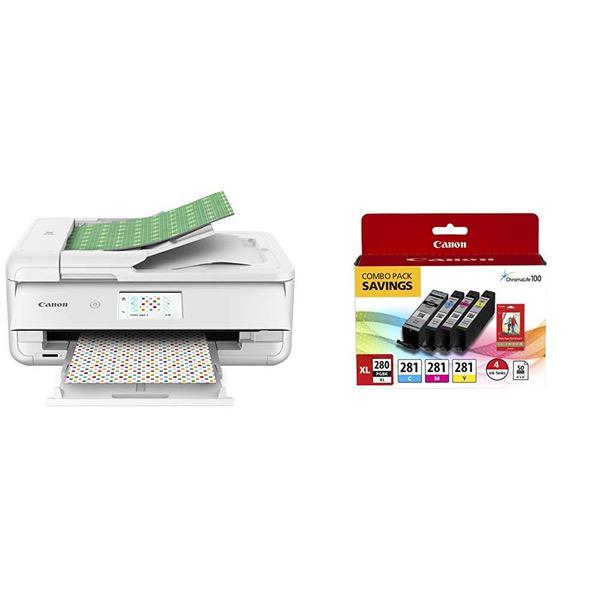
Canon TS9521C Wireless Crafting Printer, 12X12 Printing, White
Write a review
$17900 $22900

Canon TS9521C Wireless Crafting Printer, 12X12 Printing, White

Write a review
B07G6BH2C7
TS9521C- Wireless Crafting Printer
+
Add to wish list
Target is a general merchandise retailer with stores in all 50 states and the District...

City: US, New York

Delivery
Pickup at your own expense
Tomorrow from 09:00 to 20:00, Store location
Free
Payment options
Apple Pay Google Pay Mastercard Visa
Cash, bank card, credit/installment payments, cashless payment for legal entities
Warranty and returns
Exchange/return of products of proper quality within 14 days Official manufacturer's warranty: 12 months
Features
Connectivity Technology
Bluetooth, Ethernet, USB, Wireless
Item Dimensions
18.5 x 14.5 x 7.6 in
Item Weight
21.3 lbs
Operating System
  • Windows, Mac
Printer Output
Color
Printer Technology
Inkjet
Style
TS9521C- Wireless Crafting Printer
Wireless Type
802.11bgn
Description
  • The PIXMA TS9521C has 5 Individual Inks that are ready for craft projects & everyday needs. ChromaLife100 protects photos from fading; 100 yrs. album, 30 yrs. behind glass, 20 yrs. without glass.
  • Print from all your favorite devices, whether that is a smartphone, tablet, memory card or computer - with Air Print , Mopria Print Service, and Wi-Fi - the PIXMA TS9521C is ready for all your devices.
  • With 12'x12" paper support, booklet layout copy, oversized scanning and Auto Document Feeder for multi-page documents, the PIXMA TS9521C is extremely versatile and ready to handle lots of projects.
  • FOR NUMBERS LISTED IN PRODUCT DESCRIPTION SEE “SPECIFICATION SHEET” IN TECHNICAL SPECIFICATION SECTION BELOW
Reviews
3.1
Reviews: 20
5 stars
30%
4 stars
15%
3 stars
20%
2 stars
0%
1 star
35%
mel
3
The Canon TS9520, if not used for a time, takes a long time to respond to a print command. Canon tech support tells me that if the printer is not used for about one hour, it goes into a "cool-down" mode, and will then take some time to "warm up". This is done to extend the life of the print head. My experience is that the "cool-down" begins much less than one hour after a print command, and takes 20-60 seconds to "warm up". Otherwise, the printer is fine, but the "warmup" delay is very annoying; failure to mention this in the Amazon description is a very important omission.
Theresa Petermann
3
Cannon uses Macs air print as the driver for this printer vs writing their own. The limitations of this driver are very disappointing. I spoke with Cannon tech support before I bought this printer and then again for hours after I bought the printer, trying to figure out how to do the things it advertises as possible. My biggest complaint is the paper handling. It takes multiple steps to print from the rear tray which is required to print anything other than standard computer paper. There are no selections for choosing cardstock or transparencies which I would think a printer advertised as a crafters printer would indicate, especially as it touts being able to print on up to 80# cardstock. The quality of the printing on standard computer paper is fine. Cant say that about everything else. The next step up to print what I want to do within the Cannon family is a pro printer at a $500 price point.
John Hawkinson
3
I bought this printer (Canon TS9521C) to print occasional 11x17" and color documents, and I am not sure if Im going to keep it. I was debating between it and the Brother MFC-J5930DW, and I think I made the wrong choice. The TS9521C doesnt have a real paper tray for large paper. You can fold out the "back tray" (really a manual feed) at 45 degrees and the last 4" of the 11x17" sticks off the end and curls down. This makes it inadequate for long-term storage of paper. Also, it only accommodates about 3/8" of paper (100 pages). See photo, with tray open and loaded with 11x17 paper (background other than the printer is darkened and blurred -- sorry it makes the printer look kinda weirdly halo-lit.) I printed the front page PDF of a Sunday New York Times on 11x17" paper (77% scale) and it took 5 minutes (and 21 seconds) to print! On the other hand, the print quality was excellent, better than the color laser Im used to. Normal line drawings without color photographs seem to print at a more reasonable speed (not worth timing). Overall the entire printer feels flimsy. Various doors dont feel like they totally click into place and the front paper cassette (letter only) seems it might be easy to break. Same with the unfolding the accordian door to open the rear paper tray — the plastic-on-plastic sliding is not smooth. Theres something odd about the page order, it seems like by default it prints documents in reverse order, and seemed to flip sheets 180-degrees on alternate pages in a test document. None of that is a big deal. After some soul-searching, I decided to return the Canon so I bought the Brother and now I have them both to compare. The Brother prints the same NYT test page way faster, like a minute or less. The scanner also scans white backgrounds as grey. I’ve included the same image scanned on both. The background on the Canon scans as 11% grey, but on the Brother it’s (properly) 0% grey (100% white). Ive attached images comparing the two scans. (The bw document was printed on a third laser printer. The NYT page scan was printed on the Brother.) The Canon also cannot scan duplex. On the other hand, the Brother is huge, and the Canon is much smaller. But presumably you knew that.
Nerry
3
The printhead of my mx922 needed to be replaced, so instead I opted to buy this printer. The ink is much more costly than that of the mx922! I use my printers frequently, so I purchased the printhead replacement for my mx922 (i live outside the US, so I saved on shipping by not buying a new mx922, else I would have).... Would save this printer to print my 11"x17" prints. The difference between the mx 922 and this ts9521c for me is fax capability on the mx922 and paper size of 11"x17" on the ts9521c. The ts9521c also comes with templates that I havent used yet. Print quality between the two is about the same.
Product variations
Column filling
Sort by Price Sort by Availability Sort by CODE Sort by Style
$17900 $22900
In stock
+
B07G6BH2C7
Style:
TS9521C- Wireless Crafting Printer
Contact us for a price
In stock
B07ML8DFND
Style:
Printer + Ink + Square Photo Paper
Contact us for a price
In stock
B07ML8DVVJ
Style:
Printer + Ink + Glossy Photo Paper
You may be interested
  • Bestsellers
  • Recently Viewed
 
Fast and high quality delivery

Our company makes delivery all over the country

Quality assurance and service

We offer only those goods, in which quality we are sure

Returns within 30 days

You have 30 days to test your purchase