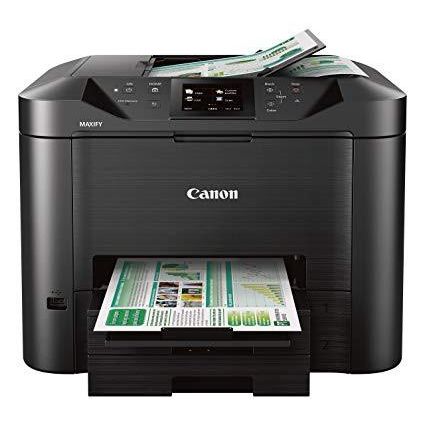
Canon Office and Business MB5420 Wireless All-in-One Printer,Scanner, Copier and Fax, with Mobile and Duplex Printing
Write a review
$27900

Canon Office and Business MB5420 Wireless All-in-One Printer,Scanner, Copier and Fax, with Mobile and Duplex Printing

Write a review
B01IIOMJMG
Printer Only
+
Add to wish list
Target is a general merchandise retailer with stores in all 50 states and the District...

City: US, New York

Delivery
Pickup at your own expense
Tomorrow from 09:00 to 20:00, Store location
Free
Payment options
Apple Pay Google Pay Mastercard Visa
Cash, bank card, credit/installment payments, cashless payment for legal entities
Warranty and returns
Exchange/return of products of proper quality within 14 days Official manufacturer's warranty: 12 months
Features
Connectivity Technology
USB
Item Dimensions
18.3 x 18.1 x 13.9 in
Item Weight
28.4 lbs
Operating System
  • Windows, Mac
Printer Output
Color
Printer Technology
Inkjet
Style
Printer Only
Wireless Type
802.11bgn
Description
  • Save time with single pass duplex scanning and copying, by scanning both sides of 2-Sided documents simultaneously
  • Be ready to print in as little as 6 seconds from power on with Quick First Print
  • By using XL ink tanks MAXIFY printers feature a Low Cost per Print with a High Page Yield that can save you money by delivering a high volume of prints from one set of ink tanks
  • With a 30,000 page peak Monthly Duty Cycle, the MAXIFY MB5420 is built to last for all your business needs.
  • Built to handle big jobs, this MAXIFY Printer features a 500 Sheet Paper Capacity with two 250 Sheet paper trays
Reviews
3.4
Reviews: 20
5 stars
45%
4 stars
10%
3 stars
5%
2 stars
15%
1 star
25%
Iris
5
This is the best printer I have gotten in a long time! The printout is clear and color good. Ink replacement is not as expensive as some. The scanner will scan both sides of a page at the same time (one pass). No delay for first page out. High quality printout takes considerably longer. One thing I do not like is the printer will shutout or go in sleep mode when do not use; when go to print in morning need to remember to press on button or cannot print. I am very very happy with this printer after buying some problem ones in last two years! UPDATE: Have owned this printer for 1 year now. Absolutely the best. Likes: Reliably scans, no jams on feeding paper for automatic document feeder. Scans legal size documents too. Ink is cheap and lasts long. Only purchased one XL cartridge for each color in one year. Very, very easy to change. Printing is good in color (pictures too) and b/w. Copier is great for enlargements Touch screen, with swiping to other settings is easy to use and change settings. Easy setup for WiFi. Will purchase another but think this will last a long time. Like it much better than my Epson, HP, other canon, and Samsung laser. I submitted this update because I am excited by the quality of this printer - wont disappoint.
lighten_up_already2
5
6:20 0:00 This video is not intended for all audiences. What date were you born? January February March April May June July August September October November December 1 2 3 4 5 6 7 8 9 10 11 12 13 14 15 16 17 18 19 20 21 22 23 24 25 26 27 28 29 30 31 2019 2018 2017 2016 2015 2014 2013 2012 2011 2010 2009 2008 2007 2006 2005 2004 2003 2002 2001 2000 1999 1998 1997 1996 1995 1994 1993 1992 1991 1990 1989 1988 1987 1986 1985 1984 1983 1982 1981 1980 1979 1978 1977 1976 1975 1974 1973 1972 1971 1970 1969 1968 1967 1966 1965 1964 1963 1962 1961 1960 1959 1958 1957 1956 1955 1954 1953 1952 1951 1950 1949 1948 1947 1946 1945 1944 1943 1942 1941 1940 1939 1938 1937 1936 1935 1934 1933 1932 1931 1930 1929 1928 1927 1926 1925 1924 1923 1922 1921 1920 1919 1918 1917 1916 1915 1914 1913 1912 1911 1910 1909 1908 1907 1906 1905 1904 1903 1902 1901 1900 Submit Adobe Flash Player is required to watch this video. Install Flash Player Ive owned Laser printers ever since they were invented and this is the first inkjet type printer Ive ever owned. I am very impressed, and given that this is an office grade machine and Im just one person who prints a few pages a week, this printer may outlive me. This printer prints color pages and copies black and white in a few seconds. Now, my ex wife has an HP color laser printer thats about four years old, and I dont think the colors are quite as rich and vibrant with this printer as compared to my exs HP, but I dont care. And besides, this machine copies and scans too. Also, I went out of my way to purchase the exact "Canon HR-101 High Resolution Paper for Bubble Jet Printers/" I am only going to feed this printer the precise types of paper that Canon recommends for it. I do have issues with the setup process and instructions however. I think the setup instructions could have been documented far more clearly and accurately. They dont even have a "quick setup" in a single document, but across two documents. I ended up setting up the machine using just the prompts on the screen without installing any software particular to this printer. (I have a Windows 10 computer). Just by using the prompts on the printer screen, I was able to connect to me wireless router, and have the printer recognized by my computer, and start printing. The setup instructions did not indicate to me that this was possible.
Michael Hudson
5
Enjoying this model more than others I have had Moved from an Epson 3640 series, which, when I purchased, was very favorably rated. As time went on, the ratings for that machine dwindled in parallel to my own experience. Ultimately, the Epson was very bad at paper handling with duplex printing jams becoming the norm after about 900 pages printed. Similarly, the ADF on the scanner jammed a lot and overall I realized it was not worth pouring more cash into ink cartridges when duplex printing was in demand at our home. Ink jet printers are cheap to acquire but expensive to run longer term with the extreme cost of ink. I had huge struggles years earlier with HP and a horrible set of driver bloat including never getting a scanner to work over the network. I saw the newer HP models had a few reviewing complaining similarly and knew I could not go down that road again. Brother branded models were historically very good to me so I really thought about buying theirs but desired to try the Canon this time around seeing the reference to 100% U.S. based customer support, which I really like as a feature. I purchased the Canon 5420 for the reputation that brand had at my office. Operating the machine for a few days at home now, we are delighted with it as the print is high quality, speed is unbelievably fast, ink cartridges are high capacity, scanner works very well, and duplex printing without a hitch, and the overall construction quality seems high. There are a few minor things Canon could improve including: • The installer is not very intuitive as it asks questions about which network interface one desires to use. Given you are installing a printer; you might guess the question pertains to the printer-side setup but it really is a question about how your computer is going to connect. Since I was on a wireless router, I needed to select wireless, which did not make a lot of sense to me the way the question was framed. Once I passed that, the install went well. When I answered incorrectly the first time, the network drivers I needed for the scanner and printer were not installed. • Why on earth they would default this printer to not resuming from sleep with the first arrival of a print job is beyond me. Fortunately, one can go into the menu under the eco mode settings and change this. That allowed me to reduce the sleep standby time from four or so hours down to 1 hour and set the printer to awake on arrival of a print job. • Paper trays do not slide all the way in when loaded with standard letter-size paper, which is kind of silly though admittedly not a big problem—they stick out about an inch. I think this printer is going to serve me well and I will report on any adversity that may arise.
JRS
5
***Update 4/9/2017 Update to my previous review as I found that the printer was set at quiet mode so it operated slower than normal. Turned quiet mode off and now printer is at the speed I expect it to be. ---------------------------- Having been a fan of the 5320, I bought the new 5420 model because i needed a second printer and liked the robustness of the 5320 and thought it would be much better. As soon as I received it and replaced the 5320 on the same setup in my office, scanning speed and print speed is considerably slower (about two times slower) and I doubled checked the settings to make sure they are the same. Both were connected via ethernet cable and I cant seem to fathom why this printer is just slower out of the box compared to the 5320. I called technical support and they didnt seem to know why either. I will record two videos showing the vast difference and hopefully canon can see what Im talking about.
LOrangerie
5
This is a machine that works _for_ the operator. It doesnt enslave the office that is using it into continually adjusting to its quirks and shortcomings, and recovering from its intractable problems--generated by fundamental design flaws--the way many other printers I have used have done. Three (3) specifics, in no particular order- - One-pass duplex scanning and built-in automatic duplex printing work like a dream - There have been few malfunctions, and when they have occurred, they have been easy to resolve, with clear onscreen guidance about how to go about it - The machine has everything it needs for high performance, such as a simple and intuitive user interface, and it is free of the clutter, bloat, and maddening Labyrinthine mazes that have plagued other products in its market segment, in both its physical and its logical (e.g., software) deployment To address something that I have read other reviewers express concern over- This product is lightly constructed. In its physical characteristics I would not consider it by any stretch of the imagination a ╥heavy duty╙ or ╥hard use╙ machine. I think, though, that if it is handled carefully and not forced into duties for which it was never intended, it should hold up just fine. To conclude, then, I would like to say that I _love_ this little machine because in my experience with it thus far (about five [5] months worth of use), it looks like the engineers made every effort to get virtually _everything_ right on its design and execution before releasing it to the market. I send my heartfelt congratulations and thanks to the team inside Canon who developed this product, and I hope that they will read this review and recognize what a phenomenal product they have created╤one that passes with flying colors across many crucial metrics that define success for a product of its type.
Ridge
5
Happy with previous model, which served us well for several years, but finally gave up the ghost. Best part of owning a Canon, however, (we have three) is the Canon customer and technical service folks. All seem to be able to speak and understand English, are helpful, and professional. Weve had HP and other printers, and it seems that recommendation of those folks do is try to transfer you to another department to buy a service plan. Not so with Canon. They help resolve your problems right away.
uijoonbug
5
Works very well, no connectivity issues and the ink doesnt dry up like our last Epson printer making the prints illegible. 10/10 would buy this printer again! I just with I could find the ink cartridges in local stores, no one seems to carry them so Ill have to order them online and hope to keep enough on hand so we arent stuck waiting to print something that we need right away.
Southside Cliff
5
First off; Im not sure who is to blame here for my initial irritation of the date of delivery. When I was in the ordering phase of this product the initial shipping and delivery were perfect for me because I was planning to be on vacation in the short term (3- days out of purchase) and the vendor was to have it at my house 5-6 days afterwards. After I bought this, I learned it was going to be delivered by FedEx on the first day of my vacation. PLEASE NOTE -- even if you sign up for managed delivery with FedEx they CANNOT change the delivery date; it must be by the shipper. So I called up the company I bought this from and they were willing to change the date. NOW comes frustration number 1; FedEx will NOT update their delivery date. So now I am on vacation trying to find out WHEN the delivery date is. It will not update even though I call FedEx multiple times. So I get home from my vacation and have to badger the locally assigned pick-up point with no success. FINALLY it arrives and I pick it up. I take it home and make my first attempt at installing it in the place of a much battered HP printer. 1st impression; The websites that Canon provides with the documentation are no longer valid ---- ????? Seriously? So now I am on an Internet search of valid Canon support sites. I have multiple attempts being invalid. Now for the good parts -- The printer has USB and a hard wired RJ-45 Network attachment AND Wi-Fi, besides an RJ-11 analog phone attachment for faxing. I try to hook up the USB attachment to my Win10 PC -- It recognizes it but WONT accept it. So now I try the wireless but get an error code. I finally get a cat5 network cable and hook it up to my wireless router that has 4 hard wired network ports. NOW after multiple hard power off resets it is recognized. I have by now put in the 4 printer cartridges (!) it needs to work. (BTW -- Canon does NOT request that you join a "ink of the month club" for this printer). So things are going better. There are 2 "cartridges" for paper in this printer -- They do NOT fit flush and ONCE you find the correct Canon website you will understand in how the paper needs to sit in their trays, They DO stick out from the front -- get used to it. After ALL of this frustration I finally find the correct Canon Website to download drivers (CAUTION -- as of 25 Aug 2018 the latest driver is over a year old) but I am on Win10 with all the updates now. After ALL of this frustration; I am now totally in love with this printer. If you want an all in one printer that duplex prints AND Duplex scans AND faxes AND wont cost you an arm and a leg to use it -- you found the right device. I will be be giving an update soon because I have an urgent faxing crisis and I will let you know how that works; If you deal with ANY government agency most will not accept emails but rely on fax, and I was spending a small fortune on fax costs. There is an USB port where it accept print jobs and also scan to it. And Canon is not asking you to join a "ink club" for monthly dues. There are power settings to let you set the printer to power on for print and scan jobs and then power off on preset timeframes. Once I learned how to use this and get past my initial startup frustration this a marvelous "All in One"
PhilBob48
5
I am totally satisfied with my Canon MB5420 printer. This device is very stingy with ink while giving very acceptable results. The user interface screen allows easy access to all functions and optional settings. Paper handling has been exemplary with the exception of heavy-weight photo paper. With no rear feed access to minimize the need for tightly curling the heavy paper around the roller, do not expect to use this printer with thick and heavy photo papers. While producing very acceptable photos, for home, school, office and presentation purposes, do not expect any level of professional photo reproduction from the MB5420. This is an economical, high-volume, multipurpose office work-horse and not a high quality photo printer. With this caveat in mind, the Canon MB5420 printer is a terrific valuse.
Product variations
Column filling
Sort by Price Sort by Availability Sort by CODE Sort by Style
$27900
In stock
+
B01IIOMJMG
Style:
Printer Only
Contact us for a price
In stock
B07767DPKK
Style:
Printer + Ink Bundle
You may be interested
  • Bestsellers
  • Recently Viewed
 
Fast and high quality delivery

Our company makes delivery all over the country

Quality assurance and service

We offer only those goods, in which quality we are sure

Returns within 30 days

You have 30 days to test your purchase