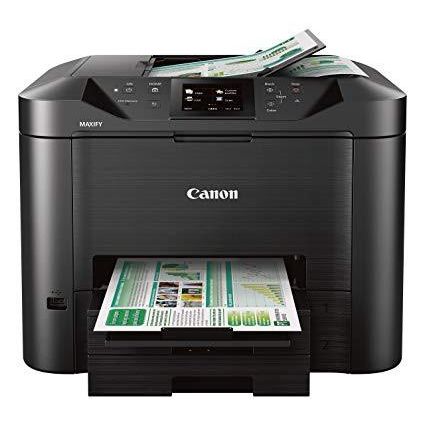
Canon Office and Business MB5420 Wireless All-in-One Printer,Scanner, Copier and Fax, with Mobile and Duplex Printing
Write a review
$27900

Canon Office and Business MB5420 Wireless All-in-One Printer,Scanner, Copier and Fax, with Mobile and Duplex Printing

Write a review
B01IIOMJMG
Printer Only
+
Add to wish list
Target is a general merchandise retailer with stores in all 50 states and the District...

City: US, New York

Delivery
Pickup at your own expense
Tomorrow from 09:00 to 20:00, Store location
Free
Payment options
Apple Pay Google Pay Mastercard Visa
Cash, bank card, credit/installment payments, cashless payment for legal entities
Warranty and returns
Exchange/return of products of proper quality within 14 days Official manufacturer's warranty: 12 months
Features
Connectivity Technology
USB
Item Dimensions
18.3 x 18.1 x 13.9 in
Item Weight
28.4 lbs
Operating System
  • Windows, Mac
Printer Output
Color
Printer Technology
Inkjet
Style
Printer Only
Wireless Type
802.11bgn
Description
  • Save time with single pass duplex scanning and copying, by scanning both sides of 2-Sided documents simultaneously
  • Be ready to print in as little as 6 seconds from power on with Quick First Print
  • By using XL ink tanks MAXIFY printers feature a Low Cost per Print with a High Page Yield that can save you money by delivering a high volume of prints from one set of ink tanks
  • With a 30,000 page peak Monthly Duty Cycle, the MAXIFY MB5420 is built to last for all your business needs.
  • Built to handle big jobs, this MAXIFY Printer features a 500 Sheet Paper Capacity with two 250 Sheet paper trays
Reviews
3.4
Reviews: 20
5 stars
45%
4 stars
10%
3 stars
5%
2 stars
15%
1 star
25%
Stephanie W.
1
My Epson died after only 2 years and was told it would cost more to replace the part than buy a new one. I felt that wasnt eco-friendly and needed a more reliable printer. I chose Canon because my little travel Canon Pixma iP100 is still awesome after a decade. I chose the MB5420 for its fast print time, wireless capabilities, and seeming good color print/copy quality. Its failed on every measure. I stupidly didnt open it up until after the 30 day return window to find that I couldnt get it to print wirelessly. I was told maybe the hub was too far away (30 feet) and the wireless connection wasnt good. We finally got it going, but the print quality was dreadful. Its an embarrassment to any business or office. Canon replaced the unit via warranty. Second one also had print quality issues. I cant count the number of hours I spent sending examples to them, talking on the phone (and I will say, the techs are very nice--its just the product that is awful.) They replaced it a second time with the suggestion that maybe I just had too high of expectations and the unit wont perform as I wanted (you know, like business level quality.) Second one I thought I could live with but just one day working at home was a nightmare. Sometimes it doesnt connect for printing, sometimes it cant find the computer to scan to. Color print is HORRENDOUS. Even black print has fuzzy letter. Copy a color print, and its nowhere near the original colors at all. I finally pulled out my trusty Pimxa and am using that to get through a work day (10 years old, and never once a clogged ink jet and always fast and accurate printing. Proof that Canon is capable of making a lasting, well-made product; its just not the MB5420.) Dont make the same mistake I did. I spent over $300 on this trying to avoid throw-away printers, and now I have to throw it away anyhow. Even if its on sale for under $200, it is not worth it. Avoid it--especially if you are a professional and need these printouts to go to clients.
Brad H Clayton
1
After almost a year of using this printer for a Home Office - I am done with it and do not recommend this product unless you prefer (1) Basic Print Jobs that could not pass for High Quality under any normal standard; (2) Frequent (as in every week) Internet Connectivity Issues regardless of whether or not your other wireless devices in the same room have never had connectivity issues and remain connected whilst the Printer does not; (3) Early 2000s "Blackberry-Like" Touch Screen Interface; (4) An annoying white light that stays on all of the time as it pierces the darkness from your office directly into your exact eye-line from where you lay in bed (doesnt matter if you move it, the light will find you); (5) Temperamental and vindictive if you succeed in turning it off without it warning you multiple times to avoid point #4 only to be blessed with point #2 all over again; (6) an on-time print job. Without fail, the printer will work perfectly until you need it to such as: printing off an important report; time-sensitive information; kids school assignments at 11:30 at night that are due in the morning, etc. It will in fact work however when you are printing bills - go figure; (7) Scanning. Want to scan a document directly to your email? - See point #2. It will work exactly one time (as in the entire life of your Printer) for you no matter how many times you go through the printer and set-up process. Other than what I have described through personal experience, it works great. As I write this review, todays Printing issue is that no matter how many times I reset it, the Printer has decided to turn off (as in it has zero connectivity) all wireless features. I reset my wireless router, checked my other devices, logged into my router to make sure some weird setting wasnt mysteriously added, and reset the printer 4x times and followed the wireless set-up process on the printer and... nothing. It sits in my office waiting for night to come with its white light...
Carulcha C.
1
The literature made me think this was compatible with a Mac, but it would only work with a cable connection. WiFi does not work. I had to return it.
fred here
1
OPEN BACK, OPEN BOTTOM, OPEN PAPER TRAY, DUST COLLECTOR, OLD MODEL!!! so, where and what, did you do with my wonderful mp530 model. your company is going downhill fast. and it list for 400, and got it for $130, NOW I SEE WHY!!! i notice they did not mention any of this when they were trying to sell it. no wonder they have model MB5420 left over. NO WONDER THEY DONT MANUFACTURE IT ANYMORE. i am not even gonna put ink in it. gotta go. any canon recommendation? love the print quality.
Amazon Customer
1
I got tired of purchasing a new printer every year or so, so I thought Id step up and buy this one instead of the under $100 variety. Bad decision! I dont even use it that much. After around 3 weeks it started getting paper jams. I have normal printer paper in one tray and photo paper in the other. I couldnt get it to switch between them and every time I printed it used the photo paper. Now I cant get it to load either. Its going to get busted up and put in the trash. Lesson learned. Its cheap printers (anything but Cannon) from this point on.
Product variations
Column filling
Sort by Price Sort by Availability Sort by CODE Sort by Style
$27900
In stock
+
B01IIOMJMG
Style:
Printer Only
Contact us for a price
In stock
B07767DPKK
Style:
Printer + Ink Bundle
You may be interested
  • Bestsellers
  • Recently Viewed
 
Fast and high quality delivery

Our company makes delivery all over the country

Quality assurance and service

We offer only those goods, in which quality we are sure

Returns within 30 days

You have 30 days to test your purchase