
















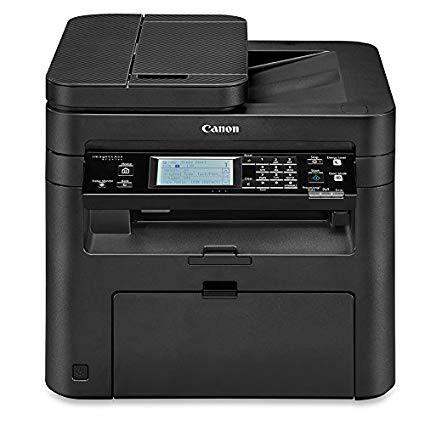
Canon imageCLASS MF247dw Wireless, Multifunction, Duplex Laser Printer

Write a review
B01K9L6USA
MF247DW
Target is a general merchandise retailer with stores in all 50 states and the District...

City: US, New York

Delivery
Pickup at your own expense
Tomorrow from 09:00 to 20:00, Store location
Free
Payment options
Apple Pay Google Pay Mastercard Visa
Cash, bank card, credit/installment payments, cashless payment for legal entities
Warranty and returns
Exchange/return of products of proper quality within 14 days Official manufacturer's warranty: 12 months
Features
Style
MF247DW
Description
  • All in One functionality allows you to print, scan, copy and fax with ease. Easily connect your mobile devices without a router using Wi-Fi Direct Connection
  • OS compatibility: Windows 10, 8.1, 8, 7, Windows vista,Windows server 2012, 2012 R2, 2008, 2008 R2, 2003, 2003 R2, Mac OS 10.6.8 or later
  • Print at speeds of up to 28 pages per minute, with your first print in your hands in 6 seconds or less
  • Print on-the-go with Canon PRINT Business, Apple AirPrint, Mopria Print Service, and Google Cloud Print
  • Paper capacity allows for 250-sheets in the standard cassette and 1-sheet in the multipurpose tray
Reviews
2.6
Reviews: 20
5 stars
10%
4 stars
25%
3 stars
20%
2 stars
5%
1 star
40%
O. R. Elofson
4
This was a tough one to review. The printer itself seems to work as well as a printer should, so no real complaints. The set up for my macbook pro was a little awkward, but, again, nothing to really complain about. What didnt work is the "manual". It was, for me, one of the most convoluted descriptions and poorest illustrations of any manual Ive seen. It was worthless. i assume it was translated from another language. But, to be fair, I ended up having to call Canons customer service and the person who helped me was quick and to-the-point. His suggestion solved my problem and I was ready to go within a couple of minutes. I hate to ding a whole star, just because a manual was so poorly thought out, but it was that bad.
J. Rivas
4
I read a lot of reviews that suggested that I shouldnt bother with installing the drivers from the disc that comes with the printer, but my experience with it was much easier after hours of issues when I tried to install from files that I downloaded from their site. Yes, I downloaded the correct files for my model number. The biggest obstacle has been finding the Serial Number. Eventually I found it and for registering the product it wasnt an issue, but when I tried to update the firmware it wouldnt accept the SN that registration had accepted. Im not sure what the problem is, I know I entered the same numbers, but the firmware update wouldnt accept it so for now Im going without a firmware update, and Im hoping I dont need it. I couldnt find an option on the disc so I guess in that sense they were right about the discs shortcomings. All that aside, it prints beautifully. Its fast and utilitarian, which is what most people want from a B&W laser printer. If you want to print in color, especially photos, then I strongly suggest getting an ink jet printer and using glossy paper. Im not sure which ink jet printers are among the best, if I ever find myself needing one Ill gladly do some research and pass along my findings. It scans nicely (in color), copying cant be much easier, and I have no land line so I cant comment on how well it Faxes but if the other features are any indication, Im sure the Fax works fine.
K. Green
4
This printer was easy to set up initially and works consistently from all computers and Apple devices in my home (I havent tried with android devices). My only issue - probably user error - is that my laptop which I used to set it up at first will not print wirelessly. No problem when its connected by the usb cable, but whenever I roam around my house I cannot print from it. Stupidly, I have to find the document using my iPad and print from there. Im sure its something that I did incorrectly when installing the driver, but its annoying. Also, the more complex set up options have to be done from the hard-to-understand browser interface. And the touch screen on the printer is not very sensitive so is a pain to use. All that being said, I still love the printer and recommend it for basic Black and white printing needs. With a moderate level of printing, the starter cartridge lasted me for three months.
Jay
4
This unit replaces a Canon 4370dn which was about a decade old. Had to replace because ADF was wildly distorting images, the feeder started "stuttering" which resulted in often times illegible copies. Also, it started throwing off "data errors" from larger print jobs so it was clearly time to go. I like the feature/technology improvements that have been made with wireless access, lcd touch menu, speed. However, the unit build quality in terms of "sturdiness" is not what it used to be, the build quality does not seem as "robust" as my prior generation of machine. The first one that was delivered to me would not allow me to open the toner cartridge area due to what could not have been a more than flimsy 39 cent piece of plastic that had sheared off in transit. There is a white plastic "post" that juts out from the top right hand side of the machine right in front of the platen glass, and if that post is not held down by the ADF cover the "hood" of the copier will not allow access. I wasted 90 minutes trying to figure out how opening a printer was so difficult, and kind of stumbled on the solution by accident. In any event, how Canon designed a printer that "hinged" (no pun intended) a cheap, tiny piece of plastic being intact to simply lift the toner cover is beyond me, IMO that is an incredible design flaw. At a minimum, they could have made the plastic piece much thicker and stronger to prevent it from shearing off. Anyway, other than that, Im happy with the performance so far, although it did take forever and a day to load the drivers and software from the included DVD, it hesitated several times and I thought it had stopped the install process but it did eventually finish. It looks like Canon has cut a few corners to keep their prices down, unfortunately. In any event, I dont expect Ill be getting 10 years of service out of this machine. That last machine was a workhorse that I did get my moneysworth from and then some. 4/22 update - ADF works ok, but has what I guess Im going to start calling the "Canon tilt". The top margin of all copies are "slanted, or tilted" about 10% to the right. My old Canon all in one machine also did this, and to be honest Im shocked that this has not been addressed in 10 years. Its unbelievable to me that nobody ever took the time to fix this, obviously it is something that has to be known to Canon at this point. As the copies I make this way are for my files only, I can "live" with it, but that is shoddy build quality on Canons part and again hard to believe its never been addressed. 4/24 Update: As many other users have reported, the fax will not receive faxes "automatically" no matter what setting you put it on. I experienced that, too, until I changed the mode to "answering machine", and after I did that I was able to get it to pick up "automatically". As it were, I do have an "old school" answering machine attached to my phone line, and apparently the Canon "prefers" that the fax setting is to "answering machine" only, not to "auto", or "fax/tel" when this is the case. The way my mind works, the "answering machine" setting is counter intuitive to how one would set up a fax if you wanted it doing auto pick ups, but not so. You are basically telling the fax that yes, I do have an answering machine set up on the line and you are to "ignore" it when a fax comes in. So, if you are one of those people who thought it wouldnt auto pick up, maybe you just need to reset the fax "mode" to "answering machine".
Packer fan
4
Hello, Just installed my printer today. Overall it seems to be a very high quality printer. It doesnt have that loud clunky sound of an HP or cheap printer. Be prepared to call Canon though for help with installation. I am a highly technical person but was unable to successfully install it without tech support help. Good news is that its free and its USA based. The person who helped me was patient and terrific. So dont get frustrated if you have trouble on your own...just call them. I have Windows 7 which is getting old now so I think that may have been part of it. One thing I will say is that if you try to use the touch screen on the front of the printer it is very labor intensive with the typing. In fact very dinasaur. Reminds me of trying to text on a old flip phone....I think this could and should be brought up to date and even be voice activated. I will update my review if I dont continue to be satisfied. After having the last two printers be junk...one HP and the other Samsung Im hoping this one is the charm. It better be given the price.
Product variations
Column filling
Sort by Price Sort by Availability Sort by CODE Sort by Style
Contact us for a price
In stock
B01K9L6USA
Style:
MF247DW
You may be interested
  • Bestsellers
  • Recently Viewed
 
Fast and high quality delivery

Our company makes delivery all over the country

Quality assurance and service

We offer only those goods, in which quality we are sure

Returns within 30 days

You have 30 days to test your purchase