
















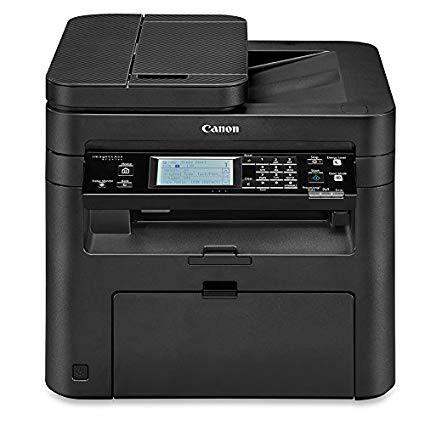
Canon imageCLASS MF247dw Wireless, Multifunction, Duplex Laser Printer

Write a review
B01K9L6USA
MF247DW
Target is a general merchandise retailer with stores in all 50 states and the District...

City: US, New York

Delivery
Pickup at your own expense
Tomorrow from 09:00 to 20:00, Store location
Free
Payment options
Apple Pay Google Pay Mastercard Visa
Cash, bank card, credit/installment payments, cashless payment for legal entities
Warranty and returns
Exchange/return of products of proper quality within 14 days Official manufacturer's warranty: 12 months
Features
Style
MF247DW
Description
  • All in One functionality allows you to print, scan, copy and fax with ease. Easily connect your mobile devices without a router using Wi-Fi Direct Connection
  • OS compatibility: Windows 10, 8.1, 8, 7, Windows vista,Windows server 2012, 2012 R2, 2008, 2008 R2, 2003, 2003 R2, Mac OS 10.6.8 or later
  • Print at speeds of up to 28 pages per minute, with your first print in your hands in 6 seconds or less
  • Print on-the-go with Canon PRINT Business, Apple AirPrint, Mopria Print Service, and Google Cloud Print
  • Paper capacity allows for 250-sheets in the standard cassette and 1-sheet in the multipurpose tray
Reviews
2.6
Reviews: 20
5 stars
10%
4 stars
25%
3 stars
20%
2 stars
5%
1 star
40%
LC
3
Prints fine, dont like the fact that it has to be assigned to a primary computer which must be on if trying to use it to print from either wireless devices such as tablets and Chromebooks -which is a serious software issue. If the primary computer isnt on, the printer shows as offline on either devices. Other than that, it prints, scans and faxs well.
MK
3
I have to say I like this machine but my lower review is due to how Canon handles the fax feature. I bought the printer and set several hours setting it up. Everything worked fine except the fax receiving. Of course this was the weekend so no tech support. Enter 3 hours of troubleshooting to no avail. Called tech support on my day off and to their credit they were very helpful and without outright saying it here is what is going on. If you read the reviewer many people have problems with fax receipt on this machine. The tech support guy tells me that they can send me a refurbished unit that will fix the problem with the fax modem. I asked, why can’t I just get a new replacement from Amazon to which he explained that will likely have the same problem. Basically, Canon is shipping units with a bad fax modem assuming many people will never use it or notice it too late. And if you complain they will send you one with the problem fixed. I opted for the refurb and it works perfectly for fax receipt on the first try. Canon gets kudos for good tech support, fast overnight shipping of the refurb, making a decent printer at this price point BUT gets a big knock for the shenanigans they play with the fax modem and the hours i wasted fixing it. You now know the game and hopefully if you need the fax feature you can save yourself some time. BTW if you fax a test sheet to 888 473 2963 you will get a fax back so you can test your machine.
Amazon Customer
3
The printer itself functions excellent. The scanner and auto document feeder work as they should, the copier functions well, and the printer feature works too. The printer also seems to be efficient with ink. My only issue was set-up, because for some reason the scanner didnt want to work correctly. After several failed attempts to reach customer service, and installing and removing the drivers multiple times without success, I had to hire a private computer support company to come and fix the issue for me, which was extremely expensive.
Saxon
3
Set it up for wireless LAN without issue, it prints and scans fine, works with Mac, and I like the default duplex printing. HOWEVER, when I try to print via wifi, it seriously takes about 5 minutes to find the printer. Every time. As soon as it goes into energy saver mode again, it will take five minutes to find the printer again, all while the printer says its connected to the network and my laptop is connected to the network. It could feasibly be the router causing such a delay, but we dont have any problems with it doing anything else, so Im blaming the Canon software and/or hardware. The first couple of times I would cancel the print and try again, but this just extends the time you end up waiting, so just hit print and eventually it will go through.
Product variations
Column filling
Sort by Price Sort by Availability Sort by CODE Sort by Style
Contact us for a price
In stock
B01K9L6USA
Style:
MF247DW
You may be interested
  • Bestsellers
  • Recently Viewed
 
Fast and high quality delivery

Our company makes delivery all over the country

Quality assurance and service

We offer only those goods, in which quality we are sure

Returns within 30 days

You have 30 days to test your purchase