
















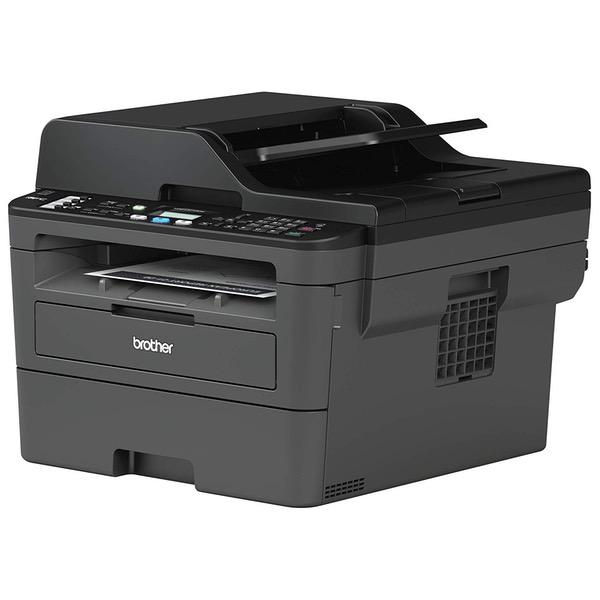
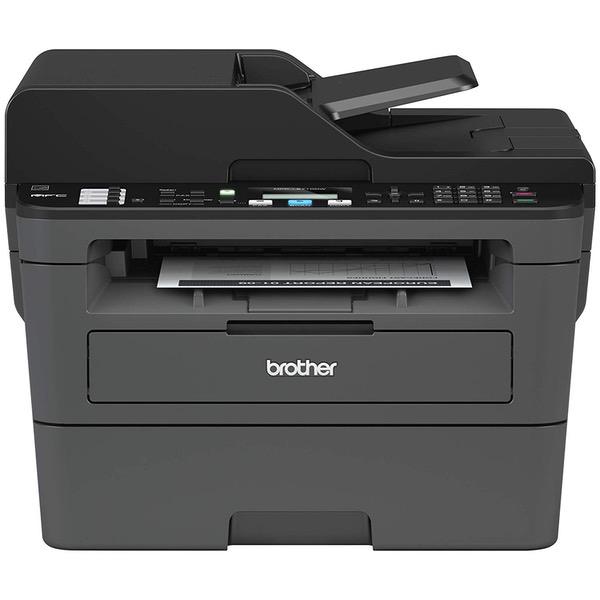
Brother Compact Monochrome Laser All-in-One Multi-Function Printer, MFCL2710DW with Standard Yield Black Toner

Write a review
B0785MRM51
Printer with Standard Yield Toner
Target is a general merchandise retailer with stores in all 50 states and the District...

City: US, New York

Delivery
Pickup at your own expense
Tomorrow from 09:00 to 20:00, Store location
Free
Payment options
Apple Pay Google Pay Mastercard Visa
Cash, bank card, credit/installment payments, cashless payment for legal entities
Warranty and returns
Exchange/return of products of proper quality within 14 days Official manufacturer's warranty: 12 months
Features
Style
Printer with Standard Yield Toner
Description
This fits your .
Make sure this fits by entering your model number. COMPACT ALL-IN-ONE – The MFC-L2710DW (replacement for the MFCL2700DW) is built with the busy homeowner or small office owner in mind. Brother’s latest compact black and white laser all-in-one features duplex printing at 32 pages per minute, as well as copying, scanning, and fax DESIGNED FOR PRODUCTIVITY – Save money and time with the 50-sheet automatic document feeder. A 250-sheet tray means less fill-up time. The manual feed slot offers flexible paper-handling for a variety of materials and sizes, such as card stock or envelopes, to help you create professional-looking documents Brother Genuine TN730 MONO laser toner cartridge. Professional MONO laser Print quality you can consistently rely on for 1, 200 pages/approx. Toner yield may vary by use
Reviews
2.2
Reviews: 20
5 stars
15%
4 stars
10%
3 stars
5%
2 stars
15%
1 star
55%
SeahorseRevolution
5
This printer is fantastic, works great, and super easy to setup. Most of the negative reviews here have to do with wifi problems. If you dont do it right the first time youre gonna have a bad time. So LISTEN UP: You cant connect to the printer wirelessly by hitting the wifi button. You must go to the website at support.brother.com and download the software. Theyre very easy to understand. You must FOLLOW THE DIRECTIONS on their website in order to do this correctly. Additionally, this printer doesnt come with a USB cable so if you are wanting to connect via usb you must have an old one lying around the house, or borrow one from a friend, or buy one. Theyre very cheap and easy to come by these days.
AI
5
I bought this unit strictly based on how happy I have been with my other Brother printer. I was using a monochrome brother laser printer strictly for printing text documents, and an HP ink jet all in one for copy, fax, and scan. I finally got sick and tired of getting ripped off for ink jet cartridges; the HP was killing me and the Brother just kept printing and printing without the need to constantly replace the toner. When the toner light on the Brother would finally come on, I would simply reset it and it was set for another few months, I must have done this at least two times before finally replacing the toner; this equated to months of double sided printing. So when the HP ran out of ink again, I decided to buy a single all in one to replace the other two, and there was no question I was getting the Brother. Since this is a new model and there were no reviews, I read the specs on the Brother website and saw that it had everything I was getting from the two separate units--except for color which I hardly used--but in one set up. I can tell you that this printer is very quiet, fast, takes up very little space, and feels solid and well made. I could not be happier with its performance, speed, functions, and options, and the set up could not have been easier. I wanted mine set up wireless, and the Brother software walked me through in just a few minutes; just make sure you follow the step by step instructions. And if you have any concern about the notorious noisy Brother cooling fan, dont worry, Brother must have been listening because this unit is quiet as a mouse.This is an awesome printer and the money I will save on ink will pay for this printer in no time. Goodbye ink jets.
Narut Ujnat
5
I am on my third Brother printer for the home office after purchasing this item. My other printer didnt die, it is still going strong by the way, but I wanted to get a printer that had duplex printing (back to back printing), plus had the capability for Apple Airprint and other wireless capabilities. When I checked around, it appeared that Brother had resolved the main complaint I had with the previous model, which was the noise. The older printer would make the lights dim and would make noise I could hear through several rooms (not good when working late at night). I jumped when I saw this printer for a really low price on a random day after looking at this model for a while (the kind of price that will make me skip eating out for a week, but not cause me to lose sleep). I am really happy so far with this printer. 1. Whats in the boxcscart_ You receive (in an incredibly well-packed box) the printer, plus a CD of drives and some printed information. 2. Aestheticcscart_ This is similar to other Brother printers. It is fairly compact, and takes up a fair amount of space, but it is not bulky at all. The navy grey color at first seemed strange compared to the usual Brother color. However, it seems ideal now because in my office it is not a large black box soaking up space and it is a bit more neutral. Otherwise, this is a really nice looking item with a minimalist appearance. Gone are the large buttons with a green glow. Like most things these days, the glow when used is blue. 3. Usecscart_ The first big test was the set-up for this item. Literally, I removed it from the box and plugged it in (following the quick-guide) and then placed the printer cartridge in, setting the time date and other vitals. I printed a test page, which demonstrated the duplex ability (awesome) and the rather quite nature of this computer. It is much quieter than my previous printer (going to my office now!). Although there is the CD drivers, I prefer that latest version so I visited the Brother solutions website and downloaded the drivers there. In the process, I received a new version of the scanning software as well. You can use this as a completely wireless stand-alone printer, but I connect it via an ethernet cable to my router for ease of use. However, I have no had any networking issues thusfar and I would imagine if this was used as a stand-alone printer it would be fine. After installing the drivers, my printer was visible on the network and without any effort was visible as a Airprint device for my Apple devices. In other words, after a minimum of effort, I was able to print from the promised sources without any issues. Plus, the family laptops recognized the printer on the networks and had no issues. As to the print, this provides a nice print as I would expect (plus you can play with the settings depending on the need). It is stated that the cartridge provided is good for 700 pages which isnt significant but enough (and ironically though I wanted a better printer, my printing needs seem to be declining!). The duplex is a very nice feature. This prints the page and then pulls the page abck in for the reverse side on the same page. A simple feat relatively, but so handy and missing from my previous printer. Since this is a multifunction, there is printing, copying, faxing and scanning. As to faxing it works fine, and you can insert the multiple pages into the feeder for ease. Scanning works well as expected, even with multiple pages. In fact, it is better at feeding than my previous printer. The software is easy enough to use and is such a valuable thing to have. I hardly ever use my flatbed scanner now except for photo projects because of the scanners ease of use. The best feature of the printer is that is quiet. From the actual printing jobs, which are of course audible, to the after print fan job, this is MUCH quieter than previous iterations. In fact, there is no post-print 20 minutes of hearing a slight hum of the fan. The printer goes to sleep much quicker and is far better than before. Overall: I cant comment yet on the overall longevity, but so far I am thrilled with this printer. It is amazing how little (relatively) money can purchase something that costs tens of thousands of dollars to duplicate years ago. This is a powerful little device and quite versatile. A very worthwhile purchase.
Product variations
Column filling
Sort by Price Sort by Availability Sort by CODE Sort by Style
Contact us for a price
In stock
B07H83KG8M
Style:
Refurbished Model: RMFCL2710DW
Contact us for a price
In stock
B077Y97R2C
Style:
Printer with High Yield Toner
Contact us for a price
In stock
B00MFG58N6
Style:
MFCL2700DW
Contact us for a price
In stock
B0763ZCH7K
Style:
New Model: MFCL2710DW
Contact us for a price
In stock
B0785MRM51
Style:
Printer with Standard Yield Toner
You may be interested
  • Bestsellers
  • Recently Viewed
 
Fast and high quality delivery

Our company makes delivery all over the country

Quality assurance and service

We offer only those goods, in which quality we are sure

Returns within 30 days

You have 30 days to test your purchase