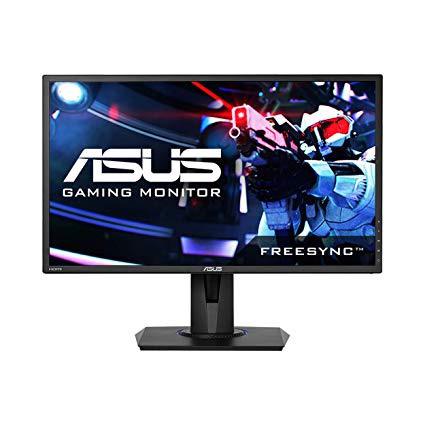
Asus VG245H 24 inchFull HD 1080p 1ms Dual HDMI Eye Care Console Gaming Monitor with FreeSync/Adaptive Sync, Black, 24-inch
Write a review
$17900

Asus VG245H 24 inchFull HD 1080p 1ms Dual HDMI Eye Care Console Gaming Monitor with FreeSync/Adaptive Sync, Black, 24-inch

Write a review
B01JGYM5H6
+
Add to wish list
Target is a general merchandise retailer with stores in all 50 states and the District...

City: US, New York

Delivery
Pickup at your own expense
Tomorrow from 09:00 to 20:00, Store location
Free
Payment options
Apple Pay Google Pay Mastercard Visa
Cash, bank card, credit/installment payments, cashless payment for legal entities
Warranty and returns
Exchange/return of products of proper quality within 14 days Official manufacturer's warranty: 12 months
Features
Display Type
LED
Item Dimensions
22.1 x 8.4 x 14.2 in
Item Weight
11.3 lbs
Mount Type
Wall Mount
Refresh Rate
75 hertz
Screen Size
24 in
Aspect Ratio
16:9
Description
This fits your .
Make sure this fits by entering your model number. 1ms response time featuring ASUS GameFast Input Technology and dual HDMI ports for a smooth console gaming experience. The brightness is 250 cd/㎡ ASUS Eye Care technology with flicker-free and blue light filter to minimize eye fatigue.Physical Dimension with Stand(WxHxD) : 22.0x(14.1 ~19.25)x 8.30 inches. Physical Dimension without Stand (WxHxD) : 22.0 x 12.95 x 1.96 inches Ergonomic stand with full height/tilt/swivel/pivot adjustments to accommodate any desk Exclusive GameVisual & GamePlus functions to enhance color performance and control.FreeSync/Adaptive Sync technology with 75 Hz refresh rate for a tear-free experience with AMD Radeon GPUs Adaptive-Sync (FreeSync) technology supported within 40Hz~75Hz for HDMI port Compliance and Standards- Energy Star, BSMI, CB, CCC, CE, CEL level , CU, ErP, FCC, ISO-9241-307, J-MOSS, KCC, PSE, UkrSEPRO, UL/cUL, WEEE, WHQL (Windows 10, Windows 8.1, Windows 7), MEPS, RCM, TUV Flicker-free , eStandby, TUV Low Blue Light
Reviews
4.1
Reviews: 20
5 stars
70%
4 stars
5%
3 stars
5%
2 stars
5%
1 star
15%
Lord Farquaad
4
This review is for the VG278Q monitor. It is a HUGE improvement over my 60Hz monitor. I wont ever go back to anything below 144Hz. There arent any dead pixels or issues with the monitor thus far. I just received it in the mail yesterday and like many reviewers have said this thing is BRIGHT out of the box. After looking up some settings that other users have found success gaming with, I was able to find something that was pleasing to my eyes. I try to remember to update this in the future after Ive had some more use out of the monitor. If youre looking for a relatively affordable 144Hz monitor, look no further. I spent a decent amount of time researched various monitors before I decided to buy this one and I am extremely happy with my purchase. I have yet to play Fortnite with it but the quality of gameplay on CS:GO is so much more smooth compared to the old 60Hz Sceptre monitor I was using. Update: Still love the monitor. I found some settings on tomshardware forum that are to my liking. Here there are: Cinema Mode Contrast 83 Saturation 42 Color temp - User mode - All colors set to 83 Skin tone - Natural Sharpness 50 Trace free 40 ASCR ON (Adjusts brightness according to content - if you like your monitor to be brighter just turn this off and adjust brightness) I have the monitor hooked up with a DVI-Dual Link cable to my GPU. *Update 11-18-18* My monitor started to go black for a split second every once in a while. I did some research and found a few different avenues to trouble shoot. The first was the possibility that my DVI-D cable was bad. So I purchased a new cable, tested it, and the problem persisted, only more severely. So I returned that cable and went back to my original cable. I decided maybe I should try using the Displayport 1.2 cable. I purchased a VESA certified DP1.2 cable and plugged it in. I didnt experience any issues with the original screen going black problem. Now I had a new issue, the colors are TERRIBLE! Even with tweaking the settings that are necessary to get a good picture on this monitor, it did nothing! Ultimately I switched back to the DVI-D cable I was using originally. Hopefully the problem doesnt get any worse or persist at all. If it does Ill have to do some more research and development. I deducted 1 star from the monitors rating due to its inability to provide quality picture via the DP1.2 port. Also, when I alt+tab out of a game, everything is magnified when using the DP. This is not the case while using Dual Link. Hope this helps someone!
Product variations
Column filling
Sort by Price Sort by Availability Sort by CODE Sort by Screen Size
$25900
In stock
+
B071KHHDNK
Screen Size:
27 in
$17900
In stock
+
B01JGYM5H6
Screen Size:
24 in
You may be interested
  • Bestsellers
  • Recently Viewed
 
Similar products
Show more
Fast and high quality delivery

Our company makes delivery all over the country

Quality assurance and service

We offer only those goods, in which quality we are sure

Returns within 30 days

You have 30 days to test your purchase