
















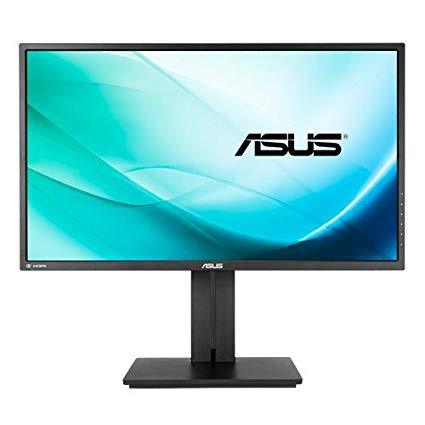
ASUS PB277Q 27" WQHD 2560x1440 75Hz 1ms HDMI DVI VGA Eye Care Monitor
Write a review
$28400

ASUS PB277Q 27" WQHD 2560x1440 75Hz 1ms HDMI DVI VGA Eye Care Monitor

Write a review
B01EN3Z7QQ
+
Add to wish list
Target is a general merchandise retailer with stores in all 50 states and the District...

City: US, New York

Delivery
Pickup at your own expense
Tomorrow from 09:00 to 20:00, Store location
Free
Payment options
Apple Pay Google Pay Mastercard Visa
Cash, bank card, credit/installment payments, cashless payment for legal entities
Warranty and returns
Exchange/return of products of proper quality within 14 days Official manufacturer's warranty: 12 months
Features
Display Type
LCD
Item Dimensions
29.7 x 8.9 x 17.8 in
Item Weight
20.5 lbs
Mount Type
Wall Mount
Refresh Rate
75 hertz
Screen Size
27 in
Aspect Ratio
16:9
Description
This fits your .
Make sure this fits by entering your model number. 27” 16:9 2560 x 1440 @75Hz with 1ms fast response time deliver smooth, enhanced detail ASUS Eye care technology with TUV certified Flicker free and Blue Light Filter for less Eye fatigue; Ergonomically-designed stand with Tilt,Swivel,Pivot,Height adjustment plus wall-mount capability for comfortable viewing position Signal frequency- analog signal frequency : 24~83 KHz(H)/ 50~75 Hz(Volt). Extensive connectivity with native WQHD content support with HDMI, DisplayPort, and Dual-link DVI Compliance and Standards- BSMI, CB, CCC, CE, CEL level 0, CU, ErP, FCC, ISO-9241-307, J-MOSS, PSB, PSE, RoHS, TCO6.0, UL/cUL, VCCI, WHQL (Windows 10, Windows 8.1, Windows 8), RCM, TUV Flicker-free , TUV Low Blue Light, Vietnam MEPS, Australia MEPS Picture-in-picture and Picture-by-picture for enhanced productivity. Smart cable management. VESA Wall Mounting : 3.9x3.9 inches
Reviews
3.5
Reviews: 20
5 stars
45%
4 stars
20%
3 stars
5%
2 stars
0%
1 star
30%
Antriksh Yadav
5
I had been using a $130 1080p 22” Asus monitor for a couple of years (VS228H-P). After settling down in a new city long-term, I decided it was time to upgrade to a larger, higher-res monitor. Over 95% of my monitor usage involves gaming. At the time of purchase (February 2017), this monitor hit the sweet spot between: - my 1440p requirement - size - rating - price IPS panels are supposed to exhibit better color range and accuracy, and this monitor has an IPS variant available. However, I decided to skip that because I read that: - IPS often has higher input latency, which you don’t want for gaming - IPS may exhibit light bleed around the edges, and I planned on using my monitor in dimmer environments frequently Additionally, I have been happy with the balance between viewing angles and color on the VA panel that powers my Vizio home theater display. I use this thing with my GTX 970, and play everything at the native 1440p. Most games so far have worked surprisingly well at 60 fps or more at very high settings (though I lag behind the newest releases a bit). There is barely anything I *don’t* like about this monitor. The height adjustment works particularly well, and the monitor comes with a nice array of cables, which is appreciated. The VA panel has been treating me well for the year I’ve been using it for. I dont have experience with higher end gaming monitors and frame rate synchronization systems like G-Sync, but for the price, this monitor has far exceeded my needs. The colors in Overwatch really pop!
Eric
5
Unless youre a professional gamer, competing at the highest level, you really dont need a response time of 1ms on your gaming monitor. In other words, you really dont need a TN panel often found in BenQ monitors (not all their models but definitely their most popular). Dont get me wrong, BenQ makes phenomenal monitors, but if youre like me and the picture quality/color matters, I recommend purchasing an IPS monitor. This is a newer technology which provides better color and quality. The knock on IPS monitors is that getting a response time lower than 5ms is very difficult. Like I mentioned above, unless youre a professional gamer, its very likely you wont even notice the difference. I do YouTube and pretty competitive gaming and I could not notice a difference between a 1ms BenQ and 6ms Acer playing a flinch reaction game (COD). Now, if were talking about a 55" flat screen TV compared to a 27" monitor, youll definitely notice the difference in the response time because the large TV will likely have a response time closer to 45ms. Believe me when I tell you, you will absolutely notice the difference between a quality IPS compared to a quality TN monitor, the TN panels color will look washed out 10/10 times. Of course, resolution plays a factor here but when were talking about console gaming (which I am), 1080p 60fps is the max youre going to get at the time of this review. Now that we have that out of the way, heres my review for the actual monitor. Lets be clear, this is a PREMIUM monitor. A few years ago when this monitor released, it cost about $700 (yes, this monitor is a few years old). $700 for a gaming monitor or second display is a lot of money, no question about it. Now that this monitor is a few years old and Asus has newer models (for much more money), this monitor is a steal at $400. Asus monitors, at least in my experience, are on the thicker side as far as physical dimensions. Its not because its older technology as Asus still makes monitors that are thicker. That being said, this is a thicker monitor so keep that in mind before you purchase it. Not thick to the point its annoying or a deal breaker, but it isnt as thin as say, some Acer models that are on the market. And thats perhaps the end of the negative part of this review. Im reviewing this monitor from a gaming AND second monitor perspective - I use this monitor for both. Lets talk about the most important part, the picture. This monitor looks GOOD. The picture is very clear and crisp, the colors pop and its a really enjoyable visual experience. Its going to be a huge upgrade to just about all TN panels and entry level IPS monitors. I truly enjoy a nice picture and am willing to sacrifice a little response time, this monitor is well worth it, I promise you. If picture quality/color is important to you, then stop reading and add this monitor to your cart; you wont regret it. After all, that really is the most important part when it comes to a monitor provided youre not a professional gamer. The adjustable stand on this monitor received a lot of hate when I was reading reviews before I decided to purchase it. I have to say, I dont agree with the negative reviews about the stand. I find the adjustable stand to be quite convenient and work well. It has all the adjustments youll need to get the screen in the perfect position for you. The base of the stand is kind of huge and Im not sure its completely necessary. But again, not really all that important. One of my favorite features of the monitor is the built in speaker. This is no lousy speaker, it is actually quite loud and pretty clear! When Im tired of using my headset for FPS, I appreciate the fact it has a reliable speaker. This may not matter to many of you because you use external speakers, but for those that dont, or dont want to spend the extra money on external speakers, this is another win for you. Bottom line, this is a phenomenal monitor for gaming and as a second monitor for your PC/Mac. Spend the money on something youre going to spend a lot of time using, youll really appreciate it in the end. By the way, 2K is a really nice touch as well when it comes to a nice picture.
David A. Curry
5
I recently purchased a Mac Mini 2.6 GHz Quad-Core Intel core i7 and this 27” ASUS PB278Q WQHD LED-lit PLS Professional Graphics Monitor. The monitor came with several connecting cables, VGA-VGA, DVI-DVI, HDMI-HDMI, DisplayPort to DisplayPort. The Mac mini has an HDMI and a mini DislpayPort connection. I tried the HDMI, but of course the best resolution I could get was 1080. I needed an adapter cable to connect the Mac mini to the ASUS monitor. I tried three adapter cables. Neither the Accell B143B-003J UltraAV Mini DisplayPort to DisplayPort 1.2 Cable, the StarTech M/M MDP2DPMM6 Mini DisplayPort to DisplayPort Adapter Cable, nor the Monoprice 5106 Mini DisplayPort to DVI Adapter gave me the full 2560 X 1440 resolution of the monitor or fill the entire display of the monitor. I didn’t originally purchase the Apple Mini MB571Z/A DisplayPort to Dual-Link DVI Adapter based on its price. I thought that the other adapter cables would work. I went ahead and ordered the Apple adapter cable. When it arrived, I connected it to the Mac mini and ASUS monitor. When I powered the Mac and monitor back up, I immediately had full 2560 X1440 resolution and full screen display. I have been using the monitor with the Mac mini and Apple adapter cable now for six weeks and have had no issues. I have had no problems with the monitor waking from sleep mode like I have read in other reviews using other adapter cables to connect a Mac mini and ASUS monitor. This is correct adapter for my Mac mini configuration and monitor. I would not recommend trying to make the other adapter cables work. This is a great monitor. I love the resolution and color...and I havent yet tried to calibrate it. I wish the sound was a little more dynamic, but its not bad.
George R. Slater
5
For its price this is a very good monitor. I purchased it to replace a 1080p 22 inch panel and found it to be quite a nice upgrade. Pros: -Crisp clear lines. -Great vibrant colors. -Runs 75Hz as advertised. -No dead pixels. -Excellent stand. Cons: -Blacks are slightly grey if you dont adjust your gamma and color settings. Other: -I didnt have the backlight bleed that others mentioned. -For color I did calibrate the monitor and found it to be better than my old 1080p panel. -Shipped quickly and was packed in OEM box with no damage when received. -I am using the Display Port cable that came with the monitor.
Damon Martin
5
Was skeptical due to the reviews over this product. But I came to realization that not everyone will be happy with this product. Some people will always be bitter rather the product is actually good or not. Heres an honest opinion over the product PROS - Great Quality - Great Design - Amazing Colors (Have on sRGB mode) - VESA compatible - ASUS brand - Stand is pure amazing, glides smoothly - Button Layout is great - Stands toe-to-toe with higher end monitors - Looks great - Feels HUGE sometimes even if its only 27". You really dont need a monitor bigger than this. This is honstly the sweet spot due to its big size and good PPI ratio CONS - Backlight bleeding, but its only notice able about 3% of the time as most of the time its unnoticeable. It has completely gone away for me now a few weeks after purchase (Or atleast i think it has). - 75Hz isnt noticeable at all over 60Hz. Its just marketing tbh.
G. Tomer
5
I had an earlier ASUS monitor for over seven years, and decided to closely review the current models for a larger screen size and increased number of resolution options. The WQHD level of resolution appeared most acceptable in price and available features. Bluelight was a powerful incentive, but the overall quality seen in the Amazon reviews greatly helped me to decide over other ASUS models. With a minimal usage of the PB277Q, I remain a devout Asus advocate. Hopefully, this model will provide the same dedicated service as its predecessor, the ASUS VH236H. Since most of my applications are predominately text with occasional graphics or spreadsheet, I have no interest in games, except for chess. The text is exactly what I had read in the reviews, and I gleefully love reading the text’s quality. The ASUS PB277Q is precisely the screen for writers. I cannot believe the enhancement 2560x1440 can bring to the written word. For writers, the 75Hz provides flickerless display. The graphics is superb and simply the best quality I’ve seen. Last, for sheer quality and affordability, I highly recommend the ASUS PB277Q over comparable ASUS models and any major competitor.
Cheese
5
I tend to enjoy Asus products in general. I decided about half a year ago to upgrade my 1080p monitors to 1440p. I do some gaming, but really dont do anything intensive enough to be worth talking about. My primary reason for going to 1440p was for the extra pixels. I purchased a pair of these monitors, and Ive been pretty content with how theyve performed. I didnt have any issues with dead pixels on either monitor. The color quality is better than some other TN panels Ive used before. Im pretty satisfied with the color brightness/accuracy. Probably the biggest issue Ive seen with the color and contrast is with the color black. In the dark, its pretty noticeable that the black isnt that dark. I could see this possibly being distracting while watching dark movies or playing games with dark levels with the room lights off. Theres a bit of flexibility when it comes to physical adjustments. They have the ability to rotate 90 degrees which can be handy. I like the shape of the base and the height adjustments possible with these monitors. Overall, I think these were a great purchase. The performance and quality are more than good enough for my needs. Upgrading to two 1440p monitors has been a pleasant experience, and these Asus monitors were quite affordable.
Chris in Phoenix
5
I was a bit skeptical with this monitor because of the price, but it proved to be an excellent buy. For starters, Im not using it for gaming. Im a software developer, and I needed more desktop to have multiple applications open. Things I like: it has a very narrow bezel, and a matte screen that minimizes reflections from overhead lights. Its also bright, and text is very crisp. There are multiple color modes, as well as a custom mode; the colors are vibrant. The stand is very adjustable, for both tilt and height, and the monitor can rotate between landscape and portrait. Its also built very well, and the stand has a very solid base (although the base is a bit large). Also, the monitor does not swivel on the base, so if you have it off to one side (as I do, because its a second monitor), you need to turn the base. Being a big rectangular shape, it tends to get in the way of other things on my desk. I have two of these monitors: one on a Dell Precision M6500 laptop, and the other on a 2012 MacMini. The monitor came with cables for VGA, HDMI, DP and DVI, so connecting to the Dell was no problem (needed to use DP to get the full resolution). For the MacMini, I had to buy a $8 mini-DP-to-DP cable, which I ordered from Amazon with the monitor. The 2W stereo speakers work well for video conferencing and most applications with audio. For gaming, youd likely want something more robust. Finally, the Picture-in-Picture feature worked great with my Amazon FireStick, although I needed the HDMI cable extender as the FireStick would not connect directly to the monitors HDMI due to its location. But, the 2-inch extension cable fixed that. Also, when in PiP mode, there is no audio from the FireStick. You must switch PiP inputs (make the FireStick the primary input) to get audio. You only get audio from the primary video in, or the line-in. Bottom line: great monitor, easy to read, crisp text and vivid color, well made, decent audio, PiP mode, matte screen, and a great price.
J Wadsworth
5
Bought this in Used-very good condition from Amazon warehouse, was super pleased when it arrived in brand-new packaging. Very pleased with the colors and the overall experience of a 27in 1440 display. Simpler and in many ways better than the dual 24in 1080 displays it replaced. Bezels are not very thin, so probably not a good choice if you plan to use two. Also, I have no intention to game with this display, but based on refresh rate and lack of freesync/Gsync this probably isnt one gamers are looking at anyway.
Product variations
Column filling
Sort by Price Sort by Availability Sort by CODE Sort by Screen Size
$28400
In stock
+
B01EN3Z7QQ
Screen Size:
27 in
You may be interested
  • Bestsellers
  • Recently Viewed
 
Similar products
Show more
Fast and high quality delivery

Our company makes delivery all over the country

Quality assurance and service

We offer only those goods, in which quality we are sure

Returns within 30 days

You have 30 days to test your purchase