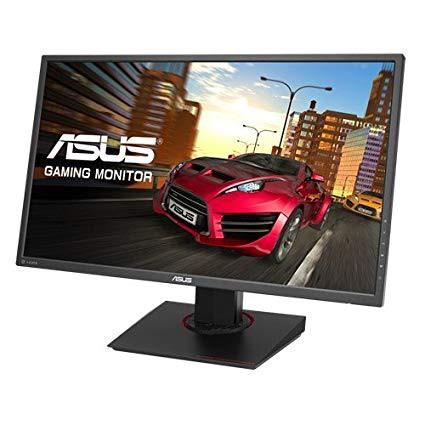
ASUS MG278Q 27" WQHD 1440P 144Hz 1ms Eye Care G-Sync Compatible Adaptive Sync Gaming Monitor with Dual HDMI DP DVI
Write a review
31172

ASUS MG278Q 27" WQHD 1440P 144Hz 1ms Eye Care G-Sync Compatible Adaptive Sync Gaming Monitor with Dual HDMI DP DVI

Write a review
B014X4U076
+
Add to wish list
Target is a general merchandise retailer with stores in all 50 states and the District...

City: US, New York

Delivery
Pickup at your own expense
Tomorrow from 09:00 to 20:00, Store location
Free
Payment options
Apple Pay Google Pay Mastercard Visa
Cash, bank card, credit/installment payments, cashless payment for legal entities
Warranty and returns
Exchange/return of products of proper quality within 14 days Official manufacturer's warranty: 12 months
Features
Display Type
LED
Item Dimensions
29.7 x 8.9 x 17.8 in
Item Weight
16.87 lbs
Mount Type
VESA Compatibility - Mountable: 100 x 100 mm
Refresh Rate
144 hertz
Screen Size
27 in
Aspect Ratio
1.78:1
Description
This fits your .
Make sure this fits by entering your model number. 27" 2560x1440 resolution display with 1ms response time and ultra-fast 144Hz refresh rate to eliminate smearing, tearing, and motion blur. ASUS Eye Care technology makes marathons even easier, reducing eyestrain and other eye ailments with TUV Rhineland-certified Blue light filter and flicker-free backlighting G-sync compatible and adaptive Sync for a tear-free gaming experience with variable refresh rate Flexible connectivity options with dual HDMI, DisplayPort 1. 2 and DVI. Ergonomically-designed stand with full Tilt, swivel, pivot, and height adjustment for comfortable viewing position ASUS Eye Care technology minimizes eye fatigue and ailments with flicker-free backlighting and blue light filters Mounting Type: VESA wall-mounted
Reviews
4
Reviews: 20
5 stars
55%
4 stars
15%
3 stars
10%
2 stars
10%
1 star
10%
Hardangelfan
5
Having a PS4 Pro and Xbox One X, i needed to finally make the jump into a 4K TV, after researching, i never found a TV small enough for 4K, i had to get a gaming monitor capable of 4K, this was the one for me after a shipping mishap w/ USPS i finally got it (Not amazons fault). Keep in mind and beware that this monitor advertises 3 HDMI slots, BUT ONLY 1 is HDMI 2.0 which can carry 4K. not a big deal, that is why they made these: https://www.amazon.com/gp/product/B0783GTZX3/ref=oh_aui_detailpage_o03_s00?ie=UTF8&psc=1 (This one was perfect and works with the monitor) The picture is clear, I played online games like COD with no issues with the screen. I wanted something not too small, but not a 40inch TV just to have 4K, 28 is perfect for my set up. really glad I went with this model.
Tristan Hardy
5
This was part of a few upgrades I bought and my first true gaming monitor.... This purchase was entirely worth it. This was my first monitor at this refresh rate and resolution.... I almost cried when I first got it hooked up. Things I thought looked good before now looked completely jaw dropping. I will go back and replay a few games JUST to see them on this monitor. Other than gaming I do a lot of digital art. This is amazing or that as well. The refresh rate lets me see my cursor better as I draw and paint with the Wacom Intous tablet. The colors are so bright and vivid. Most times if Im painting something random I just set it my canvas size to 2560 x 1440 and full screen it. Going from a 23in pleb LED monitor to THIS beast was a move I needed to make. The base has a nice height adjustment range for me and is nice and heavy. Through a couple fits of "OH COME ON HOW THE HELL DID THAT HIT ME!?" rage the monitor has not budged on my stand.
D. Robinson
5
Buy it! Ive had the Asus ROG Swift 24, Asus MX279H, Samsung CF591 curved monitor and the LG27UD58. This is the best by far especially for console/PC or just console or PC. The color accuracy is phenomenal and the picture is the best Ive seen when displaying below 4k as well. That may sound small but what you will rapidly notice on 4k displays is that non-native 4k images tend to look very soft. Not here! Its very, very, marginally, to the point of most likely indiscernible to the average enthusiast slower response time wise to the "premium branded" ROG Swift monitor all while having an IPS panel. The panel (IPS) bleed is a non-issue as blacks and contrast are still as good as my high end Sony TV panel and MILES ahead of LGs pseudo 4k panel (google the 3k LG27UD58 and youll see what I mean). It was yellow all over. The only con is.... dont buy it for the speakers. The Samsungs speakers were not just better, they were surprisingly good to the point of being better than a lot of TVs. The wrap up, this is the best 4k monitor if you dont need/want G-Sync or only do color accurate work (see Dell Ultrasharp for that) under $500 full stop. I use it with a mid-end gaming PC and a PS4 Pro on Windows 10.
Eric
5
I decided to opt-into buying this monitor after struggling to figure out what I wanted. I play video games as a hobby but Im looking into graphic design for employment, so picture quality was something I was keen on getting right the first time. Ive never owned something aside from a hand me down $100 TN 60Hz monitor before this. Pros: - Fantastic picture - No dead pixels out of the box - Large display size - Ships with MiniDisplay Port to Display Port cable, Power Cable, HDMI Cable, USB 3.0 Data Cable (MiniDisplay cable easily supports the refresh rate.) Cons: -Just be aware that lower to mid rigs might need to have their game graphics adjusted if youre used to rendering images on a 1080p resolution. - Large footprint and back panel, just in case you have a thin desk or monitor riser. Other Notes: - Noticing a motion blur between everything I do now? Not sure if its the monitor myself, or if its my eyes trying to adjust to how fast things move on the screen. (i.e. moving windows and scroll menus around) - Speakers arent superb in quality but thats not something to really be worried about. Overall, highly recommended if youre willing to accept the larger price. Might be even more worth it on a sale. Very pleased with this purchase. Putting this review out there for new monitor buyers.
Erick
5
I ordered this monitor from Amazon Warehouse Deals thinking that I would receive a monitor with minor defects like a couple dead pixels, and a bit of IPS glow(which is normal), and maybe some backlight bleed if I was unlucky. Instead, I received the perfect monitor, no dead pixels, little to no IPS glow, and no backlight bleed. This monitor is absolutely amazing, it features 186.69 PPI(The product description states 157 PPI but this is for the 27" version) which means you will see a retina display at a viewing distance of 18 inches from the 23.6" monitor. At this viewing distance it is physically impossible for your eyes to distinguish any pixels, and a higher resolution,such as 5K, would be unnecessary(this is assuming you have a normal visual acuity such as 20/20). The monitor stand itself is has great rotation angles, and the monitor settings menu is extremely easy to navigate. The 4K resolution itself is amazing, and coupled along with the IPS display it is just surreal. I got this monitor at a good discount from the Amazon Warehouse Deals, but even at the $350 full price this product is a steal. I recommend this monitor to anyone who is looking to find an affordable,yet amazing, 4K monitor.
Sean
5
First of all: This monitor suits my needs. I am not a competitive gamer, I do not play FPS games online, and I sure as heck dont care about maximizing my frames. I would have spent a lot more money and gone with a lower resolution if that was my desired outcome. This monitor is absolutely solidly built. My last monitor was a 2K Korean knock-off (it was a usable display, but the build/stand quality was lacking). A cough would wobble the last monitor I had. For this Monitor, I have to grab my desk and shake to get it to even budge. I know, this might be a weird place to go with a review, but this is a big, heavy monitor and base. Performance: This is my first time gaming at 4K/60fps. I built a new gaming rig capable of pulling that off. And, I must say, gaming on this monitor feels like the jump I made (back in the day) from a standard tube TV to a 1080p TV. Its that big of a jump. It makes most older games look better, and newer games damn near an experience. If you have the hardware to drive a new game on ultra at 4k, this is a fantastic monitor. I havent had to mess with settings on the monitor so far, and, even then, its not too clunky that it becomes cumbersome. I have not, and most likely will not, use this monitor for productivity. I cannot speak to using it for editing/creation/drafting purposes. I strictly use it for gaming, and I am immensely happy with the results so far. LONG STORY SHORT: For 4K/60fps gaming, I absolutely love this monitor. Using it for browsing the interwebs is great as well.
Sky Twelker
5
I love this monitor. It is perfect for my uses. Amazing color quality, and great response and refresh rate. I use this with my GTX1080 so I do not utilize the Freesync function. I did not want to spend the extra $200 for Gsync. It works just fine with out those functions. I do not experience any screen tearing or stuttering. I run a 8700k and GTX1080, if you are running a lighter system I could see you having frame rate issues at 1440p. I stream on twitch, and I am able to play PUBG on medium settings and stay up around 144fps. Highly recommend this monitor, best option at this price range.
Angelo Ortis
5
What can I say about this monitor. Its expensive, especially for a monitor using a TN panel that was released four years ago. You may also be distracted by the slightly off color (mostly noticeable on white/light backgrounds) when coming from a more color correct IPS monitor. However, these are the only complaints I have of this monitor and, in the end, its pros much out way its cons. First off, gaming on this monitor is amazing. Selecting a monitor with 144hz and Freesync was the best decision Ive ever made for improving my gaming experience. Being able to utilize extra FPS my new GPU provided made a huge difference to the fluidity and clarity of movement in games. The 1440p resolution gives a much crisper quality picture and the increased screen real estate is great when Im working on music or need multiple browsers open. Lastly but not least, the TN panel allows for a 1ms response time, reducing motion blur and ghosting to imperceptible levels. I was originally put off by the color difference created by the TN panel, so I decided to order an IPS gaming monitor to see if it was really that big of a deal. While the IPS monitors colors were more vibrant and accurate, the motion blur caused by the increased response time was unbearable. So while the games colors looked more accurate, the visual quality and gaming experienced was ruined. I returned it the next day and decided to stick it out with the Asus, and it was definitely the best choice I have now been using this monitor for about a month and after tweaking the "Racing Mode" screen settings in the OSD and downloading a color calibration file from Tftcentral (google it), the colors do not bother me anymore and actually look great for a TN panel. I now have the monitor mounted on an aftermarket VESA mount but the stand that came with the monitor was well built, sturdy and very easy to adjust. I also liked the design, which gave hints of a gaming computer in its design but kept it simple enough to be used in any situation. I highly recommend this monitor to anyone looking for a high quality gaming monitor. I especially recommend it to people who are sensitive to motion blur and ghosting effects. If all you want to do is photo/video editing, watching videos, browsing the web or just really need a monitor that display colors accurately, then you will not need nor want this monitor. Everyone else will find this monitor to be just what they are looking for.
Ranchodoug
5
Monitor is nice, good images. Theres 2 issues that I dont understand. First, when using Excel, there are strange vertical lines which appear between characters (disappears after editing). It doesnt appear on my 2nd monitor so theres something going on between the monitor and Windows. Second, when coming out of sleep mode, my second monitor (Display Port to HDMI, Asus) powers backup first and any windows I had opened are moved to the new (main) monitor. The new monitor powers up (Display Port to Display Port) after the old 2nd monitor. I dont know if its the graphics card (EVGA GEFORCE GTX950), Windows 10, or the new monitor. It was fine before (using a older Asus monitor). Kind of irritating, but not a show stopper.
Lucy
5
I built my own rig and use it for art, design, and casual gaming. After weeks of research I was finally able to settle on this monitor because asking for good color gamut, fast response and refresh time went upwards of $700. And for this price, it’s an absolute steal. The monitor settings needed some adjusting for it to not strain my eyes after a few hours. After some fiddling I settled on 18 brightness, 60 contrast, user mode for color display at 100R 96G 96B at racing mode. The colors are still slightly off compared to Mac computers. However it also has an sRGB mode which I’m not entirely sure if it’s the same as Mac displays since I don’t have it side to side to compare. The sRGB mode however locks you out of adjusting brightness and anything color related. Maybe they thought that they had it calibrated at its best? Adobe photoshop and illustrator have very small icons which make it hard to see. At first I thought it was a con because with somewhat bad eyesight, it can be blurry sometimes but after getting used to it, I thought it was good because I had more space to work on and didn’t having to scroll up and down several times to look for the layer I’m working on. Forhode who have better eyesight, you’ll be able to see the words just fine, but like I said before, it takes some getting used to. I looked more into it to see if I could adjust the display but it seems like it’s more of an Adobe issue rather than the monitor’s. Perhaps is the screen size/resolution that Adobe hasnt figures out. I’m not entirely sure. As for casual gaming, I’ve only ever played games on my brother’s desktop so after I made my own, I’ve bought only Overwatch and so far it has not disappointed me. I’m not really serious about playing games and only play for fun so I can’t speak for those who need the best performance. For anyone who is also building their own rig for the first time and don’t really know what to do and have the same graphics card, I used the MiniDP port for my EVGA 1080.

Showing 10 of 11 reviews

You may be interested
  • Bestsellers
  • Recently Viewed
 
Similar products
Show more
Fast and high quality delivery

Our company makes delivery all over the country

Quality assurance and service

We offer only those goods, in which quality we are sure

Returns within 30 days

You have 30 days to test your purchase