
















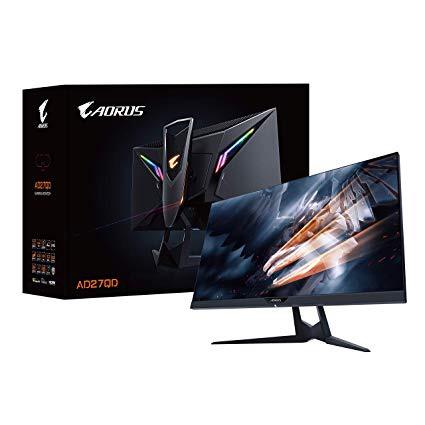
Aorus AD27QD 27" 144Hz 1440P FreeSync Gaming Monitor, Exclusive Built-In ANC, 2560x1440 QHD Display
Write a review
$59900

Aorus AD27QD 27" 144Hz 1440P FreeSync Gaming Monitor, Exclusive Built-In ANC, 2560x1440 QHD Display

Write a review
B07MVX3PKS
+
Add to wish list
Target is a general merchandise retailer with stores in all 50 states and the District...

City: US, New York

Delivery
Pickup at your own expense
Tomorrow from 09:00 to 20:00, Store location
Free
Payment options
Apple Pay Google Pay Mastercard Visa
Cash, bank card, credit/installment payments, cashless payment for legal entities
Warranty and returns
Exchange/return of products of proper quality within 14 days Official manufacturer's warranty: 12 months
Features
Item Dimensions
24.21 x 19.08 x 9.33 in
Item Weight
Mount Type
Refresh Rate
144 hertz
Screen Size
27 in
Aspect Ratio
Description
This fits your .
Make sure this fits by entering your model number. 27” 2560x1440 QHD Display with a 144Hz refresh rate, 1ms response time, and free Sync support 10 bit IPS panel with HDR and DCI-P3 color spectrum World's first tactical Display with active noise cancellation (ANC). Phys. Dimension with Stand(WxHxD)- 614.9*484.7*236.9 mm. Phys. Dimension w/o Stand(WxHxD)- 614.9*371.1*60mm Exclusive Aorus features - GAME assist, OSD sidekick and dashboard Ergonomic design with swivel, pivot, tilt and height adjustments Built-in digital RGB LED backlighting 1x Display Port 1.2, 2x HDMI 2.0, 2x USB 3.0
Reviews
3.8
Reviews: 20
5 stars
45%
4 stars
20%
3 stars
15%
2 stars
10%
1 star
10%
Thach Nguyen
5
UPDATED: Pictures show how HDR (actually just 8-bit FRC in Windows mode, not real HDR) works to improve the color gamut in Hitman 2. I really like it. At least the first monitor of Aorus, I expect more firmware updates soon to fix the bugs. Especially HDR black screen bugs. Update: I changed to AMD Radeon VII to see the diferences between Nvidia GPUs and AMD GPUs on this monitor. You may know the result. AMD GPUs perform very well on this monitor. All issues I have on 1080Ti now gone with my new Radeon VII. Nvidia can enable Freesync, but not 100% Freesync. With my 1080Ti, on the scale of 100, I can say Freesync and HDR score only 80/100. Since Freesync can work properly with HDR, I think Freesync and Freesync 2 HDR are the same (only about input lag which I feel nothing laggy anyway, but it should exist). For me, 8-bit FRC mode on AMD GPUs performs better than Nvidia. The color, the lights, the graphics are so much better. If you are using an Nvidia GPU, you can still get it with some color adjustments. Dont worry, this one is the best choice you can get right now. HDR (8-bit FRC) > RTX trust me ;)) Pros: - G-Sync fully compatible. But you will have to enable it in Nvidia Control Panel, also choose Gsync in both full screen and windows mode. - HDR will only work in full screen mode only. Remember this. - 8-bit +FRC which Windows will show 8-bit and dithering (must turn on HDR in Windows display settings). As good as HDR10 but this is not HDR10. But its not 10-bit anyway. See below for the instruction for 10-bit. - Beautiful colors, better than other HDR monitors I can say. - IPS panel, good response time (at least as good as my XB271HU TN panel). - You can draw your own crosshairs. - HDR is great, I play Battlefield V and now I can see the enemies 10 times better than non HDR monitors. - HDR 400 is decent for gaming monitors. I turned max the brightness and almost burned my eyes. - Not sure how, but I can change the resolution to 4K and then turn on Super Resolution. Native 4K 60fps easy mode ;)) - If you want to enable 10-bit native (if it exits), you need to go to Nvidia Control Panel, lower the refresh rate to 120hz, then choose Nvidia settings below, change 8 bpc to 10 bpc. Also, you have to use Displayport cable. Now, it will show 10-bit in Display Settings of Windows. Cant reach 144Hz with Displayport 1.2. Not enough bandwidth even Displayport 1.4. So actually no noticeable diference between 8-bit dithering and 10-bit at all. But I recommend using 8-bit and dithering @ 144hz to have better speed for gaming experience. If youre an expert in graphics, this one is not for you then. - Different power cables for other countries. Awesome!! - GFreesync range 48-144Hz at 1440p, 48-60Hz at 4K SR. Displayport required. If you use freesync, HDMI 2.0 will work just fine. - LFC LFC LFC Cons: - HDR is still buggy somehow. But rare. The screen usually flickers after quiting HDR games. I have to open other apps to clear the screen. Wait for the firmware updates. - OSD Sidekicks doesnt show correct values. - You turn on Freesync, then you cannot turn on Aim Stabilizer. Pick one only. - AMD web page comfirmed that Aorus AD27QD only has Freesync 1 at this time. It seems very hard to find Freesync 2 HDR monitors these days. It doesnt matter because you will not feel anything I can guarantee. - Software needs more works since I dont think we have more benefits than other monitors beside HDR and 10 bit. - RGB seems okay but odd. Since all Aorus products have RGB, so its not a big deal. But at least make it brighter next time. Or just use RGB like MSI, Razer or Asus did. I say things, you make choice. I feel good, but a little pricey. A little pricey A little pricey A little pricey A little pricey At least not $2000 like Asus or Acer. You know why this monitor is called near-perfect? No curve, No bezel less, No speakers, Aim Stabilizer problems, Software is weird, No displayport 1.4. But we can expect next year right? Also if you have backlight bleed, dead pixel or whatever problems, return for a new one, monitors are not equal so we call it monitor lottery. Putting negative reviews for those things just make you look stupid. So good luck then ;)) If you are wondering about getting this monitor or the Razer Raptor 27", I suggest this one. Better software + adjustable stand with vesa mount + higher brightness peak for HDR + $100 cheaper. Guess what? You will definitely need this Aorus.
Guillermo
5
El monitor aorus me acaba de llegar y lo primero que hice fue compararlo con un MSI optix g27c2 (panel va) y la diferencia de calidad de imagen es abismal. colores vivos, sin ghosting, gran calidad de construcción, sin fugas de luz, muy recomendable compra.
ShaunaniganZ
5
I was skeptical to spend this amount of money on a monitor but it just checked all the boxes. HDR, 144hz, 1440p, IPS Display. The current reviews were enough for me to pull the trigger and try. Coming from the Dell s2417dg, its been night and day for my experience. Horrible color banding on the dell and i was fed up and bought this. I have been loving it for the most part. I have a gtx 1070 and the gsync has worked on this freesync monitor. I was having issues at 144hz. But 120 hz has allowed me hdr + great blacks and color in all my games so far. RE2 Remake, AC Odyssey and metro Exodus. There seems to be a little IPS glow but its not intrusive to the immersion and has been running well. Its not perfect, as the osd software needs some work and Im curious to Future monitor firmware updates. One thing i cant seem to fix: my monitors screen timeout wont work. I think it may be the usb connection between the monitor and my PC but i cant do anything to get it to work. In the end, Im glad i purchased it as its been the best bang for my buck with features and quality.
Mike
5
Im an older, casual gamer (a lot of Assassins Creed Origins and Odyssey this past year). When I sit down to play, I want beautiful graphics and silky-smooth performance. So, I appreciate really good PC gaming components. I recently upgraded my PC build with a new Intel 9700K, Gigabyte Z390 Aourus Master, etc. The only things I didnt replace were my GTX 1070 Ti video card, and my 27 inch, 1980 x 1020, 60Hz monitor. After doing the new build, Assassins Creed Odyssey (max settings) looked and played played well. But, screen jitter and tearing detracted. It kind of felt like when a video card is not strong enough for a new game. But I was getting plenty of frame rate from the video card. More research started pointing to the monitor and the need for adaptive sync. My video card was cranking out the frames. But they were out of sync with the monitor. Hence the screen stutters and tears. For two months, I researched monitors and learned in the ins and outs of the various display types. Gorgeous color is important to me, so I wanted an IPS-type panel. And, I wanted adaptive sync (G-Sync Compatible, at least, since Im an NVidia graphics guy). And, I wanted 2560x1440 (2K resolution - my research showed that my 1070 Ti can handle it). I did NOT want a TN or VA panel. And every big-name IPS gaming monitor I could find on the internet in the $500–600 range was getting slammed for issues, such as excessive backlight bleed, dead pixels, Quality Control issues, etc. Then, I came across the Aorus AD27QD. After two more weeks of research, I bought it. First, it is an IPS, so I get the rich, deep colors I want (the picture is gorgeous). Most of the other big-name IPS gaming monitors in the $500–600 range use an Optronics panel. The Aorus AD27QD, however, uses an Innolux panel with Azimuthal Anchoring Switch (AAS) technology. I get the gorgeous colors, but not the raft of issues with the panel that others complain about. Second, the AD27QD runs at 144Hz and 2560 x 1440 native, and its NVidia-certified G-Sync compatible. Now that I have been gaming on it for a couple of weeks, I can tell you that the adaptive sync is worth it. And, the G-sync works perfectly. Game play is now smooth. In Assassins Creed Odyssey, even the 360° camera-spin that happens when you synchronize a viewpoint is now smooth. The display is also bright. I find that turning it down to 70 percent is just about perfect. But thats subjective. And, the colors are well-calibrated out of the box. Color temperature and gamma are almost perfect. And, the RGB spectrum this monitor displays is among the largest percentage of spectrum I’ve seen. Also, the build quality is outstanding. This thing is heavy, solid. The stand is metal. Truly a good build. The RGB lights on the backside are cool, I guess. But thats not really my thing. Nonetheless, mine did come with a flaw in the RGB lights in the Falcons head on the stand stanchion (it only displayed around half the RGB spectrum). I didnt care that much. But, I felt that everything on the new six hundred dollar monitor should work correctly. So, I got on a chat with Amazon customer service. Here, I need to sing PRAISE for Amazons customer service. Technical support was polite, respectful, listened carefully, and understood the issue. The entire conversation took mere minutes! In short, a brand new replacement monitor arrived at my door within 48 hours. I had 30 days to return the old one or a charge would appear on my credit card. You cannot ask for better service than that. I know where my technology purchases are coming from, from now on. One last thing. Another user here stated that he upgraded his Display Port cable and that it made a difference in the performance of this monitor. Based on that, I read about Display Port cables and found that upgrading to a good cable "can" make a difference where bandwidth may play a role in the end result. I was spending a ton of money on all of my other components. I felt that I may as well get a really good cable, too . . . got it here on Amazon: Club3D Displayport to Displayport 1.4/Hbr3 Cable DP 1.4 8K 60Hz 3M/9.84, 28AWG. Its Display Port 1.4, same as my video card. Though, the Display Port on the back of the Aorus AD27QD is only Display Port 1.2. Maybe the cable is overkill? Regardless, I didnt want something like a twenty dollar cable to be a potential cause of a performance bottleneck. In sum, I’m really happy with this monitor. Assassin’s Creed Odyssey is beautiful, smooth, and fast at 2560 x 1440. And, the screen jitters and tears are gone.
Zihlus
5
Using this with my 2080 ti and yes gsync works perfectly with this monitor. Will be buying another. The monitor came perfect no dead pixels or anything that you expect this day and age. The IPS panel is amazing looks amazing with all games I play. I did have to adjust a few settings but not like I didnt expect not to. for the money imo this is one of the best monitors to buy
Fredric De Knight
5
Coming from both a crappy TN panel (Monoprice 1440P 144Hz, bought refurbed for $200) and a nice Samsung VA panel (CFG70 series, 1080p 144Hz curved), this monitor stands out as amazing. Better colors than the VA panel, better response times than the shitty TN panel, and absolutely beautiful build quality. Mine had no black light bleed, very little IPS glow, and no dead pixels that Ive seen so far. This is the kind of monitor that will last 5-10 years for the average gamer.
Tyler
5
In the process of returning an Acer VG271 monitor for this. The build quality is just incomparable, its amazing, the stand metal and has plenty of adjustment and RGB(why not). The monitor itself literally 0 backlight bleed and IPS glow a non issue. No dead/stuck pixels. No dust. VERY bright. Best colors ive seen on a monitor - extremely comparable to my dell P2715q. Amazing response time and virtually no input lag - great for everything! 144/120hz is amazing!
David Joiner
5
This monitor ticked off all the boxes for me when I was looking to upgrade from my 2011 Asus 24". IPS, HDR, 1ms response time, 27" or greater (I wish the offered a larger version), G-Sync (through FreeSync which is certified through Nvidia), and 2k resolution. My came in a surprisingly large box. The monitor was well protected. The stand is made of what appears to be steal, not aluminum, and has a black powdercoating feel. It is well built and feels very sturdy. The OSD Sidekick is pretty cool for changing monitor settings and it requires the included USB. I have owned 2 Gigabyte brand video cards in the past and they never let me down and still run to this day. I am very happy with this monitor and my opinion of Gigabyte quality is now at a higher level.
ManTownMedia
5
This AORUS gaming monitor brought new life to both my XBox and Work Laptop experience! I was frustrated by the work issued HP probook with a crappy lcd and could not view powerpoints or small fonts in my home office. I was also tired of the input lag during gaming (Siege) with my Samsung 65" TV experience. This AORUS Gaming Monitor breathed new life in to both experiences! I HIGHLY recommend a usb-c to HDMI adapter or use DP for the connection - it seemed to improve the quality of my image ...
Product variations
Column filling
Sort by Price Sort by Availability Sort by CODE Sort by Screen Size
$59900
In stock
+
B07MVX3PKS
Screen Size:
27 in
You may be interested
  • Bestsellers
  • Recently Viewed
 
Similar products
Show more
Fast and high quality delivery

Our company makes delivery all over the country

Quality assurance and service

We offer only those goods, in which quality we are sure

Returns within 30 days

You have 30 days to test your purchase