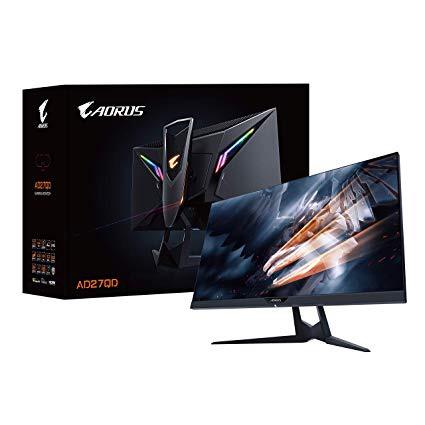
Aorus AD27QD 27" 144Hz 1440P FreeSync Gaming Monitor, Exclusive Built-In ANC, 2560x1440 QHD Display
Write a review
$59900

Aorus AD27QD 27" 144Hz 1440P FreeSync Gaming Monitor, Exclusive Built-In ANC, 2560x1440 QHD Display

Write a review
B07MVX3PKS
+
Add to wish list
Target is a general merchandise retailer with stores in all 50 states and the District...

City: US, New York

Delivery
Pickup at your own expense
Tomorrow from 09:00 to 20:00, Store location
Free
Payment options
Apple Pay Google Pay Mastercard Visa
Cash, bank card, credit/installment payments, cashless payment for legal entities
Warranty and returns
Exchange/return of products of proper quality within 14 days Official manufacturer's warranty: 12 months
Features
Item Dimensions
24.21 x 19.08 x 9.33 in
Item Weight
Mount Type
Refresh Rate
144 hertz
Screen Size
27 in
Aspect Ratio
Description
This fits your .
Make sure this fits by entering your model number. 27” 2560x1440 QHD Display with a 144Hz refresh rate, 1ms response time, and free Sync support 10 bit IPS panel with HDR and DCI-P3 color spectrum World's first tactical Display with active noise cancellation (ANC). Phys. Dimension with Stand(WxHxD)- 614.9*484.7*236.9 mm. Phys. Dimension w/o Stand(WxHxD)- 614.9*371.1*60mm Exclusive Aorus features - GAME assist, OSD sidekick and dashboard Ergonomic design with swivel, pivot, tilt and height adjustments Built-in digital RGB LED backlighting 1x Display Port 1.2, 2x HDMI 2.0, 2x USB 3.0
Reviews
3.8
Reviews: 20
5 stars
45%
4 stars
20%
3 stars
15%
2 stars
10%
1 star
10%
James Nguyen
4
Pros: Accurate Colors out of the Box - Did some quick reference tests and did not really need to adjust settings. Great Adjustment Options- Can adjust to almost any angle I could want. Very Minimal Backlight Bleed/IPS Glow- There is some however not as much of a bother as some IPS screens I have seen. Cons: Stuck Pixel- I have one stuck pixel which I couldnt fix using common methods. Its only really shows on black screens and out of the way enough to deal with RMA. Dust in Screen- I also had some dust in my screen that I was able to flick away. However your mileage may vary. Short Cables- Maybe its just my use case however the included cables were too short and could barely plug in the power cable. The Biggest Con: Smearing/Response Times for Gaming. To reach the claimed 1MS you have to disable FreeSync to turn on Aim Stablizer or Ultra Low Motion Blur which introduces some strobing. Then if you want to have FreeSync on and still want a fast Response Time then you need to turn the OverDrive on the highest setting. If you do though it introduces a bunch of smearing and ghosting. If you are sensitive to it then its going to look terrible. If you put on the regular Balanced Overdrive it doesnt look too bad. I hope this is something that Gigabyte/Aorus can adjust in Firmware. Biggest Positive: AMAZINGLY Low Input Lag- I am coming from a very fast TN Panel with very low input lag already and this is a step above. I think I could get used to the smearing/ghosting for fast games like FPSs since actions seem instantaneous.
Emond
4
I will preface this review by letting you know that you must get a VESA approved Display Port Cable or you wont share the same good experience I have with this monitor. For example: Club3D CAC-2068 DisplayPort 1.4/HBR3. This cable made changes to the settings of the monitor that the DP cable provided with the monitor simply didnt produce. Example 1: OEM DP Cable slow to wake up monitor from a cold PC boot. Thus, I missed most of the PC Post details. With Club3D CAC-2068 DisplayPort cable the monitor snaps out of sleep mode almost instantly Example 2: OEM DP Cable would black screen whenever I would change the resolution and/or refresh rate. With Club3D CAC-2068 DisplayPort cable its now instant without blackscreen/delay. Example 3: OEM DP Cable: the Super Resolution would only sharpen text, lines no different then the Sharpening feature found in the OSD. With Club3D CAC-2068 DisplayPort cable text and lines are more defined, richer, bolder, darker and/or whiter making it more defined and noticeable. A stark difference then just sharpening it. I went from 0 (old cable) to 1 with new cable. Example 4: OEM DP Cable with Overdrive: Quality and Display Settings at FPS the game was noticeable input lag. Speed was the only/best option for gaming. With Club3D CAC-2068 DisplayPort cable Overdrive: Quality and Display Settings at FPS the game does show a slight lag but its correctable by increasing the dpi of the mouse. No, Im serious, its correctable. With Overdrive: Quality and Display Settings at FPS the game I notice 1:1 response time and I had to lower the mouse DPI to compensate for it from Quality. There are firmware and utility updates to improve the monitor this month and things are only going to get better. FreeSync works without issue. Image Quality is simply beautiful to me. I havent found a need to use Aim Stabilizer as of yet because Ive been happy with FPS/OD: Speed. I really dont want to repeat with others said about this monitor. I would recommend this monitor in a heartbeat. Heck, even Game Nexus (YT) uses the monitor in their video(s). Caveats: You have to connect a usb cable from monitor to PC in order to use the OSD from win10. There are firmware updates that are currently addressing outstanding issues. So, this monitor is still maturing. Whenever you update the firmware you want to also get the newer version of OSD_Sidekick to correlate. Turning off the monitor is a bit tricky. You have to push the joystick up, wait for the osd to display the option to turn it off then move the joystick towards you in order to turn it off (if its already on). If the monitor is already in sleep mode you have to push the joystick/toggle in, then wait a few seconds before the osd option becomes available.
Sergio K.
4
Using this monitor for a couple of days and I am impressed. I think what everybody wants to know is about Dead Pixels, IPS glow and Backlight Bleeding, right? Well, NO dead pixels for me). As for IPS glow, I think it is moderate, and I have a very small strip of Backlight bleed on my left side. IPS glow (inherent to IPS panels) or BLB are barely noticeable during use, only in perceivable TOTALLY black screens. During all day use (games, movies, office, etc) I do not see it at all. The colours are very rich and the panel is VERY bright (I was used to a supposed 350 nit TN 144 Hz before and the difference is huge). The built feels VERY sturdy, and the monitor is HEAVY! As for HDR, I really have to test it more but I do not like right now (as said, my other panel did not had that option, so I got used to calibrate my screen without HDR). Between 10bit colours +120 Hz or 8bit +144 Hz I see no difference colourwise so I am sticking with the 8bit+144Hz (you cant have 10bit + 144HZ). The software is very friendly to calibrate the monitor on the fly, without clicking and clicking the joystick. There are some bugs, for example, some hotkeys do not activate the assigned function (Crosshair is one) Other user said the provided DP cable was short. I disagree, it is 1,5 m long, enough at least for my needs (my PC sits under my deskt and the cable permits rotating the monitor with no problem). I like RGB, for me it is a little plus, but do not expect much, it is not very bright at max settings. Rounding up, it is a nice monitor, has some little flaws, but still RECOMMENDED!
garret wood
4
The MONITOR is an absolute STUNNER. This is the monitor Ive been waiting on for years. a True 144hz IPS Freesync monitor that also comes with HDR to boot? This is awesome!!! The colors are phenomenal, and its an absolute treat to play on. The build quality is top notch, a solid metal base with gorgeous RGB lighting on the back and a really unique on-screen display that you can access via software makes working with the monitor really easy. With all the good this monitor has, I do have to mention the negatives. 1) By far the worst issue for me is the false advertising in the image being used by Gigabyte. The monitor DOES have bezels, dont let the image fool you. I know when I saw that I was like HOLY this is a must buy, though I figured it might not be QUITE that good. While the bezels are small, they are still there and noticeable compared to the image. TBH Im not sure why Gigabyte did that, the image is completely misleading and not an accurate representation of what youre buying. If I didnt love the monitor so much Id have returned it in a fury, but its so damn good theres no way I can. 2) 144hz means youre getting 8-bit color, not the end of the world, and tbh I hardly notice the difference coming from a TN panel, its all gorgeous. Youll need to lower the resolution to 120hz to reach the 10-bit color. 3) Quality control seems to be an issue. I returned my original monitor due to some minor BLB on the top left & bottom right but judging from reviews people seem to have the same issue. Amazon customer service was amazing though and 1 day shipped my replacement out and I got a perfect replacement.
Product variations
Column filling
Sort by Price Sort by Availability Sort by CODE Sort by Screen Size
$59900
In stock
+
B07MVX3PKS
Screen Size:
27 in
You may be interested
  • Bestsellers
  • Recently Viewed
 
Similar products
Show more
Fast and high quality delivery

Our company makes delivery all over the country

Quality assurance and service

We offer only those goods, in which quality we are sure

Returns within 30 days

You have 30 days to test your purchase