
















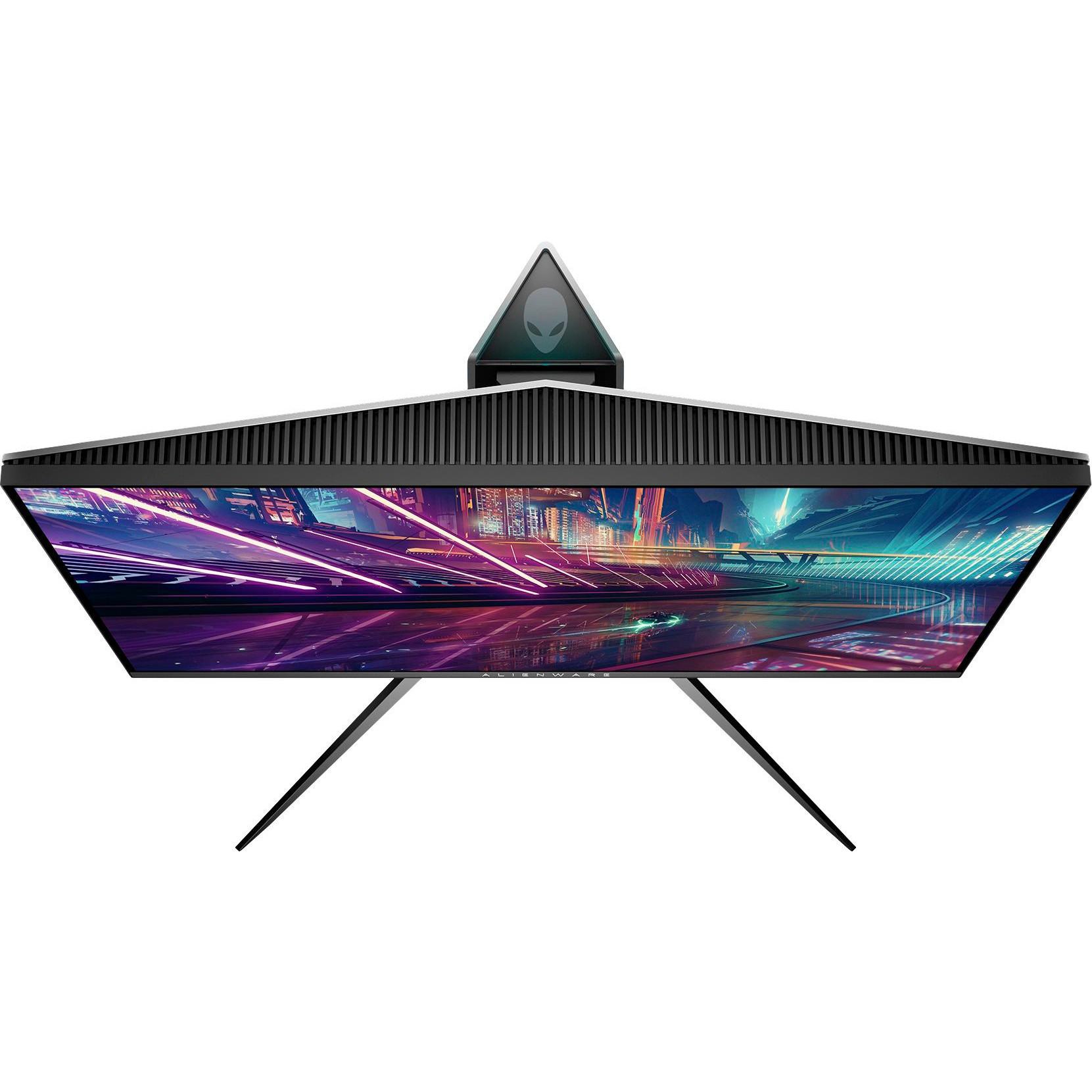
Alienware 25 Gaming Monitor - AW2518Hf, Full HD @ Native 240 Hz, 16:9, 1ms Response Time, DP, HDMI 2.0a, USB 3.0, AMD FreeSync, Tilt, Swivel, Height-Adjustable
Write a review
$32900

Alienware 25 Gaming Monitor - AW2518Hf, Full HD @ Native 240 Hz, 16:9, 1ms Response Time, DP, HDMI 2.0a, USB 3.0, AMD FreeSync, Tilt, Swivel, Height-Adjustable

Write a review
B0733YCKM5
+
Add to wish list
Target is a general merchandise retailer with stores in all 50 states and the District...

City: US, New York

Delivery
Pickup at your own expense
Tomorrow from 09:00 to 20:00, Store location
Free
Payment options
Apple Pay Google Pay Mastercard Visa
Cash, bank card, credit/installment payments, cashless payment for legal entities
Warranty and returns
Exchange/return of products of proper quality within 14 days Official manufacturer's warranty: 12 months
Features
Display Type
LCD
Item Dimensions
21.88 x 10.57 x 20.56 in
Item Weight
13.47 lbs
Mount Type
Table mount
Refresh Rate
240 hertz
Screen Size
25 in
Aspect Ratio
16:9
Description
This fits your .

Make sure this fits by entering your model number. Designed for the enthusiast, the AW2518HF delivers a futuristic style and precise form with solid stability Lightning-fast 240Hz native refresh rate combined with 1ms response time delivers buttery-smooth gameplay with virtually no input lag Compatibility- All Operating System. AMD Free Sync eliminates choppy gameplay and broken frames with fluid, artifact-free performance at virtually any framerate Specific gaming OSD (onscreen display) design keeps your user experience in the gaming theme. Brightness : 400 nits Game comfortably in your zone with a height adjustable stand, tilt, swivel and pivot features. Refer to the PDF attached below in Technical Specification for Installation manual

Reviews
4.4
Reviews: 20
5 stars
55%
4 stars
30%
3 stars
10%
2 stars
5%
1 star
0%
Robert A. Jones
4
The Monitor is replacing a 120hz Alienware that was 8 years old and finally gave out. This new one is ever better. I have a gtx 1080 FE and when I booted into win 10 it was at 60hz and no option inside the Nvidia control panel to go higher, it only listed 60hz and 50hz. I thought maybe the HDMI could not do 240hz but its 2.0b so it should. I had to right click on desktop and go to WINDOWS display settings (not nvidia) from there at the bottom choose "Display Adapter Properties" then click "List All Modes" You will see an extended list that is not https://www.amazon.com/gp/css/order-history/ref=nav_nav_orders_firstin the Nvidia control panel settings. From there you can select 1920x1080 32 bit 240 hz. You will know you are in 240hz by moving the mouse in a circle on the desktop quickly. You will see a circle of mouse pointers that are touching each other (like 80 of them). If its in 60hz and move the mouse fast in a circular motion you will see maybe 8 pointers and they will be separated by like an inch. I almost took a star off due to the poor shipping. They put it in a box 2x the size of the internal box with no filler. So it was just bouncing around inside about 1 foot back and forth. It seems to be intact so Im keeping it. But come on shippers. And dont worry about getting Gsync over the Free Sync. If you have a good video card like a 1070 just play games with Vsync OFF and run the panel at 240hz. Screen tearing at 240 hz is nil and your games do not have to be running at 240 fps. Its looks great with the game running at 50fps 100 fps etc. Vsync and Gsync and free sync are sort of gimmicks, you dont really need them. People that play FPS that are fast like Quake, Unreal Tourney etc. You will have far less mouse lag, input lag etc if you run the game with Vsync OFF. I took a star off due to its edge bleed on all 4 sides. About 1/2" of brighter bleed through on dark scenes in movies and games. My IPS monitors do not have any edge bleed. Not sure its on ALL of them or maybe mine got damaged in shipping.
Nathan G.
4
This monitor has been a pleasure to use and is one of the best-looking high refresh rate monitors that Ive gotten my hands on thus far. Paired with a higher-end card such as the GTX 1070, the Alienware 25 is an excellent choice for those with a moderate budget. The Good: - Great build quality. Its sleek bezels add significant flare to my setup, and even looks good from the back! - Has a great color configuration out-of-the-box, especially for a 240hz monitor. - Its not OLED, but this monitor has a seriously great looking TN panel. - Has one of the best looking on-screen configuration menus I have seen. - Excellent viewing angles. - Has a surprisingly capable USB hub. The Bad: - The monitor is relatively heavy. Some lower-end VESA mounts may not be able to support it. - The VESA mount is slightly recessed into the back of the monitor, making it difficult to attach to some mounts without damaging the monitor. The Ugly: - The adhesive at the bottom of the monitor became visible in less than a week, making it look like there is a build-up of dust underneath the Alienware logo. - Severe ghosting occurs when running at 240hz with a 1ms ("Super Fast") response time. To avoid this, I am required to run the monitor at 200hz, as I prefer higher response times over being able to see a few extra frames.
SJBIH
4
This monitor is awesome! Worked flawlessly out of the box, no dead pixels and minimal back light bleed. Coming from 144Hz to 240Hz is noticeable. 240Hz is buttery smooth and even in games that dont hit 240 Fps, you can still notice the smoothness of the game. Even though I do recommend the monitor, wait for it to go on sale. I believe a few weeks back it was in the $340-350 range for the FreeSync model.
( ゚▽゚)
4
Okay, so i bought this in october 2018. I sold both of mine to upgrade to an ultrawide curved monitor right before the update that let these work with Gsync, lol. I still think they are excellent monitors. The main issue is that they are NOT the best monitors for text or graphics editing. You should know that it is a TN panel screen because only those can respond fast enough. On my personal system, i spend 90% of my time non gaming and 10% at the very most gaming. When your monitor use is mostly text, it sticks out when some characters are not displayed as clearly as they could be on a 1080p screen. Between that and wanting to move to a single monitor was when i replaced these (I was running two of these and decided it was pointless using a 1ms, 240hz monitor for a screen that only ever showed a text editor). I went for an ultrawide monitor with an IPS panel and 75hz refresh rate and I am perfectly happy with it. I know to a lot of people considering this monitor, wouldnt ever consider using 75hz and thats fine. I also sold my gtx 1070 and am back to using onboard video now, lol. Its good enough for my one weekly game. For gaming purposes, this monitor IS the bees knees pretty much, at 240hz the detail and sheer smoothness has to be seen to be believed. I drove both of these with a 8gb gtx 1070 and it did great. Not once did i ever have issues and i usually maxed out the game settings. I noticed my kills in FPSs definitely went up when i got this monitor and it did help me become a better player by being able to time stuff I couldnt on slower monitors. Well im back to my 75hz and im still doing great so maybe once you learn it you keep it :)
Quan
4
Ok. So the monitor is good looking on the outside that fit for gaming experience with RGB light on the back in which I can customize. The quality of the picture is much better than I expected for the TN panel, it is not great for movie viewing such as in dark sense, but it work perfect with gaming at 240hz with sygn. It is very smooth while playing game life Fortnite or Global Counter Strike. My computer can handle it at around 200hz while streaming at the same time with second monitor. The color look better than my 27 Dell 1440p sygn monitor. This monitor has around 120% sRGB coverage. First Person Shooting game is really great for the monitor. Plus, this monitor is very bright and good saturated color for gaming. However, there is a little down side to the monitor, the quality control is not very good. I got a little scratch on the monitor, but very hard to see unless I try to find it. Plus, it getting snuggles dirty things on very easily. In addition, it is a little pxialated compared to higher resolution monitor out there. All in all, a good product.
Zane
4
Amazing monitor! Came with a dead mouse. edit: found a second dead mouse.
Product variations
Column filling
Sort by Price Sort by Availability Sort by CODE Sort by Screen Size
$32900
In stock
+
B0733YCKM5
Screen Size:
25 in
$27900
In stock
+
B0733YCKM5_B4F4
Screen Size:
21.5 in
$62900
In stock
+
B0733YCKM5_2834
Screen Size:
34.1 in
$87800
In stock
+
B0733YCKM5_190B
Screen Size:
31.5 in
You may be interested
  • Bestsellers
  • Recently Viewed
 
Similar products
Show more
Fast and high quality delivery

Our company makes delivery all over the country

Quality assurance and service

We offer only those goods, in which quality we are sure

Returns within 30 days

You have 30 days to test your purchase