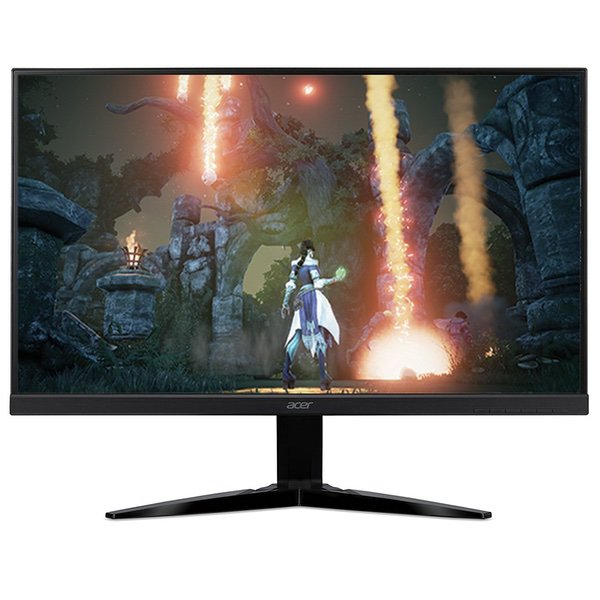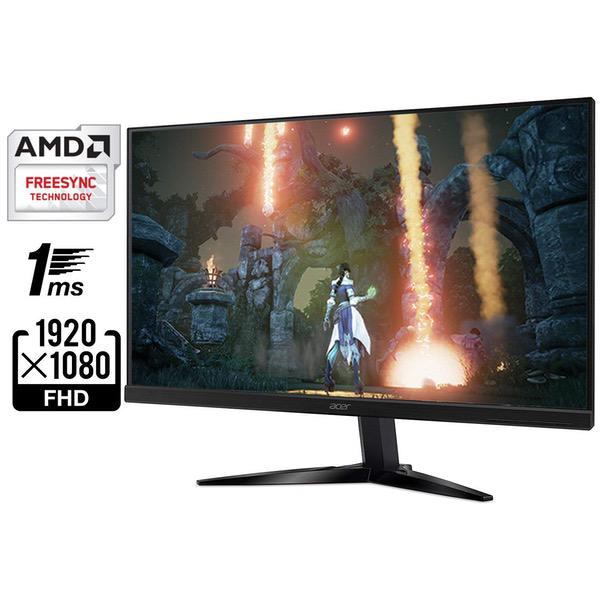
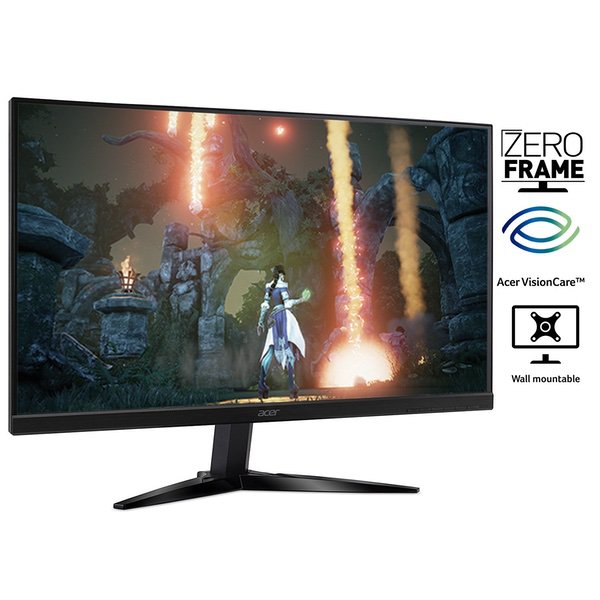
Acer Gaming Monitor 27” KG271 Cbmidpx 1920 x 1080 144Hz Refresh Rate AMD FREESYNC Technology (Display Port, HDMI & DVI Ports)
Write a review
$20900

Acer Gaming Monitor 27” KG271 Cbmidpx 1920 x 1080 144Hz Refresh Rate AMD FREESYNC Technology (Display Port, HDMI & DVI Ports)

Write a review
B07598SX6S
+
Add to wish list
Target is a general merchandise retailer with stores in all 50 states and the District...

City: US, New York

Delivery
Pickup at your own expense
Tomorrow from 09:00 to 20:00, Store location
Free
Payment options
Apple Pay Google Pay Mastercard Visa
Cash, bank card, credit/installment payments, cashless payment for legal entities
Warranty and returns
Exchange/return of products of proper quality within 14 days Official manufacturer's warranty: 12 months
Features
Display Type
LCD
Item Dimensions
24.2 x 9.1 x 18.3 in
Item Weight
11.7 lbs
Mount Type
Wall Mount
Refresh Rate
144 hertz
Screen Size
27 in
Aspect Ratio
16:9
Description
This fits your .
Make sure this fits by entering your model number. 27" Full HD (1920 x 1080) Widescreen TN Display with AMD FreeSync Technology 144Hz Refresh Rate- Using Display Port Response Time: 1ms, Pixel Pitch: 0.311mm Ports: 1 x Display Port (v1.2), 1 x HDMI & 1 x DVI (w/HDCP) Display Port & HDMI Cables included Mounting type: VESA Compatible
Reviews
3.5
Reviews: 20
5 stars
45%
4 stars
20%
3 stars
0%
2 stars
10%
1 star
25%
Atlas
5
At first I was sceptical about getting this because it was a TN and not an IPS panel. However, after getting it and having it now for a week. I can honestly say that Im happy I took the chance. G-SYNC is worth every penny, any shooter game is like night vs day. Really makes all shooters feel completely different, and makes you better as a player. Ive always had a 60hz monitor, some even 4k. I can really see what people mean when they say that 2k gaming at 144hz is the (sweet spot) and I will never go back to 60hz again. If you are like me, and are concerned that the TN panel will disappoint you. Take it from me, I spent an entire week debating and watching videos. Im very happy that I took the chance, if you have any doubts then take my word and go for it. This is the very first time I have spent this much on a monitor, and I definitely do not regret it.
Amazon Customer
5
This is truly the best gaming monitor you can buy hands down. 27 in 2560 x 1440 G-Sync, 1ms response time at 144-165Hz by using the display port. This is the TN technology panel and not the IPS. The IPS can be seen better at side angles but has a response time of 4ms and this is only 1ms. No issues with seeing everything. Spot on. I dont use the built-in monitor speakers since I have Bose speakers or my Sennheiser GAME ONE gaming headset for gaming. The quality of this monitor is superb and truly the top of the line for gaming. Solid sturdy stand the goes up, down, tilts and you can also spin your monitor vertically too (make sure you have a long enough monitor cable to do that)..Its very well package for shipping too. You also get a 3 ft. Display cable, 3 ft. HDMI cable and a 3 ft. USB 3 cable and a special Predator support number if you need it. It also comes with two USB 3 ports on the left side of the panel. Nice. Make sure to read the directions in how to setup things correctly. There are lots of tutorials online on how to setup and turn on G-Sync through Nvidia Control Panel. Make sure to use the Display cable to get the 144+Hz speed etc. This monitor is truly 10 times better than my previous well known and respected name brand monitor which was also a 27 in 1920 x 1080 with a 5ms response time at 60 Hz. I never thought that this monitor would make such a huge difference in regarding to the speed, detail visually and no tearing or ghosting while gaming. Everything is so smooth with G-Sync technology at 144Hz. It made all of my games look even better like never before. Just amazing and so superior than my other monitor in all aspects period. Im still shock in how much of a difference this monitor truly makes. I never thought it would have such a huge impact on me but it has with a big smile. Ive read some reviews that didnt favor this monitor or they had some issues. Im not sure if they were talking about this exact monitor XB271HU Abmiprz. I was a little concerned but, someone I know truly recommended this monitor and told me not to make a mistake and to purchase this monitor if I was using an Invidia graphics card to game or even to do heavy videos etc. I was also looking at other brands but, Im so happy that I took my friends advice. I can tell you that this Acer Predator is it. Yes, I would purchase another one again without any hesitation at all. If you looking for the best gaming monitor, the Acer 27in Predator MODEL: XB271HU Abmiprz is the one to order. Its worth every penny and you wont even have any buyer’s remorse or be disappointed.
Monty H.
5
I needed a monitor with a faster refresh rate for casual gaming... mostly FPS. I had spoiled myself on a 27" that only had a 60 Hz refresh rate, so when this 27" model with 144 Hz popped up on sale, I grabbed it. So far, I love it... especially for the price. I was disappointed with the depth of color when I first hooked it up... the whole display looked a bit hazy on Windows 10 compared to my old Samsung display. However, I looked in the Advanced Display Settings in Windows and found that it was running at 60 Hz by default. I bumped it up to 144 Hz and that somehow made the colors much deeper and true-looking. Color depth is now similar to my Samsung display, except now with a much higher refresh rate. If you are disappointed with a haziness in your new display, check to see what refresh rate it is running at. I tried some gaming and am very pleased so far. I cant use the Freesync feature since I have an NVidia GPU and I didnt want to pay for G-sync. However, I enabled V-sync on the games I played and experienced absolutely no screen-tearing and great response, with no noticeable hit to FPS. And 144 Hz is a definite improvement over 60 Hz. One other thing to note: there is virtually no physical bezel on the top and sides of the monitor. However, there are apparently no actual pixels for about a quarter inch from the edge of the display on the top and sides, which gives it a sort of "soft" bezel. Not a big deal for me, as I just wanted a 27" monitor with a faster refresh rate than I had, but be aware that when you hook it up, the display doesnt really reach the virtually nonexistent bezel. The bezel that is there is like a brushed/matte looking material, as is the screen itself, so there is no noticeable reflection from any surface of the monitor... which is another plus. Overall, I am very pleased with this monitor, especially considering the price I paid for it.
Namrezy
5
Love the monitor, love the 144hz refresh, love the look and the adaptability. I am giving it 5 stars because I am ultimately happy with my purchase since I waited until the price dipped down to $499ish, I cant remember. That being said, I have already started experiencing the "line down the screen" causing you to turn off/on the monitor in order to clear it. It happens maybe once or twice a week, so nowhere near a deal breaker, but apparently it gets worse with age, so that is very unfortunate. I have my headphone receiver, my wireless controller receiver, and my keyboard, all attached to the monitor, so when I have to reset the monitor, all 3 of those shut-off as well, so it makes "clearing the line" a lot more difficult than it should be. I will attempt to come back in another 12-16 months to update my review with the longevity of the monitor, but, with all this said, I would still buy another Predator XB271HU if the price was right and I needed it. Granted, if the line issue were any worse, Id probably be whistling a different tune.
N.Y
5
This is an AMAZING monitor with great image quality, 1 ms response time, and 144 hz refresh rate. However, you need to be very knowledgeable about computers before making such an expensive purchase. First of all, expect initial image quality issues, and also expect the Display Port to stop working on you for no reason at all. If this happens, it doesnt mean you need to RMA your video card or get a new cable, its a known issue with Display Port which is not tried and true. Only buy this monitor if you know exactly what youre doing and are a computer expert like I am. If not, youll run into nothing but hassle and problems. BTW, contrary to other reviewers, the integrated speakers are excellent for an apartment setting where subwoofers and extremely loud sound would be disturbing. If you want bass and loudness, get a pair of 7.1 headphones. Whats nice about the integrated speakers is that they dont disturb the neighbors, are loud, and allow me to take the headphones off when not gaming. Excellent monitor, just not for the amateur.
Kenichiwa
5
I did exhaustive research of brands and specs before deciding on the monitor. Its hard to be happier with this monitor for work and play. Purchased 2 of these October 2017. Not a single dead pixel on either monitor. Very minimal blue light bleed on very bottom edge on complete black screen in a dark room. Easy overclock to 165Hz when using a DP cable. USB ports and adjustment are excellent. Screen is responsive, bright, and sharp. No way I can go back to 60Hz ever. Only CONS? The price. Not a big deal but I also found it strange that if you have multiple computers hooked up to the monitor (1 on HDMI, 1 on DP), it does not automatically switch over to the powered up system. Last thing is the speaker sound quality is horrible and near useless. That is to be expected and I would rather they stop building speakers into monitors anyways.
Connor C.
5
So if youve read any of these reviews, most of the bad ones are because of the vertical tear this monitor gets when you enable G-Sync. Fortunately, I have found a working solution to this problem. Ill address this first, and then get on with the actual review. If you experience this, which it looks like most people do, there is a hilariously simple fix. Out of the box, this monitor was working great, but after about 2 weeks without issue, the dreaded tear showed up when I started playing a game with gsync. So, I did the classic "I wonder what happens if I turn it off and turn it back on." It worked. You have to go into the nvidia control settings, go to gsync, and turn it off. Sometimes the tear will show up again. Turn off gsync, restart your computer, then turn it back on. It should be fixed. I have not had any issues with this fix so far, so I am assuming this will work with other monitors as well. Now for the actual review of the monitor itself, that issue aside. This is my very first 144hz monitor, so I do not have a baseline to compare this to. That being said, I have literally zero complaints with this monitor. The price is insanely good for what this monitor can do. Once you get all of your settings right (enabling the 144hz in your display settings, tampering with color settings and other things within the monitors controls) this monitor looks gorgeous, and performs flawlessly. I have this aside a 60hz 4k monitor, and it has no issues working in tandem with another monitor. All in all, if youre worried youll get this tearing issue, which you most likely will, there is a fix for it, and an easy one. It is annoying, however, that you spend ~$500 on a monitor, and will know its going to ship with a flaw, but just know there is an incredibly easy fix for it. So if youre not willing to up your budget another $100 to get another monitor that is on par with this one, there are virtually no issues with getting this one, and feel confident recommending it to you, given you have a moderate amount of troubleshooting and general computer experience.
Giancarlo
5
This monitor is a great improvement to what I had previously and I am extremely happy. There is one noticable issue when it comes to actually watching a show/movie on netflix. Once I put it on full screen, after about 10 seconds, the screen becomes dark and the colors are distorted, a quick move of the mouse solves the problem. I am not picky enough to say this is a make or break deal but it does prevent this review to be a full 5-star. **Update** After the initial issue with the dark screen I have not encountered the problem again. Im switching my review to 5 stars.
NCshopper
5
This is a review for the 27" TN panel model. Acer makes it very confusing by assigning such a similar model number to the IPS panel. My monitor arrived in a well packaged boxed in perfect condition. No dead pixels. No light bleed. I have never used an IPS monitor so I dont know how much different they look. This replaced a 7 year old Acer V223W 22" monitor with a resolution of 1680x1050. The difference is very noticeable. The colors look good to me. The only thing I have noticed is that the blacks arent a very deep black. Apparently this is a downside to TN panels. Playing games at 165Hz looks fantastic. I have Gsync turned on, Vsnyc turned off and limit the framerate to 165 with MSI afterburner. I have played DOOM at a constant 150 to 165 fps and this monitor doesnt even hesitate for a second. The stand seems to be quite stable and I dont mind the red feet since I have a black/red theme going on for my new computer. The Predator logo isnt distracting or out of place at all to me as other reviewers have complained about. The monitor adjusts easily up and down on the stand. It also rotates and tilts. The only downside to the base design is that it is too big to fit on the riser I bought. However, with the ability to adjust the monitor up and down on its own stand I dont need one. The menu is a little cumbersome to navigate as was the old Acer monitor I was using. It has plenty of settings to fine tune but is quite confusing on how to use until you have practiced a little bit with the arrow keys. 1440P looks fantastic. I was concerned that such a high resolution would "shrink" everything and I was right. I had to adjust the scaling in Windows display properties to 150% to be able to comfortably see things. This seems to work pretty well. Nothing looks distorted and games still run at the native resolution of the monitor. I was debating on getting the 32" monitor but they just dont have the same features as the 27" ones. Maybe in a year or two we will be able to buy a 32" version of this monitor. The 34" widescreen curved monitors are a little pricey and the aspect ratio looks a bit strange since they are so short and wide. I didnt ding any stars but I had a huge problem when I first set this up. I plugged in the display port cable and the power cord and all I got was a no signal message. I called Acer tech support which is supposed to be some premium tech support service as stated on the fancy card in the box. They had no solution and basically told me I have a defective monitor. Come to find out the default input was set to HDMI. All I had to do was switch to display port in the menu and it worked. For the price this monitor should be able to auto detect the connection you have made and adjust accordingly. Acer tech support gets zero stars!!
You may be interested
  • Bestsellers
  • Recently Viewed
 
Similar products
Show more
Fast and high quality delivery

Our company makes delivery all over the country

Quality assurance and service

We offer only those goods, in which quality we are sure

Returns within 30 days

You have 30 days to test your purchase