
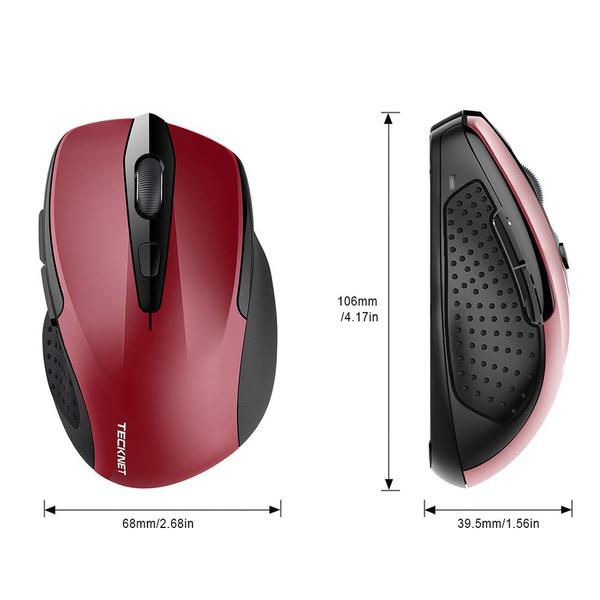
TeckNet 2600DPI Bluetooth Wireless Mouse, 12 Months Battery Life with Battery Indicator, 2600/2000/1600/1200/800DPI
اكتب تقييم
$‎ 1400 $‎ 5000

TeckNet 2600DPI Bluetooth Wireless Mouse, 12 Months Battery Life with Battery Indicator, 2600/2000/1600/1200/800DPI

اكتب تقييم
B07FV8NPD7
Target is a general merchandise retailer with stores in all 50 states and the District...

المدينة: US, New York

Delivery
Pickup at your own expense
Tomorrow from 09:00 to 20:00, Store location
Free
Payment options
Apple Pay Google Pay Mastercard Visa
Cash, bank card, credit/installment payments, cashless payment for legal entities
Warranty and returns
Exchange/return of products of proper quality within 14 days Official manufacturer's warranty: 12 months
Description
This fits your .
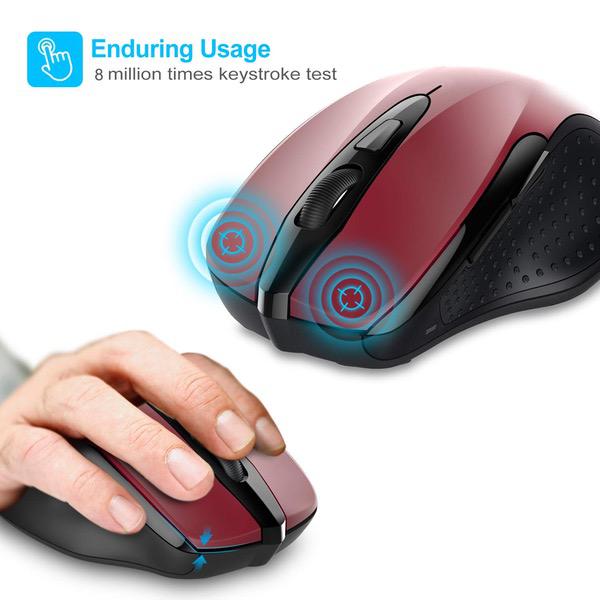
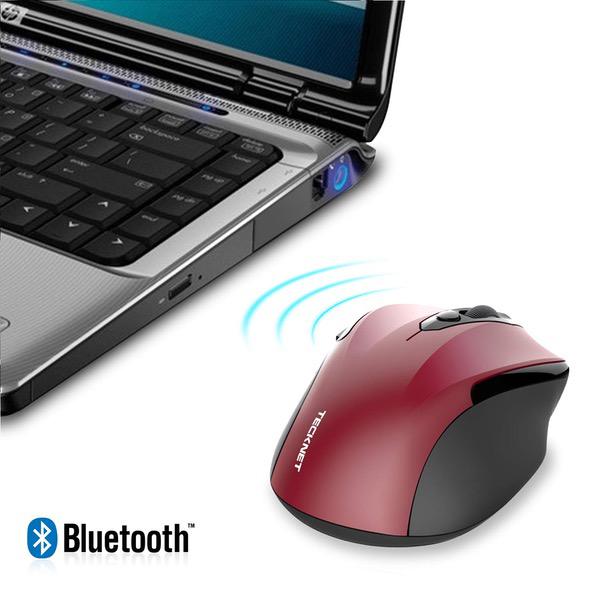
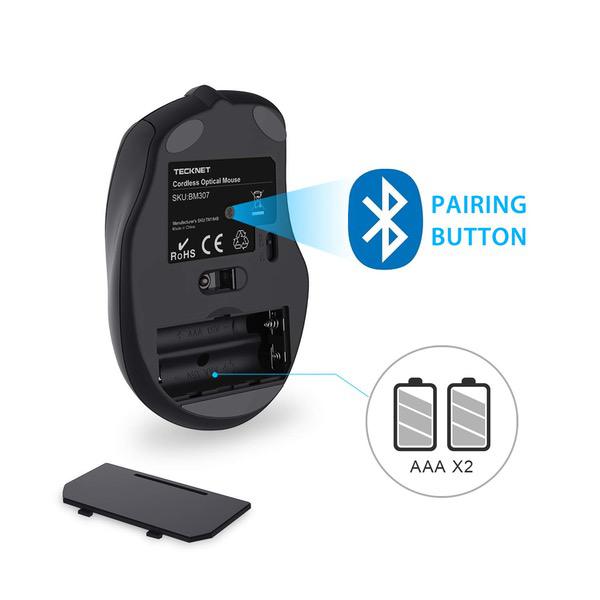
Make sure this fits by entering your model number. Connects directly to Bluetooth-enabled notebooks laptop or PC without the need for a receiver. 12 Months Battery Life, with battery indicator light TruWave technology for precise, smart cursor control over many surface types. 5 DPI Selection:2600/2000/1600/1200/800 Works with Bluetooth-enabled computers running Windows XP, VISTA, 7, 8 and 10.Don't support iPad bluetooth connection. (for iPad all series) Battery: 2 x AAA size battery (NOT INCLUDED). Box Contains: 1 x Wireless Bluetooth mouse, 1 x User Manual, 1 x Warranty Card
Reviews
3.4
التقييمات: 20
5 نجمة
30%
4 نجمة
35%
3 نجمة
5%
2 نجمة
0%
1 نجوم
30%
Escos
4
If youre on windows and are having trouble using the mouse on Bluetooth (pointer skipping frames, unresponsive, etc.) do this: 1. Open the device manager 2. Expand Bluetooth 3. Right click your Bluetooth controller (in my case it was Intel(R) Wireless Bluetooth(R)) and click Properties 4. Click the last tab called Power Management 5. Un-tick the Allow the computer to turn off this device to save power Thats it. The mouse will work perfectly. It will still turn off after awhile but thats normal and needed for battery purposes.
A. Garcia
4
The mouse works well overall, but the center wheel requires too much effort to press down on it to use as a center button; for example when opening a link to a new tab. However, the rotation of the wheel works well and as expected. The rubber traction wrapped around the wheel is excellent and provides for a smooth operation. Someone gave advice on disabling the computers Bluetooth from going to sleep (Device Manager>>>Bluetooth Radios>>>Intel Wireless Bluetooth Adapter>>>Power Management). I did that in advance and the mouse connects consistently and without problems. When the mouse goes to sleep, it is easy enough to wake it by pressing one the buttons and waiting 2 or 3 seconds. Alternatively, the mouse can be shut off for long periods of inactivity or transport. When I turn the mouse back on, the connection is immediate as far as I can tell. It is similar in design to the Logitech M510, but its about an inch shorter and proportionally smaller in girth. My hands are large and I had no problem adjusting to the smaller size. Easy to recommend at such a low price, as it looks and feels like a quality product. Despite the center wheel requiring extra effort to press down on, I would buy this product again. BTW: I ordered from Hippidion USA and I appreciate their "welcome" and follow-up emails to ensure Im satisfied with the purchase.
a
4
UPDATE 11/7/17 - My mouse has been replaced by this company after seeing my displeasure in how fast the mouse stopped working. The new mouse works great. They were willing to refund me my purchase price or replace the mouse. That is the customer service I was looking for. If I could give this no stars I would. I am hoping that I just got a defective moue. I bought this on May 6, 2017 and now it does not work August 22 2017. I replaced the batteries in this mouse about 2 weeks ago, everything seemed to be ok. Yesterday it was showing low battery and would not connect up. I replaced batteries this morning and it still shows low battery and will not connect up. My last wireless mouse lasted me 6 years. I didnt even get 6 months out of this one. Very disappointed.
Kach22
4
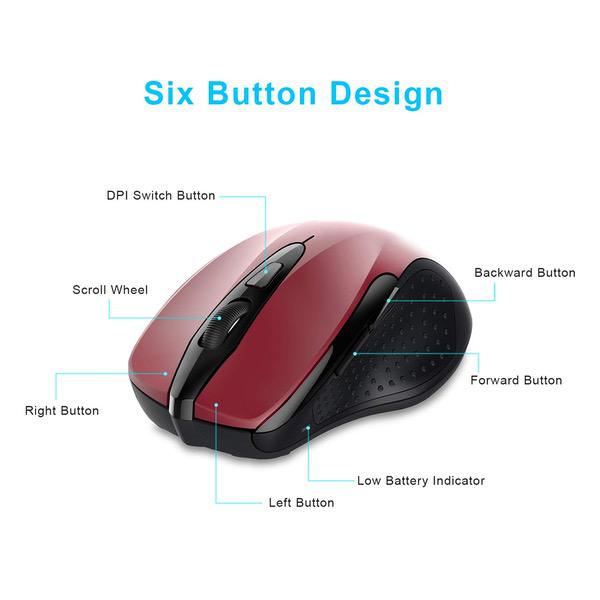
How it works: Operates with Bluetooth-enabled notebooks or PC without the need for a receiver (dongle). Enable Bluetooth on your PC, pair with the mouse, start working. Pros: - The TruWave technology does seem to work well over a variety of surfaces. - Operating distance was effective to about 20 feet. - Left, Right, Back, Forward buttons all work quickly and quietly. - The Scroll wheel is smooth and fairly quiet. Works well with no time lag. - Interesting feature: Holding down scroll wheel enables a Fast-Scrolling ability. An arrow appears on the screen, and if you move cursor above it, scrolls up quickly. Move below the arrow and it scrolls down quickly. The farther away from the arrow you place the cursor, the faster it scrolls. - Pressing DPI button cycles through 5 settings, reflected in the flashing LED 1 to 5 times - When you power off the mouse, then power back on, it connects to the PC immediately with no apparent time lag. - The User Manual recommends best results by using the mouse on a light colored surface. It seems just as responsive & quick on a black colored mouse pad; although the manual suggests that may decrease battery life. - It comes with an 18 month warranty that may be extended to 24 months by registering the device at the TeckNet website. Did that, and it was an easy process of a few simple steps. Cons: - Usage the next day (after it’s been sleeping quite a while) shows a bit of initial time lag between button clicks and the actual response by the PC. (Cant determine if caused by the mouse or the PC). However, movement of the cursor by moving the mouse around is always quick. - I evaluated the BT mouse on two different PCs, both running Windows 10. One of the PCs performed well with the BT mouse. However, I did encounter one significant problem that is most likely related to the 2nd PC’s Intel Dual Band Wireless-AC 3165 chip itself, or the Firmware & Drivers; but Id be negligent if I didnt mention it. BACKGROUND: With other (2.4 GHz & receiver/dongle) mice, my 2nd PC’s Wi-Fi varied between 135-150 Mbps. But the moment I turn on the BM307 (and it quickly pairs with PC & comes alive), the Wi-Fi drops quickly to 54 Mbps, then 11 Mbps, and often loses connection to the router completely! (Even while connected, the browser cant seem to find anything on the internet.) I do NOT believe this is the BT mouses fault; more likely, Windows-10 is having trouble driving the Intel Pro-Set combined Wi-Fi & Bluetooth single chip. When I turn the mouse off, Wi-Fi remains at 54 Mbps until I ran the Win-10 Troubleshooter... Nothing showed up against the Wi-Fi circuit, but it found something wrong with Bluetooth, repaired it (in the background), and my Wi-Fi connection immediately shoots back up to 135-150 Mbps while the BT mouse was asleep. The moment I clicked a mouse button to activate it, the Wi-Fi dropped immediately to 54 Mbps, then to 36 Mbps! I had do Disconnect / Reconnect to the Wi-Fi to get 150 Mbps back. I updated the Intel DBW-AC 3165 drivers to the most recent ones (dated 5/29/17) and resulted in no change! Bottom line: The BT mouse worked well with the 1st PC; and only the 2nd PC had Wi-Fi slowdown problems when using the BT mouse. Your mileage may vary. Overall Evaluation: - A good quality responsive BT enabled mouse of slightly smaller size. Convenient for travel, but big enough for everyday comfort. Shares the same physical mouse unit/body as their 2.4 GHz mouse (as shown in the comparison photo). - Requires 2 x AAA batteries (not included). Box contains the mouse and User Manual. On/Off switch on the bottom. - The optical sensor on the TechNet standard 2.4 GHz mouse (same device body but with receiver/dongle rather than BT circuitry) does not reveal visible light beneath. However, the tBM307 always reveals the red LED (or LASER?) constantly glowing. No concerns, just FYI that it’s normal. - FYI, to enable the PC Windows 10 side, try this: - Click the Start menu and select Settings. - Click Devices. - Click Bluetooth. - Move the Bluetooth toggle to the desired setting. - Click the X in the top right corner to save the changes and close the settings window. - FYI, to enable the BT mouse side, try this: - Press button on mouse bottom 2-3 sec to enable the pairing mode - on the PC, Click "Add Bluetooth or other device" - After about 10 seconds you should see , "TeckNet BM307 Connected"
Tommy
4
This could have been a great mouse but it just not work for me... the connection is quick and responsive. the battery life seemed to be good enough for me. grip is comfortable but.... A very very big issue for me is that: whenever I use any other bluetooth device on the same computer, the mouse starts to lag, jumping around, latency > 1 sec. wont be able to actually do anything with the mouse. I have a bluetooth headphones connected to the working computer and whenever I play anything through the headphones, the mouse is practically unusable. However whenever I turned off music, after few seconds the mouse become responsive again. FYI my previous bluetooth mouses never had this issue before. In summary this mouse may be really great, but just not work for me at all ( or for anyone who has a secondary bluetooth device on the same computer) UPDATE: after some time I found out the stuttering of the mouse really is an issue of both this mouse and my other bluetooth device (headphones). Therefore change back to 4 star since this is still a pretty good mouse for the price. Just a side note, that the bluetooth interference doesnt happen to all devices, and well made bluetooth device should have measures to overcome this interference. But for someone having the same issue: replacing one device would help, otherwise, change wireless adapter settings (band changed to 5Hz, turn off bluetooth collaboration, change performance mode to high) will ALLEVIATE this issue but cost more battery consumption.
Livermore, CA
4
Changing my update of 7/19 when I cited it was dying because it kept losing bluetooth and I had made no changes on my Mac. 2 days later my keyboard did the same thing. A reboot of my Mac seemed to have solved it. so this was not the Mouse fault at all and Im bumping this back to 4 stars and removing my nasty update :) Original April 2018:: So Ive been using for 2 weeks and its working well. Bluetooth to my Mac reconnects on startup etc. No issues, so far its working as expected and from the price, no issues.. Comfortable. so 2 weeks is not a lot of time to be able to comment on the battery lift, but since its used 12-15 hours .a day, seems to be solid so far. Will update when the batteries need changed. Okay Batteries needed changing, kept blinking red and quitting on me :) So its now what May 16th so that is probably 30 days of continuous on, and probably 12 hours a day of use (or more). So not quite 8 months :) hahaha, maybe Ill try to turn it off in the evenings and see what I get.. More updates when I have to change them again. Also still working fine, very smooth and comfortable mouse. June 7th, 2018 Well I failed to turn it off each night and today the battery light came on, so that was May 16th until today, not its not dead, so not sure how much more time i would have but I would say this mouse with constant use is good for 30 days. So the 18 month statement is well, hmmm ya :) still happy with it!
W in Md
4
The reason that I rated it so low is due to my issue with the on-off switch. It is both stiff and hard to move as well as it is recessed so far that the only way that I can move it with my hand is by digging in a finger nail. Due to the large amount of friction required to move it, my finger nails are getting chewed up. Based upon my experience, I would not recommend this product due to so many other similar products available I will definitely try another brand when I need a replacement and perhaps I will seek a replacement even before the product wears out. . eta - It has gotten so bad that I now remove the battery to turn it off and completely bypass the on/off switch. The company contacted me and offered me a replacement mouse. This new one works much better. I have no complaints with the replacement. I changed my rating from 1 star to 4 stars. A product must exceed expectations for me to give a 5 star so theres nothing negative about my 4 star rating. I would buy this product again.
You may be interested
  • Bestsellers
  • Recently Viewed
 
Similar products
$‎ 2200 $‎ 5000 -56%
New York, US
Gold
Show more
Fast and high quality delivery

Our company makes delivery all over the country

Quality assurance and service

We offer only those goods, in which quality we are sure

Returns within 30 days

You have 30 days to test your purchase