
















Microsoft Wireless Comfort Desktop 5050 (PP4-00001)
Write a review
3047 3906

Microsoft Wireless Comfort Desktop 5050 (PP4-00001)

Write a review
B014W20C90
+
Add to wish list
Target is a general merchandise retailer with stores in all 50 states and the District...

City: US, New York

Delivery
Pickup at your own expense
Tomorrow from 09:00 to 20:00, Store location
Free
Payment options
Apple Pay Google Pay Mastercard Visa
Cash, bank card, credit/installment payments, cashless payment for legal entities
Warranty and returns
Exchange/return of products of proper quality within 14 days Official manufacturer's warranty: 12 months
Description
This fits your .
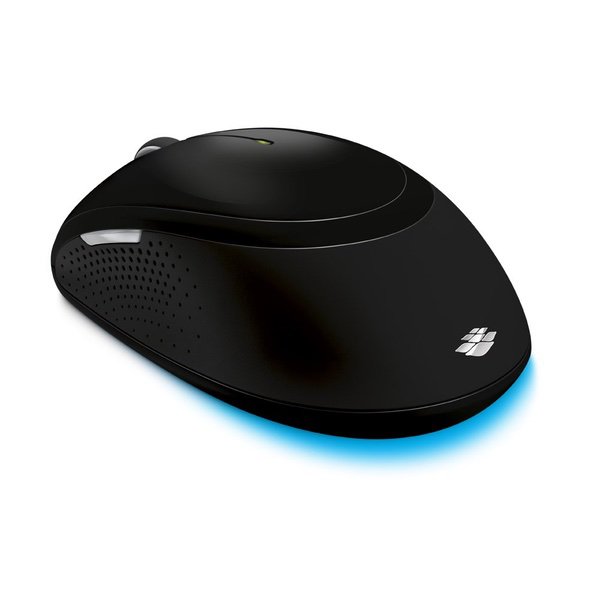
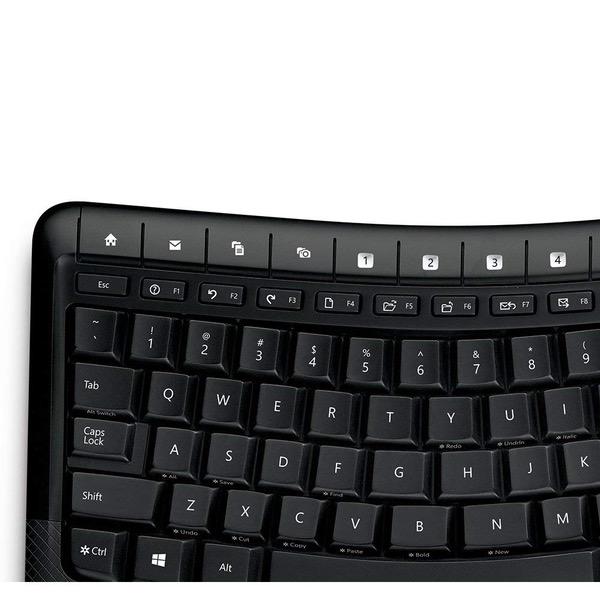
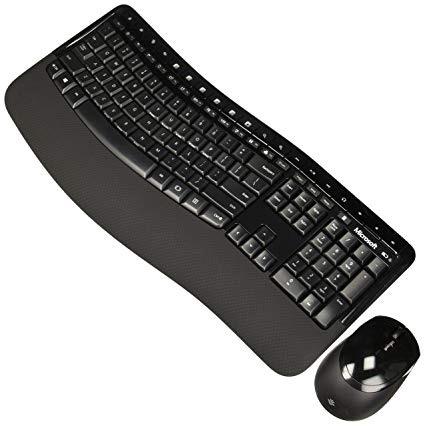
Make sure this fits by entering your model number. Ergonomist-Approved Comfort Curve Design ; Designed to fit your right or left hand Advanced Encryption Standard (AES) 128-Bit Encryption Built in palm rest helps support and straighten wrists and 4 AA alkaline battery Wireless for increased freedom. System requirement is windows 10 / 8 / 7 and mac os x v10.4 – 10.7 Customizable shortcut keys to easily access your favorite programs Works on virtually any surface with BlueTrack Technology Ambidextrous design is suitable for use with either hand Refer user guide below.
Reviews
2.6
Reviews: 20
5 stars
15%
4 stars
10%
3 stars
30%
2 stars
10%
1 star
35%
Missing Module
4
Ill start off this review by saying that I do like this keyboard. The mouse, eh.. its all right but theres some minor gripes. One gripe universally that affects both the mouse and keyboard is the USB dongle. Its a bit too long and I would prefer the dongle from the MS Sculpt keyboards or Logitech transceivers. Theyre just smaller, more compact, seem more durable and doesnt get in the way. Ill review the mouse and the keyboards pros and cons separately. Keyboard: Pros: Not a split keyboard so its a bit smaller in width than most ergo keyboards which ensures closer mouse placement for less RSI strain. (Plenty of people forget about mouse placement and how it affects you). Its keys are quiet and it gives a durable feeling to it overall. Simple and effective layout for an everyday user. The palm rest is nice and the overall keyboard has a sleek and cool look to it. Cons: You have to download the driver from Microsofts website to customize the extra keys (1-5) and to see if the lock keys are activated. When accessing some of the lock keys, ex."Function lock", which I and many others prefer a regular toggle button and not a lock function; it doesnt indicate whether its activated without the driver. A simple light indicator to show whether the keys are "locked" or not would be helpful. I also dont like the fact that theres 2 removable "legs" to raise the board. I would prefer everything be attached so theres no extra pieces that could get lost. Lastly, theres a couple of buttons that youre not sure what it does and it would help if the manual indicated their functions. (TIP: the button next to the right ALT is a switch task button, and you might need the driver for it to work properly. At least, Im pressing it without the driver, and nothing is happening). Mouse: Pros: Its a larger mouse so it fits in the palm of your hand fuller, which can be helpful since you dont want to be gripping too hard or over-exerting your hand muscles. Cons: The mouse is just a bit awkward itself. The back and forward keys are on both opposite ends of your hands so your ring finger would unconsciously hit the forward key when just holding the mouse. One note: I couldnt find an ON/OFF button on the mouse (apparently its on the bottom, but I mustve missed it when I looked there). So there you have it. A good keyboard (albeit a few gripes) overall with an okay mouse combo. Decent affordable price. A bit more compact which is nice for RSI/Carpal sufferers to have closer mouse placement. Its probably one of the more affordable keyboards on Amazon that doesnt cut too many corners on quality.
J
4
A keyboard is a keyboard, right? No, this one is awesome! The gentle curve of the keyboard makes it so much easier to type when you sit in a corner with an arm propped up on each side. I never realized how much my wrists were angled on a straight keyboard until I started using this one. Ive always typed very fast, and with this keyboard, I can type even faster because it sits just right for me. Its super comfortable, including the wrist support. I downloaded the Microsoft driver to configure the hotkeys, but probably wont bother. I find it easier to mouse over to what I want rather than look down and find a key. But its there if I decide that I want to configure it. This keyboard is definitely more expensive than most, but it is a Microsoft product, and they generally have a lengthy life. So far, its great, and Ill update if something changes. Ive been using this product for nearly a month and changing my review to a 4 because the mouse is awful. Throw it away kind of awful. It is big and loud and has no redeeming qualities other than it works. The clicking sound is incredibly loud and annoying. Im throwing away the mouse. But, I absolutely love the keyboard!
You may be interested
  • Bestsellers
  • Recently Viewed
 
Fast and high quality delivery

Our company makes delivery all over the country

Quality assurance and service

We offer only those goods, in which quality we are sure

Returns within 30 days

You have 30 days to test your purchase