
















Microsoft Wireless Comfort Desktop 5050 (PP4-00001)
Write a review
$3900 $5000

Microsoft Wireless Comfort Desktop 5050 (PP4-00001)

Write a review
B014W20C90
+
Add to wish list
Target is a general merchandise retailer with stores in all 50 states and the District...

City: US, New York

Delivery
Pickup at your own expense
Tomorrow from 09:00 to 20:00, Store location
Free
Payment options
Apple Pay Google Pay Mastercard Visa
Cash, bank card, credit/installment payments, cashless payment for legal entities
Warranty and returns
Exchange/return of products of proper quality within 14 days Official manufacturer's warranty: 12 months
Description
This fits your .
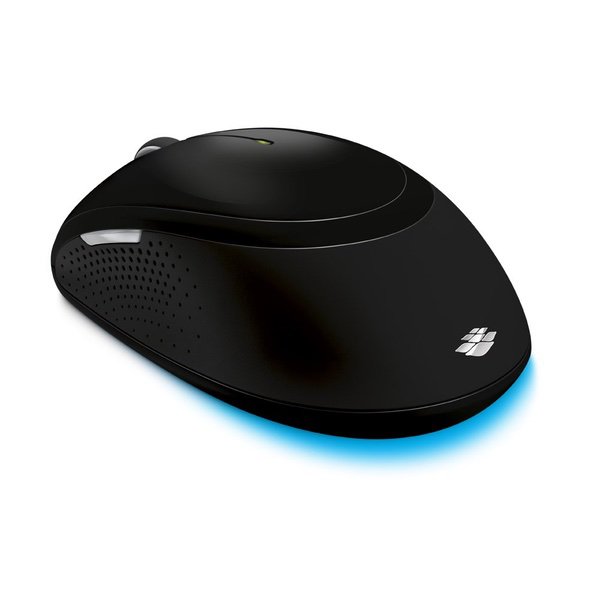
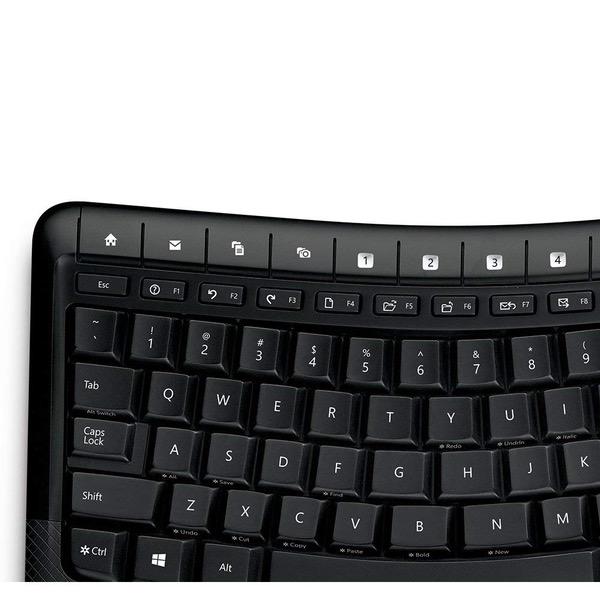
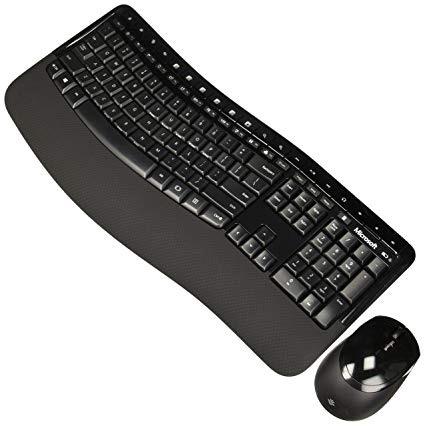
Make sure this fits by entering your model number. Ergonomist-Approved Comfort Curve Design ; Designed to fit your right or left hand Advanced Encryption Standard (AES) 128-Bit Encryption Built in palm rest helps support and straighten wrists and 4 AA alkaline battery Wireless for increased freedom. System requirement is windows 10 / 8 / 7 and mac os x v10.4 – 10.7 Customizable shortcut keys to easily access your favorite programs Works on virtually any surface with BlueTrack Technology Ambidextrous design is suitable for use with either hand Refer user guide below.
Reviews
2.6
Reviews: 20
5 stars
15%
4 stars
10%
3 stars
30%
2 stars
10%
1 star
35%
Nancy Crays
1
I had a much earlier model that I loved, so I bought this one thinking it would be as good or better. The mouse is a piece of junk. It is an optical mouse and the mouse pointer is jerky and jumps all over and is extremely difficult to control. Ive changed mouse pads, cleaned mouse pads and mouse. I moved the USB thing to a different USB port closer to the mouse. Still it jumps around a lot. It seems to be worst when it is dark. The keyboard is ok, but the old one was better. No light for caps lock or number lock keys. Function keys are TINY. So is the Esc key. Sometimes the first few characters dont type. Im going to toss these and go to a local store to buy another keyboard and mouse.
Master Universe
1
Dont know where to start even. The KB has programmable" function keys plus extra keys on top. But nothing works "out of the box." For example Im used to hit the F2 in Windows Explorer to rename a file that is selected. In Excel, F2 allows to edit a cell. These things do not work. I downloaded the Microsoft utility for the KB/Mouse and it "allows" you to assign functions to all these keys. But it does not say how. I have no clue how to make F2 do the regular things using the utility. The mouse scrolling is slooooooooooow. Again the utility allows you to change the speed with the scroll bar between "slow" and "fast". But nothing really happens. You use the scroll wheel in the center, and the page barely moves. Moreover the reaction of the scroll wheel is very poor. You start turning the wheel for a while before the scroll function catches on. I have been using this KB/Mouse for over a week.and decided to trash it. A waste of time. And Im using it with another Microsoft product, a Surface Pro 3! No excuses.
Joe from chicago
1
had it for a month. At first missing keystrokes but now completely disconnecting. Hopefully just a bad one and i can get an exchange. Update. Product is absolute garbage. I was issued an exchange and the same issues. random disconnecting and forget about typing in your windows log on. It will not catch the first key entered. I swapped in a cheap dell wireless keyboard and mouse and they work flawlessly. I disable the bluetooth sleep function too and the same issue. First time i have ever felt so compelled to write a bad review for something but i would hate for anyone else to waste money on this product.
eagle
1
So, I got hooked on "Microsoft Ergonomic" keyboards since the late 1990s--I guess almost 20 years now. Generally, these have been very comfortable keyboards that just "felt" right and were very easy to use as a result. This particular keyboard does follow in this tradition on the physical level. My hands are relaxed when typing, and its all good. Unfortunately, the "wireless" function is not working right. Very frequently, the first character I type is ignored. This is especially painful when the first key-down is a ctrl or alt combination, which means that something else is selected and it gets replaced with the ctrl/alt combo char vs the control sequence being executed. On a more basic level, renaming files with F2 or refreshing firefox or chrome browser with F5 also does not work because keyboard presses are just sometimes ignored. Somehow, Microsoft lost its track. Cant blame it on the OS--they own this also. Maybe non-MS HW is best now. Dont know. Im sticking to wired HW for now (non-MS) and will figure this out for myself. Meanwhile, I would recommend you stay away from Microsoft keyboards.
Craig and Renae Gregoire
1
BUYER BEWARE. I bought this keyboard on recommendation from my computer guy. It was really nice ... while it lasted. A little more than a month into using it, the keys suddenly stopped working half the time. Id type, but only half the words would register. In looking for a solution online, I found all of the negative reviews here. Wish Id taken the time to read them before buying. Sad to waste so much money. The mouse is still hanging in there though, as if that makes a difference. ~Renae
Michi
1
I like how the keyboard feels from an ergonomic standpoint, however, after just 4 uses, neither the mouse or keyboard work anymore. USB device is no longer recognized by my PC. Update - Ive only had this product for 5 weeks. Amazon will not allow a return, and Amazon support directed me to contact Microsoft for assistance. After literally 2 hours on the phone with MS support, they offered a replacement, and I have to pay to ship the faulty unit in. The box is roughly 30x3x9, it would cost me a fortune to box and ship from home. Seriously disappointed.
Dennis N Eddlemon
1
Ive had this keyboard and mouse (model 5000) for many years with my Windows 7 computer and it worked fine. Then I bought a Windows 10 computer and found the mouse does not work properly. The mouse pointer lags, jump, hangs, stutters, whatever you want to call it. This jumpiness varies and sometimes it works fine but then start acting up. I havent found any rhyme or reason to it. I thought it also might be interference and I did some testing along those lines without success, but that also wouldnt explain why other makes of mouse work fine. The key board works fine. So I thought maybe a newer copy might work better so I bought the keyboard and mouse again and had the same problem with the mouse pointer. I researched on the internet and found a lot of other people had the same problem. I found lots of on-line advice on how to fix the problem but none of the ideas worked. The computer came with a HP wireless mouse and it worked fine. So did a Leadsail wireless mouse I bought. So bottom line is that other mice work with this Windows 10 but not the Microsoft 5000 mouse. I like the feel of the Microsoft mouse and thats main reason I kept messing with it trying to make it work, but it refuses to work properly. I also dont want to take up another USB port with a separate wireless mouse receiver, but if thats what I have to do to get a mouse to work properly then thats what Ill do. So for Windows 10 I wouldnt recommend this mouse and keyboard purchase. Update 3/05/19. I finally settled on a logitech mouse M525. I like the feel and seems to work great. Previously I reported the keyboard works fine, but lately Ive been having some problems with it as well. Ive noticed that if the hard drive seems to be busy the keyboard skips or doesnt respond. When the hard drive is done or slows down its activity the keyboard starts working again properly. Now Im trying to select another keyboard.
You may be interested
  • Bestsellers
  • Recently Viewed
 
Fast and high quality delivery

Our company makes delivery all over the country

Quality assurance and service

We offer only those goods, in which quality we are sure

Returns within 30 days

You have 30 days to test your purchase