

























Dee Vee
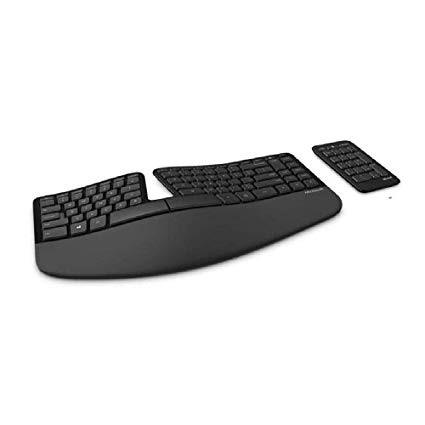
Ill list the highlights first, then get into the descriptive details for keyboard aficionados. PROS: - Size – compact, comparable to MS Elite - Arrow key configuration – standard - Key type – chiclet/laptop - Key noise – quiet, gentle “thunking” sound - Key tactile feedback – firm, satisfying - Key travel – a bit shallower than Elite but more than a Mac keyboard or many newer laptops. It reminds me how laptop keyboards were 10-15 years ago - Ergonomic curve – comparable to MS Elite, but even more comfortable - Detached num pad - Num pad backspace key - *Padded palm rest, feels a bit like suede (see note at end) - No dedicated media keys (there IS a Calculator key)–which I realize would be a con for some - Strong signal / dongle (NOT Bluetooth) - Detachable riser CONS: - Detached num pad - F key split between F6 and F7 - F key hard click - PgUp/PgDn/Insert key configuration UNKOWN: - Battery life First, I want to say how much I *LOVE* the arrow key configuration. I could write a freaking sonnet about how happy this arrow key config makes me! As is, I will just write a thorough review of all the reasons I am very pleased with this keyboard, and the few things I don’t care for much. I was trained to use keyboard shortcuts as a transcriptionist, including shift+arrow and CTRL+shift+arrow to move quickly through text while editing. The tiny diamond config arrow keys of the Elite keyboard have been the biggest problem for me since being trained/forced to work that way. You can’t easily keep the left hand on the CTRL and shift keys and the right hand on the arrows, using 3 fingers to easily arrow L, R, U and D without making a very tight, weird “claw” that gets uncomfortable quickly. I had to switch to the MS 4000, but that was too big–on my desk AND for my petite hands overall–and the keys got harder to push the older it got, which led me to replacing it with the Sculpt. Ive had carpal tunnel syndrome (and surgery) -- and Im educated in ergonomics and proper technique. This keyboard is the best investment Ive made in an ergo keyboard since the MS Elites I bought years ago and which died. I have done a lot of research on ergo keyboards over the past 10 years. I’ve tried a couple different Kinesis boards. I’ve tried the Goldtouch Pro. I’ve used the MS 4000 extensively after the Elites were no longer available at my old employer. I’ve used an Elite at work and at home off and on since 1998 (20 years). It’s been my favorite keyboard, yet it’s so hard to find and expensive, it was tough to need a new ergo keyboard yet again and decide “now what will I do?” Recent research determined there are even fewer truly affordable choices for ACTUAL ergonomic keyboards than there were 10 years ago. There aren’t many under $300, and even fewer under $100. Finding this one under $75 and ending up loving it was pleasantly surpising. Most of the actual ergo boards are mechanical (clicky) keys, which I cannot stand anymore. I used to love how they felt when typing, and the sound didn’t bug me. But when you listen to people talk 8 hours a day for a living, and your employer rates you on how accurately you hear them, you really need to eliminate other noises which can interfere with that–but I digress! My research led me to the MS Sculpt being the closest in size to the MS Elite, and it had the traditional arrow key configuration which was top of my list of “must haves” as I scoured the interwebs for my options. I have been using the Sculpt for a couple months at home for light business and personal use. It is quite solid, which surprised me given its slim profile. Despite its low profile, it still achieves good ergonomic positioning. It has a detachable riser for the front. I hate those things, but I know a lot of people like them. MS was nice enough to give us the option on this, like with the MS 4000. Its keys are flat, WITHOUT sharp edges that so many chiclet keys have these days. They are low profile but sturdy, like a high end laptop used to feel. They feel a little further apart than the MS Elite keys (which I currently have at work again), but I havent actually measured or compared them side by side. Its very slight, though. Not enough to throw me off more than a few seconds as I get acclimated again each time I sit down at it. It’s a nice compromise between the MS Elite and the MS 4000. The only keys I am still getting used to are the Delete, Insert, PgUp, and PgDn keys–and if I wasn’t switching back and forth between the Elite at work and Sculpt at home, I probably wouldn’t still be struggling. Essentially, this keyboard combines the standard arrow configuration of the MS 4000 with the relative size and curvature of the MS Elite, and the key style and feedback of a well-constructed laptop of the late 90s. The membrane switches are stiff enough to give good feedback without requiring pressing too hard. The detached num pad is a bone of contention for some users, and I cant quite decide how I feel about it. Sometimes I like that its detached and I can move it up when I know I wont need it, moving my mouse closer to the keyboard (reduces neck/shoulder/arm fatigue). Sometimes I need to use it, and I can pull it back into position beside the keyboard. But sometimes I forget and grab both ends--like I would my MS Elite--to reposition it, and it doesnt work. It annoys me a bit that I cant pick "it" up because "it" is a "them"... and I have to pull them back toward me. I have a tendency to push them a little bit forward as I work because my work surface at home is a rather slick table. I am going to get an extra-large mouse pad type thing to put under the whole keyboard and mouse. I have one at work under my Elite, and other than when I bump it with my chair or something, it never moves. Given how well the MS Sculpt stays in place on the "slickery" table, I am confident the mat will solve my issues as well as the one at work did with the Elite. So, once I do that, I think my overall feeling about the separate num pad will be that it’s actually more helpful than annoying. One VERY cool positive that this num pad has, which many do not, is the BACKSPACE key at the top right. I freaking LOVE when keyboards have that! It also has a Calculator key to launch that app. It’s the closest thing to a media key this set has. I know a lot of people love media keys, but I loathe them. They’re a waste of space for me. I don’t use them except when I unintentionally bump one. I’m glad this keyboard doesn’t have them. It makes the keyboard more compact, and it keeps me from wasting time closing programs I don’t use. The media keys are integrated with the F keys, and you slide a tab to select regular F key use or secondary use of media keys, monitor settings, etc. The F key issues are minimal for me. I quickly get used to the fact that the F keys are split like the actual number keys – between 6 and 7 – instead of between 5 and 6. Again, it’s mostly an issue because I am switching between a Sculpt at home and an Elite at work. However, given how much I love the Sculpt, and the fact that I have had several problems with keys on my Elite activating as I typed and edited this–I will probably be replacing my work keyboard with a Sculpt really soon! Battery life is difficult to judge. I’ve had it a couple months, and I use it between 8-24 hours a week. Haven’t had to change batteries yet. If I don’t have to change it for 3 more months, I’ll be satisfied. Two AAA batteries every 3-6 mos is fine with me. I’ll try to remember to update the review after I’ve had it longer, or after I have experience using one at work, which would be extensive use 8-9 hours daily, 5 days a week. Overall, I am extremely satisfied with this keyboard, and I wish Id gotten one sooner! I have spent SO much money on ergo keyboards over the years, though, which were such disappointments, I was quite gun-shy on trying this one. Im quite glad I took the leap, though. Also -- I highly recommend getting a “Protection Plan” on this, or any electronic item you invest more than $50 in and NEED to have. For a few extra bucks, you can get easy, hassle-free replacements of products. Electronics are like the people who make them -- imperfect, and occasionally you come across one thats a dud. I figure that if youre spending over $50 on a keyboard, its because you are choosy enough or have physical needs which require something specific. The protection plan is an investment in your own peace of mind, health, and well-being. A few bucks for a guaranteed replacement if it goes belly up? Worth it. *Padded Palm Rest “PRO”– Palm and wrist rests are only supposed to be used for pauses *between* typing and mousing, not for resting or pressing on while performing the actions. While this keyboard’s lightly padded, synthetic leathery feel is nice, you should NOT actually rest your palms on it WHILE typing. That is how I exacerbated my carpal tunnel syndrome to the point of needing surgery–by subconsciously pressing on the palm rest while typing. The more busy and stressed I was, the harder I pressed. AFTER my CTR surgery, I realized I had been doing that, and I retrained myself to stop it. I also had an ergonomic specialist consultation (thanks to my employer!), and they told me my fingers should dangle from my hands, which should be held above the keys, with my arms at a 90-degree angle (L-shape) as seen from the side. Rest between typing only. If you need support, get a chair with arms or get arm supports that attach to your desk. The support under your forearms can relieve a lot of shoulder/neck tension and strain. But that’s too much weight to put on small points such as the wrists or palms.