

























Yoda Flame
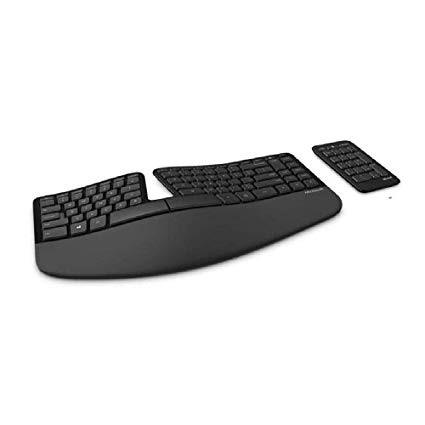
0:00 0:00 This video is not intended for all audiences. What date were you born? January February March April May June July August September October November December 1 2 3 4 5 6 7 8 9 10 11 12 13 14 15 16 17 18 19 20 21 22 23 24 25 26 27 28 29 30 31 2019 2018 2017 2016 2015 2014 2013 2012 2011 2010 2009 2008 2007 2006 2005 2004 2003 2002 2001 2000 1999 1998 1997 1996 1995 1994 1993 1992 1991 1990 1989 1988 1987 1986 1985 1984 1983 1982 1981 1980 1979 1978 1977 1976 1975 1974 1973 1972 1971 1970 1969 1968 1967 1966 1965 1964 1963 1962 1961 1960 1959 1958 1957 1956 1955 1954 1953 1952 1951 1950 1949 1948 1947 1946 1945 1944 1943 1942 1941 1940 1939 1938 1937 1936 1935 1934 1933 1932 1931 1930 1929 1928 1927 1926 1925 1924 1923 1922 1921 1920 1919 1918 1917 1916 1915 1914 1913 1912 1911 1910 1909 1908 1907 1906 1905 1904 1903 1902 1901 1900 Submit Adobe Flash Player is required to watch this video. Install Flash Player I thought I would love this keyboard after messing with it in Best Buy. The action of the keys feels really nice -- you can type super fast on this thing. It is also very modern and clean looking. The detachable number pad seems pointless. I guess its nice if you dont want to use it at all and need to free up space, or perhaps if you are an accountant, but otherwise it just feels like one more piece of something to move around and keep managed on your desk. I have read a complaint from an actual number cruncher so I wouldnt count on the latter. The biggest glaring flaw is the function keys. I am used to having multimedia keys on my keyboard. This keyboard has special function keys, but you have to toggle a switch every time you use them. SUPER ANNOYING. This alone (potentially) ruins this keyboard. The function keys are also very small. Some smart guy somewhere decided there shouldnt be a function key on this keyboard. Instead they put worthless keys (like a context menu button). It has been years and I dont see Microsoft ever resolving it. As a programmer your day looks something like this: Press F5 to refresh page, etc. Oh... I want to pause my music... Find tiny toggle switch... switch over... Press special function key to pause music Switch the tiny switch back so function keys can behave normally.... later on... need to play music again... hmmm is the key switched on or off (I cant remember where I left the toggle)?... let me look.. cant tell from the tiny switch.. guess I will press a key and see... oh I guess its toggled... oops... repeat cycle all day .... Imagine if every time you wanted to use your shift key for instance, you have to toggle a switch of pressing a key. Then you had to toggle the switch again to turn shift off... Thats basically what this is like. At least if they were gonna make it so freaking annoying, they could have use a button to toggle instead of a tiny switch. If you dont ever play music, youtube, facebook videos, etc., on your computer, then maybe you will love this thing. UPDATE: So here is a solution for those who want to hold on to this thing but really need the multimedia buttons to be easily accessible: 1) Go and download autohotkey. I did some research and this program is open source and seems safe. It also have decent community on stack overflow, but feel free to do your own research. Create the following script: <#F11:: Send {Volume_Down} return <#F12:: Send {Volume_Up} return <#F9:: Send {Media_Play_Pause} return <#F10:: Send {Volume_Mute} return This will basically map the Windows Key to serve a function key. I only updated the multimedia buttons, but feel free to check our their docs to alter the other buttons.