
















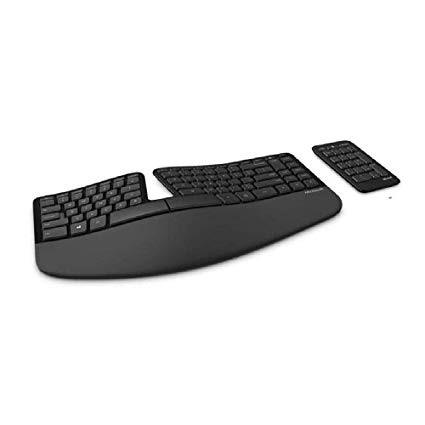
Microsoft Sculpt Ergonomic Keyboard for Business (5KV-00001 )
اكتب تقييم
$‎ 5400

Microsoft Sculpt Ergonomic Keyboard for Business (5KV-00001 )

اكتب تقييم
B00CYX26BC
Target is a general merchandise retailer with stores in all 50 states and the District...

المدينة: US, New York

Delivery
Pickup at your own expense
Tomorrow from 09:00 to 20:00, Store location
Free
Payment options
Apple Pay Google Pay Mastercard Visa
Cash, bank card, credit/installment payments, cashless payment for legal entities
Warranty and returns
Exchange/return of products of proper quality within 14 days Official manufacturer's warranty: 12 months
Description
This fits your .
Make sure this fits by entering your model number. Split Keyset Design Helps To Position Wrists And Forearms In A Natural, Relaxed Position Cushioned Palm Rest Provides Support And Promotes A Neutral Wrist Position Domed Keyboard Design Positions Wrists At A Natural, Relaxed Angle Separate number pad provides greater flexibility for workspace setup Natural Arc key layout mimics the curved shape of the finger tips Split keyset design helps to position wrists and forearms in a natural, relaxed position Cushioned palm rest provides support and promotes a neutral wrist position
Reviews
2.3
التقييمات: 20
5 نجمة
5%
4 نجمة
25%
3 نجمة
10%
2 نجمة
15%
1 نجوم
45%
Yoda Flame
4
0:00 0:00 This video is not intended for all audiences. What date were you born? January February March April May June July August September October November December 1 2 3 4 5 6 7 8 9 10 11 12 13 14 15 16 17 18 19 20 21 22 23 24 25 26 27 28 29 30 31 2019 2018 2017 2016 2015 2014 2013 2012 2011 2010 2009 2008 2007 2006 2005 2004 2003 2002 2001 2000 1999 1998 1997 1996 1995 1994 1993 1992 1991 1990 1989 1988 1987 1986 1985 1984 1983 1982 1981 1980 1979 1978 1977 1976 1975 1974 1973 1972 1971 1970 1969 1968 1967 1966 1965 1964 1963 1962 1961 1960 1959 1958 1957 1956 1955 1954 1953 1952 1951 1950 1949 1948 1947 1946 1945 1944 1943 1942 1941 1940 1939 1938 1937 1936 1935 1934 1933 1932 1931 1930 1929 1928 1927 1926 1925 1924 1923 1922 1921 1920 1919 1918 1917 1916 1915 1914 1913 1912 1911 1910 1909 1908 1907 1906 1905 1904 1903 1902 1901 1900 Submit Adobe Flash Player is required to watch this video. Install Flash Player I thought I would love this keyboard after messing with it in Best Buy. The action of the keys feels really nice -- you can type super fast on this thing. It is also very modern and clean looking. The detachable number pad seems pointless. I guess its nice if you dont want to use it at all and need to free up space, or perhaps if you are an accountant, but otherwise it just feels like one more piece of something to move around and keep managed on your desk. I have read a complaint from an actual number cruncher so I wouldnt count on the latter. The biggest glaring flaw is the function keys. I am used to having multimedia keys on my keyboard. This keyboard has special function keys, but you have to toggle a switch every time you use them. SUPER ANNOYING. This alone (potentially) ruins this keyboard. The function keys are also very small. Some smart guy somewhere decided there shouldnt be a function key on this keyboard. Instead they put worthless keys (like a context menu button). It has been years and I dont see Microsoft ever resolving it. As a programmer your day looks something like this: Press F5 to refresh page, etc. Oh... I want to pause my music... Find tiny toggle switch... switch over... Press special function key to pause music Switch the tiny switch back so function keys can behave normally.... later on... need to play music again... hmmm is the key switched on or off (I cant remember where I left the toggle)?... let me look.. cant tell from the tiny switch.. guess I will press a key and see... oh I guess its toggled... oops... repeat cycle all day .... Imagine if every time you wanted to use your shift key for instance, you have to toggle a switch of pressing a key. Then you had to toggle the switch again to turn shift off... Thats basically what this is like. At least if they were gonna make it so freaking annoying, they could have use a button to toggle instead of a tiny switch. If you dont ever play music, youtube, facebook videos, etc., on your computer, then maybe you will love this thing. UPDATE: So here is a solution for those who want to hold on to this thing but really need the multimedia buttons to be easily accessible: 1) Go and download autohotkey. I did some research and this program is open source and seems safe. It also have decent community on stack overflow, but feel free to do your own research. Create the following script: <#F11:: Send {Volume_Down} return <#F12:: Send {Volume_Up} return <#F9:: Send {Media_Play_Pause} return <#F10:: Send {Volume_Mute} return This will basically map the Windows Key to serve a function key. I only updated the multimedia buttons, but feel free to check our their docs to alter the other buttons.
frankfromnj
4
I purchased this to replace my Microsoft Natural Ergonomic Desktop 7000. This keyboard is better than the 7000 in almost every way. Pros: 1) Separating the numeric keypad is great. I can center the keyboard and have my trackpad within easy reach. 2) The key presses feel so much better than the 7000. 3) The front riser attaches via magnets. This is such a nice touch. 4) The battery cover attaches by magnets. 5) The receiver is so tiny. Be careful, you could easily lose it. There is a nice storage area in the battery compartment though. Cons: 1) The biggest issue is the palm rest. Ive only been using the keyboard for a few weeks now and there are permanent discolored areas where my hands rest. I had the 7000 for years and this never happened. 2) The Esc key and Function keys are about 1/3 the size of the regular keys and they can be harder to press, especially the Esc key because of its location. 3) I do find myself missing the separate Function and media keys. You have a flip a switch to change the Function keys to their secondary functions. The bottom line is that for everyday typing this keyboard is far superior to the 4000/7000 models that came before it.
FPoole
4
I bought this keyboard after looking for an ergonomic KB that was quieter than what I had. What I had was an original MS "Natural Keyboard Elite" which Ive been typing on for many years. In fact, its so old, it has a PS2 connector instead of USB and I had to use an adapter to make it work. It was also very noisy when I typed which was never a problem until I started working from home. When on conference calls, I couldnt take notes because the old keyboard would drown out the conversation. My wife also complained which, of course, was the tipping point. I wasnt looking for wireless but it was all could find in a "Chiclet" style keyboard. I find the "ergonomic" shape as comfortable, if not more, than old Elite and the chiclet style keys are MUCH quieter. The keys are mostly in the same configuration so Im not hunting for delete, home, pgup, etc. But, Im not able to type as fast as I did before, for some reason. I suppose its an adjustment. I didnt think I would like the detached number pad but have grown to really like it. For one, my mouse is much closer to the keyboard now so less reaching for it. Secondly, you can pick it up and use like a calculator if you have some numbers to crunch. I also like theres a button to launch the Windows calculator on the KB and the num pad. Overall, its a great replacement for the old Elite. I would have given 5 stars but it didnt sit level on my desk at first. There are 5 padded feet on the bottom with the 5th in the middle front. The KB was bowed just slightly and the foot didnt touch the desk which made the KB rock a little when typing. However, I found I like the riser that attaches under the wrist rest so the unevenness is now moot. But, for the price, you would think the it would have been made better. I havent seen any other complaints on this so I must have the lucky KB!
Terry Molnar
4
I bought one for my office and liked it so much that I bought another one for home. The ergonomic structure fit my hands perfectly and I really appreciated that I could place the numerical unit and the mouse separately. That gave me loads of options, which I need because the standing desk I use has a keyboard tray that really isnt big enough, yet it is at just the right height for putting paper documents to sign, edit, etc. without going to the trouble of lowering the desk. It is a delightfully fluid arrangement. The keys are farther apart than on a standard keyboard, which reduces the chances of accidentally hitting two keys at once. And doesnt feel cramped. I can use it all day without fatigue. As I read through the reviews I noted that professional typists were unhappy with the unusual placement of some of the auxiliary keys (back space, delete, end, etc.) and the response time. Im far from being a proficient typist, so those differences did not bother me much. The feel of the keys takes a little getting used to, but once I got the hang of it, it was smooth sailing. Then, about 4 months after purchase (November 2018) the keys began responding slowly, then intermittently, not at all. It took about a week for it to become unusable. I was dismayed, to say the least. The only hesitation I had when I selected this keyboard was the problems some people reported with durability, describing a progressive deterioration after a few months of use. But I decided to take the gamble. I lost. About four days ago I sent a message to the manufacturer through Amazon, explaining the failure and asking if it was still under warranty. To date Ive gotten no response. I would gladly buy another if I were assured that I would get support, but Ill have to buy a different keyboard (actually two, because switching between two different keyboards would be a pain) if I dont get a response soon. Too bad.
J. Lohr
4
After having used the Microsoft Natural Ergonomic Keyboard 4000 for over 10 years both at work and at home, in the last year or so Ive started getting RSI in my thumbs from hitting the both the space bar and the number pad on the keyboard (and also from gripping my vertical mouse). I never really thought about how much pressure it required to hit the type of keys that the 4000 had. So I finally decided to try this newer version of the keyboard, and so far I really like it. The keys are much easier to press so they dont tire out my fingers as much, and having separate space bars for each thumb is an improvement over the 4000. On that one the space bar became "lopsided" because I hit it more with my right hand than my left. So when I would try to hit it with my left it would be much harder to press the key down. This one hopefully shouldnt have that issue in the future. This is the second one I bought. Ive been using one at work for a few weeks now and its definitely more comfortable. Its not completely fixing my RSI but it doesnt hurt as much, and it takes longer before it starts to hurt. I like that the number pad is separate, because I move it out of the way when Im not using it at home, and also move the keyboard over to a more comfortable position for gaming. The attachable wrist rest works very well. Its comfortable and is actually at a slightly better height for me than the 4000. Im probably in the minority here, but I wish the keyboard were wired instead. At work I plugged the dongle into my computer under my desk and it must be close enough to my keyboard tray that theres no issue. But at home my computer is about 3 or so feet away from my tray, and the tower is on the other side of my desk. Apparently that was an issue because the keyboard was working very sporadically. So I finally used a USB extension cable and put the dongle on top of my desk, about 1 1/2 feet from my tray, and now its working fine. I also miss the shortcut keys that the 4000 had. I used those a lot for quick access to my favorite programs and I miss that. I did edit the blue side of the function keys to add a couple back, so thats something. I also wish they hadnt moved all the arrow/page down/etc. keys, because I use those a lot as well and Im having more trouble adapting to their new positions than I thought I would. Without the separation between the sets of keys its harder to find the right one by feel, but Im assuming Ill get better in time. All things considered, I would definitely recommend it as an upgrade to anyone who has the older 4000 model.
You may be interested
  • Bestsellers
  • Recently Viewed
 
Similar products
$‎ 2200 $‎ 5000 -56%
New York, US
Gold
Show more
Fast and high quality delivery

Our company makes delivery all over the country

Quality assurance and service

We offer only those goods, in which quality we are sure

Returns within 30 days

You have 30 days to test your purchase