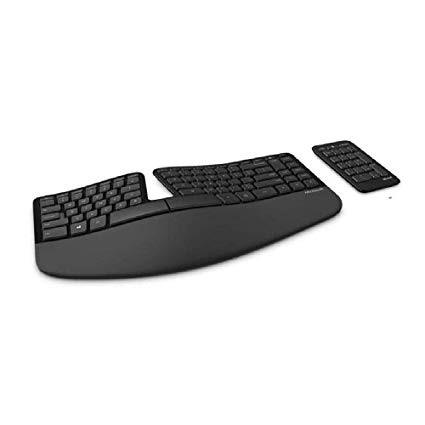
Make sure this fitsby entering your model number. Split Keyset Design Helps To Position Wrists And Forearms In A Natural, Relaxed Position Cushioned Palm Rest Provides Support And Promotes A Neutral Wrist Position Domed Keyboard Design Positions Wrists At A Natural, Relaxed Angle Separate number pad provides greater flexibility for workspace setup Natural Arc key layout mimics the curved shape of the finger tips Split keyset design helps to position wrists and forearms in a natural, relaxed position Cushioned palm rest provides support and promotes a neutral wrist position
As a long time user and owner (since 2003) of the Ergonomic 4000 keyboard by Microsoft, I decided it was time for an upgrade at work. (New job...needed an ergo keyboard anyway) I was ordering a 4000 when I stumbled across this pretty thing. After finding hardly any major reviews on it, I took a leap and ordered it. The difference between this keyboard and its much older brother is substantial. Several features are different: specifically the location of the 10 key and the wireless capabilities. I find the keyboard to be just a touch smaller than the 4000. Most of the major keys dont feel that way, but some areas--specifically around the arrows--feel much more cramped. The Delete key and its brothers being out of the rows they have been assigned for ages causes me to have to hunt for them like a beginner again. Which is a little unfortunate.I actually like the 10 key being removed it allows my mouse to be much closer and therefore more economical--that is until I need it and I wish it was attached. (I do alot of finance work, so Im still up in the air about it being loseable). FN switch is a nice addition, instead of a light on or off, while undoing when you meant to rename, that feature has been switched to a toggle that keeps its setting. Most of the isolated media keys, zoom, home key, search etc. are gone. I like the action the keys have. It is a shorter stroke that makes the keyboard a little nicer to type on. It does take some getting used to however. The keyboard pad feels nicer than the 4000. More firm...but it is coated in something that absolutely loves dust, dirt, and crumbs. The piano black is an unfortunate choice it ultimately makes it look cheap while feeling very well built. I honestly think they could of left the layout alone and it would of been fine. I like this reboot, I just wish it had a full size version of it without the piano black choice. EDIT: 8/15/16 After several months of use, Im disappointed with the rubber that acts as a wrist pad for this keyboard. It is easily stained by your hand oils, so this keyboard looks like it is MUCH older than it actually is. I like the design of this keyboard, and I still feel that is an improved version of the 4000, but be warned, after little use, it wont look as pleasant as you would expect.
Torrey Jaeckle
3
I bought this keyboard due to wrist pain I have been experiencing while typing lately (I spend most of my work day on a keyboard and mouse). My hope was that this keyboard would help alleviate the wrist pain, which it has to an extent. Here is the good and bad with this keyboard: PROS: - This definitely did seem to help with my wrist pain issues, even after just two weeks. - The keyboard is easy and comfortable to use. CONS: - It takes some getting used to, which is to be expected. I am still getting used to it, and maybe my opinion will improve as I gain more experience with it. - The function keys dont depress in the same manner as the other keys, which I dont like. I use a lot of function keys in my daily use, and I just dont like the feel of depressing the ones on here. I like consistency across the keys, and Im not sure why the function keys have a different method than the other keys. They dont really depress as much as click. I like that feeling of knowing that I pressed the key, and I dont get that with the function keys here. If you use the function keys a lot in your work, this could be an issue for you. - In addition, the function keys dont always work unless you press them perfectly in the middle each time. If you press on the end or in a corner (not in the middle) you will get the feel that it was pressed (it will click), but it wont actually register. This probably happens to me about 3 times a day in the average work day. - I frequently wind up inadvertently pressing a combination of keys that activates some short cut, forcing the computer to do something I dont want. Just in typing this review alone I have three times now inadvertently activated a set of keystrokes that opened a new blank tab on my browser and took me to it. Several times a day while typing emails I will inadvertently activate the "select-all" short-cut, and then when I resume my typing after unknowingly doing so it winds up deleting the entire text of the email (thank heavens for "undo"). I think this issue has to do with the placement of shift key, because it always seems to happen when I need to use the shift key to capitalize a letter. The shift and control keys on this keyboard are setup in a little different positioning than my old keyboard, and the control key on this one is quite large (square as opposed to rectangular on my old keyboard). I think I am inadvertently hitting the control key instead of the shift key, and this is what is making my next key stroke, in conjunction with the control key, activate whatever shortcut is associated with that letter. It is very frustrating. I probably inadvertently activate short-cuts twenty times a day. Maybe (hopefully) that will go away as I gain more experience on this keyboard and get more used to it. But I never used to inadvertently activate short-cuts on my old keyboard, so I am a bit concerned. - I only have this keyboard at my office, and from home I type on my laptop. Last night I had to type on my laptop for the first time since getting this keyboard and I found it very difficult. It seems Im currently in a position of not being totally used to this new keyboard yet, but used to it enough that it has screwed up my ability to type effectively on regular keyboards. If you are someone who will have to frequently still use a normal keyboard on a regular basis, you might want to consider that issue before moving in this direction - it could cause some frustration. Overall, I purchased this to relieve my wrist pain, and it has helped with that. I can feel the pain lightly right now as I type this, but I know if I was on a regular keyboard the pain would be 5x worse. Whether I keep using this keyboard or not remains to be seen. It may come down to whether I can accept the cons above in exchange for some wrist pain relief. I will give it a few more weeks, and then make a decision I guess. Ive attached a picture of the shift-control key placement on this keyboard vs. my old so you can see the difference in setup that is causing issues, at least for me.
Please sign in so that we can notify you about a reply