Logitech Slim Folio with Integrated Bluetooth Keyboard for iPad (5th and 6th Generation)
Write a review
$7400

Logitech Slim Folio with Integrated Bluetooth Keyboard for iPad (5th and 6th Generation)

Write a review
B07F2NTH91
+
Add to wish list
Target is a general merchandise retailer with stores in all 50 states and the District...

City: US, New York

Delivery
Pickup at your own expense
Tomorrow from 09:00 to 20:00, Store location
Free
Payment options
Apple Pay Google Pay Mastercard Visa
Cash, bank card, credit/installment payments, cashless payment for legal entities
Warranty and returns
Exchange/return of products of proper quality within 14 days Official manufacturer's warranty: 12 months
Description
This fits your .
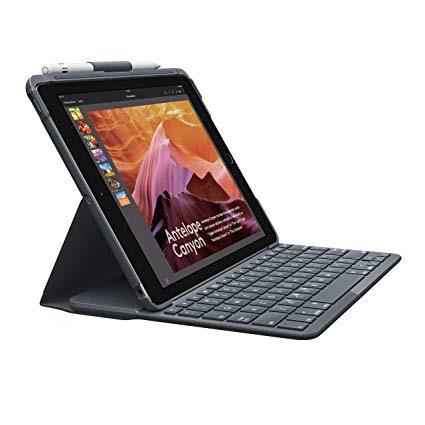
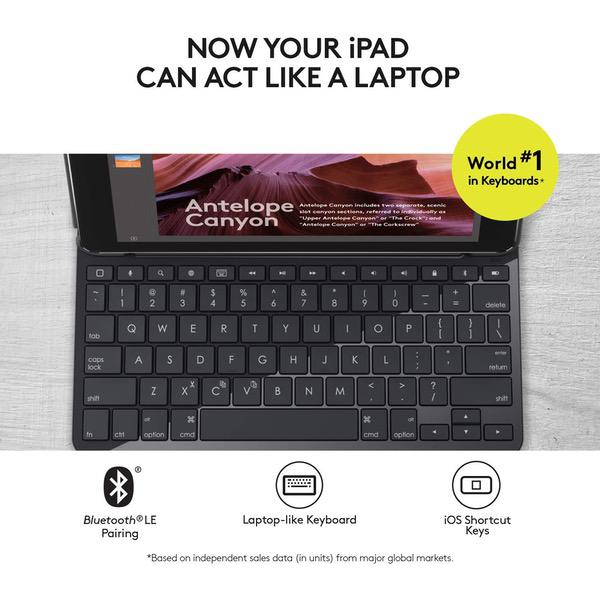
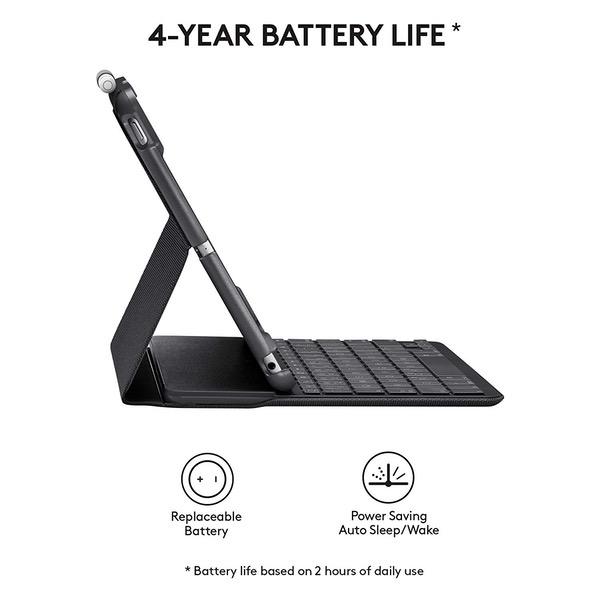
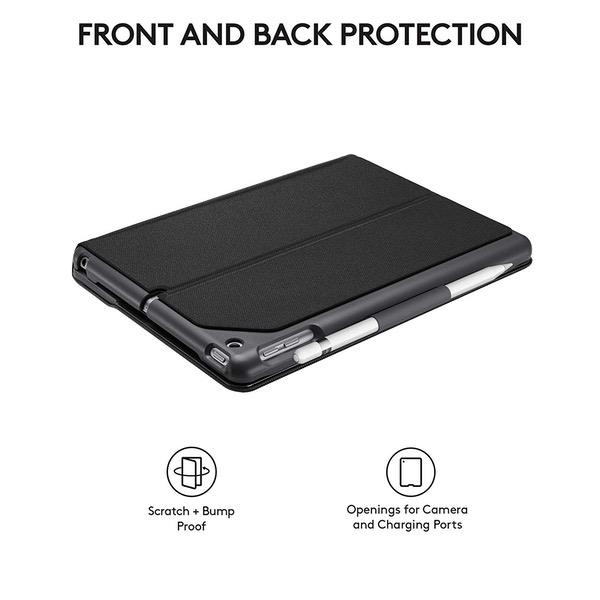
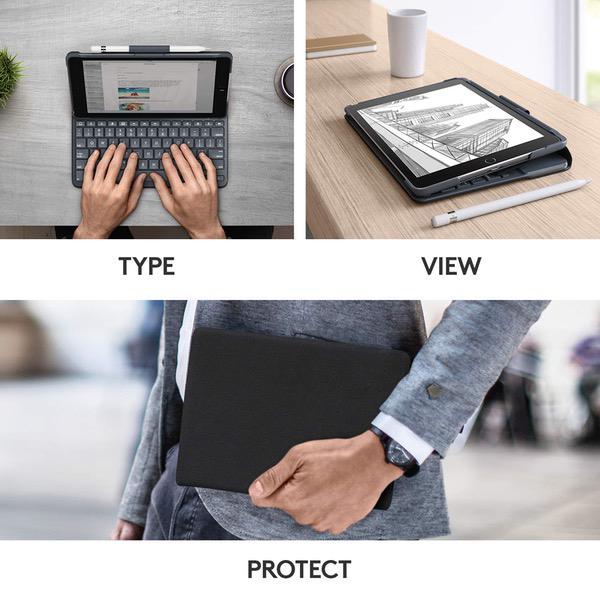
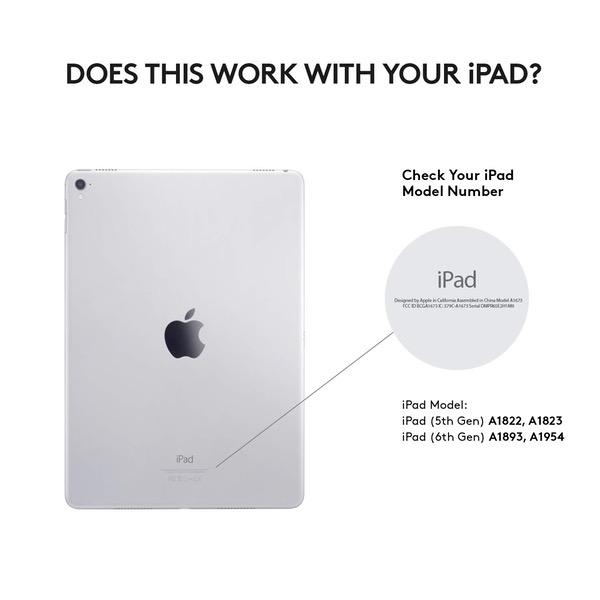
Make sure this fits by entering your model number. Compatible with iPad (5th and 6th generation): Designed to fit and complement your iPad. 3 use modes with integrated keyboard: Type, View, Protect. Enjoy the simplicity of this all-in-one, including front and back protection for your iPad from bumps, scratches and spills. Premium laptop-like typing with iOS shortcut keys: Enjoy the familiar, comfortable feeling of well-spaced, full sized keys. 4 year battery life*: Powered by replaceable coin cell batteries. (*Based on 2 hours of use per day). Apple Pencil Holder: Slide your Apple Pencil into the holder– where it won’t get lost, or in the way.Water repellent, easy-to-clean fabric and durable plastic material ; Full size keyboard (17 mm key pitch) ; Scissor keys (1.5 mm key travel)
Reviews
3
Reviews: 20
5 stars
40%
4 stars
5%
3 stars
10%
2 stars
5%
1 star
40%
Ryan Barry
5
I usually do not write reviews for items I did not purchase on amazon however I got mine at another retailer before amazon got their stock in and noticed the several bad reviews bringing the overall star rating down and wanted to chime in. This is the BEST keyboard I have ever used for the iPad. The magnet holds it in place very well, the keys are spaced perfectly, and the key travel is excellent for a portable keyboard. To set it up all you have to do is pull the tab on the battery, place the iPad in the case, then go to your Bluetooth settings and select the Folio Keyboard. It will come on by itself every time you open the case and latch it in to place via the magnets. When you take it off the magnets the keyboard turns itself off to save batteries and ensure no accidental key presses if you have it folded back and not using the keyboard. It is also a very nice and sturdy case for the iPad. The material is textured which feels nice and gives it a grip to prevent it from slipping from your hand during transport. As far as the battery complaints, it uses 2 watch type batteries which can be replaced (not charged). The battery compartment is located on the edge of the keyboard closest to the iPad. However this shouldnt be an issue for most people as the batteries are designed for 4 years of usage. Even with extreme usage they should last for 2 years and would only cost.a few dollars to replace. I could never go back to another case or keyboard. Highly recommended!
Jeffry A. Pritt
5
Overall, I gave this a 5 star rating although I do have one complaint. I have used the keyboard for about a month at this point and am extremely satisfied with the key action, quality of the build and the materials used. I really like the exterior covering especially. The case feels very solid and I think it will protect my iPad quite well. My one complaint is the viewing angle: There is only one angle available and it is not adjustable. The angle may be perfect for some folks but is just not quite right for me. (I am tall at 62", so will be less of an issue for folks shorter than me.) On the plus side, the magnets holding the iPad in place when open are extremely strong and it seems there is a very low chance of collapse. (Unlike my old Belkin case on a prior iPad which regularly collapsed when you placed too much pressure on the iPad screen while browsing.) I presume Logitech opted for a tradeoff by going with only one viewing angle, but one in which your iPad is very stable. Although I do not like the viewing angle it is not a dealbreaker for me. The case is quite good overall. I had another Logitech case for my iPad2 a few years back and this is quite an improvement.
ColinC
5
After a backlit aluminum alloy keyboard, 2 folio keyboards, this logitech is the best keyboard by far. The previous folio has come really close but this logitech has brought it home. The bigger keys make my typing comfortable and accurate. 5 rows of keys mean you can forget about hitting the Fn key. My favorites are the big backspace and right shift key. These make the world of difference. Logitech knows what they are doing. This was 3 times more costly (no discount) than those of other keyboards, but Im very happy with it.
Joes Wife
5
Absolutely love this case. Dont get the cheaper brands. If you can afford this, get it. I have the 2017 ipad and it fits perfectly. It also fits the 2018 iPad. I had Belkins version of this and loved it, but when I got this one, I loved it even more. The difference is Belkin (although reliable and awesome) is floppy due to the way it is constructed. Logitech is more rigid so you can pick it up without the screen flopping around. I love that I never, ever have to charge it. I cant provide insight into battery life as I have only had this for a few months. It says should last 4 years, but I use it a lot. Even it it lasted a year, I wouldnt care. Its great. Once it needs a new battery, it is inexpensive to replace. Once paired, it has worked fine automatically pairing with the iPad each time you open it. If you run into the unusual situation where it does not, it is very easy to pair again. In the Belkin, the colon/semicolon button was weirdly place, which they did to conserve space and keep keys a good size. The Logitech has this key exactly where it is supposed to be. I highly recommend this case/keyboard. Dont waste your time on the cheaper brands. If you can afford it, get this one. Youll save money in the long run. Adding, this is not for the iPad Professional.
Moshe
5
This is by far the best iPad keyboard I’ve had. I tried 5 other (cheaper) keyboards before eventually getting this one as well for my 2017 (Gen 5) iPad 9.7”. All other keyboards had issues, either with weird layouts, bad BT sync (typing a word only to see that almost every character was hit twice) and others. This convinced me to try that keyboard despite the higher price. After using it for a couple of days, I can surely say that it’s well worth every cent! Awesome keyboard, closest thing there is to the Apple Smart Keyboard which is unfortunately not compatible with my device.
MWebb
5
Nice and slim and easy to type on - much better than average typing "feel" despite the reduced keyboard width necessary to match the narrow iPad width (the iPad is only 9.7" versus typical small laptops with 11.6" screens, so there is less available width for the keyboard). I like it much better than the Belkin Qode I have on an older iPad due to the Logitechs more rational keyboard layout. Unfortunately, the Belkin Qode puts some commonly used punctuation marks into odd places - the Logitech puts them in the expected positions and doesnt require a function (Fn) key to access them. Pluses and minuses: + iPad 2017 (probably 2018 too) plus Logitech Slim Folio => great cafe/travel laptop. Bright multi-angle IPS screen, thin, light, compact, super battery life. Nothing else competes in this combined price range ($249-$329 for the iPad itself, depending on Black Friday sales, plus $80 or so for this Logitech). + iPad "Apps" are cheap compared to full-blown Windows/Mac applications, and there are a lot more of them filling some pretty specialized niches. Between the standard 32gb of the 2017/2018 iPads, and the fact that most Apps save their data "in the cloud" instead of on the iPad, a modern iPad can have more useful apps on it. Word Mobile is free, Google Docs is free and outstandingly multi-platform, multi-device, and auto-syncing. Android should compete in this tablet space, but it dropped the ball. + Main conventional laptop competition is an 11.6" Chromebook, maybe an 11.6" budget Windows 10 laptop. They have vastly inferior screens for video watching. + The browser and App experiences on a 9.7" iPad are GREAT because most web pages, web apps, and certainly iPad Apps are optimized nest for the 9.7" iPad because it has been around so long and Apple has sold so many. The screen is easy to see, read, and use, even though only 9.7". + The Logitech Slim Folio fixes the one iPad 9.7 user problem: the onscreen keyboard that obscures most of the screen when in use, and isnt easy to type on anyway. Did I mention autocorrect typos? - & + The Slim Folio doesnt have a trackpad - because the iPad cant connect to one - but has arrow keys to save you some frustrating screen tapping. - The Slim Folio inevitably "fattens up" the iPad. Cant be helped, just keep it in mind. It works much better after installation as a mini laptop than as a tablet. + & - Other reviewers have complained about battery life on the Slim Folio.I havent had problem. Setting the iPad into typing position automatically turns the keyboard on and off. The "watch" style batteries should be sufficient given modern low energy Bluetooth technology. Even if you have to replace them more often than Logitechs probably optimistic estimate, an 8 pack of the 2032 batteries is just $2.99 at Ikea, 2 or 3 go for just $2-$3 from Amazon and other retail outlets. I prefer watch batteries, which havent started any known fires, vs. rechargeables, which sometimes fail in spectacular fashion. I think TSA and airlines are happier with old-style single use batteries too. + Turns itself off automatically when keyboard cover is closed, or keyboard is folded to the rear for tablet mode. Goes into sleep mode..eventually. + Screen angle is ok for typing and casual video watching, not perfect for serious video watching unless you prop the keyboard front up. But then, the keyboard is active and battery draining, so better to fold keyboard to rear then hold the tablet or prop it up on the desk...or buy that cheap 8-pack of Ikea replacement batteries. - Cant use rear camera when keyboard is folded back. But you can work around this by leaving it in laptop mode or turning sideways and holding it like a book. - Keys are not waterproof or backlighted. But I only see backlighting on Surface (Microsoft Surface) tablet keyboards and other more expensive laptops. You arent going to get backlighting in the typical $400 kit. As for waterproofing, thats available low-end now - in Chromebooks marketed to schools, because they demand it. But its still very rare overall. - Screen jiggles when you touch it for swipes and taps. Nobody has solved this problem satisfactorily, even on most touch screen laptops. + No obvious keyboard wake up issues or keystroke lag. + Keyboards is decently quiet. Should be lecture auditorium-worthy. My first unit was an obvious return - battery protecting film sheet had been removed and it wouldnt pair despite multiple attempts (either defective or not enough battery juice to stay in pairing mode long enough to pair). My second unit, ordered specifically from Amazon, paired instantly just by moving it into laptop position (the iPad battery activates the on switch). All I had to do was turn on the iPad first and go into Settings => Bluetooth => pair, then move the iPad edge into typing position on the magnetic strip. Re-pairings with other iPads will require holding down the power button to re-pair. NOTE on alternate keyboards: My favorite alternate keyboard is the Apple Macintosh compact Wireless Bluetooth Keyboard, specifically the version powered by 2 removable AA alkaline batteries. Heres the Amazon link for the Certified Refurbished version that is usually around $40: Apple Wireless Keyboard with Bluetooth - Silver (Certified Refurbished) . I have used the official Apple keyboard successfully with ALL my iDevices. It wakes virtually instantly and never drops key strokes or lags. Battery life is phenomenal, but after all it has AA batteries. Its light and compact for travel, but a tad big for dragging out with me for coffee. For local cafe use the Logitech Slim Folio is king. For a student, it is light and compact with great battery life and a very compact charger and cable. For overseas travel, I would use the Logitech in transit but carry the Apple compact keyboard for more serious extended in-hotel use (in other words, for regular laptop/desktop substitution). In that scenario, the Logitech isnt a good match - its too narrow and cramped Whats a beautiful compromise for local cafe use, with my real work done at home on a conventional computer, begins to show its shortcomings for extended, immobile, desktop use in a hotel. Once I accept the need for an Apple desktop keyboard (dont be scared by "desktop" - its more compact and lighter than the Microsoft travel keyboard), I need to rethink my "tablet stand" options. The Logitech could be used by un-pairing and removing the batteries to prevent drain, but I think Id rather use the MoKo Case for iPad 9.7 2018/2017 - Slim-Fit Multi-angle Folio Cover Case with Auto Wake/Sleep for Apple iPad 9.7 Inch (iPad 5, iPad 6), BLACK for holding the iPad up on my desk - it has multiple, and better, viewing angles for both typing and video watching since it doesnt have to reserve space for the keyboard. Its not like that second case would weight too much, or take up too much space in my checked luggage; and changing from one iPad case to another is, literally, a "snap". iPads and their accessory cases are very cool, and allow for a lot of personalized adaptation to individual usage scenarios. Thats why I like them so much!
Heather H
5
Logitech has the best customer service I’ve ever experienced. Great keyboard case, works perfectly. However there was a little strip that appeared to be there solely for cosmetics that was coming off. It’s possible one of my kids accelerated its demise, I wasn’t sure, so I contacted them via their online support. All I wanted to know was if it was ok to pull it off or if I could try and reglue it on? They sent me a brand new keyboard case! And then about 3-4 months later I dropped my case and iPad (yikes). My iPad was completely fine, but one of the keys snapped off as a result and I wasn’t able to reattach on my own. So I contacted Logitech again...to see if it was possible to reattach and/or to see if I could order a replacement key. Guess what?...they send me ANOTHER brand new keyboard case! I couldn’t believe it. I don’t recommend mistreating your purchases, but they really really stand behind their products. I am impressed. I will continue to buy Logitech accessories whenever possible. I would highly recommend registering your Logitech products as soon as you get them. I think that has contributed greatly to my excellent customer service experience.
brobeta
5
This is a very good keyboard and folio case for the regular 9.7" iPad (not the iPad Pro). The case is a little bigger than my ideal, but it does protect the iPad pretty well. The keyboard action is very good imho. A decent amount of travel and very "clicky" instead of mushy. I saw complaints about keys falling off. One time during my first week with this case/keyboard I accidentally let the keyboard "flop" onto the tabletop when opening it. The iPad was resting on the table, so its not like a dropped the whole thing. But it was enough of an impact that the little key in the upper left (with the tilde) popped off. I was able to snap it back on and since it has been fine, knock wood.
You may be interested
  • Bestsellers
  • Recently Viewed
 
Fast and high quality delivery

Our company makes delivery all over the country

Quality assurance and service

We offer only those goods, in which quality we are sure

Returns within 30 days

You have 30 days to test your purchase