
















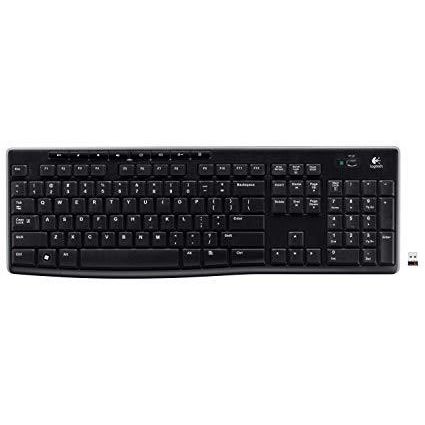
Logitech Wireless Keyboard K270 with Long-Range Wireless
Write a review
$2900 $5000

Logitech Wireless Keyboard K270 with Long-Range Wireless

Write a review
B004N627KS
+
Add to wish list
Target is a general merchandise retailer with stores in all 50 states and the District...

City: US, New York

Delivery
Pickup at your own expense
Tomorrow from 09:00 to 20:00, Store location
Free
Payment options
Apple Pay Google Pay Mastercard Visa
Cash, bank card, credit/installment payments, cashless payment for legal entities
Warranty and returns
Exchange/return of products of proper quality within 14 days Official manufacturer's warranty: 12 months
Description
This fits your .
Make sure this fits by entering your model number. Plug-and-play setup with one tiny receiver that stays in computer and lets to add compatible devices Robust connection with up to 10-meter (33 feet) range Eight hot keys: For instant access to the Internet, e-mail, music volume and more Long-lasting battery life; 3 trial AAA Batteries included (Best with Polaroid AAA Batteries) Works with Windows-based computers
Reviews
3.5
Reviews: 20
5 stars
35%
4 stars
25%
3 stars
15%
2 stars
5%
1 star
20%
Tony Wang
4
The keyboard doesnt come with a normal Logitech Unifying Receiver (on the left), it comes with a slightly different receiver (on the right). However, you can pair the K270 with the normal unifying receivers by downloading the unifying software from Logitech and manually pairing it that way. That way you dont need to have 2 receivers plugged into your computer.
orm
4
Been using it for a couple of weeks know, very good performance, I bought this kybd because the previous one didnt worked well and so far there is no complaint on this one. It has some special function keys on the top to control the audio (mute, vol up, vol dwn), to launch email, to turn off/on laptop, I like these special function keys especially because I hate when keyboards have like three different function on the same key. Very solid construction and very good material. You can turn the kybd on and off which helps if you are not going to use it for a day or two. The only thing was that I had to buy a wrist rest to properly rest my hands while typing, w/o the wrist rest it feels like tall and is not very comfortable for me.
Brianne
4
I have 2 main complaints with this keyboard. The first is that it wont hook up with the unifying receiver for my mouse, which is a year or so old. The mouse will not connect with the unifying receiver for this keyboard. Its frustrating. Maybe I just need to go to Logitech website and get new drivers but that seems to defeat the purpose of having unifying receivers. Second, the finger guides are nearly non-existent. I regularly type 70-90 wpm and can manage that with this keyboard if I visually check my finger placement periodically but I dont like that. I cant easily reach out and start typing because I cant be 100% sure of my placement by feel. And dont even get me started on the 10-key guide, it might as well not even exist. If this was for work Id return it in a heartbeat. Since its just for casual home use Ill keep it but Im a little disappointed.
Kindle Customer
4
I found it tricky to pair the new Logitech keyboard and unifying receiver to my Logitech older wireless mouse under Ubuntu 16.04. But its not hard when you know how. 1. Using the Ubuntu software application, download and install the Solaar application. The only thing this app does is manage Logitech unifying receivers, nothing else. 2. Plug in the old and new unifying receiver into USB ports. 3. Start the Saar application. You should see both unifying receivers, with the old device on the old receiver and the new device on the new receiver. You might need to reboot. 4. Using the Solaar app, unpair the old device from the old receiver, then turn off the old device. 5. On the new receiver click the pair new device button, then turn the old device back on. It should be detected. Ive used Logitech devices for years, and generally liked them (I replaced the old keyboard because I dropped and broke it). I gave this new keyboard four stars only because the space bar seems a little insensitive. I havent tried it, but I understand that in Windows you must uninstall and reinstall the device driver. Good luck!
Julia Brayne
4
I just purchased this keyboard and Logitechs wireless trackball which both sync up to the same device. I like both products but have only given them 4 stars because, when downloading the Unifying Software you need for them to operate, it also installed 2 lots of adware, 1 spyware and one PUP on my computer which slowed my computer down considerably. They were not easy to get rid of and it took me 3 hours to do so. I dont expect to buy products and then encounter the amount of aggravation and time wasted to get my computer operating again. I tried to report this on Logitechs site but they have tailored things in a way that you are unable to give any kind of feedback.
You may be interested
  • Bestsellers
  • Recently Viewed
 
Fast and high quality delivery

Our company makes delivery all over the country

Quality assurance and service

We offer only those goods, in which quality we are sure

Returns within 30 days

You have 30 days to test your purchase