الرئيسية/Catalog/Computers/Keyboards, Mice & Accessories/Logitech MX Ergo Wireless Trackball Mouse – Adjustable Ergonomic Design, control and Move Text/Images/Files Between 2 Windows and Apple Mac Computers (Bluetooth or USB), Rechargeable, Graphite
Logitech MX Ergo Wireless Trackball Mouse – Adjustable Ergonomic Design, control and Move Text/Images/Files Between 2 Windows and Apple Mac Computers (Bluetooth or USB), Rechargeable, Graphite
Logitech MX Ergo Wireless Trackball Mouse – Adjustable Ergonomic Design, control and Move Text/Images/Files Between 2 Windows and Apple Mac Computers (Bluetooth or USB), Rechargeable, Graphite
Logitech MX Ergo Wireless Trackball Mouse – Adjustable Ergonomic Design, control and Move Text/Images/Files Between 2 Windows and Apple Mac Computers (Bluetooth or USB), Rechargeable, Graphite
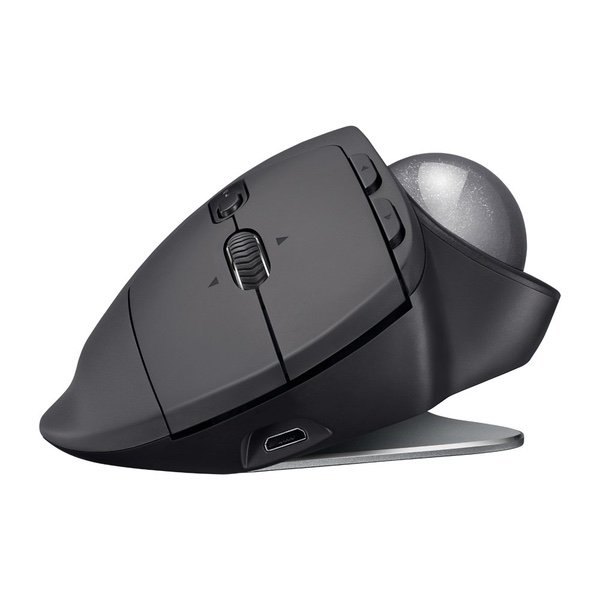
Make sure this fitsby entering your model number. ERGONOMIC SCULPTED DESIGN - Unique adjustable hinge allows you to customize the trackball angle from 0 to 20 degrees for a more natural, comfortable hand position, and reduced muscle strain CROSS-COMPUTER CONTROL - Game-changing capacity to navigate seamlessly on two computers, and copy-paste text, images, and files from one to the other using Logitech FLOW DUAL CONNECTIVITY - Use with up to three Windows or Mac computers via included Unifying receiver or Bluetooth Smart wireless technology RECHARGABLE BATTERY - Up to 70 days of power on a single charge; Number of buttons: 8 PRECISION SCROLL-WHEEL - Tilt and middle click wheel allows for precise scrolling and other convenient controls such as horizontal scrolling
Ive been waiting for this device for well over a decade - a Bluetooth version of Logitechs fabled TrackMan Marble Wheel. And this is, indeed, a really nice trackball for use with new laptops that dont have USB-A ports, such as the MacBook/MacBook Pro. Im torn whether to give it four stars or five - its borderline, and if I could give 4.5, I would. I decided to round up. (And Ive gone back and forth several times while writing this review.) The trackball functionality is exactly as youd expect if you used the M570, with a few extra features - tiltable scrollwheel, the precision button to allow fine control, and the ability to switch between two devices. The AA battery has been replaced by li-poly and recharges via micro-USB. The form factor is where things get a little weird. The bottom of the trackball has a 20-degree bend in the middle, and magnets on either side. It ships with a 2mm-thick metal plate that can magnetically attach to either side to cause the tilt. The result feels much more stable than youd expect, and while you can deliberately tilt it, its not generally going to accidentally tilt when you arent expecting it. I find the tilt feels really good, actually - I hadnt expected it to. The downside of this is that it increases the weight by over 1/3, to over 9 ounces. The device is overall about 4 ounces heavier than the M570. You can use it without the metal plate, but it feels extremely wobbly in that state, and will fall to flat rather than tilted unless propped up. The only other issue is that theres no spot inside to hold the Unifying Receiver. Not an issue for me because I want this for Bluetooth, but may be an issue for someone. I purchased the MX Ergo Plus direct from Logitech - the difference is that the Plus ships with an additional plastic wedge that can add another 10 degrees of tilt. If that sounds useful to you, my understanding is that the Plus is exclusive to Logitech and Best Buy.
Brad Jones
5
Ive been waiting for this device for well over a decade - a Bluetooth version of Logitechs fabled TrackMan Marble Wheel. And this is, indeed, a really nice trackball for use with new laptops that dont have USB-A ports, such as the MacBook/MacBook Pro. Im torn whether to give it four stars or five - its borderline, and if I could give 4.5, I would. I decided to round up. (And Ive gone back and forth several times while writing this review.) The trackball functionality is exactly as youd expect if you used the M570, with a few extra features - tiltable scrollwheel, the precision button to allow fine control, and the ability to switch between two devices. The AA battery has been replaced by li-poly and recharges via micro-USB. The form factor is where things get a little weird. The bottom of the trackball has a 20-degree bend in the middle, and magnets on either side. It ships with a 2mm-thick metal plate that can magnetically attach to either side to cause the tilt. The result feels much more stable than youd expect, and while you can deliberately tilt it, its not generally going to accidentally tilt when you arent expecting it. I find the tilt feels really good, actually - I hadnt expected it to. The downside of this is that it increases the weight by over 1/3, to over 9 ounces. The device is overall about 4 ounces heavier than the M570. You can use it without the metal plate, but it feels extremely wobbly in that state, and will fall to flat rather than tilted unless propped up. The only other issue is that theres no spot inside to hold the Unifying Receiver. Not an issue for me because I want this for Bluetooth, but may be an issue for someone. I purchased the MX Ergo Plus direct from Logitech - the difference is that the Plus ships with an additional plastic wedge that can add another 10 degrees of tilt. If that sounds useful to you, my understanding is that the Plus is exclusive to Logitech and Best Buy.
Amazon Customer
5
This is about the sixth Logitech trackball Ive bought, along with half a dozen keyboards, and its among the best of their products. The M570 has been my favorite pointing device for years, and Ive worn out a couple of them -- the L and R button switches take a lot of beating, L especially, and after a couple years the button becomes erratic. This, of course, is a terrible flaw, since it means you may accidentally DROP something that youre dragging across the desktop -- occasionally into some folder you didnt notice -- and then its a challenge to find the file (or 100 files) you dropped. Logitech replaces these worn out trackballs for free, unless they last too long, and then Im stuck buying a replacement. But they last for years, and the M570 is now less than $25, so its not even $1/month "maintenance" cost. I mention the M570 reliability mainly because the new MX ERGO is reported to use button switches that are 10X longer-lived, or more. Since that was the only defect in the M570, that should mean the ERGO is pretty close to perfect. If it wears out in 20 years, I probably wont be around to care. Compared to the M570, the ERGO is heavier and I find it easier to keep in place on my desk. I love the sideways tilt feature, since I can use it lying flat for several hours, and then give my wrist some relief by switching to the more upright position, which allows the side of my hand to rest lightly on the desktop. Its also much easier to relax my fingers without inadvertently clicking L or R. I suppose if I were using this as a portable controller I might not like the extra weight, and I did often carry the M570 with me on trips. If I were doing that on a daily basis, in a briefcase or backpack, the added ounces and volume (the ERGO is about 20% larger) might be a problem. But the trade-off is that it stays put more easily, on a much larger and tackier rubber base layer, and its more restful to use. I do miss the acceleration feature, long a standard among mice and trackballs, but the one-touch Hi-Res button somewhat makes up for it. I would prefer both, and I hope Logitech will reinstate acceleration in the next update of the new configuration utility. The little nubs that the ball rides on are seemingly indestructible. Some reviewers complain that theyre plastic, but I believe theyre actually a kind of ceramic or glass. Considering that my oldest M570 (5 years?) still runs smoothly and the little nubs are still round with no visible flat spots, Id say theyre considerably harder than most plastics, and I doubt they are plastic at all. Viewed at 30X they look like ceramic to me -- glossy and absolutely smooth and spherical. In any case, they afford very light, smooth rotation in all directions, and they dont wear out. Like any small mechanism in a hands-on application, they do collect dust and other debris from ones hands, but that accumulation of dust and furch just makes the ball movement gradually increase in friction. Pop out the ball, flick of the little dust donuts with your fingernail, and the thing is super smooth and free-wheeling again. If I could take off half a star for the lack of acceleration, I might do so, but in all honesty, Ive been switching back and forth between an M570 and an ERGO for days now, and I cant say I notice any significant difference in pointer movement. On my 50" UHD monitor, its a long way from one side to the other, but thats why I use a trackball in the first place -- I can just swipe it a few times at the medium-high speed setting, and Ive traversed 3,840 horizontal pixels with barely any effort at all. In the end, if I had to trade the Hi-Res button for acceleration, Id go with the button, and of course thats what you get with the ERGO. But all this is really nit-picking. The biggest bonus after comfort is the improved scroll wheel, which now has L and R tilt, in addition to downward clicking, and Ive missed that for years using the M570. I do wish it had a few more buttons for less-frequent uses, but theres something to be said for simplicity -- I have a few other pointing devices with lots of buttons, and I was never able to make them indispensable. The biggest downside is the price. Im not sure why this costs 4X the price of an M570. Clearly its more expensive to manufacture, but not by that much, but then its new, and the development costs havent been amortized yet. If in a year or so it comes down to $39.95, Id call it a bargain.
C.A.
5
The Logitech MX Ergo is a justifiable upgrade from the M570 and is the best trackball mouse (in my own opinion) on the market. I have one at my office, one at home and will not go back to a traditional mouse ever again! It takes some time to get used to, but eventually (after a few days) you move much faster and effortlessly on your screen. The MX Ergo has the trackball, two standard click buttons, scroll wheel and four other programable buttons. The software for the mouse can be downloaded on the Logitech website and from it, you are able to program the buttons for a plethora of shortcuts and macros. You can even get as detailed as to programing gestures and buttons for different aps. As an example, for excel, holding down one of the buttons and moving the track ball a certain direction allows me to copy, paste, run functions I use often and much more. You charge the mouse via a USB cable and Ive found that it can hold a charge for about 6 months, (this is with the mouse on at all times too). The device overall is a complete upgrade as far as materials and design. I like that you can change the resting position of it and also that it is heavier and sleeker looking as well. The price tag is steep, but if you plan on using it daily, I find it a justifiable purchase.
ViperGeek
5
With mixed reviews of this new, improved, and twice as expensive Logitech wireless trackball, I had my reservations about spending $100 on a "new" product. Given Amazons excellent return policy, I figured Id give it a try. Im very happy to report that Im very happy with this new generation of Logitech wireless trackball. The new Logitech MX ERGO wireless trackball has several useful updates beyond "old green ball" (the M570). The unit feels more substantial with seemingly less lightweight plastic. The tilting option is more of a gimmick to me than anything. I set it clicked to the right and forgot about it. The controller software has been upgraded from the older, end-of-life SetPoint to the newer Logi Options, which as the name implies, gives lots of options for programming the various additional buttons on the MX ERGO. The scroll wheel feels confident, as do the low-profile buttons, and the Precision button above your thumb (controls speed of the trackball motion) is much more handy than I wouldve thought. All in all, I am very happy with the new Logitech MX ERGO wireless trackball. When my other M570s eventually die, I will have no problem replacing each one with the new, improved model.