















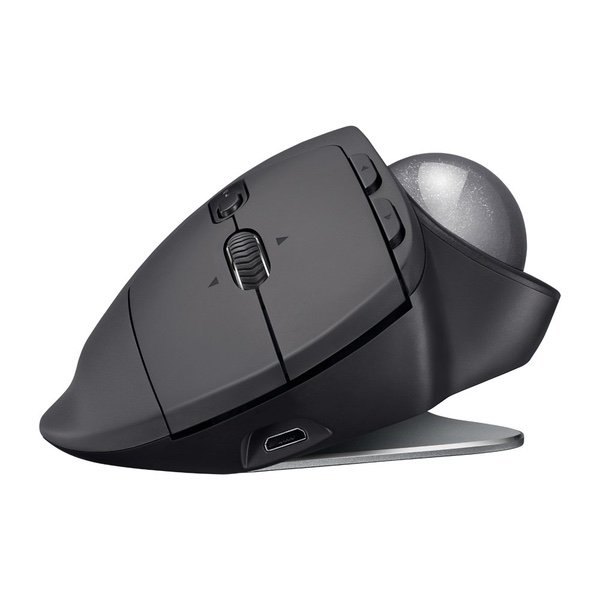
Logitech MX Ergo Wireless Trackball Mouse – Adjustable Ergonomic Design, control and Move Text/Images/Files Between 2 Windows and Apple Mac Computers (Bluetooth or USB), Rechargeable, Graphite
اكتب تقييم
$‎ 7700

Logitech MX Ergo Wireless Trackball Mouse – Adjustable Ergonomic Design, control and Move Text/Images/Files Between 2 Windows and Apple Mac Computers (Bluetooth or USB), Rechargeable, Graphite

اكتب تقييم
B0753P1GTS
Newegg is the best place to go for all sorts of nerdy items- motherboards, graphics ca...

المدينة: US, New York

Delivery
Pickup at your own expense
Tomorrow from 09:00 to 20:00, Store location
Free
Payment options
Apple Pay Google Pay Mastercard Visa
Cash, bank card, credit/installment payments, cashless payment for legal entities
Warranty and returns
Exchange/return of products of proper quality within 14 days Official manufacturer's warranty: 12 months
Description
This fits your .
Make sure this fits by entering your model number. ERGONOMIC SCULPTED DESIGN - Unique adjustable hinge allows you to customize the trackball angle from 0 to 20 degrees for a more natural, comfortable hand position, and reduced muscle strain CROSS-COMPUTER CONTROL - Game-changing capacity to navigate seamlessly on two computers, and copy-paste text, images, and files from one to the other using Logitech FLOW DUAL CONNECTIVITY - Use with up to three Windows or Mac computers via included Unifying receiver or Bluetooth Smart wireless technology RECHARGABLE BATTERY - Up to 70 days of power on a single charge; Number of buttons: 8 PRECISION SCROLL-WHEEL - Tilt and middle click wheel allows for precise scrolling and other convenient controls such as horizontal scrolling
Reviews
2.8
التقييمات: 20
5 نجمة
20%
4 نجمة
15%
3 نجمة
25%
2 نجمة
5%
1 نجوم
35%
Most Helpful Positive Review
Brad Jones

5
Ive been waiting for this device for well over a decade - a Bluetooth version of Logitechs fabled TrackMan Marble Wheel. And this is, indeed, a really nice trackball for use with new laptops that dont have USB-A ports, such as the MacBook/MacBook Pro. Im torn whether to give it four stars or five - its borderline, and if I could give 4.5, I would. I decided to round up. (And Ive gone back and forth several times while writing this review.) The trackball functionality is exactly as youd expect if you used the M570, with a few extra features - tiltable scrollwheel, the precision button to allow fine control, and the ability to switch between two devices. The AA battery has been replaced by li-poly and recharges via micro-USB. The form factor is where things get a little weird. The bottom of the trackball has a 20-degree bend in the middle, and magnets on either side. It ships with a 2mm-thick metal plate that can magnetically attach to either side to cause the tilt. The result feels much more stable than youd expect, and while you can deliberately tilt it, its not generally going to accidentally tilt when you arent expecting it. I find the tilt feels really good, actually - I hadnt expected it to. The downside of this is that it increases the weight by over 1/3, to over 9 ounces. The device is overall about 4 ounces heavier than the M570. You can use it without the metal plate, but it feels extremely wobbly in that state, and will fall to flat rather than tilted unless propped up. The only other issue is that theres no spot inside to hold the Unifying Receiver. Not an issue for me because I want this for Bluetooth, but may be an issue for someone. I purchased the MX Ergo Plus direct from Logitech - the difference is that the Plus ships with an additional plastic wedge that can add another 10 degrees of tilt. If that sounds useful to you, my understanding is that the Plus is exclusive to Logitech and Best Buy.
Brian D. Chapin
3
As an owner of 4 Logitech M570s (one for each laptop / desktop) I was really looking forward to the upgrade. Unfortunately, this doesnt feel like an upgrade at all. It requires new software (Replacing SetPoint with Logitech Options) which does NOT support the old "Pointer Acceleration" feature. Compared to the old M570 this is 4x the price with reduced functionality. Until they update the software I would NOT recommend it - especially if you are using a large multi-monitor setup. Other minor annoyances: 1) The trackball actually makes noise where the M570s are silent 2) Micro-USB connection where the rest of the world has moved to USB C 3) Far heavier than the M570 and a flatter profile.
David Lee Hudson
3
Love it yet hate one thing... and it baffles me! OK - first the good - ive been a trackball user for almost 20 years..... I had to original model trackball from logitech and used both the wireless and wired versions. I never really thought about it, but the ergonomics on this are fantastic - it is definitely a more neutral and better position that is more comfortable. I also like the "precision mode". But here are my two gripes.... 1) I bought this specifically for the Bluetooth functionality..... it seems quirky... once it "goes to sleep" it lags a minute before getting going and last night it started acting flaky.... never had that with my other trackballs.... i dont want to use the unifying reciever because i need all my USB ports. 2) and this is the one that baffles me.... in order to provide the ergonomic "pivot plate" they use a VERY STRONG MAGNET! How did i figure this out? I have a large laptop with a numeric keypad and metal case - the trackball fits perfectly below the keypad it, next to the trackpad..... i set it there like i have always done and worked for a bit, then i went to take it off and to my horror, it was stuck to the laptop! Thank goodness i have an SSD and not a magnetic hard drive! LOGITECH - why in the world would you put a huge magnet on a device being used around computers???!!! Really dumb engineering move!
FA Cabs
3
Received the ERGO trackball this morning. Was very much looking forward to it, given that (like many others) the M570 was one of my favorite Logitech mice. So, I put the MX ERGO in service immediately. My first impressions are …. hhhmmmm, not what I had hoped for. For my rather small hands, the trackball doesn’t feel comfortable if I’m to operate all controls. My hand doesn’t rest ‘naturally’ on the mouse (at any ‘variable’ tilt angle.) The trackball is too bulky. And, let’s face it; the trackball feature of this mouse, i.e. the prevention of wrist strains, is really the main attraction for the M570 / MX ERGO aficionados. In that category, the MX ERGO, in my initial (i.e. 3-4 hour) impression, barely gets a passing grade. As to the additional features, i.e. the sideways 20˚ tilt function and optional / pointer settings, I have yet to explore the full range. The mouse / pointer responds accurately and well, as do most Logitech wireless mice. Adjustments are easy to initiate and adaptable with necessary, respectively preferable precision. No complaint there. Generally, Logitech Options, the software app controlling the MX ERGO (and other Logitech hardware) is self-explanatory. I’m not awestruck by what I had anticipated would be (or should be) an amazing, state-of-the-art, innovative (functionally) trackball at a price of $99.00. I second other opinions that in comparison to the M570, this mouse is way too expensive for what seem, initially, to be limited improvements. At $99.00, the price is absurd. Around a $50.00 price level, the amount would be acceptable (given the “imagined” technological advances incorporated in the MX ERGO.) I have not yet made up my mind whether to test the MX ERGO for a short while longer or to return it (even at a small loss.) What was to be an exciting event (for me), proved to be a deflating balloon. Update: 11.10.2017 - Returned the MX ERGO.
James
3
Bottom line (for people who dont expand): Great hardware, terrible software due to lack of mouse acceleration. Third party solution needed to fix this issue. (See below) The good: The mouse has a solid feel The 20 degree tilt does make a bigger difference than I thought it would. It really is more comfortable this way. It still works while charging The mouse wheel has good friction, allowing for more precise movement than the 570. It can also be tilted left and right to scroll horizontally. The bad: Whole-underside rubberized foot is less effective than the 570s multiple feet at keeping the mouse stationary. I was able to freely spin the mouse on my desk! Youll want to put this on a pad, and even then it wont be quite a stable. The trackball seems to move less freely than the 570 and also makes noise. The Ugly: This mouse requires the use of the Logitech Options software, which lacks options for Mouse Acceleration that the old SetPoint software had. I tried, I really tried, to live without it. However, one setting for mouse speed was too slow (requiring multiple movements just to get across the screen), and the next setting was too fast (making it impossible to target anything reliably). Mouse Acceleration helps the cursor move fast when you want it to, and slow when you dont. The "Precision Mode" button is not a substitute, and I could not even find any situation where I wanted it anyway. Windows has its own setting, called "Enhanced Pointer Precision", which does the same thing as Mouse Acceleration. Enabling it helped tremendously.....for a while. I found that it would occasionally disable itself. I could find no pattern to this. I was ready to give up and return the mouse for a refund simply because the software made it unusable. And then I found this on reddit: /r/Trackballs/comments/726n7d/logitech_ergo_has_no_acceleration_options/ In this reddit thread I found a link to a program which can be used to re-create the effect of mouse acceleration, along with some suggested settings. It requires a reboot after installing the driver, but after that I was able to easily tweak and create a near perfect replica of the behavior I had before. I highly recommend it to anyone looking to purchase this mouse. This driver saved the Ergo for me. Im including a screenshot of my settings. Hopefully this helps someone else with using this otherwise very nice mouse. I seriously wouldve returned this mouse otherwise.
Sim
3
I love this mouse and its a great successor to the m570. I like how smooth the movement is even right out of the box. I programmed all the buttons to my personal customization and I love the toggle button next to the ball to slow it down for work like Photoshop, etc. I recommend this to anyone who uses a mouse all day long and needs relief from wrist pain. The M570 was good for long use but this angled bottom gives it much move comfort. I do travel with this mouse every day so i did buy a case separately to protect it. I hope it holds as well as my other m570s. UPDATE: This mouse is still great except it is giving me terrible wrist pain. Its the best mouse I ever bought but I cant use it more than 2 days at a time without getting pain. Its so smooth and so precise but its a little too large for my medium sized hand. I tried everything and I feel disappointed to be getting pain from an ergonomic mouse. I lowing the stars from 5 stars to now 3 since this might work for others just not me
You may be interested
  • Bestsellers
  • Recently Viewed
 
Similar products
Show more
Fast and high quality delivery

Our company makes delivery all over the country

Quality assurance and service

We offer only those goods, in which quality we are sure

Returns within 30 days

You have 30 days to test your purchase