















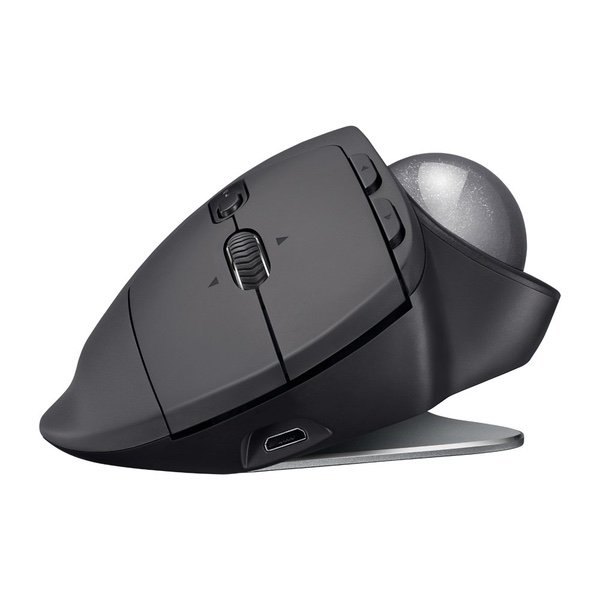
Logitech MX Ergo Wireless Trackball Mouse – Adjustable Ergonomic Design, control and Move Text/Images/Files Between 2 Windows and Apple Mac Computers (Bluetooth or USB), Rechargeable, Graphite
اكتب تقييم
$‎ 7700

Logitech MX Ergo Wireless Trackball Mouse – Adjustable Ergonomic Design, control and Move Text/Images/Files Between 2 Windows and Apple Mac Computers (Bluetooth or USB), Rechargeable, Graphite

اكتب تقييم
B0753P1GTS
Newegg is the best place to go for all sorts of nerdy items- motherboards, graphics ca...

المدينة: US, New York

Delivery
Pickup at your own expense
Tomorrow from 09:00 to 20:00, Store location
Free
Payment options
Apple Pay Google Pay Mastercard Visa
Cash, bank card, credit/installment payments, cashless payment for legal entities
Warranty and returns
Exchange/return of products of proper quality within 14 days Official manufacturer's warranty: 12 months
Description
This fits your .
Make sure this fits by entering your model number. ERGONOMIC SCULPTED DESIGN - Unique adjustable hinge allows you to customize the trackball angle from 0 to 20 degrees for a more natural, comfortable hand position, and reduced muscle strain CROSS-COMPUTER CONTROL - Game-changing capacity to navigate seamlessly on two computers, and copy-paste text, images, and files from one to the other using Logitech FLOW DUAL CONNECTIVITY - Use with up to three Windows or Mac computers via included Unifying receiver or Bluetooth Smart wireless technology RECHARGABLE BATTERY - Up to 70 days of power on a single charge; Number of buttons: 8 PRECISION SCROLL-WHEEL - Tilt and middle click wheel allows for precise scrolling and other convenient controls such as horizontal scrolling
Reviews
2.8
التقييمات: 20
5 نجمة
20%
4 نجمة
15%
3 نجمة
25%
2 نجمة
5%
1 نجوم
35%
Most Helpful Positive Review
Brad Jones

5
Ive been waiting for this device for well over a decade - a Bluetooth version of Logitechs fabled TrackMan Marble Wheel. And this is, indeed, a really nice trackball for use with new laptops that dont have USB-A ports, such as the MacBook/MacBook Pro. Im torn whether to give it four stars or five - its borderline, and if I could give 4.5, I would. I decided to round up. (And Ive gone back and forth several times while writing this review.) The trackball functionality is exactly as youd expect if you used the M570, with a few extra features - tiltable scrollwheel, the precision button to allow fine control, and the ability to switch between two devices. The AA battery has been replaced by li-poly and recharges via micro-USB. The form factor is where things get a little weird. The bottom of the trackball has a 20-degree bend in the middle, and magnets on either side. It ships with a 2mm-thick metal plate that can magnetically attach to either side to cause the tilt. The result feels much more stable than youd expect, and while you can deliberately tilt it, its not generally going to accidentally tilt when you arent expecting it. I find the tilt feels really good, actually - I hadnt expected it to. The downside of this is that it increases the weight by over 1/3, to over 9 ounces. The device is overall about 4 ounces heavier than the M570. You can use it without the metal plate, but it feels extremely wobbly in that state, and will fall to flat rather than tilted unless propped up. The only other issue is that theres no spot inside to hold the Unifying Receiver. Not an issue for me because I want this for Bluetooth, but may be an issue for someone. I purchased the MX Ergo Plus direct from Logitech - the difference is that the Plus ships with an additional plastic wedge that can add another 10 degrees of tilt. If that sounds useful to you, my understanding is that the Plus is exclusive to Logitech and Best Buy.
Brian Carnell
1
Ive been using the Logitech M570 exclusively for as long as I can remember. Currently I have 5 or 6 of the M570s lying around my house connected to various computers. Ive convinced my wife, co-workers and a few friends to switch to the M570. The M570 had one major drawback--no bluetooth connectivity. Like a lot of M570 fans, I was elated to read a couple months ago that Logitech was releasing a bluetooth version of this popular trackball. And then I actually used one. For me, the Ergo is uncomfortable to use. It is the first time using a Logitech trackball for 20 years that I felt any discomfort in my hand or wrist. This will likely vary by individual, but there are four flaws to the device that have led me to abandon it: 1. The metal riser on the MX Ergo increases the height of the device which results in awkward hand/thumb placement as compared to the M570. 2. The extra weight and the textured grip nature of the MX Ergo means that it has less "give" when you move your hand onto it. Rather than my hand gliding over the plastic of the M570 (especially when I am reaching to move the cursor without looking at the mouse directly *or* if Im readjusting my hand placement), the MX Ergo resists the movement of my hand. The result is something that I feel in my wrists after a few hours of use, and not in a good way. 3. The ball does not seem to roll as freely in the MX Ergo as it does in the M570. I used this for about a week before giving up on it. Four weeks later, I could still feel faint aching in my trapeziometacarpal joint. 4. As anyone who has owned an M570 knows, the ball needs to be removed periodically as dust, etc. will accumulate in the area that holds the ball. This is much more difficult to do in the MX Ergo. There is a hole underneath the ball, but it is not nearly big enough to fit a finger through. Youll need some sort of device small and strong enough to dislodge the ball, but also avoid scratching it. Really dumb design decision on Logitechs part. I have to wonder how much ergonomic testing of this they did, or if this is a quality control issue with these early units. Its a huge step backward from the M570 IMO.
Charles Lee
1
Bought one as soon as it was announced, and boy was I disappointed. The left button didnt click straight out of the package, and after some gentle tapping, I got it to at least click. However, the button is sticky, which means unless I did a very quick tap, the button would stay down after I lifted my finger. Since the left button is the primary one, this was a deal breaker. The ball also rolled poorly, which is a comical regression compared to all previous products from Logitech. A trackball has two primary requirements: a ball that rolls and a button that clicks. This $99 piece of junk failed both. This is the first trackball I have returned after 20+ years of using them.
Tony
1
Flaw: There were other reviews about "misclicks" - I feel this is what they were talking about. The copy of the mouse I got is prone to having the click in the pointer finger "stick". Not due to it sticking, but lacking a "bounce back" or recoil. In fact, there was a noticeable difference in the right, middle-finger clickpad, which was sharp and the responsive, and the left (pointer), that sinks in. I have to consciously attempt to raise my finger - like *lift* the finger from the mouse. Compared to a g400s, which has a great click pad to it thats reliable, I can repeatedly click rapidly and my finger never leaves the surface. The MX ERGO will let your finger drag and sit. This is critical if you intend on doing any gaming. And I gamed fine with the MX570. OK: Im on a 4k monitor and itd be nice if there were more ways to toggle sensitivity. At the moment, there was only a very precise sensitivity, and one that didnt perform as well on a huge monitor. I had to adjust it through the software. Pros: - The quality of the hardware is excellent, despite the click - The accuracy of the ball/laser is excellent. - The scroll wheel in the middle is also fluid and accurate. - The right-click is great.
Jeffrey S. Kane
1
Ive been using Logitech trackballs for 20 years. I have been using the M570 since its first release and although I like its functionality, they only last for a year or so before the left click button fails. Logitech has known about this defect for many years and refuses to upgrade the switches. I have bought at least a dozen of these due to the left click failure. I heard the the MX Ergo was a major upgrade so I took the plunge. Ive been using it for the past couple of hours and its basic functionality is very close to the M570 with one huge exception: you cant adjust the scrolling resolution. In the Amazon comments section it scrolls at 6 lines for each tick of the scroll wheel. The M570 software allowed the scroll rate to be set as low as 1 line. On many websites the text entry for comments is in a narrow window and you cant scroll back to previous lines if the scrolling is set to 6 lines minimum. Logitech should add scroll rate adjustment to their Options software for this device. Why they would take away this capability in a supposedly upgraded product is inexplicable. If this device had this option, I would give it 5 stars; without it, I give it 1 star, a major fail.
Jonathan Watson
1
Ive been using Logitech TrackMan Marble devices for ~20 years.... I own 3 of them, starting with a 1st gen button and then the later generation model that replaced the middle button with the scroll wheel. I have them both at home and at work. The TrackMan series have been incredibly durable and usable devices (basically, Ive never had a problem with them). I bought the new MX Ergo hoping to find it would be a good upgrade with better ergonomics..... Unfortunately Ive been disappointed since the moment I opened the box and placed it on my desk. Unlike the older designs the buttons dont align with your index and ring fingers and the scroll wheel doesnt line up with either your index or middle fingers. This makes things awkward because, while you can left/right click comfortably, you have to move a finger (index or middle) to operate the scroll wheel. Your ring finger doesnt have anything to do and the placement of the buttons wheel doesnt make it comfortable to rest where all 3 functions are accessible to 3 fingers. The thumb button is awkwardly placed and cant be reached without contorting your thumb off the trackball and/or moving your whole hand. Unless you have the unit in the "rotated" (angled up) position your pinky finger kind of flops around and falls off the unit and doesnt have a comfortable resting place. Pretty much an all around failure of poor ergonomics / usability over Logitech designs from 15-20 years ago, where all your fingers and your whole hand rested comfortably on the unit. Seems like a solid device that worked out of the box, just has terrible ergonomics.
Tok
1
First, the battery lasts about 2 days on a charge, as opposed to the 6 months I got on a single AAA battery on the previous thumb trackball mouse that costs about 1/3rd as much. It then takes several hours to charge, so its basically a wired mouse. The other version also had a nice spot inside the battery area for the USB adapter, which was great for travelling since it didnt stick out of the laptop or get damaged if left in. Also, the ball on this one requires a stick of some sort to remove the ball for cleaning, my pinky finger was all I needed for the cheaper version. This one also weighs about 3x as much. I tried and tried to like this one since its so much more expensive, to justify the excessive cost, but after a few months, it just refused to pair with the USB adapter. That was the last straw, I threw it out. Its inferior in just about every way to the cheaper Logitech thumb trackball mouse.
Evan Carroll
1
Logitech has sunk to new lows. Now they have an MX Ergo, and a MX Ergo PLUS. Theyre they same mouse. One of them has a really cool rubber riser though that increases the tilt. I like that a lot. The MX Ergo PLUS is a cool product. Its a cheap rubber riser. The first mouse I ordered had one. The new mouse does NOT ship with one. I called Logitech and requested one, and they denied me. I wouldnt do business with a company that creates two similar products only one of which has a cheap mold of a rubber-plastic (that sells for the same price) and one without. The MX Ergo Plus isnt sold on Amazon, its exclusive to brick and mortar retailers. I wouldnt suggest purchasing the version without the rubber-riser.
You may be interested
  • Bestsellers
  • Recently Viewed
 
Similar products
Show more
Fast and high quality delivery

Our company makes delivery all over the country

Quality assurance and service

We offer only those goods, in which quality we are sure

Returns within 30 days

You have 30 days to test your purchase