

















Logitech MX Anywhere 2S Wireless Mouse – Use on Any Surface, Hyper-Fast Scrolling, Rechargeable, Control up to 3 Apple Mac and Windows Computers and Laptops (Bluetooth or USB), Graphite
Write a review
3750 3906

Logitech MX Anywhere 2S Wireless Mouse – Use on Any Surface, Hyper-Fast Scrolling, Rechargeable, Control up to 3 Apple Mac and Windows Computers and Laptops (Bluetooth or USB), Graphite

Write a review
B071VK5KXN
+
Add to wish list
Target is a general merchandise retailer with stores in all 50 states and the District...

City: US, New York

Delivery
Pickup at your own expense
Tomorrow from 09:00 to 20:00, Store location
Free
Payment options
Apple Pay Google Pay Mastercard Visa
Cash, bank card, credit/installment payments, cashless payment for legal entities
Warranty and returns
Exchange/return of products of proper quality within 14 days Official manufacturer's warranty: 12 months
Description
This fits your .
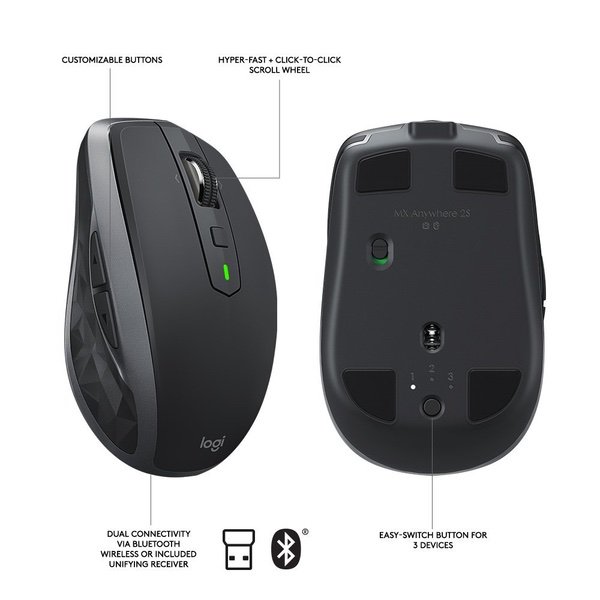
Make sure this fits by entering your model number. CROSS-COMPUTER CONTROL - Game-changing capacity to navigate seamlessly on three computers, and copy-paste text, images, and files from one to the other using Logitech FLOW DUAL CONNECTIVITY - Use with up to three Windows or Mac computers and laptops via included Unifying receiver or Bluetooth Smart wireless technology HYPER-FAST SCROLLING - Scroll through long documents or web pages faster and easier. Or press the wheel and shift to click-to-click mode for precise navigation WORKS ANYWHERE - 4000-dpi Darkfield sensor tracks flawlessly virtually anywhere, even on glass RECHARGABLE BATTERY - Up to 70 days of power on a single charge
Reviews
2.7
Reviews: 20
5 stars
15%
4 stars
20%
3 stars
20%
2 stars
5%
1 star
40%
Johnny Devil
5
A few months after ordering this mouse, I absolutely love it. I have a Macbook Pro (2016) and use an HP laptop at work, and I hate keeping track of USB dongles and dealing with incompatibilities between MacOS and Windows. The MX Anywhere has eliminated both problems. Pairing was quick and easy out of the box—I had this mouse up and running on both machines in minutes, and being able to swap between them at the press of a button is incredible. The mouse is responsive, charges quickly, and has excellent battery life. he buttons have good tension and are responsive, but not so "clicky" as to be disturbing in an office setting. Its build quality is also excellent; solid and ergonomic without being too bulky to travel with easily. It also does not suffer from the random disconnects and signal losses that I have experienced with cheaper products. I frequently have 2-3 bluetooth devices connected to my Mac at any given time, so this is important—I dont want my mouse to stop working when I turn on my headphones. I will say that I have experienced a few temporary disconnects when using the mouse with my HP laptop, but this seems to only happen when the driver gets out of date and its a truly miner issue. T Finally, I wasnt expecting to be impressed by Logitech Options, the free software that allows you to customize every aspect of the mouse, but I was. You can change all of the normal things you would expect (scroll speed and direction, button actions, left/right hand setups), but there are many more options for button mapping that vary depending on the operating system, and when you switch from one machine to another the mouse remembers your configurations for each. On my mac, the middle button captures a screenshot and saves it to my clipboard; on my HP, it pastes unformatted text. All that said, the most impressive feature to me is that you can make app-specific button maps as well. The mouse detects whether you are working in a "global" state or within a given app and adjusts all of the button assignments seamlessly. If the options you want arent there, you can simply program a button to execute any keystroke combination you wish. Anyone could find a dozen ways to use the flexibility in this product to improve their workflow. Logitech has created an excellent synergy of hardware and software that is easy to setup and uses and provides value straight out of the box at a great price. Im never going back to cheap mice.
Alex Beyer
5
I love this mouse. I had the last generation of this mouse, but it was dying too frequently, maybe lasted two weeks with moderate use. So I bought this one since it has double the battery size and supposedly a 70 day battery life. It came 50% charged so well see how well it does. Pros: -Connectivity options to spare. With laptops losing ports its nice to have bluetooth as a fall back, and when Windows 10 decides to act up and not accept the bluetooth input then its nice to have the unifying receiver to work with. One thing to note, I dont know if this says it anywhere, but this is a Bluetooth 4.0LE device I know Logitech likes hiding behind some weird name like "Bluetooth Smart". I have BT 4.0 on my PC, and havent tested to see if it works with older radios. -It plays well with Android. Ever since my NotePro got lollipop (5.0), it stopped accepting mice inputs. Called Samsung and they tried to sell me on their microscopic $50 mouse. At least with this $50 you know youre getting great quality. -Love that I can toggle between 3 devices. Cons: -Minor one is that the "Middle Click" is gone, that toggles the scroll wheel state from free to ratchet. As a result they added a button below the scroll wheel which by default is a gesture activation button, havent tried it out. I just went into the software and changed it to middle click. The other annoying thing is that its awkward to hit and not easily doable. I imagine if you have small hands, not an issue, but with my medium male hands, its not great. -The 2S did away with a "connect" button on the underside. The MX 2 has that button. I like that button since it makes setting up pairing easy and means there isnt an annoying button combo one has to remember when pairing since the power is tied to a toggle switch. Normally with like Bluetooth speakers and headphones, the power is a button and depending how long you press it it determines if it enters pairing mode. This being a switch removes that dual feature of the power button. It feels the same and operates the same as the MX 2 before it. Havent messed with the "Flow" feature, and will have to see if the battery can withstand my testing. I used to be a huge fan of M510 by them, but only having 3 mouse ports made it annoying having to sacrifice one for a mandatory unifying receiver. For me this mouse is the perfect size, for larger hands, cant say. The back of it juts so high that I think thats what helps make it fit better in multiple hand sizes. Good mouse, with all the buttons you could want for and okay enough software for extended customisation options. The only issue with Logitech Options is that it has a battery level indicator, but its super vague and when youre charging the mouse it wont tell you how long until its full. Wont even display charge level percentage. BT 3.0 was built with that option on offer to companies and it has been an option since 3.0, so 4.0 clearly has that feature and the mouse vaguely takes care of it by giving you vague responses and a near useless battery indicator. Percentage at least. Note: Any future updates, revelations and what not will be listed in the comments since Amazon gets rather fickle when it comes to people updating reviews. Sometimes they dont accept the changes. UPDATE: Battery Life Test Claims: 70 days worth, but if you read the manual thats 70 days worth at 8hrs per day or 560hrs max total. My Discover: Around 450hrs My Setup and Use Case: - April 6th got it and used it since then - So about 30 days in, 20% battery life; -30 days at 12hrs average use per day = 360. - 20% = 1/5 left so 5-1= 4. - 360/4 = 90; 90+360= 450 max projected life span -Im using a 3M mouse pad that is said to increase the battery life of optical mice by a max of 80% -Connected via BlueTooth, not bad. Lasted more than a month, but far from the 70days or 560hrs max total. Maybe you can squeeze more out of it if you use the Unifying receiver, I doubt it. Also this has the same battery size as the last generation mouse (500mA)
Kenny Best
5
I ordered this with an MX Master 2S (for a good friend). They arrived in three days in the same box. The MX Anywhere was easy to set up with both my 2015 and 2017 MacBook Pros. It’s much more form fitting and easy on my wrist than Apple’s Magic Mouse 2. The MX Anywhere is great because it does everything the Magic Mouse 2 can do with its middle button and a few motion gestures. All YouTube reviews I’ve watched before this purchase said the same thing about the functionality being superb to other mice, and the single thing that sets it apart is the ability to switch between multiple devices. The software needed to use this function is called Logitech Options. I wish they had put a scannable barcode on the package so you could easily navigate straight to the download page. But it’s still easy to find and at only 16 MBs, you won’t be dealing with bloat ware. The Bluetooth connection is quick and simple, the responsiveness is very satisfactory, and switch from computer to computer is seamless. I recommend this to anyone using multiple computers at a time for professional or recreational work.
You may be interested
  • Bestsellers
  • Recently Viewed
 
Fast and high quality delivery

Our company makes delivery all over the country

Quality assurance and service

We offer only those goods, in which quality we are sure

Returns within 30 days

You have 30 days to test your purchase