
















Logitech MX Anywhere 2S Wireless Mouse – Use on Any Surface, Hyper-Fast Scrolling, Rechargeable, Control up to 3 Apple Mac and Windows Computers and Laptops (Bluetooth or USB), Graphite
Write a review
$4800 $5000

Logitech MX Anywhere 2S Wireless Mouse – Use on Any Surface, Hyper-Fast Scrolling, Rechargeable, Control up to 3 Apple Mac and Windows Computers and Laptops (Bluetooth or USB), Graphite

Write a review
B071VK5KXN
+
Add to wish list
Target is a general merchandise retailer with stores in all 50 states and the District...

City: US, New York

Delivery
Pickup at your own expense
Tomorrow from 09:00 to 20:00, Store location
Free
Payment options
Apple Pay Google Pay Mastercard Visa
Cash, bank card, credit/installment payments, cashless payment for legal entities
Warranty and returns
Exchange/return of products of proper quality within 14 days Official manufacturer's warranty: 12 months
Description
This fits your .
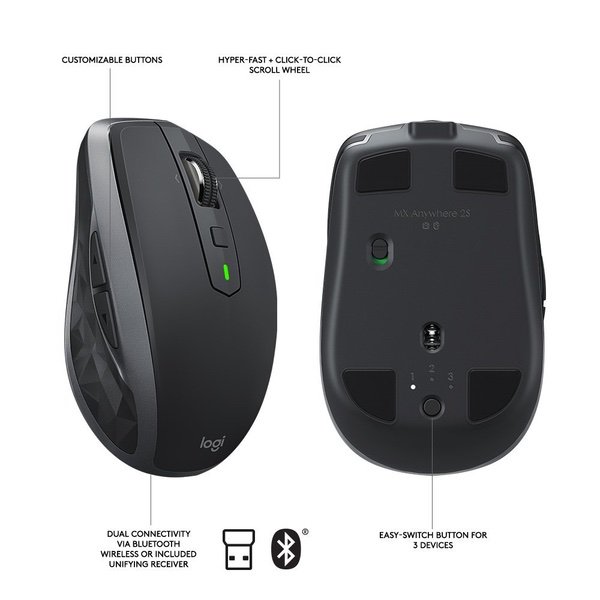
Make sure this fits by entering your model number. CROSS-COMPUTER CONTROL - Game-changing capacity to navigate seamlessly on three computers, and copy-paste text, images, and files from one to the other using Logitech FLOW DUAL CONNECTIVITY - Use with up to three Windows or Mac computers and laptops via included Unifying receiver or Bluetooth Smart wireless technology HYPER-FAST SCROLLING - Scroll through long documents or web pages faster and easier. Or press the wheel and shift to click-to-click mode for precise navigation WORKS ANYWHERE - 4000-dpi Darkfield sensor tracks flawlessly virtually anywhere, even on glass RECHARGABLE BATTERY - Up to 70 days of power on a single charge
Reviews
2.7
Reviews: 20
5 stars
15%
4 stars
20%
3 stars
20%
2 stars
5%
1 star
40%
sdaless
3
Really love the first generation of this product. After 4 years and having been dropped many times walking to meetings, the buttons started malfunctioning, so I purchased this model. Overall I like the product, but a few things to note... 1) They used to include a soft case with the 1st gen version. Im not sure why they couldnt include that again for the premium you pay for this mouse 2) I haven;t had long enough to test durability, but the build quality just seems significantly cheaper in this version compared to 1st gen 3) For someone who uses this device with a laptop and is on the go, the on-off switch on this version is "inconvenient" compared to 1st gen 4) I really like that this version is rechargeable, but interestingly enough, without AA batteries, I really do not care for the "weight" of this mouse as I push it around my desk. Im sure I just need to get used to it, but personally, it just seems to not feel balanced.
awehrman
3
Im simultaneously quite pleased and very disappointed with this mouse. It does many things very well, but those are overshadowed by some truly bizarre design choices that make me wish Id bought a cheaper, saner mouse. tl;dr: -If you dont care about middle-clicking and just really value a mouse with excellent tracking and a long battery life, get this mouse. -If, however, you want an intuitive mouse that works without having to think much about it, keep looking (and skip any Logitech mouse that offers "hyper-fast to click-to-click precision scrolling with a press of the scroll wheel") ----- First, good things: 1) Excellent battery life. Ive used this mouse daily for over two weeks of full 8-hour workdays, and the Logitech Options software still claims the battery is "full." 2) Excellent tracking. I havent tested it on glass, but on any normal table/desk, it tracks perfectly. I dont think Ive ever had a mouse this smooth. 3) Very comfortable. Im susceptible to mild wrist pain with many mice, but havent had problems with this one so far. Its big enough to be comfortable to use all day, yet still compact enough to take on trips. The back/forward buttons on the side are well-positioned. The material of the mouse feels good on my hand and doesnt get slick or gross after several hours of use. ----- So, all good stuff so far. But there are a few things that really ruin it for me: 1) The scroll wheel design is insane. When you press down on the wheel, instead of middle-clicking like pretty much every other mouse, it changes the scrolling mechanics. With one press, the wheel is ratcheted like most mice. With another, the wheel is allowed to freely spin in order to scroll very long documents with ease. Which, I guess is a nice feature? But why lock that function to the scroll wheel? How often do you need to change how you scroll vs middle clicking? And, while I knew this was the default behavior going in, I didnt realize that the scroll wheel button is the one button that CANNOT be customized. It does this one function and that is it. Period. Which is insane in a mouse that is otherwise fully customizable and well-designed. 2) As a consequence of the first point, you kind of need to install the Logitech Options software. Technically, its optional; the mouse is more or less plug and play. But realistically, youll probably want to change some buttons. The scroll wheel can tilt left or right, which defaults to horizontal scrolling, but both can be customized to be middle click, so I can sort of get normal middle click functionality with a little self-retraining. 3) This mouse is LOUD. The buttons make very loud clicks, and when the scroll wheel is ratcheting, thats pretty loud, too. Which, again, is a really weird choice. This is a mouse designed to be used anywhere, which includes, say, a quiet conference room where someone is giving a presentation. I end up using my laptops touch pad in those situations despite it being less comfortable just because I feel like Im drawing attention to myself otherwise. Im not saying the mouse should be utterly silent, but plenty of super cheap mice are much quieter than this one. Hopefully it softens with age and calms down a little. ----- In the end, I wont be returning the mouse, so I guess the good points outweigh the bad. But Im still pretty disappointed in Logitech for this one.
Amazon Customer
3
I gave the 2S a try after my Microsoft Arc mouse buttons began dying. Ive used Logitech for years, and always appreciated the innovation in the amount and placement of configurable buttons. All of their mice ave also fit well in the palm of my hand. My main mouse is currently a Performance MX, and I figured the mobile mouse would work when Im not at my desk. Unfortunately, while the quality and button functionality is great, there are a couple of issues leading to my returning it after a few hours of use. The Good: - Its small. You can easily put this in a bag and know you have room. Its also great for small hands. - The software installed with the mouse is excellent, its clear what buttons do and how to configure them. - It tracks well on any surface I used in my home. Could be improved: - Itd be nice if there were a place to store the bluetooth dongle - The profile is significantly lower than other Logitechs, including the predecessor to this one. You palm wont rest well on this. - The scroll click turns the ratchet on/off, which is different from every other Logitech where the middle click is fired. I couldnt get used to clicking the button below the scroll wheel for middle click, its just too far away. - The right and left mouse button clicks are really loud. Maybe this would get better over time, but theyre much louder than any Logitech Ive used in the past. Unfortunately I only had it for a day, so I cant talk to long term use or battery life. Overall, if youve never used a Logitech before most of these things wont bother you. Its great for people with smaller hands, or when you really need a very small mouse. I use mine for hours, and know I wouldnt be able to use this one correctly.
Small Forest
3
UPDATE: I feel duty bound to update/change my original 5 star rating for this mouse. The best I can offer now is 3 stars and thats only because it does work on a single PC. The reason? After using this mouse for a few days, I have a different opinion of it. Here is what I can say with certainty: 1. On my setup (fairly new Windows 10 desktop PC and fairly new MacBook Pro running High Sierra), the MX works great on my PC. It really and truly cant be said to work at all on the Mac. It DOES pair and move the cursor about on the Mac but "moving the cursor" is a bit of a stretch. What it actually does, is "fling the cursor" all over the screen. It sends the cursor willy-nilly in all directions and as far as it can get in whatever direction pleases it. There is essentially zero user ability to control cursor movement accurately and no amount of fiddling with the mouse preferences/setup helps 2. I have paired it to the Mac using Bluetooth and with the Logitech "unifying transceiver." Cursor behavior is the same regardless of how pairing is done 3. Relating to "Flow," I would absolutely love that feature if the mouse worked. It will move the cursor (and any copied files) between computers just like Logitech says it should but the problem is you cant predict where the files will land when the cursor arrives at the second computer. What you CAN predict is that the cursor will NOT be anywhere close to where you wanted it to be and you will have one devil of a time getting the cursor to drop the file (or click on anything) with any precision whatsoever Im keeping the mouse because it does work on my PC, but the real reason I bought it was for FLOW, which, sadly, does not work satisfactorily ORIGINAL REVIEW: I bought this mouse for two reasons. 1. I wanted to eliminate at least two cables from my desktop. Mission accomplished 2. I wanted to use the same mouse on my Mac and PC (via what Logitech calls "Flow"). Again, mission accomplished This mouse is a keeper
You may be interested
  • Bestsellers
  • Recently Viewed
 
Fast and high quality delivery

Our company makes delivery all over the country

Quality assurance and service

We offer only those goods, in which quality we are sure

Returns within 30 days

You have 30 days to test your purchase