
















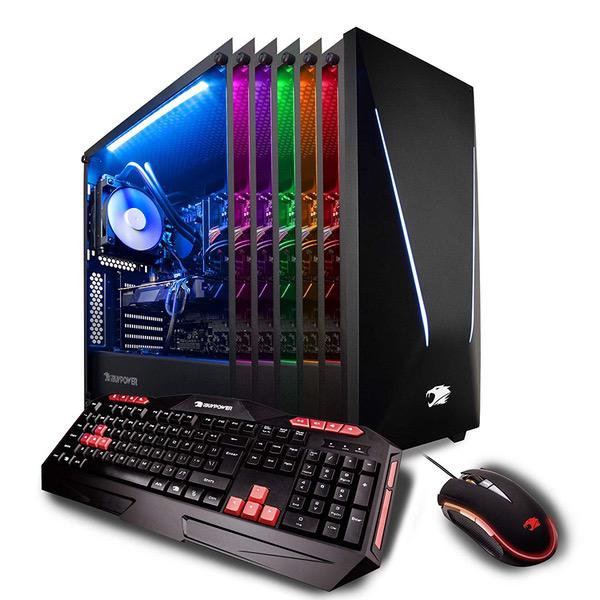
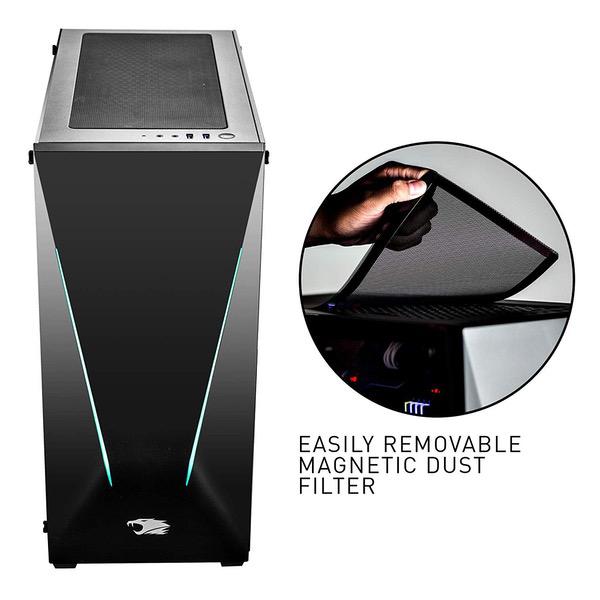
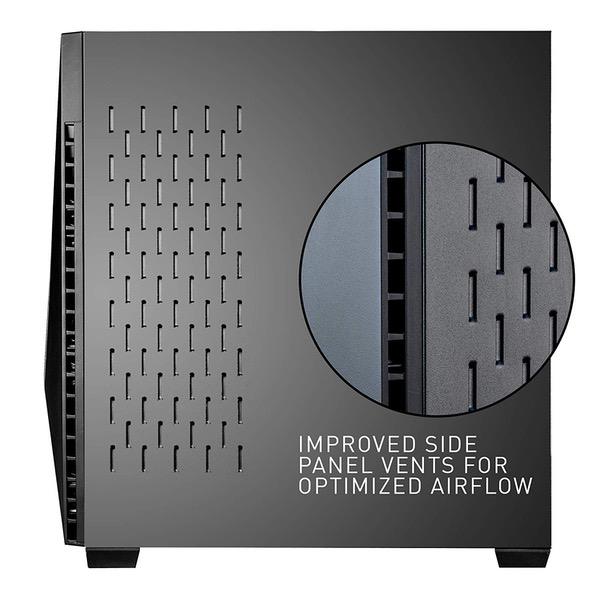
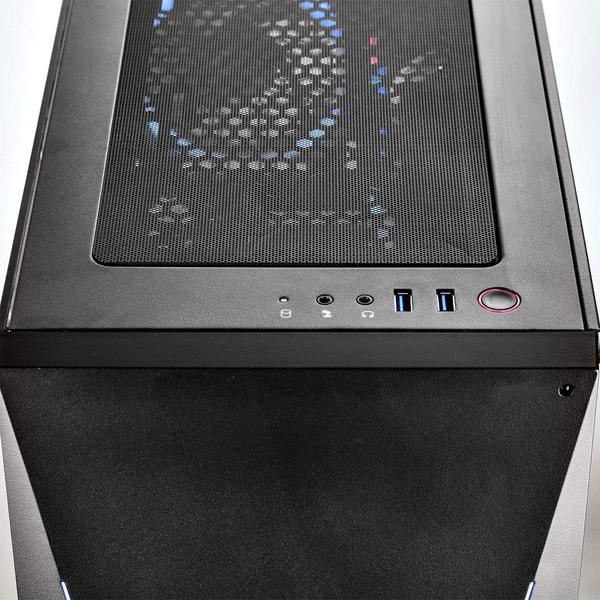
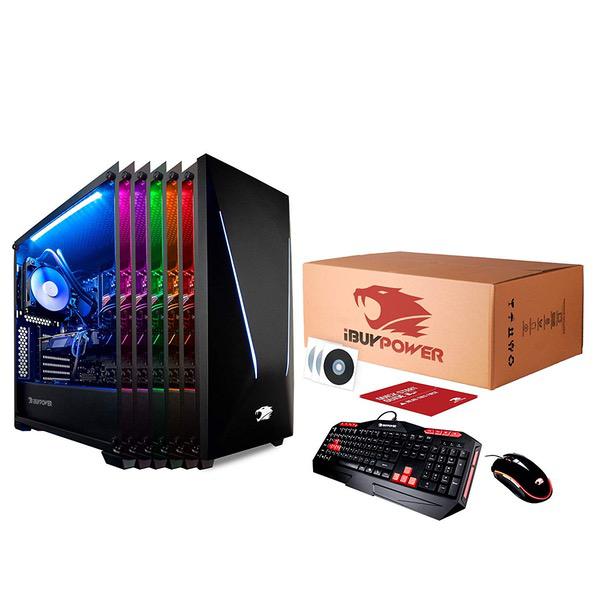
iBUYPOWER Gaming PC Desktop Trace 9220 Liquid Cooled Overclockable i7-8700K, NVIDIA Geforce RTX 2070 8GB, Z370 Motherboard, 16GB RAM, 1TB HDD, 240GB SSD, AC WiFi, Win 10 64-bit, RGB Case, VR Ready

Write a review
B07G77QHV8
i7 8700K | RTX 2070 8GB
Hard Drive1000 GB Mechanical Hard Drive Processor BrandIntel Processor3.7 GHz None
Target is a general merchandise retailer with stores in all 50 states and the District...

City: US, New York

Delivery
Pickup at your own expense
Tomorrow from 09:00 to 20:00, Store location
Free
Payment options
Apple Pay Google Pay Mastercard Visa
Cash, bank card, credit/installment payments, cashless payment for legal entities
Warranty and returns
Exchange/return of products of proper quality within 14 days Official manufacturer's warranty: 12 months
Features
Graphics Coprocessor
NVIDIA GeForce RTX 2070
Item Dimensions
19.48 x 8.54 x 19.76 inches
Item model number
Trace 9220
Item Weight
30 pounds
Operating System
  • Windows 10 Home
Series
Trace 9220
Style
i7 8700K | RTX 2070 8GB
RAM
16 GB DDR4
Hard Drive
1000 GB Mechanical Hard Drive
Brand Name
iBUYPOWER
Processor
Processor Brand
Intel
Processor Count
6
Processor
3.7 GHz None
USB
USB 2.0 Ports
1
USB 3.0 Ports
4
Description
This fits your .
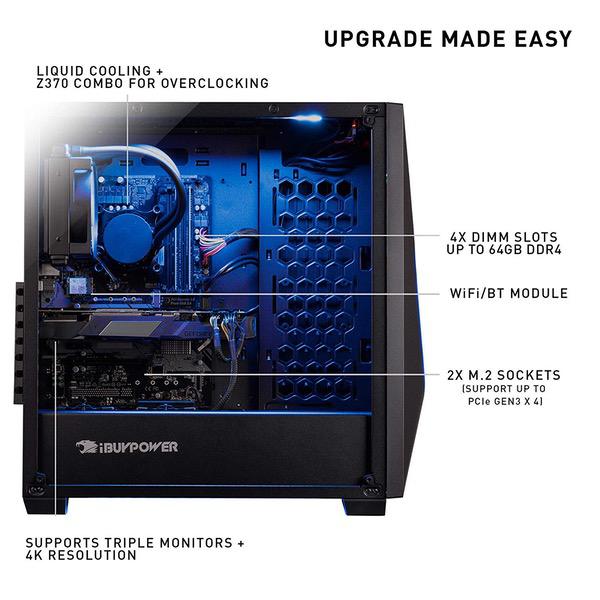
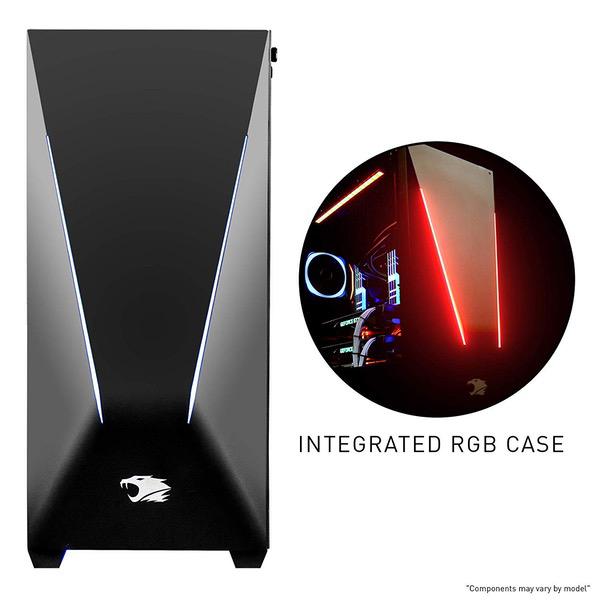
Make sure this fits by entering your model number. System: Intel Core i7-8700K Six-Core Processor 3.7 GHz (4.7 GHz Max Turbo) | Intel Z370 Chipset | 16GB 2666MHz DDR4 RAM | 1TB HDD | 240GB SSD | Genuine Windows 10 Home 64-bit Graphics: NVIDIA GeForce RTX 2070 8GB Dedicated Gaming Video Card | VR Ready | Display Connectors: HDMI, DisplayPort, DVI Connectivity: 4 x USB 3.1 | 2 x USB 2.0 | 1x RJ-45 Network Ethernet 10/100/1000 | Audio: 7.1 Channel Special Add-Ons: Liquid Cooling | 802.11AC Wi-Fi | Tempered Side Glass | 16 Color RGB Lighting Remote Controlled Case | iBuyPower Gaming Keyboard & Mouse Warranty: 1 Year Parts & Labor + Free Lifetime Tech Support | Assembled in the U.S.A
Reviews
2.9
Reviews: 20
5 stars
25%
4 stars
25%
3 stars
5%
2 stars
5%
1 star
40%
Derek
5
Specs of Purchased Unit: CPU- Intel i7 8700K GPU- ASUS GTX 1070 Ti Cerberus RAM- 16GB ADATA XPG (2 @ 8GB) Motherboard- MSI Z370 A Pro Water Cooling Unit- Corsair H60 SSD- Apacer 250GB HDD- Western Digital 1TB Power Supply- 500 watt non name brand (more on that below) Fans- One NZXT and one "ARC" fan (that has red LEDs) in a push/pull configuration on the radiator of the water cooling unit (both 120mm) USB Ports- 6 USB 3.1 ports, 2 USB 2.0 ports Before purchasing this computer I had always been interested in building a PC. As the price of graphics cards and memory have gone up in the last year because of Bitcoin mining, I thought I would never be able to have a nice gaming PC. Then I started looking into this PC and what a good value it was and I thought it would be a great jumping off point for my PC hobby. I wanted something that would chew through graphically demanding games on ultra settings without issue. I also wanted a computer that would run general tasks quickly for many years in the future. I have dabbled in PC gaming in the past but the majority of my gaming had been done on consoles. I have not played anything too graphically demanding on it yet, but I have run Heaven benchmark on it and got a ~2500 score on 1080p with ultra settings and 8x AA (if you are reading this and dont understand what that means dont worry. Just know that the PC did very well in benchmark testing). Running games at 4K resolution isnt impossible, but it is nowhere near as smooth as running at 1080p. This is not a slight against this computer however, because only the newest graphics cards (1080 Ti) can handle 4K gaming and even those cards dont hit 60fps averages from what I have researched (remember, I am pretty new to all of this). I am coming from an HP Pavilion dv7 laptop that is 6 years old, so there are a lot of quality of life upgrades that come with this PC as well. Please note that the individual parts that IBuyPower PCs come with can vary from unit to unit, but most things are comparable (from what I have read in other reviews). Now that I have had the computer for a little bit, I wanted to share some thoughts about it. I dont work for any PC companies, and I didnt get this for free to write this review (although it would be awesome to get free stuff just to review it, I cant believe people get to do that) Pros: Startup is very fast because windows 10 loads from the SSD. If your computer still boots up from a standard HDD you have no idea what you are missing. Gaming is gorgeous and the computer is super quiet even when running stress tests and benchmark programs. (I have the PC hooked up to a new 55" TCL tv that has very little input lag). Upgrading- As a person just starting to get into the tinkering aspect of PCs, this computer does not disappoint. Lets start with the case itself. The case has the option to add 120mm fans to the top panel toward the rear of the case (above the rear panel vent that currently has the radiator and push/pull fans exhausting air out the back), on the bottom panel toward the front of the case, and the front panel of the case has 3 vents to add 120mm fans or (I think) 3 140mm fans. To add fans to the front of the case you have to pop off the front cover that has the red diagonal LED line. It pops on and off fairly easily (make sure you pull from the slot located at the bottom of the front cover and not from the vented opening on the sides of the front cover, and the red LED line is connected with a wire so hold on to the front cover when it comes off). The tempered glass side panels are easy to take off and put back on (thumb screws) and they are on both sides of the case, allowing easy access to the cables (it had great cable management for a pre-built) and the 1TB HDD. The case also has feet that keep the computer raised about an inch off of whatever surface it is on. The case dimensions are 18.5" tall (with the feet on), 8.25" wide, and 18.5" deep (the front cover protrudes out adding about 3/4 of an inch). Next we have the motherboard. The MSI z370 A Pro is great for adding components and for overclocking (which is a whole new level of tinkering). The BIOS is easy to navigate and allows for a ton of control over the components in your PC. It has 4 slots for DDR4 RAM (up to 64GB) and mine came with 2 8GB ADATA XPG sticks. The motherboard does not allow for SLI because the 2nd 16x PCIe slot is only rated at 4x. For the inexperienced reading this review (which I was a few weeks ago), SLI is being able to add a second video card to your PC and get added graphical processing power for games and what not, and this motherboard cant do that. This shouldnt matter to most people, cause if you want to run two graphics cards in SLI you are probably not going to buy a pre-built computer but instead build your own. The motherboard specs can be found on MSIs website if you are curious to know more. Lastly, the AIO (All in one) Corsair water cooler is nice as opposed to an air cooler. From what I have researched, AIO water coolers are very low maintenance compared to a custom water cooling setup. I am actually upgrading the AIO to a larger Corsair one in the next few days but there is nothing wrong with the one that came with the PC. Overclocking- The GPU (graphics card), CPU (Intel processor), and RAM (ADATA memory) can all be overclocked but I havent started that process yet. Just know that you can potentially increase the performance of the GPU, CPU, and RAM by about 15-20% by overclocking (but there are some drawbacks to the longevity of the parts). RGB LEDs- The LED lighting in the case is nice addition to the system that adds some wow factor at very little cost to IBuyPower (since LED strips are pretty cheap now). It isnt top of the line LED customization like you can get with companies like Corsair or NZXT but it gets the job done. The remote works decently, but often requires multiple presses of the button even when pointed directly at the small sensor located near the SSD. I also have found that my TV remote sometimes gets picked up by the LED sensor in the computer and it changes the color or display setting of the LED strip inadvertently. But it is easy to change it back and this is another thing I am currently in the process of upgrading with Corsair LED strips. Cons: Power Supply- I read online that pre-built PCs often come with a low quality power supply to help cut down on costs for the company putting it together. A lower quality power supply puts all of your precious and expensive PC components at risk if it were to have an issue. The one that came with my PC was 500 watts and the system worked fine with it. The research I did indicated that the power supply would be fine for the time being, but I should consider upgrading it sooner rather than later (especially if I wanted to add more components that required power). So I decided I didnt want to take the risk and I upgraded the power supply to a Corsair RM750x ($120 on Amazon). I promise I dont work for Corsair or anything like that, their products just look nice (packaging and the units themselves) and I have read that they have good customer service. TL:DR If you want a computer that just works fast and runs games at the highest settings you wont be disappointed. If you are new to the world of PC tinkering and upgrading, this is a great starting point. If you have an old computer that is starting to die on you and you want something that will last a long time, treat yourself to this behemoth. If you want to build your own PC, but the inflated prices on PC components have you waiting until Bitcoin mining becomes less popular or profitable, this PC is a reasonable value right now. If you can afford it, get the 1070 Ti version over the 1070 and the i7-8700K over the i7-7700K because the surrounding components will probably be a little nicer as well. (Also, sorry for all the parenthesis)
dm554erxnn92
5
The system performs exactly as intended. So glad I ignored the negative reviews! Ill address each of the issues noted by other reviewers one at a time: 1. BOOTING: The system booted into Windows 10 from the SSD. I takes a while to boot the first time you turn it on, so you will see the MSI Bios splash screen for up to 10 minutes while windows initializes, so be patient. After that, systems boots up in about 10 seconds or less from a complete shutdown. If for some reason computer does not boot, hold down delete key immediately after powering on to enter BIOS, then be sure that "Windows Boot Manager" is listed under SettingsFixed Boot Order PrioritiesBoot Option #1, and also under settingsUEFI Hard Disk Drive BBS Priorities. That said, I have not had any trouble booting this computer. 2. TEMPERATURE AND NOISE: Quieter than my imac, even when gaming. Temperatures well within normal at 99% GPU utilization over extended usage periods, without any disruptive noise. 3. GPU: Verified NVIDIA GTX 1070 TI. Mine is a slightly customized card by MSI, but is still the genuine NVIDIA product underneath the hood. Ignore reviews stating that the graphics card was switched out because it says ASUS or MSI on the label--it is still the NVIDIA card slightly customized to work with the computer/motherboard it is being sold with. The GTX 1070 TI runs very cool and quiet. GPU fan is generally OFF unless gaming -- that is normal for this card and speaks to the low power usage compared to an equivalent AMD card. 4. PORTS-- This computer has ALL necessary ports. The GTX 1070 TI occupies space for TWO slots at the back of the computer. You will see the DVI port by itself prominently protruding from the second slot position. That is probably why some reviewers think the GTX 1070 TI only has DVI. In the slot above you will find 3 displayports and 1 HDMI port, all connected to the GTX 1070 TI, and sometimes covered with black plastic covers such that they are not very visible. Additionally, the motherboard has a DVI, Displayport, and VGA port. Use these motherboard ports ONLY if you are using the ONBOARD graphics adaptor (ie, you have disabled or removed your GTX 1070 TI). 5. CABLES: Computer comes with an HDMI cable which carries sound and video to your monitor (monitor purchased separately, of course). There is also a sound cable to connect the computer to the monitor to activate the microphone jack on the monitor. Note: if you plug in the microphone jack, then you will NOT get sound from the monitor speakers. All power cables are also provided. 6. MOUSE AND KEYBOARD: The mouse is surprisingly good for a budget computer, but did take a little getting used to. The keyboard is marginally functional. The "enter" key is spaced an extra key further than a standard keyboard so it does not work well for typical typing. The right shift key can get "stuck" going down unless pressed in center and can cause mistyped passwords. One of my children complains that this keyboard yields "ghosting" when gaming. Overall, I consider this keyboard adequate for gaming but not for typing. We eventually replaced with a Redragon mechanical keyboard (red backlit), which is a great visual match for this system and a huge improvement. No matter what keyboard the vendor provides, someone is going to complain, so may as well provide a budget keyboard. I have no issue with that. 7. USB AND WAKE FROM MOUSE -- Computer has 6 USB3 and 2 USB2 ports (8 USB total). The two USB3 on top of case are powered even when the computer is off. If you use a USB hard drive for backup, DO NOT plug it into either of the two top powered USB ports or the USB hard drive will remain on and spinning even when the computer is off. If you want to resume the computer from sleep using your mouse button, you will need to configure the BIOS under SettingsAdvancedWake-up Event SetupResume by USB Device and set to "Enabled". Plugging in the mouse into one of the top powered USB slots will keep the mouse lighted when the computer is off as a reminder that a click of the mouse will turn everything back on. 8. SOUND: Not sure what is meant by reviews stating there is no sound card. Whether or not there is an actual card, the computer provides good sound to the monitor (ours has speakers) and to our USB connected gaming headset (purchased separately), so for us this is a non-issue. 9. WIFI: Tested the wifi for this gaming desktop compared to my imac with an airport wifi adapter, and see similar performance, so no issues for us. Of note, our wifi router is in the same room as both computers. 10. CASE LIGHTING -- The remote for the case lighting works when the remote is held close to the case. The default lighting is very nice. I like that the lighted case has a nice refined appearance that will appeal to both adults and kids alike, and not gaudy like other gaming systems. My 15 year old son shrieked for joy the first time he saw it, so good enough for him. iBUYPOWER Gaming Desktop PC i7-8700K 6-Core 3.7 GHz, Geforce GTX 1070 Ti 8GB, Z370 Motherboard, 16GB RAM, 1TB HDD, 240GB SSD, Liquid Cooled, 802.11AC WiFi, Win 10 Home 64-Bit, Slate 9210, RGB Case
Rafael R.
5
At first I was really skeptical about buying a computer online and having it shipped. I was also really hesitant to buy a pre-built PC but because of the prices of parts, I found that this might be the best option. I used to be into wanting to see every component physically before dropping my money on something expensive. I did some research before buying this PC. I looked at countless computer builder/parts sites and got prices from $800 - $2500+. After seeing this option on Amazon, I decided to go with them. This PC has exceeded my expectations in every way and has given me newfound confidence to buying more big purchases online. iBUYPOWER really did well with their packaging when shipping my PC. Everything arrived on the expected shipping date and it was packaged very well. The inside of the PC had blown up plastic inside it to keep all the parts from falling out during shipping which kept everything secure. Once I un-packaged the contents and followed the instructions, I was extremely amazed at how easy it was to have it up and running. Here are the specs I got for my PC: Video card/Graphics card: Nvidia GeForce GTX 1070 8GB Processor: Intel i7-8700K @3.7GHz (Hexcore) Ram: 16GB DDR4 2400MHz OS: Window 10 Home 64-bit Motherboard: Z370-A Pro LGA1151 WiFi Adapter: Generic Realtek adapter Storage: 240GB ADATA SU650 SSD (Boot drive) Storage: 1TB Western Digital 7200 RPM HDD Case: Slate Gaming Case (Dual Glass Side Panels) USB Ports: 4 USB 3.0 (2 in front) 4 USB 2.0 Free iBUYPOWER mouse and Keyboard were included as well. The case is really bold with the red strip down the front just like you see in the pictures. The glass panels are easily removable and have a semi-dark tint. The LED lights are very nice and a remote comes included to adjust various setting for it. It can also be turned off if thats not your thing. On start up, the SSD really gives a fast boot, averaging less than 20s. I was pleasantly surprised to find no bloatware on any kind aside from the usual Windows 10 apps. The multi-tasking is a beast and doesnt slow down at all. All apps and programs open insanely fast. This thing doesnt know what the word "slow" means. As far as gaming goes, I havent truly tested it yet with any AAA games. I only have League of Legends downloaded at the moment and it runs super smooth at 4K resolution. I will edit this review once I get a graphic intensive game and see how well it does. Overall, the PC is super quiet, has flawless performance and doesnt hiccup whatsoever. The only thing I can think of that would make this stand out as a true great for this price point is a built in media card reader (MicroSD or SD slots) and a CD or Blu-ray drive. Pros: - Super quiet - Amazingly fast - Free Keyboard and Mouse - Great price for the amount of performance built in - Mouse is nice and smooth with lighting on the side Cons: - No media card reader / CD or Blu-ray drive - Not much room for upgrading - Keyboard is lacking a bit and not backlit
angelroundtrip
5
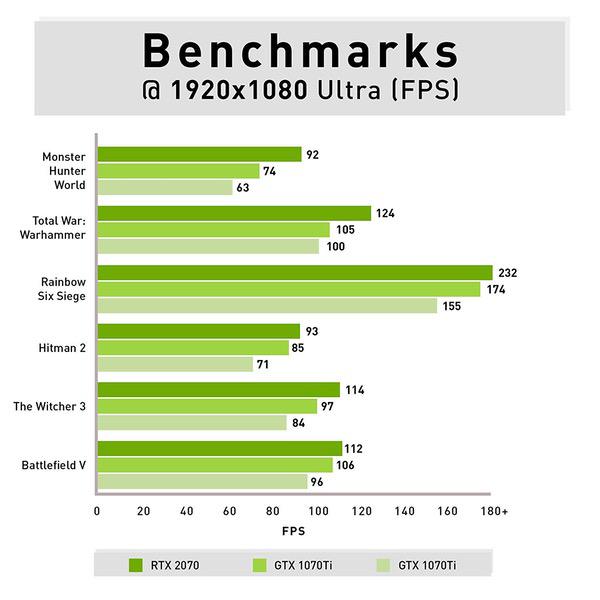
I finally decided to take the plunge into buying a PC for gaming and photo/video editing and Im satisfied with my purchase. Initially, I purchased a previous model from iBuyPower which had some sound issues. I was in contact with their customer service and they were extremely helpful and friendly. My current PC has no issues and everything is running well thus far! There are some very nicely detailed reviews about these PCs, so I wont detail all of the technical specs. But since the GPU seems to be the part that varies most amongst these PCs, Ill state that the GPU that was installed in mine was the GIGABYTE RTX 2070 Gaming OC 8G ($549.99 current retail price). PRO: 1) This PC is powerful. I decided to go with an RTX 2070 because I couldnt afford a 2080 or 2080ti. Im happy to say that games run smoothly and Im getting well over 60fps at 4k at high settings or 1440p on ultra settings. Im currently playing a lot of Call of Duty: Black Ops 4 (October 2018 release) at 1440p and high settings and consistently get 90-100+fps. Ive tried a number of other games and performance has been great on all of them. Theres plenty of power to go higher in terms of fps if you want to. Needless to say, photo and video editing is a breeze as well. 2) Ray tracing and DLSS - the RTX 2070 supports these. So theoretically, this should mean better looking games and/or higher frames for future games out of the same card. A nice perk for sure, even if its just wait and see at this point. 3) The case is nice. 1 side is tempered glass and the included remote allows to change the colors of the RGB lights. The remote is inexpensive and simple, but it is responsive. One great thing is that the trace case allows for the RGB lights to be turned OFF completely, which is very useful if youre using your PC in the dark and dont want any extra lights shining. So its possible to use your PC without any bright lights distracting you (like many gaming PCs have) or turn the lights on and customize as you please. You can also change the color on the front of this case, whereas you had no option other than red in older cases. 4) Includes a mouse and keyboard that are perfectly serviceable - but admittedly, I will upgrade soon. 5) Doesnt get hot, cooling seems to work well. I sometimes have played for a few hours at a time and the computer doesnt get hot, only very slightly warm. Thats very reassuring. CON: 1) Its a bit loud. Not distracting, but I can hear it lowly humming during quiet moments. I havent noticed it getting any louder thus far, even after intensive gaming sessions, so that it a great thing. More of a minor point, than a con. RECOMMENDED? YES. Its a quality, prebuilt PC. It has some good, quality parts installed and is a good buy for those who dont want to or dont have the time to build your own PC.
B. Benjamin
5
Quickly shipped and received with prime, very excited about the computer. The product I received has a MSI Aero gtx 1070, 2x8gb XPG DDR4, with a z370 pro4 mobo. Really quiet, and quick. The Rgb lighting is cool but a pain to switch with the remote, tip: aim remote down the grill on top of the case. Definitely a deal with all the components included in light of current crypto mining/video card demand.
Product variations
Column filling
Sort by Price Sort by Availability Sort by CODE Sort by Style Sort by RAM Sort by Processor
Contact us for a price
In stock
B07G77QHV8
Style:
i7 8700K | RTX 2070 8GB
RAM:
16 GB DDR4
Processor:
3.7 GHz None
You may be interested
  • Bestsellers
  • Recently Viewed
 
Similar products
$79960 $1,99900 -60%
New York, US
Gold
Operating SystemMac OS X SeriesiMac
Contact us for a price
New York, US
Gold
Processor BrandIntel ProcessorIntel Core i7
Show more
Fast and high quality delivery

Our company makes delivery all over the country

Quality assurance and service

We offer only those goods, in which quality we are sure

Returns within 30 days

You have 30 days to test your purchase