
















HP ENVY 13” Thin Laptop w/ Fingerprint Reader, 4K Touchscreen, Intel Core i7-8565U, NVIDIA GeForce MX250 Graphics, 16GB SDRAM, 512GB SSD, Windows 10 Home (13-aq0044nr, Natural Silver)
Write a review
$47960 $1,19900

HP ENVY 13” Thin Laptop w/ Fingerprint Reader, 4K Touchscreen, Intel Core i7-8565U, NVIDIA GeForce MX250 Graphics, 16GB SDRAM, 512GB SSD, Windows 10 Home (13-aq0044nr, Natural Silver)

Write a review
B07PPDFFG9
Laptop
+
Add to wish list
Hard Drive512 GB Flash Memory Solid State Processor BrandIntel Processor1.8 GHz Core i7 Family
Target is a general merchandise retailer with stores in all 50 states and the District...

City: US, New York

Delivery
Pickup at your own expense
Tomorrow from 09:00 to 20:00, Store location
Free
Payment options
Apple Pay Google Pay Mastercard Visa
Cash, bank card, credit/installment payments, cashless payment for legal entities
Warranty and returns
Exchange/return of products of proper quality within 14 days Official manufacturer's warranty: 12 months
Features
Item model number
13-aq0044nr
Item Weight
7.35 pounds
Operating System
  • Windows 10 Home
Series
13-aq0044nr
Style
Laptop
RAM
16 GB DDR4
Hard Drive
512 GB Flash Memory Solid State
Batteries
1 Lithium Polymer batteries required. (included)
Brand Name
HP
Processor
Processor Brand
Intel
Processor Count
4
Processor
1.8 GHz Core i7 Family
Description
This fits your .
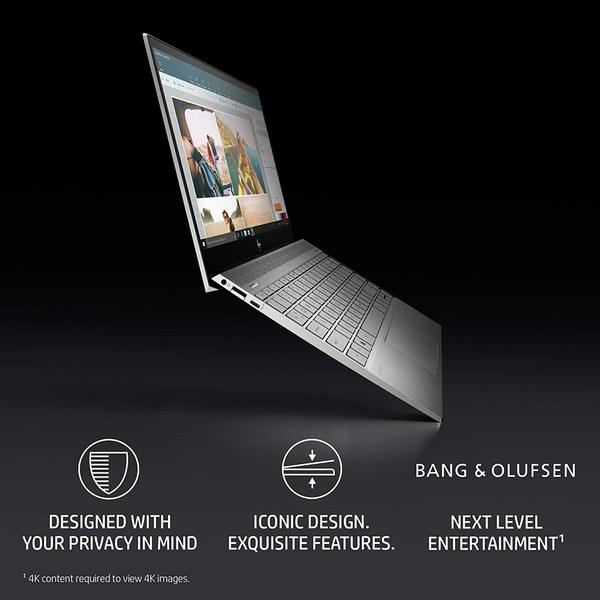
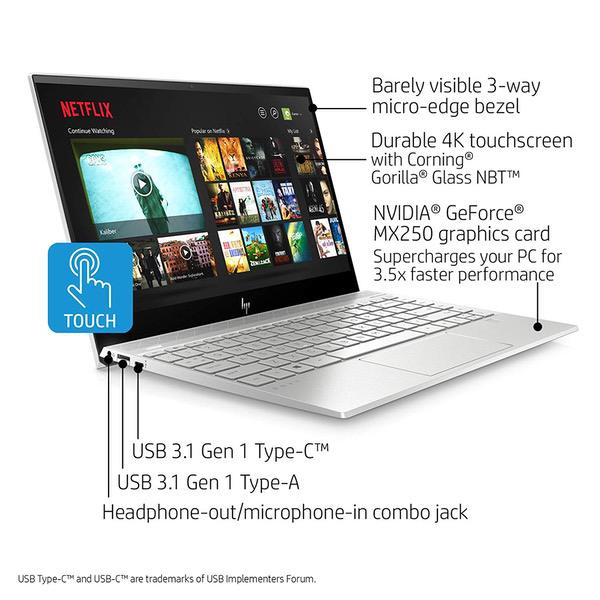
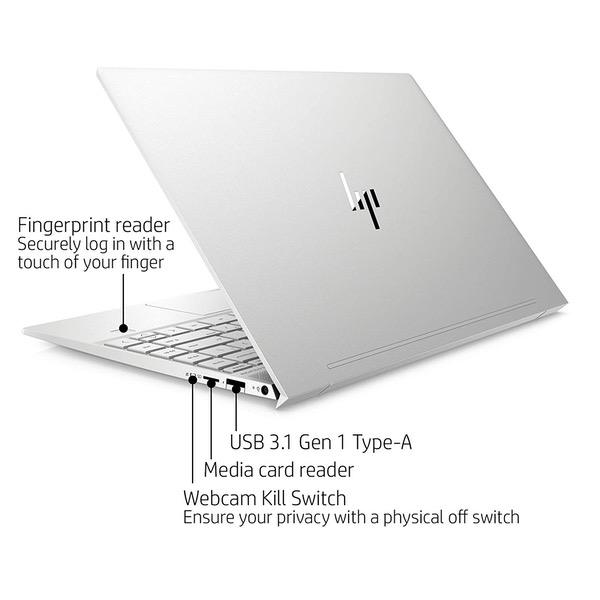
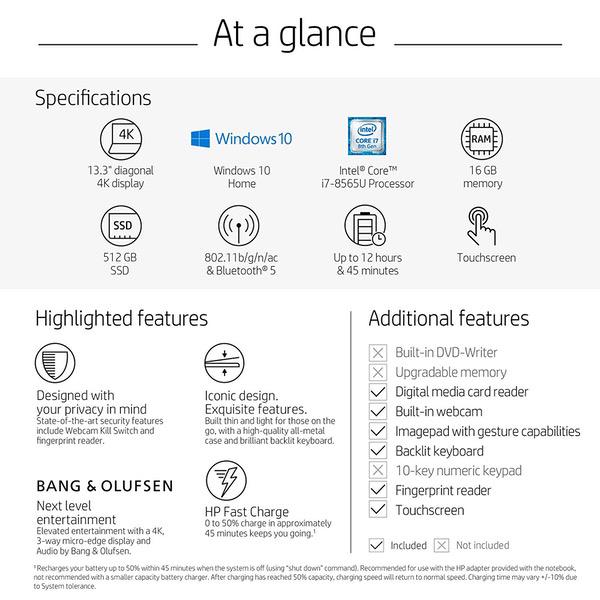
Make sure this fits by entering your model number. CUTTING-EDGE SECURITY: State-of-the-art security features include Webcam Kill Switch and integrated fingerprint reader BIOS RECOVERY AND PROTECTION: Automatically checks the health of your PC, protects against unauthorized access, secures local storage and recovers itself from boot-up issues DISTINCTIVE DESIGN: High-quality, durable, all-metal case built to last, with premium design features including a brilliant backlit keyboard and geometric pattern speaker grill SUPER FAST PROCESSOR: 8th Generation Intel(R) CoreTM i7-8565U, Dual Core, 1.8GHZ UP TO 4.6GHZ 4K DISPLAY: 13.3-inch diagonal 4K IPS micro-edge WLED-backlit touchscreen with Corning(R) Gorilla(R) Glass NBT(TM) (3840 x 2160) MEMORY AND HARD DRIVE: 16 GB DDR4-2400 SDRAM (not upgradable), 512 GB PCIe(R) NVMeTM M.2 Solid State Drive BATTERY LIFE: Up to 12 hours and 45 minutes (mixed usage), up to 9 hours and 45 minutes (video playback), up to 5 hours and 45 minutes (wireless streaming)
Reviews
4.4
Reviews: 20
5 stars
55%
4 stars
35%
3 stars
5%
2 stars
0%
1 star
5%
Bob W
4
This laptop seems to be HPs attempt at directly competing with the 13 inch MacBook Pro. It certainly looks like one. Its very light; under 3 pounds. It has a powerful four-core Intel processor (Please note that the description of this product says it has a dual core processor. Thats not correct mine has a four core.). The screen is great. It has adequate brightness to use in daylight. The colors are vivid and accurate. The touchscreen is every bit as good as any I have ever tried. I have to admit that I usually forget the touchscreen is present; Im so used to doing everything on a keyboard. However, when I realize I can use my finger, the results are great. This laptop has 16 GB of memory. Thats more than enough to run Photoshop and edit large images. Ive also run Premier Pro with no problems at all. The combination of the powerful processor and fast, plentiful memory makes this machine perfect for a power user like me. This laptop could easily replace my desktop computer in terms of processing, memory and disk size. My unit has 512 GB of SSD. Considering that most of my data lives in the cloud, Im never going to run out of disk space. The touchpad is the one weak spot in this nearly-perfect laptop. I find it not nearly as responsive as my Macs. Its very fussy about where you press it to get a left click or a right-click. The Mac works with just a tap with one finger for left click and two for a right-click. That doesnt happen with the HP. I use a Microsoft mobile mouse to compensate. That brings me to one really great feature of Windows 10. If you go to the Control Panel and then the mouse screen, youll find that there is an option to disconnect the touchpad when the mouse is present. This is an amazingly important feature. In the past, Ive disabled the touchscreen to prevent accidental mouse activity while typing. Then, on occasion I had a problem at startup and needed to use the touchscreen. Of course it didnt work. Now, if I connect my mouse (Bluetooth), the touchpad is disabled. If I want to do something quickly in the car, and there is no mouse, the touchpad works. The keyboard is generously sized and the keys have a nice solid feel. I have one little quibble: in bright light I find it difficult to read the white markings on the silver keys. In a normally lit room the keys are backlit and very easy to read. Ive used HP laptops in the past. I think the keyboard in this laptop is a real step forward for them. Priced similarly to the MacBook Pro, I expected a great deal from this laptop. From the perspective of processing power and useful features, this HP competes favorably. If anything, the screen is better. Colors are accurately rendered, brightness is more than adequate, and the touch functionality is a great bonus. Battery life is excellent. I dont have the standard test suite to verify the manufacturers claim of about eight hours of working on a charge. I can say that I had absolutely no problem getting through the day without needing to recharge. Of course, battery life is dependent on how you are using the laptop. For example, when I worked with it in my car I had to crank up screen brightness which of course, eats up battery. Even so, I never ran out of power. Wi-Fi operation is flawless. The built-in camera and microphone provide excellent quality for videoconferencing and other AV needs. I like that there is a physical switch to turn off the internal camera. That certainly improved my comfort using the device in my hotel room. If HP could fix their quirky touchpad, this could be a true MacBook killer. Even with the less-than-perfect touchpad, its a joy working with this computer.
evanjamesroskos
4
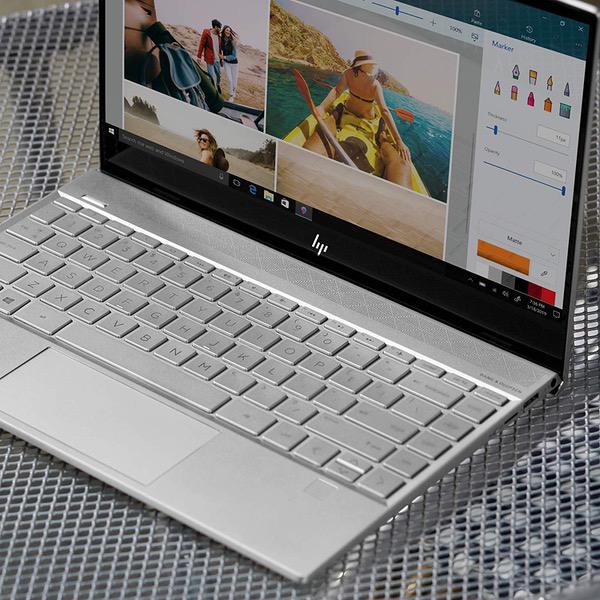
Ive long been one of those "do we really need touchscreens on everything" people. In fact, I reviewed the 27" HP Envy All-in-One desktop many years ago and lamented the limited touchscreen functionality. Touchscreen on phones and tablets work well if the software offers lots of different touchscreen functions, but this HP seems to limit the screen to single-digit usage, even while the touchpad allows for 1-4 finger gestures that can be assigned by the user. On the one hand, thats sad and limiting and on the other Im not sure how much I miss it. Being able to zoom, rotate, flip, resize, and such when editing photos would be cool. SCREEN I wasnt sure if a 4k 13inch screen was really necessary but its magical: crisp and bright! (Dont read this the wrong way; I just still have questions about whether 4k density in such a small screen means much. After using this machine, I think it DOES make a difference! I could see a difference between this machine and a 1080p 13" screen. The touch response of the screen is fine -- but its limited to pretty much single digit use. The touchPAD on the laptop can handle all sorts of 1-4 finger gestures. Somehow this is not translated to the screen. STORAGE Its 2019, so SSD storage is standard on this machine. You will appreciate this when youre installing new software and if you work with photos and videos. Video games dont always benefit from SSD storage (except in cases where long load or save times are an issue; but even then, no guarantees in my experience with various systems). WIndows loads up and restats FAST because of the SSD. Its glorious if you remember the days even 10, 15, or 25 years ago when you could reboot and go to get a snack. Windows has definitely improved, but the SSD drive makes a huge difference. If you end up with a USB3 back up device plugged into this, doing a full-drive backup will not take all night like in the old days. Transfer speed is great and makes backing things up less of a "Ill do it some other time" feeling. KEYBOARD Laptops or "portable computers" as they are legally called, tend to have underwhelming keypads. The HP is not awful but its not the kind of machine I would want to type on for hours at a time. I would have to get used to the wide, flat, square keys. Though they are backlit, which is nice, and they respond well. Ive used plenty that are bad. This machine is just "eh". Note that I spend much of my computer time on a desktop with a mechanical keyboard because I type A LOT. For short documents, the keyboard is fine. But expect fatigue if you are trying to type reports, essays, articles, or a novel. The keyboard does include plenty of useful functions though: airplane mode, volume, media controls and even the Home/PgUp/PgDn/End buttons that couldve been cut from the design. I find that the less than pleasing tactile nature of the keys is made up for by the plethora of functions that are still included. TOUCHPAD The touchpad is accurate and offers plenty of gestures, which can be reprogrammed for personal use. PORTS 2 USB ports -- one on each side of the machine -- are offered. Theres also a USB-C and SD card slot. The USB3 ports are modified so that they have a slight hinge -- I guess to keep the sleek lines of the laptop. Basically you have to use the USB connector to open the port slightly so that you can insert it. This sounds way more annoying than it is, but it was my first exposure to such a mechanical feature. SOUND The HP Envy sports a Bang & Olufsen sound system. I will say that the speakers are good and theres an equalizer accessible via pre-installed software. As with all things sound related, you will have to fuss with Windows to ensure that the B&O equalizer is the one running the show. The speakers are good and will let you hear things well even outside, so enjoy a movie in the park, if you wish! GRAPHICS CARD The Envy has integrated graphics in the Intel chip as well as a NVIDIA GEFORCE card. I installed a couple of games that I knew would require some effort from the graphics and wasnt super impressed. Cities:Skylines stuttered at the top graphics options; even when I used the NVIDIA optimized selections, the game didnt run fast, though the stuttering did go away with some tinkering. Like most machines, everyones mileage will vary because of the type of game, but I didnt see anything here that was surprising. Its still better than an MacBook graphics card when it comes to gaming, but I think this machine -- with its SSD and 16GB of Ram -- is meant for multitasking not necessarily gaming. So get some work done! DESIGN HP has designed a pretty, silver, metallic, thin, lightweight machine. I would say that the chiclet keys probably wont stop crumbs and liquids very well and the speaker grill likely will need a nice brushing now and again. A cool thing is that theres a built in foot that ensures the base of the computer isnt flat on the desk surface, allowing for air to circulate. This didnt stop the fans from running, but with a i7 chip, getting rid of heat is always helpful. OVERALL I received this unit for free to review. I have 2 Windows PC desktops, one I built myself, the other is an HP Envy from years ago that is still running well. Ive also used Mac portables extensively, so when I used this machine it was hard to judge it in a vaccuum. There are plenty of things I like about it and if I were replacing an older laptop, the price and functionality wouldnt cause me to hesitate. I dont think I could get a cheaper laptop thats brand new with this much RAM and an SSD and a beautiful screen. The touchscreen aspect I could do without, but for MS Office or similar document creation, this machine works great and would likely hold up for a few years if treated right (ie, protect against malware and dont drop it!)
Soapman88
4
I am a freelance designer. I needed a small durable laptop that can handle lots of artboards, heavy psds, animation, video editing etc.. but i really wanted to stay away from a 15" laptop. I was not sure about this one and assumed i was taking a gamble. For one i dont like HP, the customer service is awful and i think they cheap out alot. With all this said i have been very happy so far. after effects, spotify, chrome, couple adobe psds, few affinity files etc. thing works great i havent noticed any real issues so far. as far as power its been pretty solid. The keyboard is fantastic, one of the best i have used on a laptop. Screen is fantastic, sharp clear good colors. build quality is fantastic, VERY VERY solid machine. the battery is incredible. lasts a VERY VERY long time. much longer than 4 hours. Cons: My biggest pet peeve with laptop companies is the fact that they ALWAYS F-up the thermal paste so the thing is bouncing off 98c. This laptop was a bit different after a day of lots of creation, 2 cores hit around 89-90 but stayed around 65-75 degrees. For an ultra book thats not bad. Since im a heat nut, i re-thermal pasted the cpu and bought it down 10 degrees. So after a long day of creating, i maxed out at 78-80 with average of 50-65. Currently im pretty happy with the machine.
Peggy
4
This is probably my 10th laptop... this one feels fast, touch screen, mouse pad, speakers, and keyboard are all great. have only had it a few hours, but so far its just what we wanted and ordered. The display is truly beautiful. Cannot get a feel for battery yet, of course, but its held its charge for a couple of hours already. Took some time to remove the bloat -- but set up was otherwise painless. Added a tiny app to control fan -- otherwise, the fan runs loud and often. Was surprised it had a fan with the SSD drive -- but HP should include an app to control the fan. (My 10" Dells never had a fan, but my two HPs have both had loud fans.) We actually ordered this from HP directly because this listing said dual processor instead of quad -- but that is a typo. Ordering this on the phone through HP ended up in them sending the wrong laptop for $50 more... and it took about 10 days to get it... and that was during their Memorial Day sale. Shipped it back and ordered this one. The extended warranty package was only for three years from HP and was more expensive then the 4 year package offered through Amazon... those things are usually not worth it, but for 10-15% of the price of a laptop heading off to college, I thought it might be worth it this time. (Included free shipping to get your laptop fixed... if it cant be fixed, they give you an Amazon gift card for the cost of the laptop... only reviews on the insurance have been poor. but there was sooo few of them... and the reviews just didnt seem right, so decided to give it a shot.)
Stingaree
4
I just got this computer and I have loved everything about it. It is sleek, light and looks great. It is very fast and has a beautiful display. I have already streamed several movies and shows on it. However, after having it for about a week the fingerprint sensor does not activate leaving me to use my password to log on. Not sure what happened or what I need to do to make it work. Otherwise everything is great.
Pedro Knigge
4
I bought this notebook because I was looking for something powerful but small and thin. This Ultrabook fulfills those characteristics. I can edit videos in Adobe Premiere, even in RED RAW format. The port on the left is really fast, but the one on the right works like USB 2.0 in speed. The biggest problem is the duration of the battery. It does not matter how you configure it, nor the saving mode, nor any setting that you can apply. The duration does not drop from 4: 20hs. I was able to update manually to Windows 10 May Update but it still did not improve. I hope you can improve some configuration, since in the minimum use of it, or in Idle mode, there is no possibility to reduce the Discharge Rate.
Oun
4
shipped all the way to Saudi Arabia, came in new unopened. A very speced out especially the mx250 video card and the ddr4 rams, you will never find such specs with this price. Highly recommend it. a little coil one, not to loud, comes and goes depends on heavy usage. The only thing i dont like about this laptop that the screen cant be laid back much, it only opens to certain degree which is not enough for my use. Other than that i would give it 5 stars! havent tried it on video editing yet since that is the reason i bought the laptop for, I will update my review on that after testing it. Oh and i am sad they removed the fancy looking wooden line at the back of the screen like the previous models.
Product variations
Column filling
Sort by Price Sort by Availability Sort by CODE Sort by Style Sort by RAM Sort by Processor
$47960 $1,19900
In stock
+
B07PPDFFG9
Style:
Laptop
RAM:
16 GB DDR4
Processor:
1.8 GHz Core i7 Family
You may be interested
  • Bestsellers
  • Recently Viewed
 
Fast and high quality delivery

Our company makes delivery all over the country

Quality assurance and service

We offer only those goods, in which quality we are sure

Returns within 30 days

You have 30 days to test your purchase