
















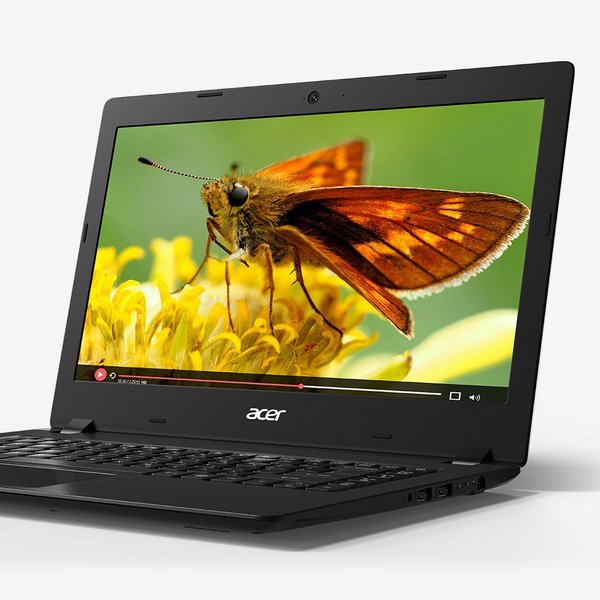

Acer Aspire 1 A114-32-C1YA, 14" Full HD, Intel Celeron N4000, 4GB DDR4, 64GB eMMC, Office 365 Personal, Windows 10 Home in S mode
Write a review
$24900

Acer Aspire 1 A114-32-C1YA, 14" Full HD, Intel Celeron N4000, 4GB DDR4, 64GB eMMC, Office 365 Personal, Windows 10 Home in S mode

Write a review
B07D97S1CR
PC only
+
Add to wish list
Hard Drive64 GB Flash Memory Solid State Processor BrandIntel Processor1.1 GHz Intel Celeron
Target is a general merchandise retailer with stores in all 50 states and the District...

City: US, New York

Delivery
Pickup at your own expense
Tomorrow from 09:00 to 20:00, Store location
Free
Payment options
Apple Pay Google Pay Mastercard Visa
Cash, bank card, credit/installment payments, cashless payment for legal entities
Warranty and returns
Exchange/return of products of proper quality within 14 days Official manufacturer's warranty: 12 months
Features
Item Dimensions
9.65 x 13.5 x 0.71 inches
Item model number
A114-32-C1YA
Item Weight
3.64 pounds
Operating System
  • Windows 10 Home
Series
Aspire One
Style
PC only
Wireless Type
802.11ac
RAM
4 GB DDR4
Hard Drive
64 GB Flash Memory Solid State
Batteries
1 CR5 batteries required. (included)
Brand Name
Acer
Processor
Processor Brand
Intel
Processor Count
2
Processor
1.1 GHz Intel Celeron
USB
USB 2.0 Ports
2
USB 3.0 Ports
1
Description
This fits your .
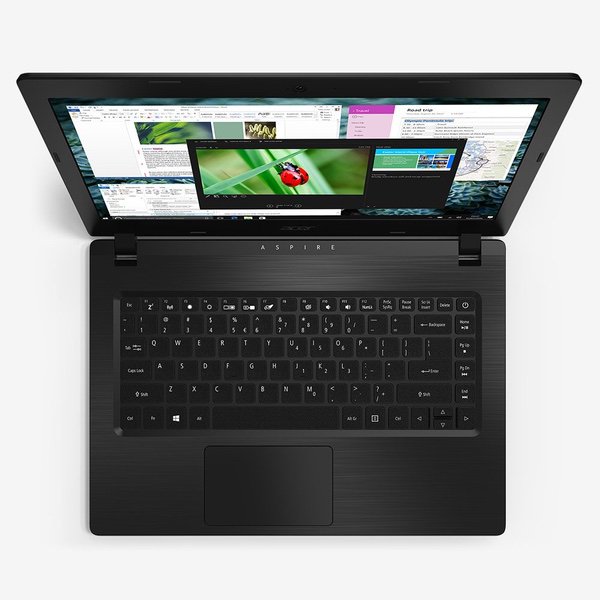
Make sure this fits by entering your model number. Intel Celeron N4000 Dual-Core Processor 14" Full HD (1920 x 1080) Widescreen LED-backlit Display 4GB DDR4 SDRAM Onboard Memory & 64GB eMMC Microsoft Office 365 Personal 1-Year Subscription & Windows 10 Home in S mode Up to 6.5 Hours Battery Life
Reviews
3.5
Reviews: 20
5 stars
35%
4 stars
30%
3 stars
5%
2 stars
5%
1 star
25%
Lon J. Seidman
5
0:00 0:00 This video is not intended for all audiences. What date were you born? January February March April May June July August September October November December 1 2 3 4 5 6 7 8 9 10 11 12 13 14 15 16 17 18 19 20 21 22 23 24 25 26 27 28 29 30 31 2019 2018 2017 2016 2015 2014 2013 2012 2011 2010 2009 2008 2007 2006 2005 2004 2003 2002 2001 2000 1999 1998 1997 1996 1995 1994 1993 1992 1991 1990 1989 1988 1987 1986 1985 1984 1983 1982 1981 1980 1979 1978 1977 1976 1975 1974 1973 1972 1971 1970 1969 1968 1967 1966 1965 1964 1963 1962 1961 1960 1959 1958 1957 1956 1955 1954 1953 1952 1951 1950 1949 1948 1947 1946 1945 1944 1943 1942 1941 1940 1939 1938 1937 1936 1935 1934 1933 1932 1931 1930 1929 1928 1927 1926 1925 1924 1923 1922 1921 1920 1919 1918 1917 1916 1915 1914 1913 1912 1911 1910 1909 1908 1907 1906 1905 1904 1903 1902 1901 1900 Submit Adobe Flash Player is required to watch this video. Install Flash Player Video review posting soon! I review a lot of laptops at or around the $200 price point and its nice to see how far things have come. This is a solid offering from Acer that lines up nicely with a similar laptop from HP (The Stream 14) with the same basic internal configuration (N4000 dual core Intel processor, 4GB of RAM, and 64GB of storage). The Acers advantages here is that it has a 1080p display vs. a 720p on the Stream 14. It also has a built-in hard wired ethernet port for connecting up to the network. But the Stream has better battery life. Performance is solid for basic tasks like web browsing, email, Word, Excel, etc. It has a nice snappy feel to it. Games are not so great given the lower end fanless processor inside. So things like Fortnite and other recent games will be too slow to enjoy on this device. For those looking to run Linux I found the compatibility here to be better than the Stream 14. Ubuntu 18.04 ran properly with all of the onboard networking, wireless, display, and audio drivers working properly. The Stream 14s Wifi did not work with the same version of Ubuntu. Overall this is one of the nicer low cost laptops Acer has put together recently. More detail will be in the attached video.
Kindle Customer
5
I havent owned a new laptop since I bought my Asus 6 years ago. I am comparing this little gem with that monster. This is smaller and lighter. The battery life so far much surpasses what I was used to. This Acer has a much more user-friendly keypad and touchpad, and the display and sound are much improved as well. The internet speed is faster and the response to new tasks is quick. The set-up was pretty easy. Nice to have Office included for the first year, therefore saving $60+ out of the gate. I was used to Windows 10 and the s mode does not seem to be a problem as I just use Edge to access what I need without downloading the apps, ie google photos, etc. I did not need anything with bells and whistles and therefore did not want to spend a lot of money - just something better for word processing, social media, emailing, etc. That is exactly what I found.
Dark Star
5
For around $250, this thing is worth it. I’m running an el gato game capture card on it that’s recording gameplay, I have multiple tabs open, playing music on YouTube from one of them, and I’m downloading mp4 from the game capture all at once. It’s not slowing down or lagging at all right now. I approve.
Kamel A.
5
I love it ,Even I dont really need it any more but I decided to keep it ...Very Thin with Smooth Looking , MSOffice One Year
Baroque Tossit
5
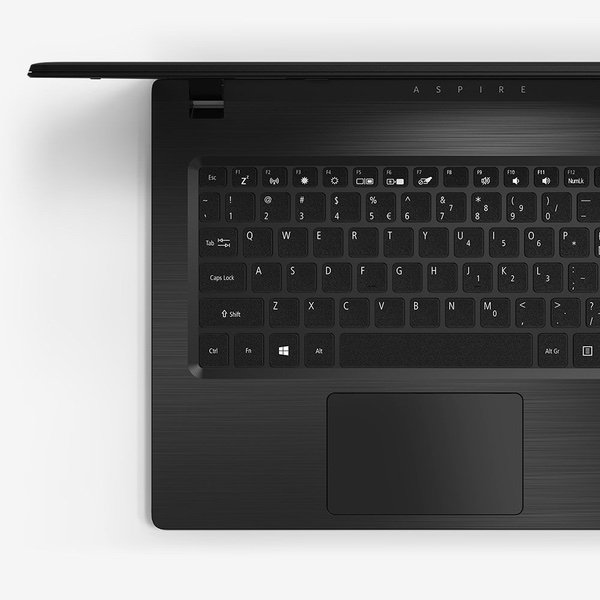
This review is for the Acer A114-32-C1YA. 64gb of storage, 4gb of RAM, Windows S. Im a semi-retired I.T. tech, so this review comes from that standpoint. After booting the device and logging in (using a Microsoft account, not a local account) I upgraded Windows S to Windows Home. This is a free upgrade, but is not reversible. Windows S supports only apps available in the Windows Store; Windows 10 Home supports Office 365 and 3rd party software. Once Win 10 Home was installed (if you do this, be sure to reboot the system, just to let things stabilize); also Win 10 updates will want to install and the malware definitions of Windows Defender will want to install, so give it some time to do those chores before installing other apps. Before I installed more apps, I removed a BUNCH of apps from the original Win 10 install - the machine comes loaded with "Bloatware" from Microsoft. After the "Bloatware-ectomy and Windows updates I installed Office 365, Chrome browser, DIA (an open source diagramming application), four printer drivers, Splashtop (a remote access application), a "Caps Lock" indicator app, Dropbox and setting up MS Outlook, a couple of GB of data, and have 33 GB free. 8 GB is taken up by the backup of Windows ("Windows.old") and could be recovered by running disk clean / clean system files. I tested Windows Remote Desktop and SplashTop and was able to access remote Windows computers without issue. Setting up an old HP4050n printer took some time - the drivers had to be manually configured. Performance of the Acer with 4gb RAM and an N4000 processor is not earth shaking; it isnt a gaming machine. However, running Office apps or having 3-4 Chrome windows open doesnt seem to task the system. The keyboard is acceptable for the market price (YMMV since keyboards are subjective). Theres no "Caps Lock" indicator on the keyboard. However Ive installed a 3rd party freeware program that places an indicator on the screen when Caps Lock is on. (You can find the software by searching the web). Im finding the screen to be better than I expected for this price point - but again, thats subjective and YMMV. One irritation - "Cortana" wants to search the web, the local device, the planet, the outer planets, and extend the search to the Andromeda Galaxy for all I know. Theres a registry hack that kills ("murders" might be a better word) Cortana and limits searches to the local machine. If I need to search the web, I use Google (or some such); when Im looking for a file or an app, I want the Windows 10 Home search bar to limit the search to the local machine. Once the hack was in place, the search bar works nicely. You can search the web on how to disable Cortana. Be sure to save a backup copy of the Registry before attempting to edit it. Since Bitlocker isnt supplied with Win 10 Home (shame on Microsoft for that!!!) Ive added a BIOS / boot password so that once shut down the machine cant be fired up w/o the password. If you need more storage, a USB thumb drive can be installed (some of them are very small and dont extend out of the USB port by much). Online storage (DropBox, Google Drive, OneDrive, etc.) is also an option (Ive disabled OneDrive on my machine). Theres an SD card reader, but the card sticks out too far for my taste to leave a card in the machine permanently for storage purposes. YMMV. (Edit 2/23/19): I added a 64 GB USB drive and moved my 2 GB of data onto that. I used another computer running Window 10 Pro to encrypt the drive using Bitlocker. Windows 10 Home can unlock Bitlocker drives. If the laptop is lost or stolen the BIOS password will protect the Acer from booting up and Bitlocker will protect the data. The machine is lightweight and would be good for making notes in class or meetings; my primary usage will be to maintain a Windows Server 2012r2 domain controller and network using remote desktop and Splashtop. Email and Office apps run well; Ive experienced no issues. Note that I normally have no more than 2-3 apps running at once; if youre in the habit of having 15 web pages open you may stress the machine more than I do. Dont expect to run online games or Adobe PhotoShop or other intensive apps on this machine. But for me - $250 for a serviceable laptop that can do what I need to do w/o fuss rates 5 stars. (There are other computers in the price range with better specs - but the Acer works for me. YMMV.) (Edit 2/23/2019) After a full battery charge I used the computer on a service call. The computer was in use (no videos, just Office, web searches, and remote accessing clients network machines) from 5 a.m. until 10 a.m.; it was placed into sleep mode until 3 p.m., then used from 3 p.m. until 5:15 p.m. when the "low battery" warning at 20% came on. A little over 7 hours run time, 5 hours sleep mode - not bad at all for the first real day of work. HTH Regards Jim
Eilsel
5
You get what you pay for! I think this is value for money. It’s not built like a tank, it’s plastic but if you are someone that takes care of your things, it lasts just as well. Very good screen resolution and set up is very simple. So far I’ve had no problems with it at all and it does everything I need it to do. I’m not a gaming person at all so this handles everything else very well at a fraction of the cost. I suppose it depends what you need it for. Highly recommended for a low budget computer. If I were to rate it according to those in its class - there would be five stars throughout.
Micah S. Bicker
5
I guess it works well. I got it for my 15 year-old daughter, as she was often panicked and losing her mind with last minute word-processing issues and printing needs at 11:00 pm the night before they were due. The idea was I could sleep. Maybe. I havent seen her since. She disappeared into her room, and Im assuming shes just streaming all the G- rated crap she can find. Which means that setup was easy and its functioning with greater capacity than I thought a cheap laptop could. Dammit.
Product variations
Column filling
Sort by Price Sort by Availability Sort by CODE Sort by Style Sort by RAM Sort by Processor
$24900
In stock
+
B07D97S1CR
Style:
PC only
RAM:
4 GB DDR4
Processor:
1.1 GHz Intel Celeron
You may be interested
  • Bestsellers
  • Recently Viewed
 
Fast and high quality delivery

Our company makes delivery all over the country

Quality assurance and service

We offer only those goods, in which quality we are sure

Returns within 30 days

You have 30 days to test your purchase