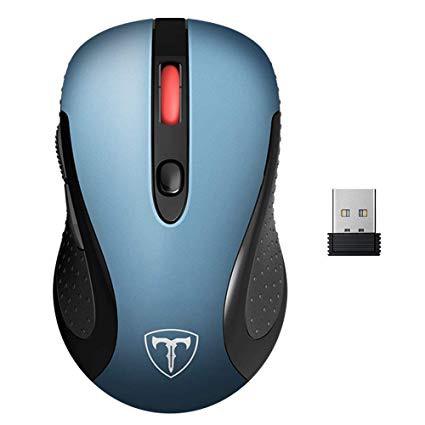



VicTsing 2.4G Wireless Mouse Wireless Optical Laptop Mouse with USB Nano Receiver, 6 Buttons,5 Adjustable DPI Levels,15 Months Battery Life-Blue
Write a review
$1100 $5000

VicTsing 2.4G Wireless Mouse Wireless Optical Laptop Mouse with USB Nano Receiver, 6 Buttons,5 Adjustable DPI Levels,15 Months Battery Life-Blue

Write a review
B079HM4568
+
Add to wish list
Target is a general merchandise retailer with stores in all 50 states and the District...

City: US, New York

Delivery
Pickup at your own expense
Tomorrow from 09:00 to 20:00, Store location
Free
Payment options
Apple Pay Google Pay Mastercard Visa
Cash, bank card, credit/installment payments, cashless payment for legal entities
Warranty and returns
Exchange/return of products of proper quality within 14 days Official manufacturer's warranty: 12 months
Description
This fits your .
Make sure this fits by entering your model number. 5 ADJUSTABLE CPI LEVEL. This wireless mouse owns 5 Adjustable DPI Switch(800, 1200, 1600, 2000, 2400), control your own speed freely. No need any driver, plug and play directly. STRONG DURABILITY AND LONG WORKING DISTANCE. 500,0000 Times keystroke test and perform well. 2.4GHz Wireless, increase working distance of up to 50ft. ERGONOMIC DESIGN. Contoured shape keeps your hand comfortable even after long hours. And the USB Nano Receiver can be stored in the the back slot of the mouse. WIDE COMPATIBILITY. Compatible with most system including Windows, Mac and Linux. Fit for Notebook, PC, Laptop, Computer, Macbook and other device. LONG BATTERY LIFE AND AUTO ENERGY-SAVING SLEEPING MODE. Up to 15 months of battery life virtually eliminates the need to change batteries.(Battery life may vary based on user and computer conditions.) The Auto Switch Off function helps you save energy as your Wireless Mouse will switch off when your PC is turned off or the receiver is disconnected.
Reviews
3.8
Reviews: 20
5 stars
40%
4 stars
35%
3 stars
0%
2 stars
10%
1 star
15%
Love to click and buy
4
Had this for about a week now. Was very happy with it initially after I adjusted the dpi settings. I use the mouse all day for work and frankly, its not cut out for that level of usage. Its already degrading in key performance categories as follows: 1) Scroll wheel started stuttering and is no longer useable. 2) Batteries wear out quickly. Not a big deal walking to my battery charger and popping in a new AA but doing this every couple days is a bit much. 3) Mouse cursor become intermittently unresponsive but when I take it off my mousepad, it works much more consistently. Hardly worth going through the trouble of returning it for less than $11 but I am now in the market for a better mouse. My foray into wireless has been thwarted. ** update 1/27/18 ** The vendor sent me a new unit and Ive had a much improved experience. I believe the original unit was defective. Notes: - Use a good battery. The rechargeable AA batteries Ive been using are old and dont hold a charge as well as they did. A new battery resolved a lot of the twitchy cursor issues - The scroll wheel has held up well considering my high volume daily usage - I really like the size of the unit and the wired Gigabyte m6800 I went back to for a while seemed clunky in comparison - I can recommend this wireless mouse now and if youre one of the rare users like myself who gets one thats faulty, get a free replacement
LizGM
4
This is a great mouse from a technical perspective. Took a chance ordering an unfamiliar brand and (its only been 3 days) so far, so good. I have a large-ish female hand and the curve of this mouse is significantly easier on my hand than my previous smaller Logitech. I havent explored all the options yet - there appear to be a plethora - but I do know that after popping in a battery and plugging in the wireless USB, I was using this mouse on my Windows 10 laptop within 60 seconds. Im deducting one star because of delayed reaction time when first logging on: I unlock Windows and move my mouse and... HELLO, wheres my pointer?!? I get nothing for about 2-3 seconds. I have to jiggle and click the mouse to "wake it up" and find my pointer on my screen. Maybe theres a fix for this and I havent had time to find it, but I dont remember having this problem before. Its a wee bit frustrating, but I can live with it for now. The true test will be longevity: I can never seem to get more than 6 months out of a wireless mouse (with anywhere from 2-10 hours of use a day during the week) before it dies. If this one lasts longer, Id probably buy again (if that delayed response thing doesnt end up driving me nuts).
ZaraByte
4
UPDATE: I was given a new mouse to replace the first mouse this one appears to be working a lot better now, was surprised the company reached out to me offering to replace the mouse at no cost. Hopefully this one wont have any problems like the last one however it did take a while for the last one to start acting up. I wanted to at least wait a little bit longer before leaving a updated review but this company kept bugging me to do a review on it. If the mouse starts acting up like the last one did Ill update this review. ------------ I could help but notice this mouse has a logo that resembles the female part of a women LMAO... With that said this mouse is trash or at least mine is it suffers from not moving correctly whats happens is I try to move the mouse and it doesnt wanna move seems like their is some kinda problem with the adapter thats plugged into the computer or just the mouse. I bought two of these and both have the same problem on different computers. I assume these might be effected by stuff that operates on the 2.4Ghz FREQ so a Microwave or some thing like a Microwave turns on it kills the signal. Would not recommend this mouse, I think I will stick to wired mice from now on.
Jay B.
4
Needed a mouse for my new PC laptop. it came with a single touch pad like a Mac does, which is a horrid way to operate the internet. I got tired of that quickly so needed a wireless mouse. I wasnt sure about all the extra buttons, i never had a mouse with more than right left and scroll wheel before. Though maybe it would be handy. I havent used them at all and honestly dont see how anyone other than a gamer or graphic artist would ever need them. That being said, the way I usually hold a mouse the side button was always getting clicked in the beginning. This ticked me off and almost returned it, but before I knew it I got used to it and honestly forgot all about it.
Lin C.
4
This mouse works fine, but for some reason I am having a difficult time getting accustomed to it. Its just uncomfortable for some reason. I do like the back/forward buttons. The scroll wheel works fine. The sleep mode is easy to use. Its all just fine. The USB adapter is compact and unobtrusive. Maybe it is "me" just trying to get accustomed to a different brand, but my wrist gets more sensitive using this mouse than any other. Not sure why because I think it is a perfectly fine and usable mouse. I feel like I have to work harder with this mouse. Perhaps I havent found the correct adjustment yet. So far the battery life has been fine. Im not a gamer, but I do use spreadsheets and click around a lot. The price was really great and if it lasts at least as long as the bigger brand-named mice, I can recommend it.
Ana D
4
Ordered 2 of those (but different colors) for me and my bf. THERE ARE SO MANY Wireless Mouse on AMAZON, that I was overwhelmed when was picking the right one. This one had a lot of reviews already and the price was pretty good , that I decide to order it. Came fast (Prime can not go wrong:), I was really excited to get them , because before we had not Wireless Mouse. It does what it suppose to do, sleek design , nice colors(I like mine because its purple :). BUT it is small, way smaller than the regular mouse size. I was about to return them because I thought we never get comfortable , but my bf said that its only for work and not like a gaming mouse. We got used to it, just want to aware the future buyers
toad6386
4
The mouse works as advertised, but just isnt my cup of tea. The 8 minute "sleep" setting, designed to increase battery life, is a good idea in theory, but was more annoying to me as I dont always move my mouse within that time frame. Then to click the DPI button to wake it up changed my settings at times, causing more annoyance. So my main gripe is probably more a preference than defect. Ill go back to my old, flaky (which is why I wanted a new one) MS 3500 mouse while I decide on which to order next. Update: I have to upgrade the rating a bit as customer service tried to make things right, though I hoped to make it clear it was a preference thing, and not any real flaw in the product (akin to car manufacturer preference, etc). Now that I know theyll back their product, Ill keep that in mind when shopping for other such things in the future.
You may be interested
  • Bestsellers
  • Recently Viewed
 
Fast and high quality delivery

Our company makes delivery all over the country

Quality assurance and service

We offer only those goods, in which quality we are sure

Returns within 30 days

You have 30 days to test your purchase