


















Logitech MX Vertical Wireless Mouse – Advanced Ergonomic Design Reduces Muscle Strain, Control and Move Content Between 3 Windows and Apple Computers (Bluetooth or USB), Rechargeable, Graphite
Write a review
$8700

Logitech MX Vertical Wireless Mouse – Advanced Ergonomic Design Reduces Muscle Strain, Control and Move Content Between 3 Windows and Apple Computers (Bluetooth or USB), Rechargeable, Graphite

Write a review
B07FNJB8TT
+
Add to wish list
Target is a general merchandise retailer with stores in all 50 states and the District...

City: US, New York

Delivery
Pickup at your own expense
Tomorrow from 09:00 to 20:00, Store location
Free
Payment options
Apple Pay Google Pay Mastercard Visa
Cash, bank card, credit/installment payments, cashless payment for legal entities
Warranty and returns
Exchange/return of products of proper quality within 14 days Official manufacturer's warranty: 12 months
Description
This fits your .
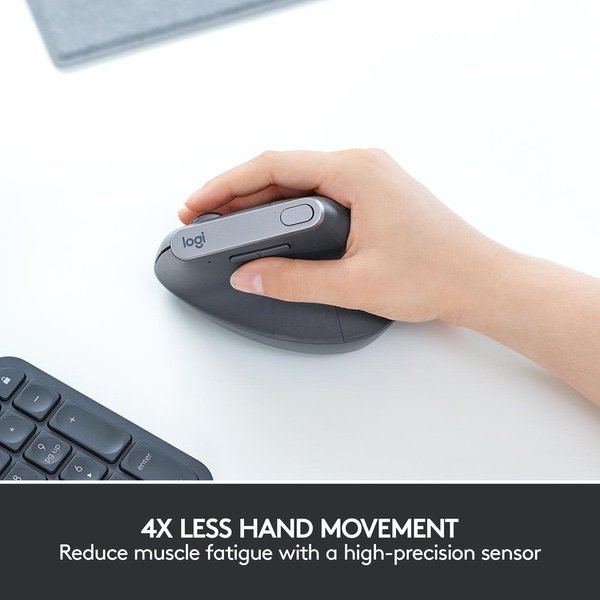
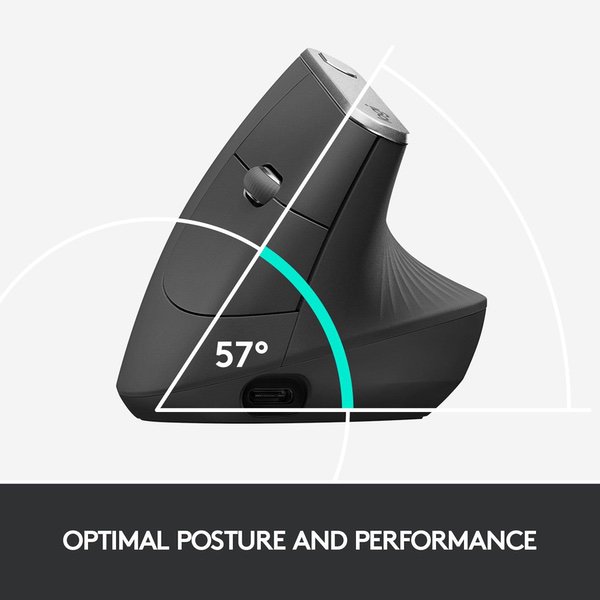
Make sure this fits by entering your model number. ADVANCED ERGONOMIC DESIGN - Places your hand in a natural handshake position using a unique 57-degree angle, preventing forearm twisting and reducing muscular strain by 10 percent* (*As compared with a traditional non-vertical mouse. Based on Logitech Study, September 2017) HYPER-EFFICIENT TRACKING - 4000 DPI high-precision sensor provides precise tracking that requires 4x less hand movement compared to a traditional mouse with a 1000 DPI sensor CROSS-COMPUTER CONTROL - Game-changing capacity to navigate seamlessly on three computers, and copy-paste text, images, and files from one to the other using Logitech FLOW THREE WAYS TO CONNECT - Use with up to three Windows or Mac computers via included wireless USB unifying receiver or Bluetooth smart technology or the included USB-C charging cable RECHARGEABLE BATTERY - With quick charging: Stays powered for 4 months on a full charge – and get 3 hours of use from a 1-minute quick charge (Battery life may vary based on user and computing conditions). Batterylife:Rechargeable Li-Po battery (240mAh)
Reviews
3.6
Reviews: 20
5 stars
30%
4 stars
30%
3 stars
20%
2 stars
5%
1 star
15%
Dcon
5
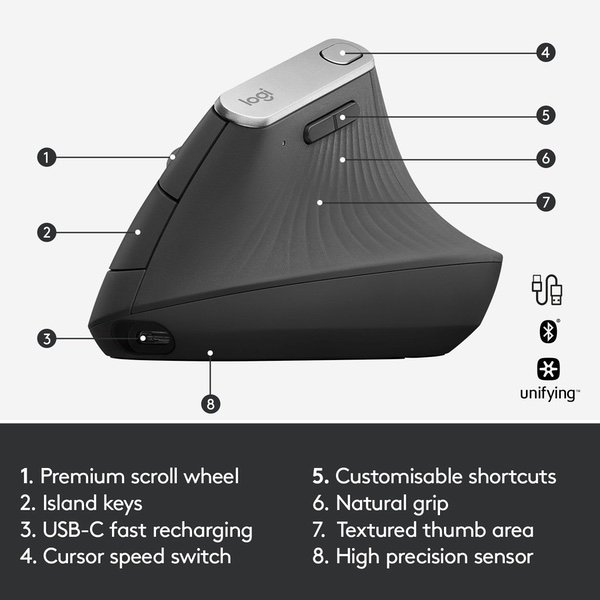
Below is the script for my video review on Youtube (under title: Logitech MX Vertical Mouse - 30 Days Going Vertical). I purchased this with my own money and this is an unbiased take. Thank you :) Vertical mice have been around for some time now, but this is the first one Logitech has ever created. Logitech is known for making very nice, high quality peripherals at an affordable price. Their MX line for lack of a better term is their flagship line and typically comes at a higher cost. But at that high cost you’re getting better features, a built-in battery, a unique/premium design and the overall craftsmanship is just better. And this mouse is no different. Overall the body of the mouse is composed from a plastic polymer which allows it to be equal parts durable and light as it comes in at around 135 grams. The portion of the mouse where your hand rests on and interfaces with has this nice texturized, rubber coating. This texturized surface allows for improved grip and allows the overall end user experience to be that much more comfortable. The MX vertical mouse has 6 buttons in total, 4 of which are customizable via Logitechs downloadable application. Along the right edge is standard left and right buttons and in between is the scroll wheel. The scroll wheel is depressible, customizable and has that same rubber coating as the rest of the mouse. It is buttery smooth, has a subtle click and feels so nice when turning it. Along the left edge there is two more customizable buttons. These are just above where your thumb lies and are easy to reach, even if you have smaller hands. Along the top edge just adjacent Logitech’s branding is our last customizable button. This is also easily within reach and comes setup as a DPI adjuster out of the box. This button allows you to toggle between 2 different DPI settings, both of which can be adjusted by holding down the button and moving the mouse. The DPI range of this mouse is extremely impressive. It can cover as low as 400 dots per inch or a maximum of 4000 dots per inch. This is helpful for a few reasons: firstly the higher the DPI you can achieve the more area you can cover when moving your mouse. This is convenient when you have a larger monitor such as an ultrawide or when using a 4k monitor as you can cover more pixels with less movement. Higher DPI is usually emulated via settings within the software but this results in less smooth movement which is important for professional work or while gaming. And less movement feeds into the main ideology of this mouse. Higher dpi allows for less movement which is less strain on your wrist, resulting in a more comfortable experience. This is the main reason why this mouse exists: to minimize strain on your wrist and increase the overall comfort. It does this by allowing for a higher DPI range but mainly by altering the way your hand rests on the mouse. The average mouse orients your hand parallel with the surface. In order to achieve this position your forearem twists and is forced into a pronated position. This causes stress on a major muscle in your wrist, the pronator quadratus. This muscle (along with the pronator teres) is responsible for turning your wrist inward and maintaining this pronated position. Not only is your wrist stressed but in order to maintain this position your elbow is forced to flare away from your body causing a secondary strain on your deltoid, which in turn causes a tertiary strain on your upper back near your scapula. In order to relieve this strain, Logitech has re-oriented the angle at which your hand rests on the mouse. Rather than being parallel with the surface, the mx vertical mouse is oriented at a 57-degree angle. This is a more natural position for your wrist to be in and helps reduce strain greatly. Not only does this reduce the strain in your wrist, it also helps keep your elbow tucked closer to your body, allowing your deltoid to relax, and further preventing it from causing strain on your upper back. In terms of connecting the mouse you have 3 options: you can connect wirelessly via Bluetooth or with this included usb dongle. And lastly you can hard wire in with the included USB type-C cable. The usb type c port also allows for charging. The mouse has a 240mAh battery and Logitech claims you can get 4 months of battery life on a single charge and I actually think this is accurate. Over the 35 days I have owned this mouse, I have used it 2-6 hours on a given day and have put roughly 80 hours of use on my first charge. And according to logitech’s desktop application my battery is still near full. Only time will tell if it actually survives 3 more months without needing to reach for the cable but as of now it’s excellent! The MX vertical mouse is also capable of connecting up to 3 devices as it has an easy-switch selector on the bottom. This is nice if you’re wanting to use this across multiple computers and it switches effortlessly whether you’re on a pc or mac. Overall this mouse is great. It attempts to provide a more comfortable, ergonomic experience and reduce strain in your wrist and I have to be honest I was skeptical at whether or not this would even achieve that goal. I mean I’ve never had any wrist issues before would I actually benefit from this? The answer is a resounding yes. After using this mouse for just over a month I can comfortably say this mouse will provide you with a more comfortable experience and it will make you aware that you are causing stress to your wrist. Just transitioning from the mx vertical mouse to my keyboard, I can feel a drastic difference in my wrist. It immediately becomes strained when typing and relief is found when I go back to using the mouse. If you have any wrist or arthritic issues definitely give this mouse a look, it may just provide the relief you need. I know I won’t be going away from mine anytime soon.
Pepper K.
5
Ive used an Evoluent Vertical mice for over a decade and when my last one broke (mousewheel got stuck after a fall) I decided not to go back. The accuracy wasnt the best and it was heavy which put a strain on my wrist despite it being vertical. The USB receiver also didnt play well with the dongle needed for my work Macbook. I was concerned that since the Logitech Mouse wasnt completely vertical it would be a problem but Ive used it over a month now with no problem. Its smaller than the Evoluent mouse and since you dont need alkaline batteries its a lot lighter. The best part about the Logitech Vertical Mouse however is Logitechs Flow software. Using the mouse, Blueetooth and this software, I can move seamlessly between three different devices at one time. I have a Type C mouse Macbook for work and an old 2011 iMac at home and I can work between the two with ease. Once my mouse hits a certain zone of one device screen, the mouse automatically switches and appears on the other device. On a Mac I just had to make sure to enable the security settings for the Logitech Options Daemon and that the mouse was set up on each of the devices to get this to work. There is already software out there to do this, but having it included with the mouse makes it even more worth it.
Nick
5
I tried the Evoluent and the Anker before settling on this one. The Evoluent is way too heavy and makes your wrist too vertical. The Anker one feel really nice at first but you end up putting pressure on the side of your hand which is bad for people like me who suffer from ulnar nerve issues. I wasnt sure about the shape of this at first, but the more I used it, I realized the genius of the design. You end up supporting your hand with the palm, and the angle is perfect for ergonomic comfort. The sensor is super accurate which means you get things done quicker, and the software is awesome for creating macros to help speed up your workflow. I love the rubber grip; it keeps your palms from getting sweaty and feels nice on your hand. My only minor complaint would be that the side buttons could be a better shape and easier to press. Also I wish the software allowed for modifier keys to be used with click-drag movements on a single key. Cant complain because its not like there is better software out there really.
muir
5
I have some ulnar nerve / Raynauds hand and arm issues so have to be careful about ergonomics for blood flow. I literally cannot work with a normal mouse as a result and have to use a vertical mouse and spend over 8 hours per day during the week using the computer / a mouse. This is the best yet. Evoluents vertical mouse was better than everything out there but this Logitech vertical mouse requires noticeably less strain to move the mouse and the hand is just considerably more comfortable at rest. Sure there are some things I miss about the Evoluent (3 large mouse buttons including left click, middle click, and right click; wheel button was easier to click; buttons for Back/Forward were better positioned) but those are a much smaller percentage of use than improving the resting hand position and ease of movement (which are about 98% of your use time). Buy it.
Lucien
5
I was a bit nervous after reading reviews... would this fit my hand, would I like it, would it even pair with my computers? So... it fits my hand great (59" , right handed, male).. huge difference from regular mice and I have tried a lot. it feels more comfortable, and more precise at the same time. I love it, and use it at work (lots of writing and editing, some photoshop) and will be buying another for home. Extremely intuitive. It pairs seamlessly by blue tooth (good bye dongles!) with my 2018 MacBook Pro, and 2017 iMac Pro. Someone commented it does not pair with older Macs that have older blue tooth protocols. I did not test that, but Macs made for the last 4 years at least have the required blue tooth standard (3.0). you might want to check yours. The one thing I will say about pairing... is that it can bind up to three different computers.. it has a button to switch between, and it will not overwrite (easily) one computer pair for another.. ie. I paired first to my iMac on machine one, then tried to pair to my laptop without changing machine setting.. and it did not do it. I hit the button to say machine two, and it paired fine. thats a plus in my books. I now use it between both computers easily. One day if I have to overwrite those machine choices I suppose I will need to dig into a manual to figure out how. I dont know if it would make a good gaming mouse... I am not much of a gamer and those I do play, right or left click with scroll are really all I need and it does that great. It has a few extra buttons that I havent played with, but certainly no where near as many options as some of my other mice.. options I never use and typically get in my way. BUT if you want a gaming mouse, this probably needs more research. What its great for, as I said, is productivity apps and general mousing around. I dont see myself going back. My only regret is that its so BIG. I travel a lot for work, and dont see myself packing this thing (though it is light). For that I will have to go back to my Magic Mouse. Cant have everything I suppose.
Mainian
5
I received mine yesterday, Id say 5/5 because it fit what I was looking for. The mouses build quality is on par with the MX Master, and the angle feels nice to use. I do miss hyper-fast scrolling and the side scroll from the MX Master. The middle click alone makes this way better than evoluents options. The clicks feel and sound the same as the MX Master.
You may be interested
  • Bestsellers
  • Recently Viewed
 
Fast and high quality delivery

Our company makes delivery all over the country

Quality assurance and service

We offer only those goods, in which quality we are sure

Returns within 30 days

You have 30 days to test your purchase