


















Logitech MX Vertical Wireless Mouse – Advanced Ergonomic Design Reduces Muscle Strain, Control and Move Content Between 3 Windows and Apple Computers (Bluetooth or USB), Rechargeable, Graphite
Write a review
$8700

Logitech MX Vertical Wireless Mouse – Advanced Ergonomic Design Reduces Muscle Strain, Control and Move Content Between 3 Windows and Apple Computers (Bluetooth or USB), Rechargeable, Graphite

Write a review
B07FNJB8TT
+
Add to wish list
Target is a general merchandise retailer with stores in all 50 states and the District...

City: US, New York

Delivery
Pickup at your own expense
Tomorrow from 09:00 to 20:00, Store location
Free
Payment options
Apple Pay Google Pay Mastercard Visa
Cash, bank card, credit/installment payments, cashless payment for legal entities
Warranty and returns
Exchange/return of products of proper quality within 14 days Official manufacturer's warranty: 12 months
Description
This fits your .
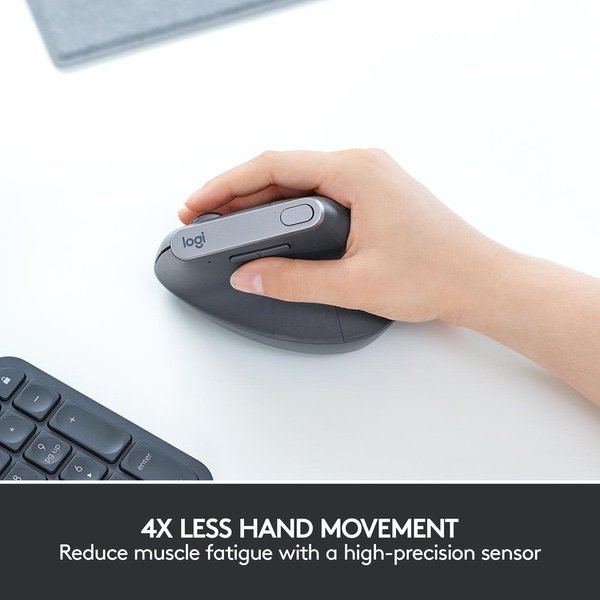
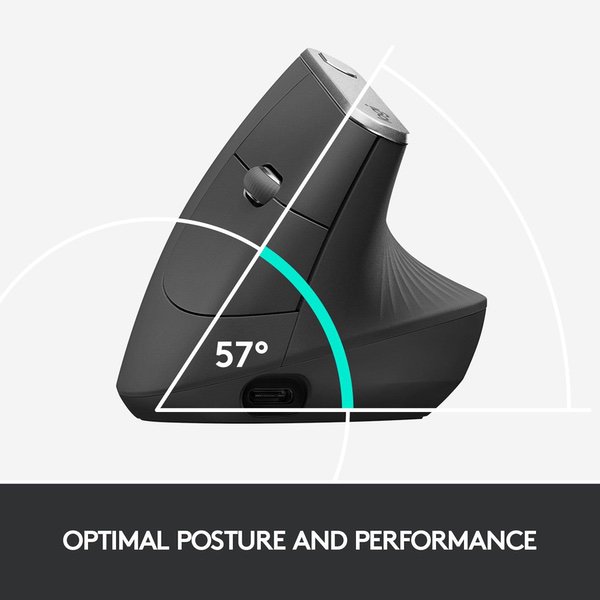
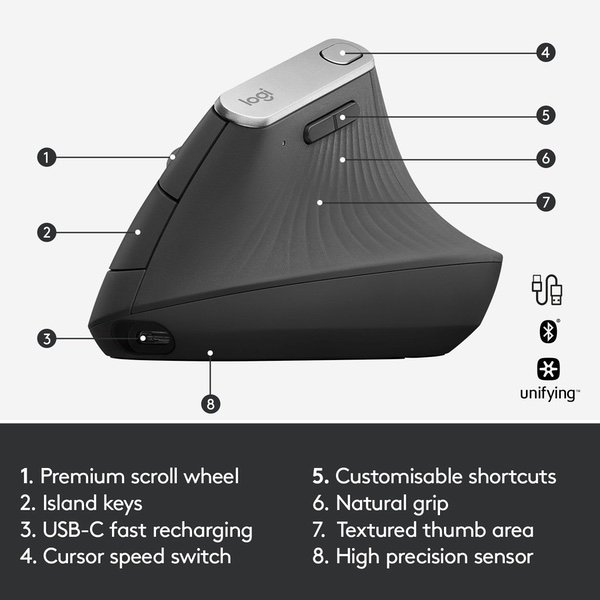
Make sure this fits by entering your model number. ADVANCED ERGONOMIC DESIGN - Places your hand in a natural handshake position using a unique 57-degree angle, preventing forearm twisting and reducing muscular strain by 10 percent* (*As compared with a traditional non-vertical mouse. Based on Logitech Study, September 2017) HYPER-EFFICIENT TRACKING - 4000 DPI high-precision sensor provides precise tracking that requires 4x less hand movement compared to a traditional mouse with a 1000 DPI sensor CROSS-COMPUTER CONTROL - Game-changing capacity to navigate seamlessly on three computers, and copy-paste text, images, and files from one to the other using Logitech FLOW THREE WAYS TO CONNECT - Use with up to three Windows or Mac computers via included wireless USB unifying receiver or Bluetooth smart technology or the included USB-C charging cable RECHARGEABLE BATTERY - With quick charging: Stays powered for 4 months on a full charge – and get 3 hours of use from a 1-minute quick charge (Battery life may vary based on user and computing conditions). Batterylife:Rechargeable Li-Po battery (240mAh)
Reviews
3.6
Reviews: 20
5 stars
30%
4 stars
30%
3 stars
20%
2 stars
5%
1 star
15%
Nick B.
4
I am a CAD designer and typically hold a mouse most of the 8 hours I work every day. A click and hold with the mouse wheel is how to rotate the 3D object in the software. Scrolling in and out with the wheel is how you zoom in and out. This wheel is used A LOT and the one on this mouse is worse than the one in my cheapo Dell mouse. The indents in the wheel are spaced out and require a little more force to overcome than a wheel in my M325 and my G602. The force required to depress the wheel is also higher than all three mice I have mentioned. That is a major bummer and I really want to give this mouse 3 stars, but I realize most users are not concerned with this and everything else about the mouse is excellent. On a side note if Logitech is listening. Why not add a third mouse button to be operated by the ring finger? The way this mouse is held makes it an exceptional candidate for a third mouse button. Fix the wheel and add a third mouse button and you will have hit a home run. I dream of being able to use a third button with my ring finger for so many CAD operations. Positive notes include: -The mouse glides effortlessly over my mouse pad. There is a lot of that slick material on the bottom of this mouse. Very nice. -Tactically this mouse is excellent. It feels wonderful to hold. -They nailed the Goldilocks of weight for this mouse. Its not too heavy, and its not too light. Its weight is perfect. -The two regular mouse buttons are excellent. The click is very nice and clicks well from multiple spots on the button. -The tracking is exceptional. -Time will tell, but it feels durable. I feel like I could throw this in my computer bag and not worry about giving it a case or its own padding. UPDATE (5/26/2019): The wheel started squeaking as I was scrolling with it. I contacted customer support and with some reluctance they replaced the mouse. The replacement was great...for about 2 months. It squeaks as I am scrolling now as well. Its unfortunate for an otherwise excellent mouse to have a fatal flaw. This is the only problem I have with this mouse.
verbalclay
4
Ive used vertical mice for more than 4 years now, so Ill share my experience and comparisons. Im a software developer by trade and a gamer by hobby, so my mice get a lot of use, and I use vertical mice to combat my tendinitis. I started with the Evoluent VerticalMouse, which I LOVED. In terms of basic feel and functionality, it exceeds the Logitech MX Vertical. However, its mouse buttons degraded over time, so that each mouse would only function for a maximum of 2 years before one or more buttons stopped clicking consistently. After going through two of those mice, I was excited to see the Logitech MX Vertical announced, and I ordered one as soon as it was available. In general, its a good mouse, and its as effective for my tendinitis as the Evoluent, even though its angle is not quite as directly vertical. In fact, because of its more sloping angle and more traditional button placement, its likely an easier transition from a standard mouse than the Evoluent. The Evoluent has an extra button that naturally falls under the ring finger, but I miss that less than I expected to. My biggest complaint about the Logitech is the buttons on its left side. Whereas the Evoluent has two long buttons, one above the thumb and one below, the Logitech instead has two short buttons that both sit above the thumb, so I find I have to stretch my hand oddly to reach the forward one, and be very careful not to press both buttons at once. The top button is also a little awkward, since it doesnt fall under or near any of the standard resting finger positions, but Im getting used to it. For users who dont care that much about the extra buttons, of course, none of this would matter. Aside from that shortcoming, the Logitech holds its own pretty well. The software for programming buttons is comparable to the Evoluent; both allow for a range of common functionality for each button as well as the ability to assign custom keystrokes. Ive only had to charge the Logitech once so far; it lasted about 2 months on a charge. Its documentation says up to 4 months, but then again, I probably use it a lot more than the average consumer, so I really cant complain. As long as it lasts as well as other Logitech mice Ive had, rather than failing within 2 years like the Evoluent, Ill count it a very good purchase.
Edward Maynard
4
I bought this mouse after trying the offering from Anker and finding it to not track very well at times, which was very frustrating; so much so that I wound up buying another Vert mouse soon after (this one). I will be comparing the two a lot since they are the only 2 vertical mice Ive dealt with. The finish and comfort level of the Anker is better than the Logitech: Logitech is hard plastic with some grooves in it and the Anker just has a sort of smooth rubbery texture over the whole mouse and is much lighter in comparison (triple As compared to internal battery weight for sure). The Logitech MX Vert is a great mouse, if not a little overpriced for what it is. It is still the best Vert mouse on the market as far as I am aware, and I have been using it everyday since I got it and love it. I have heard a lot of mention in reviews and other places that there is a learning curve to using a Vertical mouse. I did not have that experience with either mice when I received them. It felt very natural and easy to use. Its essentially exactly the same except your hand is positioned in a more comfortable position. For reference I am a 59" male with pretty small hands: the tip of my longest finger to the end of my palm/hand is only about 7in. If you have bigger fingers your fingers will hang off the front of the mouse as shown in other reviews.
JG
4
I have used the Master MX for three years now but I use computer for almost 6 hours a day and my wrist has started to hurt so I got this. This mouse is different and Im sure I would need practice. Its not too bad though. Since its 5V .5 A you can charge it using USB port on your computer. I just got it in the mail so Im not sure how itll work in the long run. Just realized it does not work on glass, so apparently they went a step backwards...
techboy
4
I must say I like the wrist position better on this than on a standard mouse. And it is a nice change when youre tired of having your hand in the prone position. Its nice that you can use the unifying receiver and use both your regular Logitech mouse AND this one and just change whenever you feel like it. But - sometimes its necessary to lift up a mouse and move it to get all the way across a screen. This mouse, unlike regular ones, you cant do that without clicking buttons accidentally. You cant grip it tight enough to lift it and not push a button. So you have to take your fingers off the buttons and grab the base to lift it. The semi-sticky sides are just not grippy enough to hold it, and they have vertical grip lines instead of horizontal ones, so your fingers slide right over them. Also, the pressure on the right and left buttons when clicking tends to also move the base slightly, and that can negate your attempt to double click. The mouse is programmed just the way I like it right out of the box, and was simple to activate. Just plug in the receiver, let the software install, and youre good to go. Charging is easy with the supplied USB charging cord. The button on its top is used to adjust cursor speed. It does not have a switch on the scroll wheel to convert to smooth scrolling. Has a convenient on/off switch on the bottom to conserve battery life. I think the forward and back back rocker buttons could be a tad larger. The mouse is very responsive just as my other wireless Logitechs are. All in all, Im happy with it. Some design changes could be made, but its worth a buy.
M&RB
4
I am an adult female with extremely small hands. I am on the hunt for a new mouse that is both ergonomic and compact enough for me to hold - a difficult task indeed. This is a really nice mouse and 100% worth the $$ if it fits your hand. Unfortunately, it is just too big for me. The side of my palm cannot rest on the desk surface/wrist rest and still reach the buttons. I liked this enough to try to grip it a bit differently (higher) so that I could reach all the buttons but after a week, realized that was going to cause long-term pain. So, back this goes but for that reason alone. It is very nice, has a great non-slip texture, and very comfortable to hold. So sad there isnt a smaller version of this but as with most such things, its a "one size fits all" that excludes those of us outside the 95% percentile.
You may be interested
  • Bestsellers
  • Recently Viewed
 
Fast and high quality delivery

Our company makes delivery all over the country

Quality assurance and service

We offer only those goods, in which quality we are sure

Returns within 30 days

You have 30 days to test your purchase