
















Logitech K800 Wireless Illuminated Keyboard — Backlit Keyboard, Fast-Charging, Dropout-Free 2.4GHz Connection
اكتب تقييم
$‎ 5900

Logitech K800 Wireless Illuminated Keyboard — Backlit Keyboard, Fast-Charging, Dropout-Free 2.4GHz Connection

اكتب تقييم
B003VAGXWK
Target is a general merchandise retailer with stores in all 50 states and the District...

المدينة: US, New York

Delivery
Pickup at your own expense
Tomorrow from 09:00 to 20:00, Store location
Free
Payment options
Apple Pay Google Pay Mastercard Visa
Cash, bank card, credit/installment payments, cashless payment for legal entities
Warranty and returns
Exchange/return of products of proper quality within 14 days Official manufacturer's warranty: 12 months
Description
This fits your .
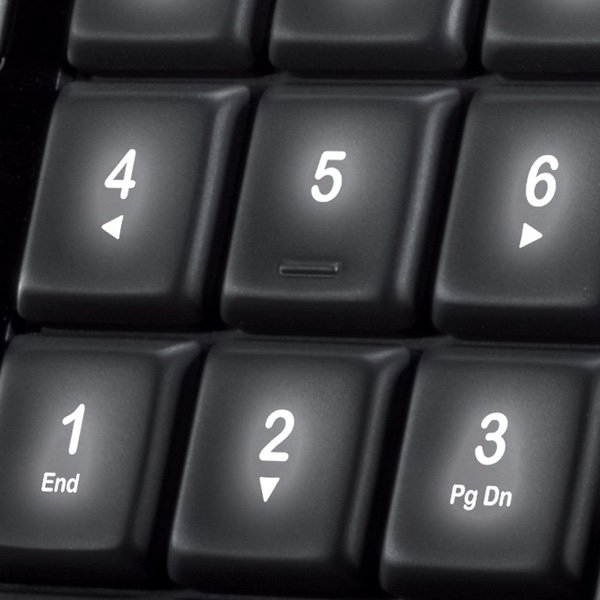
Make sure this fits by entering your model number. Brightly backlit keys with illuminated characters for easy typing, even in the dark, compatible:Windows XP, Windows Vista , Windows 7, Windows 8, Windows 10 PerfectStroke key system makes every keystroke more comfortable, fluid and quiet. No batteries needed: recharge quickly with the included universal micro-USB cable Powerful 2.4 GHz wireless connection with one tiny Unifying receiver that stays in your computer. Works with Windows-based PCs, including Windows 10 or later. Try moving the keyboard closer to the unifying receiver, or plug the unifying receiver into the receiver extender cable to bring it closer to the keyboard Easily pair with other Logitech devices through a single Unifying USB receiver. Look for orange "unifying" icon for compatible devices. NOTE: Review the videos under the image section and user manual under product details for set up and user guidance Compatible with Windows XP, Windows Vista , Windows 7, Windows 8, Windows 10
Reviews
2.8
التقييمات: 20
5 نجمة
25%
4 نجمة
15%
3 نجمة
10%
2 نجمة
10%
1 نجوم
40%
Jane Smith
5
Computing systems leave me irate. Fundamentally and deeply irate. Most systems are bereft of quality assurance or acceptable user experience design. As such, Ive broken many a keyboard over the years. In five-years of sixty-plus hour work-weeks Ive only broken two K800s. One against the head of a coworker, the other after beating the K800 with a significantly larger and heavier monitor. This purchase is #2, and it is just as sturdy as the sadly departed prior K800. As for what most people may need: * The keys feel great. That is unless youre a nostalgic weirdo and love the archaic M-style IBM keyboards that clickity-clack at 90dB. Buy this comfortable but quiet keyboard only if youre not a sadist against your coworkers. There are better ways to get under their skin. * Logitech Unity is swell. One tiny USB dongle works for both my wireless mouse and my keyboard. * Its a keyboard with all the usual keys. Thats right, unlike your diabolical laptop this keyboard has all the keys. Excel will love that you can select an entire cell region with Ctrl-Shift-End, without adding a third arm in order to manage that with some random series of secondary-function keys. Im looking at you here Mr. Dell. Your evil will catch up with you. Ive told your VP of product development about this previously. The fires of hell waft upwards, searching for you. * It doesnt have ridiculous ergonomic-nightmare bubbling, angling or separation. * The battery life is impressive. Im surprised you read this far.
Colemoon
5
I ordered this keyboard to replace my Logitech k360 which I broke. My search was limited to Logitech because I have limited USB ports and need to have my mouse and keyboard connected to the same unifying receiver. I decided to go for a more expensive option than the k360 because they last forever so I consider it a worthwhile investment. The keyboard is heavy, in a good way. Coming from the k360, which I was very happy with, it is quite obvious that this is a step up. I do not really need the back lighting so I was very happy to find out that the price premium I was paying was not only for those lights. This is a truly elegant keyboard and was well worth the extra money in my opinion. The keys have a much different feel than the k360 and most low profile keyboards that I have used. I like low-profile keyboards like my macbook which is why I dont get a mechanical keyboard but I must say that this has a much better feel than most rubber dome keyboards (note: I have only used friends mech keyboards but never owned one). As some people have complained, the keys dont have any buffer in between them so I have run into some instances where I press the wrong key. That being said, after an evening of use Im already almost fully adjusted. EDIT: Turns out the keys are scissor-switches, not rubber domes which is why they feel superior. The photos Ive included are of the charging usb included and the male to female usb extension that you are intended to plug the unifying receiver into if it doesnt communicate well while plugged directly into your computer. Ive already been using a male to female usb extension cable for my unifying receiver because the mouse would lag during games based on where the receiver would sit while plugged into my computer. The usb cables have an elegant shape to them that Ive never seen a company do before and it shows how high the attention to detail is with this keyboard. The fact that Logitech took the time to make custom usb cable molds for this product is a true testament to its quality. Long story short, I am really happy with the keyboard. The craftsmanship and attention to detail is the best Ive seen and my guess is that its the best out there until you get into the premium $100-$200+ models. Well worth the price. Oh also, be sure to download the SetPoint software. Good customization options for the keys (and even more for the mouse). By using this software I realized that the mouse Ive had for 3+ years has side scrolling capabilities when you push the wheel to the side.
JT Thompson
5
Logitech Support is beyond anything Ive ever experienced. Example. I have had many of these k800 keyboards. I love them. But I also have cats that like to stomp on my keys and lay on the keyboard. it gets hair and dander crammed between the keys. sooner or later they give out. You can technically pull the keycaps off and clean, but they arent meant to allow this and sometimes the clips break off. I ended up buying a rubber skin to get around this and now the keyboards last years. This is what i use: https://www.amazon.com/gp/product/B005RZ8104/ref=oh_aui_search_detailpage?ie=UTF8&psc=1 I also always keep a spare so when mine finally gives out i have one ready to go. Due to the way I protect them now they last a lot longer. I bought this keyboard here on Amazon in 2013. It sat in my closet, in the box, until two weeks ago. When i opened it I discovered the space key was sticking. This is the first time I have ever gotten one that didnt work right. it was out of warranty (3 years) for over a year. I figured what the heck and submitted a ticket. 5 days later I had a brand new keyboard arrive. Not a refurb. it was new. I also now had a longer remaining warranty somehow. These people support their products and its one reason I will always buy Logitech if possible
Technerd_Viking
5
Very disappointing. I had a wired logitech keyboard for almost 10 years before it started giving me problems. I decided to replace it with this one, hoping for the same quality. It worked great for the first week, and then suddenly started printing out the "+" character in continuous lines across the screen without me even touching the keyboard. (Edit) 1/1/18 Logitech sent me a replacement keyboard, which I have used for almost 2 months now and so far, so good. I like the way the keys have a softer tactile feel to them. Very smooth and the back key illumination is great. I keep mine tethered to the charging cable because it’s main purpose is at my desktop, but it also does fine when not on the charger. I’m thinking that there must be a bad batch floating around out there and I must have gotten one at first. Update 12/18 After 11 months, I started to have similar issues as I did with my first keyboard pre replacement. I found that the Logitech unified dongle seems to prefer the 3.0 USB port over the 2.0. Once I moved the dongle to 3.0, it functions normally. Really glad this resolved the issue, as I love the feel of this keyboard and did not want to have to switch to a different type.
Justified
5
I have to say, after having had this wireless keyboard for a long time now, it is one of the best that Ive used. I did a lot of research before purchasing this as I had specifics of what I wanted out of the keyboard. I wanted a wireless, backlit, accurate typing experience from the keyboard. I also was willing to pay a little more for such, but not where it would completely bleed the bank account. However, I knew for good quality that will last, it would initially be a little more than your standard keyboard. Having said that, in finding the Logitech wireless illuminated keyboard K800, I felt all the details matched up and I made the decision to get it. As I initially mentioned, I have loved the thing. The battery lasts long between charges, has accurate typing of keys that even as the battery is starting to go, I dont notice much of an issue with. Love the backlit feature when you go to press a key even in dim light. Has a well made feel to it, but not too heavy. Can use even with tablets if you can plug the usb wireless dongle to communicate, as Ive used it even with an iPad. Also can use if you have a supported wireless mouse as it can free up one of the usb pours on your computer. So an excellent buy if you decide to purchase that I cant praise enough!
You may be interested
  • Bestsellers
  • Recently Viewed
 
Fast and high quality delivery

Our company makes delivery all over the country

Quality assurance and service

We offer only those goods, in which quality we are sure

Returns within 30 days

You have 30 days to test your purchase