
















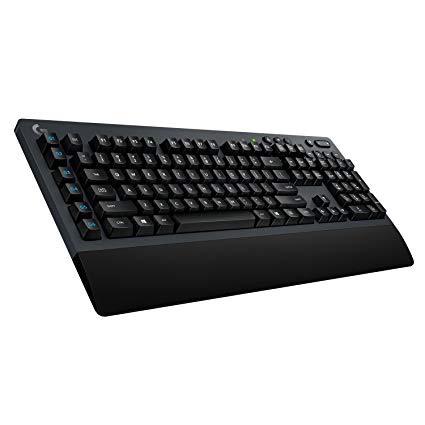
Logitech G613 Lightspeed Wireless Mechanical Gaming Keyboard, Multihost 2.4 GHz + Blutooth Connectivity
Write a review
$7400

Logitech G613 Lightspeed Wireless Mechanical Gaming Keyboard, Multihost 2.4 GHz + Blutooth Connectivity

Write a review
B07796MBJ7
+
Add to wish list
Target is a general merchandise retailer with stores in all 50 states and the District...

City: US, New York

Delivery
Pickup at your own expense
Tomorrow from 09:00 to 20:00, Store location
Free
Payment options
Apple Pay Google Pay Mastercard Visa
Cash, bank card, credit/installment payments, cashless payment for legal entities
Warranty and returns
Exchange/return of products of proper quality within 14 days Official manufacturer's warranty: 12 months
Description
This fits your .
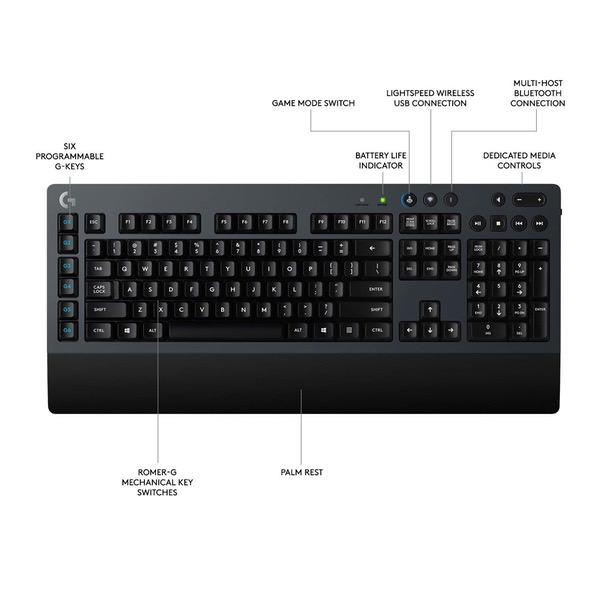
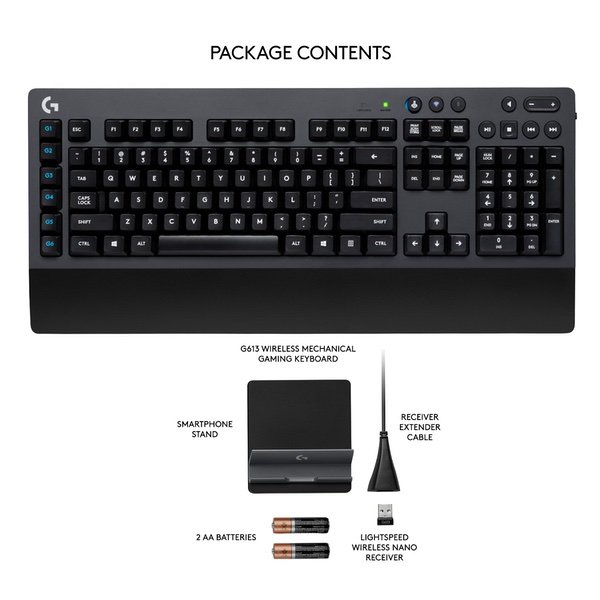
Make sure this fits by entering your model number. LIGHTSPEED wireless technology for super fast 1 ms report rate Romer-G mechanical switches deliver quiet, precise mechanical performance and 70 million click life for incredible feel and durability Six programmable G keys put custom macro sequences and in-app commands at your fingertips.1 Customize G key profiles individually for each app Bluetooth: Bluetooth enabled device with Windows 8 or later, Mac OS X 10.12 or later, Chrome OS, or Android 3.2 or later, iOS 10 or later G613 delivers up to 18 months of gaming on 2 x AA batteries. System Requirements: Windows 7 or later, Mac OS X 10.10 or later, Chrome OS, Android 3.2 or later, USB port
Reviews
3.9
Reviews: 20
5 stars
35%
4 stars
35%
3 stars
20%
2 stars
5%
1 star
5%
OmniNegro
5
First of all, let me inform you that there was a firmware update a few months ago that fixes a petty issue that some reviewers complained about. When the keyboard went to sleep, it would lose the first keypress as it woke up again. So if you pressed shift to make the first letter of a sentence capital, the letter would still be lowercase when you pressed. it. That was easy enough to work around, but still annoying. That issue is fixed. You are all welcome for the news. (I am just happy to tell you.) In my lifetime I have had dozens of keyboards. From the beloved jackhammers known as the IBM model M with the "Bulking Spring" keycaps, all the way to membrane garbage keyboards. I like mechanical keyboards enough that I would not dream of using a membrane keyboard again. But I hated Cherry Red and Cherry Black because I could never be sure I had actually pressed the key. This keyboard has a slight feel to the key actuation. Not enough to bother you, but just enough to notice the feel of the key actuating. The keyboard is very solid. It is not light weight. And it does not move on its own as you type. For typing this is as good as it can be on a wireless keyboard. Some reviewers mentioned the lettering coming off. I have seen no evidence of this at all. And I thought that perhaps it was something solving the lettering off like oil does to some materials. But I have typed on mine while eating fried chicken. And while I do take a moment to clean it off afterwards, I see no evidence that this caused any problems. The battery life is truly amazing. I have no yet had this a year, but from what I read, it will still be working just fine for more than a year. I have not yet tried the Bluetooth function. But I am very happy it has this as it future proofs this great keyboard for me. The only thing I wish this had was a chargeable Lithium battery and a backlight. But running off a single disposable 1.5 volt Alkaline AA battery, I can certainly understand why it lacks a backlight. I bought this because what eventually dies in every keyboard I have ever owned is the cord. I have swithced to a wireless Headset for exactly the same reason, and it works. My current wireless Headset is several years old now, and I expect it will be at least several more years before I need to do anything with it. For those of you reading this who really need a backlight, consider my solution instead. I can only see out of one eye at current. And my vision is rather dark all the time in my working eye. So I bought and mounted a tiny part of a cheap 2700 Kelvin strip light under my monitor. I then blocked most of the light with a thin strip of paper mounted to the front of my monitor. This leaves a very dim amount of light that washes over the entire keyboard. The white lettering on the keys reflects the light very well. With this, the keys look grey rather than black, but the white lettering is a very bright white with zero glare at all. I wish I could take a picture to show you, but I lack a camera of any sort. I occasionally have to go to the hospital for a few weeks at a time, and short of leaving the light on and just enduring the terrible glare it causes, I have a very hard time seeing the keys. I hope this helps those of you who need an idea to help with seeing it. Anyone who has a portable solution, please share. Thanks in advance.
Nossy
5
Keyboard feels solid and heavy with very good battery life. I havent really test the range yet. RomerG takes a bit of getting used to since the travel is very short. Never used CherryMX so cant compare. Non-removeable wrist rest may be a deal breaker. I like it since my other ones, its always dangling around when i transport the keyboard. The letter stamp on each key is kinda cheap and wears out even after a few days of heavy use.
MrDowntempo
5
Admittedly these arent the nicest mechanical switches in the world, but neither are they bad. Theyre quick and linear, good for gaming. This keyboard also looks like a keyboard, instead of the offspring of a stealth fighter and an origami swan, like most gaming products do. Thats a big point in its favor for me. I got this because I wanted mechanical switches, but needed a wireless solution because of my living arrangements. I do wish the wristwrest, which is quite comfortable and ergonomic, were removable. Normally I wouldnt care, but because I need to keyboard to be semi-portable (hence the need for a wireless solution), a smaller footprint wouldve been nice. The lightspeed receiver is great and Ive had no signal issues even at some distances where 2.4ghz receivers have failed me in the past. I do wish the lightspeed receivers worked as unifying receivers for other lightspeed products, but they dont, another oh well. Still if youre looking for a high quality wireless keyboard, there really isnt a better option out there.
Jake Brake
5
My wife has a bookkeeping business and uses her computer 10+ hours per day. Shes always used the keyboards that came with her computers, so she has never experienced excellence. I bought a G613 for my own use (I do zero gaming) because I wanted a mechanical, wireless keyboard. The fact that it uses AA batteries is a HUGE plus for me, because I do not want to have to charge it like a cell phone. In the 1970s and early 1980s I used an IBM Selectric typewriter, and then later I used IBM buckling spring keyboards with my PCs. Those were great keyboards. This G613 is not similar to a buckling spring keyboard, but is truly wonderful to type on, in its own way. The keys actuate smoothly, consistently and precisely. I can detect the spring "twang" that some complain about, but it doesnt bother me (or more importantly, my ultra-sensitive wife). The G613 is a very high quality, professional looking and feeling keyboard. Very solid, substantial construction. Its heavy, but in a good way. So after I used my G613 for awhile, I really was loving it and raving about it. My wife was looking longingly at it, so I gave it to her and got another one for me. She loves the key actuation, as much as I do. She also has commented on the obvious high-quality construction and materials. And, she really likes the way it looks. She loves the spacing and feel of the ten-key pad. Everything that seems to make this a good gaming keyboard makes it a superb office keyboard that gets constant use, day in and day out. I really feel that Logitech should take the G613, remove the "G" keys and with NO other changes make it the K613. Keep the Lightspeed connectivity and the Bluetooth capability. In my case, I discovered the G613 by accident. I was ready to pull the trigger on the K840, but I was really hesitating because it was corded and I dont want cords on my desk. I did a search on Amazon for a Logitech wireless mechanical keyboard and the G613 came up! If I stayed on Logitechs website I would never have found it, for I would never have gone to the gaming section of their site. Though categorized as a gaming keyboard, it doesnt look like one. I was relieved to see that it was not a flashy design and didnt have the pachinko palace (garish in my eyes) lighting. This is a mature, professional, elegantly designed keyboard. I truly believe that it is mis-marketed. This is NOT a membrane keyboard. It uses Romer-g black switches, which are very precise and smooth in their action. After I installed the firmware update, there has been no delay in typing upon waking. I wholeheartedly recommend the G613! So does my bookkeeper wife!
Jason Griffin
5
It is a REALLY large keyboard. I have been using a compact tkl keyboard/touchpad, living room style keyboard, and it absolutely freaked me out by how large, and heavy, it is. I also abhor palm rests (More on that in a minute), but this keyboard has the best wireless signal I could find. I needed something that would allow me to sit comfortably far from the television, and not have to worry about my fidgeting causing the keyboard to drop connection due to a narrow signal path. Now, with that said I have not tried many positions within the living room however I now have a strong issue free typing experience. Going back to the size. It really is large, and heavy, but that combined with the integrated palm rest makes it very stable to use in my lap. Even though this is a gaming branded keyboard Id recommend using it if you depend on rock solid connectivity.
Colton
5
I really like this keyboard for the most part. One of the few that (almost) fit my exact needs. I have not owned a mechanical keyboard before, so I cant compare the switches to other brands, but I can say it is far superior to a membrane keyboard. The only things I dont like about this keyboard are: -No backlit keys, I didnt notice this until after I ordered and that was a huge disappointment. I wish they could have included a rechargeable lithium ion battery that lasts a week or two and also backlit keys, instead of two AA batteries that last 18 months, but thats just me. -This is more of an issue when you first get the board, but the G keys on the left side really mess with my touch typing, especially since the keys are not backlit. I end up hitting the top left G1 key all the time when wanting to hit Escape, and the bottom left G6 key when trying to press Ctrl. However, this is just due to muscle memory, and I have already started to adapt, but it can be annoying at first. I wish the G keys had a seperate feel to them or some kind of physical indicator so you know which key you are pressing. -Key icons are stickers that could deteriorate over time. If I notice this happening considerably it might drop this review by a star or two. Overall, as long as this keyboard continues to work and remain durable, the above cons are not major issues since you would get used to them over time, and I would say that this purchase is worth it. However if the board begins to break down or have issues I will be sure to update this review.
Dean Or
5
Pros: Connectivity is spotless. It pretty much behaves wired in any situation. Keyboards with Bluetooth connections arent as reliable and this one is no exception. The Bluetooth on this is best for switching to a phone or tablet that might be docked on your desk which is a nice perk, but not something I was looking for. Long battery life and uses regular AA batteries. I hate the trend of peripherals using rechargeable lithium batteries. I find it much easier to just swap in fresh batteries when the low battery indicator comes up every 6-8 months or so. Having to find a USB cable to charge a keyboard for a few hours every week or so defeats the purpose of having this be wireless. Cons: The Romer-G switches take some time to get used to. I preferred cherry MX blue switches. If you like the type of linear switches then you might like these. Good thing though is these require the same force as blues. The color. I wouldve preferred it to just be black like the rest of the my stuff. The dark blue clashes with the rest of my set up and God forbid anyone were to walk into my room and laugh at terrible color coordination. However, the design is otherwise minimally elegant. Conclusion: In terms of wireless mechanical keyboards, this has one so far been the best. It doesnt completely meet all my preferences, but so far that hasnt been a deal breaker.
You may be interested
  • Bestsellers
  • Recently Viewed
 
Fast and high quality delivery

Our company makes delivery all over the country

Quality assurance and service

We offer only those goods, in which quality we are sure

Returns within 30 days

You have 30 days to test your purchase