
















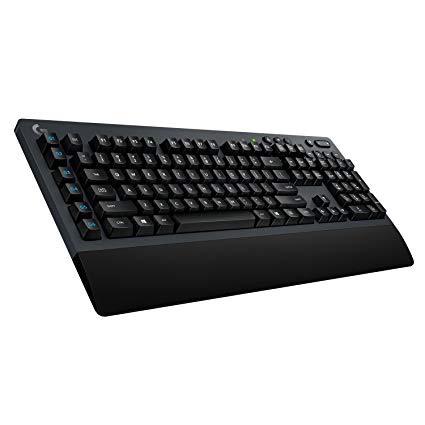
Logitech G613 Lightspeed Wireless Mechanical Gaming Keyboard, Multihost 2.4 GHz + Blutooth Connectivity
Write a review
$7400

Logitech G613 Lightspeed Wireless Mechanical Gaming Keyboard, Multihost 2.4 GHz + Blutooth Connectivity

Write a review
B07796MBJ7
+
Add to wish list
Target is a general merchandise retailer with stores in all 50 states and the District...

City: US, New York

Delivery
Pickup at your own expense
Tomorrow from 09:00 to 20:00, Store location
Free
Payment options
Apple Pay Google Pay Mastercard Visa
Cash, bank card, credit/installment payments, cashless payment for legal entities
Warranty and returns
Exchange/return of products of proper quality within 14 days Official manufacturer's warranty: 12 months
Description
This fits your .
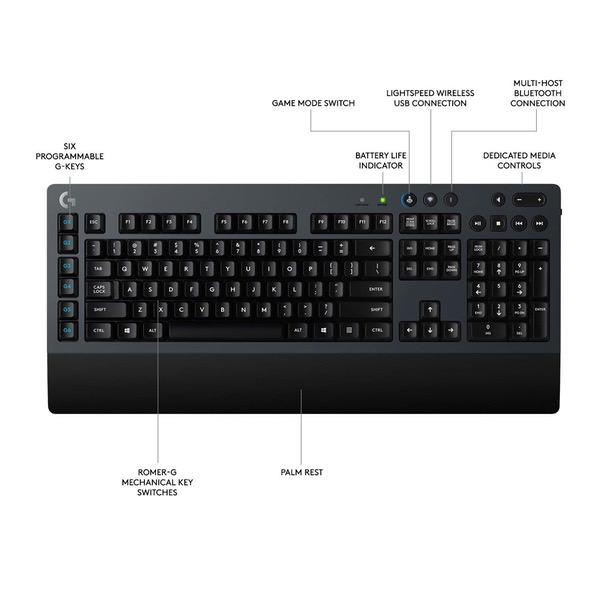
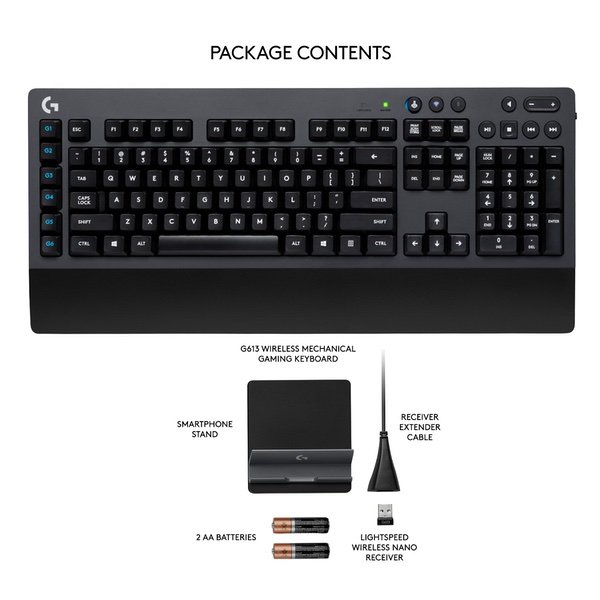
Make sure this fits by entering your model number. LIGHTSPEED wireless technology for super fast 1 ms report rate Romer-G mechanical switches deliver quiet, precise mechanical performance and 70 million click life for incredible feel and durability Six programmable G keys put custom macro sequences and in-app commands at your fingertips.1 Customize G key profiles individually for each app Bluetooth: Bluetooth enabled device with Windows 8 or later, Mac OS X 10.12 or later, Chrome OS, or Android 3.2 or later, iOS 10 or later G613 delivers up to 18 months of gaming on 2 x AA batteries. System Requirements: Windows 7 or later, Mac OS X 10.10 or later, Chrome OS, Android 3.2 or later, USB port
Reviews
3.9
Reviews: 20
5 stars
35%
4 stars
35%
3 stars
20%
2 stars
5%
1 star
5%
Cory Laliberte
3
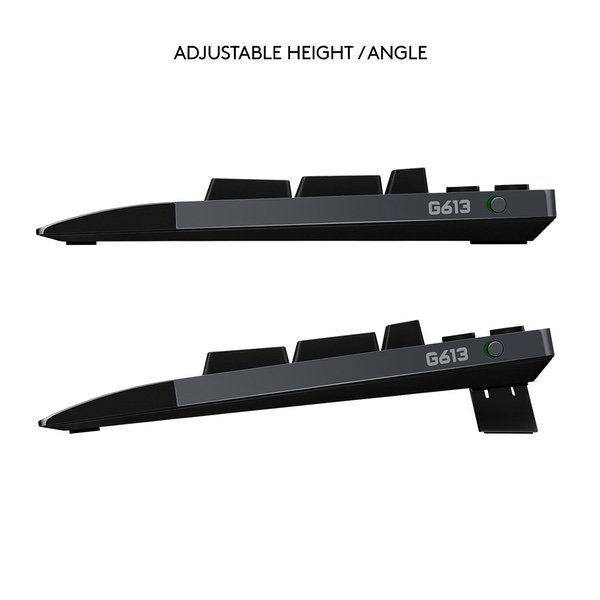
The instant Logitech announced a wireless mechanical keyboard I went nuts because Ive been waiting what seemed like forever for one. When I read the release details I was a bit bummed but they were a bit expected. Ill start by saying that I had a couple of reasons I wanted a wireless mechanical keyboard. 1) I cant touch type on membranes anymore, my WPM literally tanks at least by 40 because I mispress. So other wireless solutions do not work for me. 2) Ive wanted to see my desk with no cables for a while, and this is made possible now with the G613 and a G900 combo. 3) I use keyboard and mouse on a XIM 4 for console play and this alleviates me needing to have multiple keyboards and moving things around. I just plug the dongles into the XIM 4 and Im done. 4) I also like to use my Steam Link and Shield in my living room. This no cable business makes that a breeze. So by now youre probably wondering, why the 3 stars? Well the keyboard meeting criteria was a good start but it has flaws that are subjective. So Ill go into a Pros and Cons for me personally. Pros: 1) Wireless AND mechanical 2) Keycaps feel decent (Not that curved weird crap found on the G910) 3) off/on switch 4) Media keys and G keys 5) Wireless AND Bluetooth compatible (more on that later) 6) Absolutely no lag while gaming or typing. 7) Battery life is phenomenal when other manus stated itd be almost impossible 8) Plastic used is not very susceptible to sweat or skin oils which is a must for me 9) *Subjective* Keyboard has a nice heft to it that feels quality. It doesnt flex like a cheap keyboard and I feel comfortable moving it around. 10) Keyboard feet that flip out are sturdy and large for more support and the rubber is very grippy. 11) Battery area easily accessible and nice spot to put receiver while moving it around or packing it up. Now for them Cons: 1) Upon coming out of standby the keyboard normally misses a key press despite how quick it is. 2) I do not like Romer G switches. I have used Cherry switches for so long that I am really accustomed to Browns. RGs feel very mushy in comparison for a typer. Almost membrane like but with more spring to the actuation. 3) The built in wrist rest whether necessary for design or not is annoying. Ive never used one and it makes the keyboard unnecessarily bulky. 4) The media keys are kind of lame. They are big and easy to hit, but Im not a huge fan of how they feel when pressing, or the feedback from them. I also personally prefer a scroll wheel for volume. 5) Although I like the keycaps better than whats on my G710+ I do not like them as much as the keycaps on my CODE. 6) Speaking of keycaps, for a $150 (at the time) keyboard you would expect to find something other than printed labels on the caps. I knew this going into my purchase from reviews, but still a bit of a let down. 7) It is not backlit at all. This is obviously for battery life, but even though I am not a fan of crazy RGB I would have preferred a subtle white glow to see in the dark while playing games with dark scenes. If I did not have LED strips for ambience I would not really be able to see the keys while gaming at night unless I turned the light on. 8) There is a caps lock light but NOT a Num lock light. Not real sure why, but I prefer to have it as I do use the numpad. 9) As Ive seen mentioned in other reviews, nothing negative on the physical keyboard aspect but if I wasnt previously experienced on making macros with LGS Itd be a nightmare. Theres a lot of functionality there but the execution could be better. 10) And finally a small but not really a deal breaker jab, why dark grey? I would have preferred a black keyboard. Now if youre still reading, you the real MVP. Going back to where I mentioned Bluetooth, the fact that this also doubles as a Bluetooth keyboard blew me away. Its almost a one size fits all for my personal use. Switching between wireless and Bluetooth is a breeze and it connects immediately to the device I want to type on. Be it my iPhone, Android phone, laptop, tablet, Shield, PS4 Pro, whatever. Just hit the Bluetooth button and start typing. Because of this, because of the Pros, and despite the cons I use this keyboard everyday for almost everything. I almost want a second one for work so I dont need to try and squeeze this thing in my backpack. 3 stars and a slew of cons but dont take me the wrong way. For a "first iteration" from Logitech its a really really solid keyboard. If they actually do wind up addressing some of my subjective views I would definitely be purchasing a G613+ or whatever it might be. I would have one at work, at home, and a 10 keyless one for my stream PC would be awesome too.
Josh
3
Im typing this review on the keyboard, and will not be correcting any erroors that I myself do not make. Why? Because this is aa greatt keyboard marred by a prematture failure. First up, the good, because theres a lot to like here about this keyboard: Excellent battery life, short-throw keyswitches thatre unique in the industry, a subtle industrial styling that goes with almost any modern desk, and what could very well be the first consumer wireless mechanical keyboard. I got mine on sale and was quite eager to throw it down on my desk. Tthe dual radio wireless/2.4 USB is an excellentt feaature as well, allowing me to also use tthis on my phone! I really like theh short key throw as well, although they do take a little getting used to to really get the best out of them. ... I really, really wanted to like these key switches... Butt, the bad, thatt Im sure youve noticed by now: SWITCH. BOUNCE. I dont know if theres dirt in the contactts, premature weaar, oor whats going on in here. But foor several keys now, the keyboard routinely doubles letters when I type on them. It getts worse the more I use the keyboard in a given session. This happens whether I bottom the keys or not, I have not even owned this keyboard for a full year, and it wasnt even my daily driver the whole time during thaat less-tthan-a-year. So my recommendation: Wait until someone comes out with a wireless mechanicaal keyboard that uses real Cherry or similar key switches, oor see if Im having an isolaated case oof premature faailure, and if Im not the only one with this problem, steer clear of these sadly craappy Romer-G short throow switches.
Sue Kim
3
I believe I received a lemon. When I type very quickly or press sort of hard on the keys, it makes a slight pinging sound. Almost like a broken spring or tapping on glass. Its almost musical but not something you want to hear when typing. Im assuming others dont have this issue. PROs: -nice to be able to switch between wireless and bluetooth. If you have two computers on the same desktop like I do - work and personal - its great o be able to have one keyboard setting on wireless and the other on bluetooth. You press a switch on keyboard to seamlessly switch between two -LOVE not having the cord on my desk. I hate clutter and hated the cord. CONs: -This doesnt feel like a mechanical keyboard to me. It feels like a regular Logitech keyboard with slightly deeper keys. Keys feel mushy and dont have the wonderful feel of true mechanical switches (I like the blue switches). So this keyboard seems terribly overpriced since it feels like a regular keyboard and thus not worth buying.
Miso Thinks
3
Straight to the point, with the new firmware update, the lag from waking up and recognizing the button press is gone. I have had this keyboard for 3 months now since December 2018. The good, it’s wireless, it’s responsive, it does not have rgb lighting, which I do not want. Also it has Bluetooth so you won’t even need the nano receiver unless you are an intense gamer that requires split nano response time. The bad? The wrist pad does not come off. This makes the keyboard bulky and if you prefer a keyboard without the wrist support, you won’t like this. Another pain point, the lettering on my D is rubbing off! In my 2 decades long of computer usuage I have never had this issue with any of my keyboards. What low grade quality did Logitech decide to use? All in all, this keyboard isn’t worth anymore than $60-$80. I got it for $60, so it was reasonable enough.
You may be interested
  • Bestsellers
  • Recently Viewed
 
Fast and high quality delivery

Our company makes delivery all over the country

Quality assurance and service

We offer only those goods, in which quality we are sure

Returns within 30 days

You have 30 days to test your purchase