
















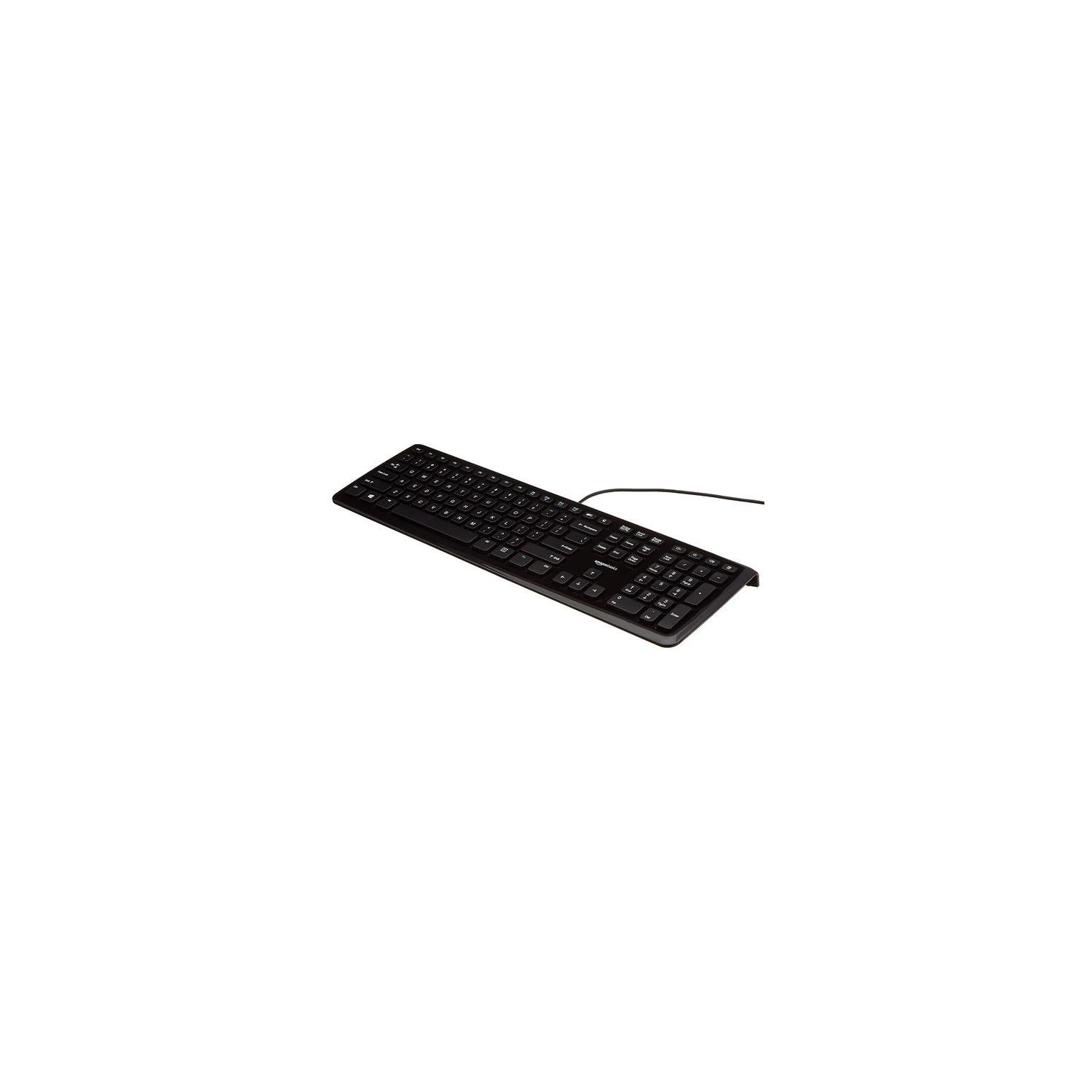
AmazonBasics Wired Keyboard
Write a review
$1300 $6300

AmazonBasics Wired Keyboard

Write a review
B005EOWBHC
+
Add to wish list
Target is a general merchandise retailer with stores in all 50 states and the District...

City: US, New York

Delivery
Pickup at your own expense
Tomorrow from 09:00 to 20:00, Store location
Free
Payment options
Apple Pay Google Pay Mastercard Visa
Cash, bank card, credit/installment payments, cashless payment for legal entities
Warranty and returns
Exchange/return of products of proper quality within 14 days Official manufacturer's warranty: 12 months
Description
This fits your .
Make sure this fits by entering your model number. Low-profile Keys Provide a Quiet, Comfortable Typing Experience Hotkeys Enable Easy Access for Media, My Computer, Mute, Volume down, Volume up, and Calculator; 4 Function Keys Control Previous Track, Stop, Play/pause, next Track on Your Media Player Simple Wired USB Connection; Works with Windows 2000, XP, Vista, 7, 8, and 10 Backed by One-year Amazon Basics Warranty Ships in Certified Frustration-free Packaging
Reviews
3.7
Reviews: 20
5 stars
40%
4 stars
35%
3 stars
0%
2 stars
5%
1 star
20%
Joey Stanford
4
Pros: * works on Ubuntu Linux * Chiclet design so food doesnt get caught in the keyboard * no-frills style * tradition full design with proper placement of ins, del, home, end, pgup, pgdn, and arrow keys (useful for lazy programmers using VIM) * lightweight * basic volume up/down etc keys * prominent home row bumps that you can really feel * standard and appropriate natural finger width chiclet spacing (e.g. exactly the same as an Applet chiclet keyboard) * has long but skinny rubber feet ensuring this keyboard will remain put on any surface even with when used by people who pound the keys on their keyboard. Cons: * USB cord is about 1 meter / 3 feet which is a bit short * its a chicklet keyboard and not a beautiful mechanical one. You have to allow time to make the chiclet transition and it will never as nice as a keyboard that uses Cherry MX Black components. * it has an "el-cheapo" feel to it but you are expecting this because of the wonderful price point * glossy design so it smudges with fingerprints within 5 minutes of use. * Letter and numbers are adhesive plastic stickers which wear down over time * Some people may complain about the permanent angle. Its exactly 10mm in the front and 20mm in the back which is happy medium. For comparison, the Apple chiclet is roughly 5mm in the front and 15mm in the back so the angle is the same but rests flatter to your desk/tray. For me personally, its just fine. I havent put enough "miles" on this keyboard yet to know how quickly the keys will fail but so far its not bad and Ive been able to get around my console text editors and GUI text editors just fine. This keyboard is rated 5v at 100ma and I use it via a hub without issue.
Troy H.
4
Ive been burned by keyboards in the past. I spend most of my day on my computer, so Im constantly pounding away on a keyboard. Ive bought $80 dollar products, Ive bought $40 dollar products, and you know what? They wear down equally fast. So I thought, if Im going to play replace the keyboard every 12 months no matter what, why not save some money? So I got this one. First impression after taking it out of the box: "Wow, shiny." Not used to a gloss finish on a keyboard, so it was a bit of a surprise. It looks nice, until it gets smudged up, then its just plain ol hard to clean. So thats a bit of a downside for this. First impression after starting to use it: "Wow, clicky-clacky." If you need a stealth keyboard, this is not it. This is the kind of keyboard they use to record typing sounds for TV and movies. It definitely says "someones typing!!!" with all three exclamation points. Now, to the finer details. How is it for actual typing for someone that can touch type at a decent wpm? Surprisingly good. Normally theres that transition time between using one keyboard that youre familiar with and a new one. With this keyboard, there was no transition time, even though I was going from a keyboard with deep keys with deep indentations, while the AmazonBasics keyboard has shallow, nearly flat keys. That tells me some thought went into the exact angle and spacing for these keys to be ideal for a standard keyboard layout. There is also some resistance from the keys. Not that you have to be Hercules to press them, but it gives a perfect amount of tactile feedback to know youve pressed a key and a perfect amount of resistance to keep accidental key presses to a minimum. Now, about that angle... its built in. Unlike most keyboards that come flat with those little feet at the top end that you can swing out (and hope not to accidentally knock off every time you pick the thing up to clean it or around it or under it), this keyboard has that angle built right in, with some nice rubber strips to help the keyboard from sliding off into the sunset while youre left looking like a cat is walking on your keyboard. So if you dont like a slight angle while you type... Id suggest you try this anyway, as its perfectly comfortable, whether youre using a wrist rest or not. (Sometimes I do, sometimes I dont). Cord length is a little short, I had to plug it into a USB hub to get it connected. Probably just the manufacturing process trying to save some pennies on manufacturing costs. If you dont have your computing unit nearby, Id suggest buying an extension cable if you dont have one, or plan on putting it into a hub if you have one of those instead. The little lights for those special keys (num lock, scroll lock, caps lock) are actually on the button themselves, which I think is a good touch. Theyre green, and not terribly bright so youre not illuminating your whole room like its a set thats been doused with ectoplasm in a Ghostbusters movie. Its also easier to tell you have it on because its right there instead of some arbitrary location. The hotkeys are not plentiful on this, nor are they customizable. You get function key (Fn) and your last track, stop, play/pause, next track buttons are the F9 through F12 keys used with the Fn. Next to it is a single-press media player key, then a key that will pull up your File Explorer (for Windows). Then, in lieu of those arbitrarily placed LED lights, you get mute, volume down, volume up, and calculator hotkey above the number pad. I personally LOVE having that calculator hotkey there because I find myself needing to do some quick calculations and that saves me some time. In the end, I think this keyboard will do nicely. My hope is that it will last the usual 12 months of abuse that I give keyboards. Id definitely say its worth a shot if youre looking for a low-cost alternative to all those fancy ones out there. Its basic (but hey, thats the brand identity, right?), but it most certainly gets the job done. Note to the AmazonBasics designers: next version of this, for the love of all thats 8-bit, lose the glossy finish!
Vladimir Kornea
4
Its a good keyboard for the price, but all the F keys are in a single uninterrupted row, which makes it hard to find the right one to press. I press F5 all the time because Im a web programmer, I press F11 all the time because thats the best way to toggle full screen mode in Netflix and Amazon Prime, I press F6 and F7 all the time in PhpStorm, and its frustrating trying to press the right key when you have to actually read what is written on the key to know if youre pressing the right one. Lack of this spacing also interferes with easily finding the right number keys to press, since you cant use the spacing on the row above as a visual clue. Instead of giving us some useful spacing that I loved in my past keyboards, they added two buttons that should obviously have been done in combination with the function key like the other 4 controls that appear on F9 through F12. Bad design decision ruins an otherwise great keyboard; now its merely good. Update: The $13 Microsoft keyboard is better.
Adam Payne
4
Its a decent and very inexpensive keyboard to use outboard of my laptop when Im working (video editing) at home. I need all the Home, End and number-pad keys when Im editing but I didnt want to spend $100+ on an Apple keyboard for the few times a year when I need to work from home. Ive used PC keyboards on Macs before but this one was a little craftier than most. It knew that even though I had removed the Windows key and the alt key and swapped their positions, they still worked in their normal PC position. I followed the instructions on osxdailys website to remap the keys to where I was used to them being; the command key is left (and right) of the spacebar and the alt key is left of that. How did I get the keys off? Ive done this before so I was confident itd work. Im not responsible if you follow these instructions and mangle, break or deface your keyboard. Youre on your own if you do this. I stuck a guitar pick under the top of the key, point down and pried up by twisting a little, then I rotated the pick while keeping the tension, clockwise and to the right side of the key and gave it a further twist and it popped right off. I did all four of the keys in about 10 seconds. If you dont care about the mismatch of function to picture, dont bother moving the keys but I guess Im OCD enough that I liked it to match.
T B
4
I bought this 4 years ago for $9. For my use, it works perfectly. No batteries to be replaced, no software to be downloaded, it has a number pad, and all the keys that I expect a keyboard to have. It looks a bit cheap, because it is cheap. I dont use it often but Ive never had a problem with it during the time that I do use it. Plug in the USB and youre good to go. My main use with it has been with my PlayStation 3 and an Android TV box. It makes typing much easier compared to selecting the letters on the TV one by one with a remote. Its not backlit, its not mechanical, its just a basic keyboard. I would describe the typing noise as "clacky" if that makes sense. Its not too bad but definitely not silent or even quiet. The price at the time of this review is $13, for that price you may be able to find a better keyboard but this one has given me no issues after 4 years of admittedly light use.
Roberta K
4
Its been 2 years and the letters are flaking off! Its decently quiet and its been a pleasure to use as a touch typer. Its survived some brutal college work and has been ticking along softly without any issues. Wish the amazon basics label would flake off like the letters.
MagicMix
4
Long story short. The ctrl key & the windows key should be switched imo... or it would be nice if I could re-assign the windows key to function as the ctrl key. Keyboard feels good & functions well... but the ctrl key on the left.... is under the left side of the longer shift key with the windows key on the right. My last keyboard had the ctrl key under the right side of the shift key... so now I find myself hitting the windows key way too often when I want to hit ctrl. Why in the world do modern keyboards put the windows key in a more primary position than the ctrl key? this makes no sense. I type around 45 wpm... & when Im flowing my thoughts to the keyboard, I would never need to add in using that windows key. IOW... The windows key isnt something you need to use while typing. Its something you use when you arent typing that brings up your windows menu which is just as easy to do with the mouse. So why that button is in a more primary spot than the ctrl key is a mystery to me. You have to stretch your hand farther to do cut, copy, paste (expecially paste... ctrl + V) reaching your pinky over the windows button to reach the very much more used ctrl key. if there was a way to re-assign that windows key into a ctrl key I would. its just as easy for me to mouse over to open my windows menus... I dont need a button... especially one thats in the way like that. /rant
You may be interested
  • Bestsellers
  • Recently Viewed
 
Fast and high quality delivery

Our company makes delivery all over the country

Quality assurance and service

We offer only those goods, in which quality we are sure

Returns within 30 days

You have 30 days to test your purchase